eml to pdf converter

Key Features

  • Convert EML files to PDF with all email details, attachments, and formatting intact.
  • Add single or multiple EML files for quick and easy conversion.
  • Perform bulk conversion without any file size limitation.
  • Save converted PDF files to any desired location on your system.
  • Apply filters to export only selected emails based on date or criteria.
  • Use different file naming options to organize converted files properly.
  • Option to embed attachments within PDF or save them separately.
  • Maintain complete data accuracy and ensure safe conversion process.
  • Works smoothly on all Windows versions including 11, 10, 8, and 8.1.
  • Free demo version available to test the software before purchase.

When to Use Advik EML to PDF Conversion Tool?

Discover situations when EML to PDF files conversion is required.

eml to pdf for forensic investigation

Forensic Investigation

In legal or forensic cases, emails can become important evidence. They must be saved in a secure format that courts accept. In this situation, this tool helps you convert EML files into PDF while keeping all email details safe. It preserves attachments, headers, and metadata, which are very important for legal verification and investigation purposes.

export eml files for legal compliance

Legal and Compliance

Many companies need to keep email records for audits, contracts, or company policies. Instead of saving emails in scattered formats, you can use this software to convert multiple EML files into PDF at once. This makes email storage simple, secure, and easy to manage for business or compliance purposes.

print eml files into pdf

Easy to Read and Print

If you want to read emails clearly or print them in a professional format, PDF is the best option. Using this utility, you can quickly convert EML files into PDF documents that are easy to open on any device. This is helpful when sharing emails with clients, managers, or team members without needing any special software.

Video Tutorial

How to Convert EML to PDF with Proficiency?

Steps to Export EML Files into PDFs

  1. Run the software on your Windows PC.
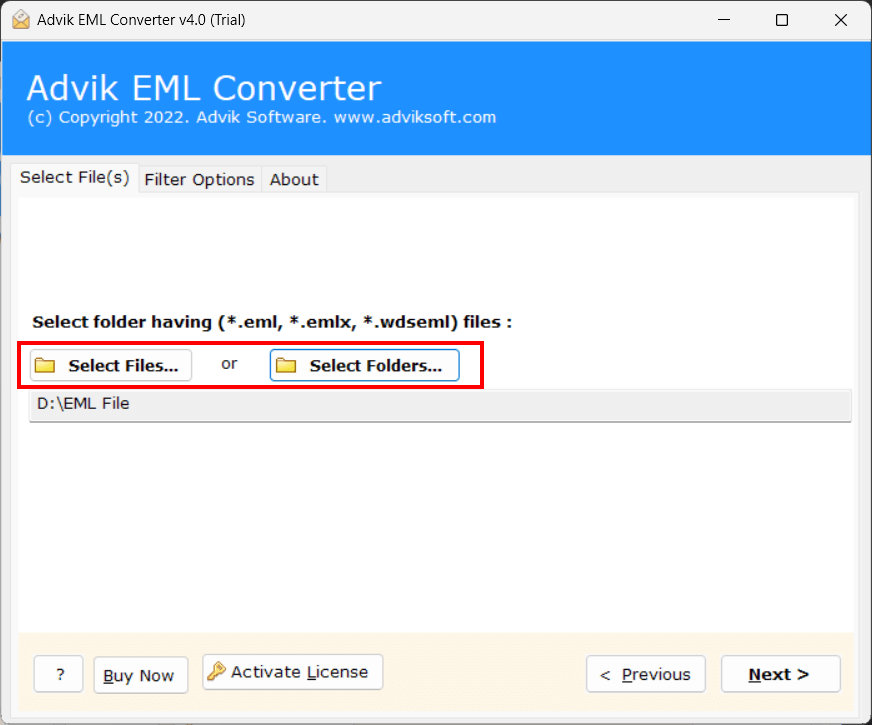
  2. Click Select Files to add .eml file.
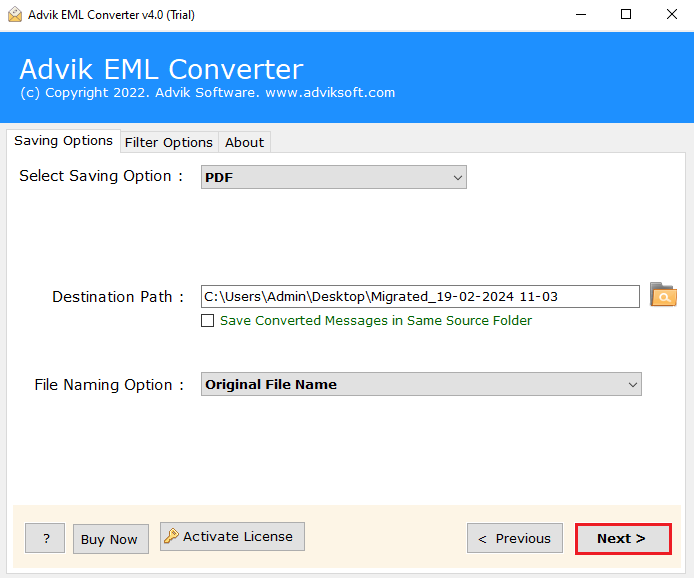
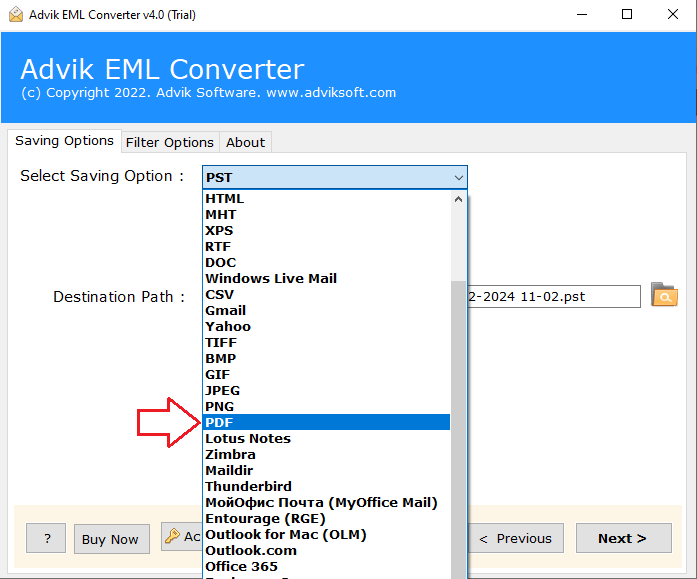
  3. Choose PDF as saving option.
  4. Select target location to save PDF.
  5. Click Convert button to start process.

The software will start converting your EML files into PDF format automatically.

Watch Tutorial

EML to PDF converter tutorial
watch video

Watch How to Change EML into PDF Format Offline

Prime Features of the Best EML to PDF Tool

Convert EML Files to PDF Documents with Advanced Options

Batch Convert EML to PDF Files

This feature allows you to convert multiple EML files into PDF format at once instead of converting them one by one. It is very useful when you have a large number of emails to manage. The main benefit is that it saves time and effort. So, that the whole EML to PDF conversion process becomes quick and efficient, especially for professionals or businesses handling bulk email data.

batch convert EML to PDF files
preserve email data

Preserves Key Elements and MetaData

The software keeps all important email details such as sender, receiver, subject, date, time, and attachments exactly the same during conversion. This ensures that no information is lost or changed. The benefit of this feature is that it maintains data accuracy and reliability, which is important for legal, professional, or record-keeping purposes.

Advanced Email Filters

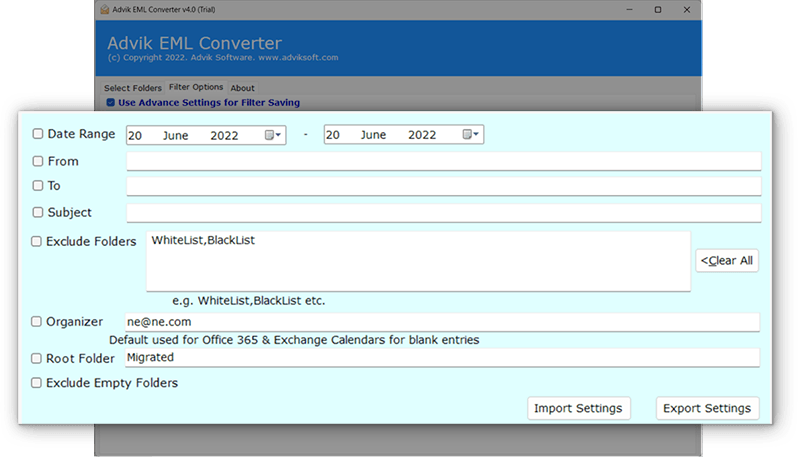
The software lets you select specific emails for conversion by applying filters like date range, sender, receiver, subject, and more. You don’t have to convert all emails if they are not needed. The benefit is that it helps you to save your time and stay organized by converting only relevant emails according to your requirements.

export Email selectively

Highlighted Key Features of Advik EML to PDF Converter Software

Extra Benefits of Using the Tool to Convert your files

Offline & Secure Conversion

This software works completely on your computer so that you can keep your emails and attachments private and protected. Since no internet connection is required during conversion, your data stays safe.

Simple & User-Friendly Interface

The tool offers a clean and easy interface that anyone can use without technical knowledge. With clearly defined steps, users can quickly complete the conversion process without confusion or delays.

Supports Multiple EML Applications

It supports EML files from various email clients like Outlook, Thunderbird, and Apple Mail. This makes it easy to convert files from different platforms without compatibility issues.

Convert EML Files with Attachments

All attachments are preserved during conversion, with options to embed them in the PDF or save them separately. This ensures that no important information is lost.

Supports Multiple Languages

The software accurately converts emails written in different languages while maintaining their original formatting. This allows smooth handling of multilingual email data.

Export to Multiple Formats

In addition to PDF, the tool allows conversion into formats like PST, MBOX, TXT, and more, along with direct migration to email services, giving flexibility in managing email data.

Selective EML File Conversion

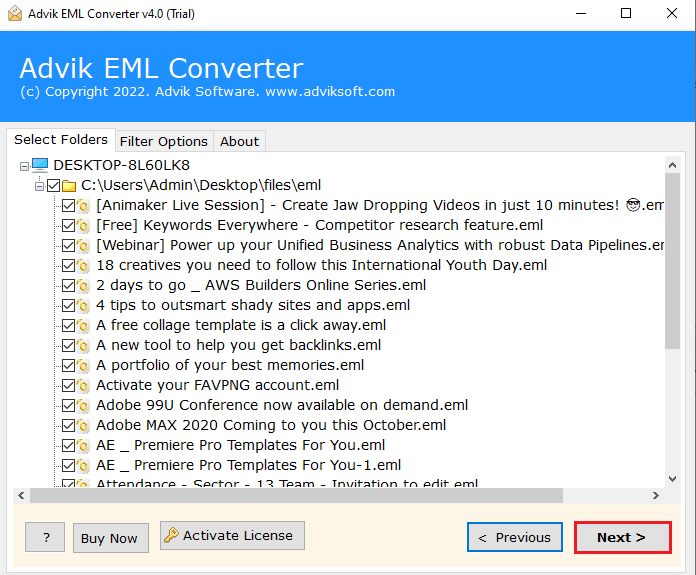
Users can preview emails and choose only the required ones for conversion. This helps avoid unnecessary processing and saves time.

Multiple File Naming Options

Different naming options like subject, date, or sender make it easier to organize and manage converted PDF files for future access.

Free Demo Version

A trial version is available to convert a limited number of emails so that users can test the software’s performance before upgrading.

Compatibility and Support

The software works on all Windows versions and a dedicated 24/7 customer support is available to help users with all types of queries.

Software Specification

best eml to pdf converter

System Requirements

Processor Pentium Class or higher

Operating System Windows 11, 10, 8.1, 8, 7

Memory 1 GB recommended

Hard Disk 100 MB of free space

License Delivery

Electronic via Email

License & Version

Personal License Activation in 1 Machines

Business License For Business Users

Migration License For Corporate Users

Who Loves Advik Software

Help us to serve you better by sharing your valuable feedback

stars

4.9 Overall Satisfaction Rating! Based on 1825 Reviews

✍ Share Your Feedback

Try it for Free

Download the Best EML to PDF Converter Software of 2026

**Free demo will convert 25 items from each folder for free


Download Now
Stars

Frequently Asked Questions

The steps for converting EML files to PDF are as follows;

  • Step 1. Install and open the tool on your system.
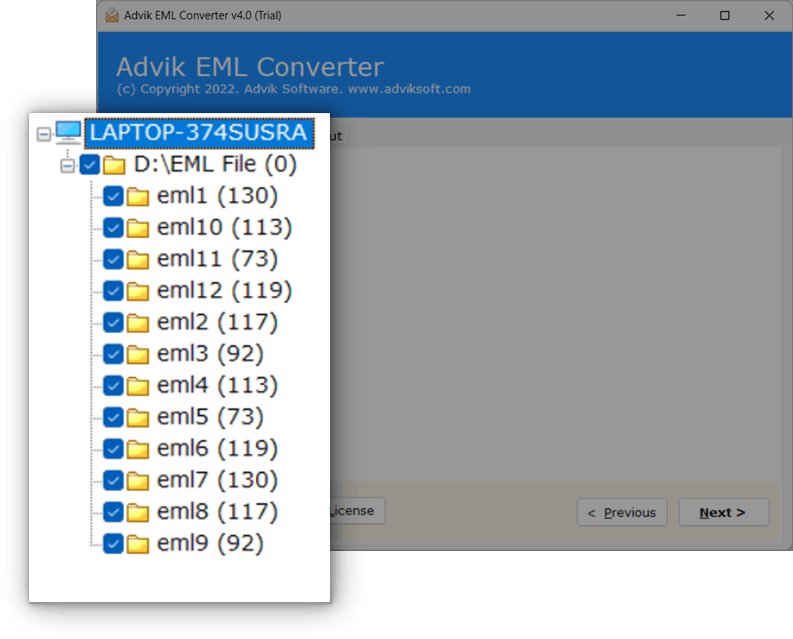
  • Step 2. Add the EML files or folders you want to convert.
  • Step 3. Select the required emails from the list.
  • Step 4. Choose PDF as the saving format.
  • Step 4. Select a location to save the output files.
  • Step 4. Click on Convert to start the process.

Finished! Now the software will instantly export EML emails with attachments in no time.

Yes, attachments are included with the emails and remain accessible within the PDF file. You can open and view them easily using any standard PDF reader.

The tool works with EML files created by popular email clients such as Windows Live Mail, Thunderbird, Outlook Express, and others.

Yes, you can convert multiple EML files in a single process. This makes it easier to handle large collections of emails without repeating the steps again and again.

No extra installation is required to perform the conversion. However, you will need a PDF reader if you want to open and view the saved files.

You can use the folder selection option to load an entire folder. This allows you to process all emails inside it in one go without selecting each file individually.

Yes, a trial version is available that lets you convert a limited number of files. You can upgrade anytime if you need to process more data.

No, it works completely offline. You can convert your files without needing an internet connection.

Yes, the software runs smoothly on all major Windows versions, including the latest releases.