Gmail to HTML Converter box shot

Gmail to HTML Converter

Software to Export Gmail Emails to HTML

4.7 (565 Reviews) [ Rate It... ]

Advik Gmail to HTML Converter is an efficient and user-friendly utility, which will assist you to convert Gmail emails into HTML Format. With this solution, you can download Gmail email as HTML files. Try Advik Gmail to HTML converter software and open Gmail message offline in any browser.

  • Batch Convert Gmail to HTML files with No data loss
  • Compatible with Windows 11/10/8/7/XP/Vista and Other Version
  • Software allows Gmail to Download Email as HTML files securely
  • Single Panel Interface to Easily Opearate Conversion Process
  • Extract emails from Gmail into HTML Format in Bulk Without any Error
  • One-year software licence with 1 Year Free Updates

Key Benefits of Advik Gmail to HTML Converter

Open, Sign in and Download Gmail Email as HTML file

Converts files in bulk

Convert Gmail to HTML in Bulk

Using this advanced utility user can export complete as well as selective emails from Gmail into HTML format. You can store plenty of emails from Gmail directly into your System in one fell swoop.

Runs locally, nothing is uploaded

Preserve Key Elements

Advik Gmail to HTML converter is an advanced program to preserve all the key elements of emails such as “Header and Footer info”, “to”, “from”, “Cc”, “Bcc”, etc. The layout of the emails also remains same during the process of conversion.

Keeps notes and message metadata

Maintain Folder Structure

The Folder and sub-folder structure of emails remains same as in your Gmail account. You can easily find your emails in exact folder as in the original one. This feature helps users to access emails easily after conversion.

Date, sender and subject filters

Advanced Email Filters

In case you need to Download Gmail Email as HTML file for particular emails, you can use advanced email filter option of this tool. Using this option users can use combination of predefined filters given in this software such as “date range”, “subject”, “to”, and “from”.

Gmail to HTML Converter interface

Simple User Interface

No matter you are a technical expert or a novice, this tool is designed to make conversion task simpler. Anyone with a basic knowledge of computer can be able to convert Gmail emails to HTML format in just 4 steps.

Email support included

Dedicated Customer Support

Gmail to HTML Converter is designed with powerful engine. Even though, if you are facing any kind of issue, you can contact our Customer care team via Live Chat. Our skilled expertise are available 24/7 to assist you.

Advik Software

Why to choose Advik Gmail to HTML Conversion Tool?

Important features of our software…

  • Convert multiple Gmail emails to HTML in one click
  • Export Gmail email to HTML of Selective Months
  • User friendly interface
  • Support all Versions of Windows OS
  • Download Gmail Email as HTML Instantly
  • 100% safe and secure
  • No spyware or ads – Ever!

24/7 Customer support is included for one year.

Take a look at our screenshots

Know How to convert Gmail to HTML with Attachments.

gmail to HTML conversion

Step 1 : Launch Tool and Enter your Gmail login Credentials.

gmail download email as html

Step 2 : Select Folders and Labels that you want to convert into HTML format.

convert gmail to html

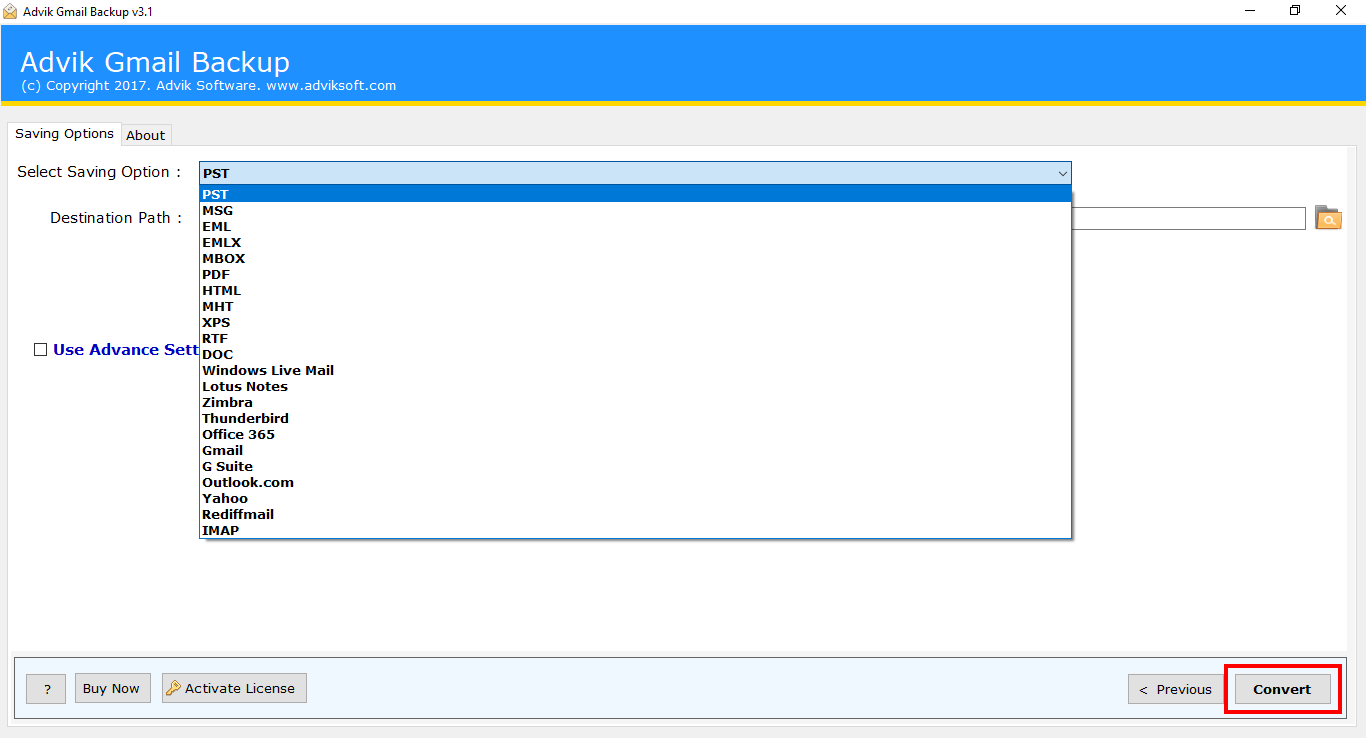
Step 3 : Choose HTML as saving option and click the Convert button.

batch convert gmail to html

Step 4 : That's it. Successful Converted Gmail emails into HTML files.

What Our Clients Says

4.7 / 5 · Based on 565 reviews ✍ Write a Review

FAQ's on Gmail Email to HTML Tool

Answer: You need to follow these simple steps in order to export Gmail email to HTML format;
  • Step 1. Launch Advik Gmail to HTML Converter software.
  • Step 2. Enter Gmail Login credentials and select desired mailbox folder.
  • Step 3. From Multiple Saving Option, Select HTML.
  • Step 4. Hit the Convert Button and Analyze the process of Conversion.

Common Problems & Solutions

"I want to download bulk emails from Gmail to HTML. what is the limit of number of emails that we can convert at once?"
Answer: You can convert unlimited number of emails of unlimited size at once, as long as you have the licensed version of this software. For demo users you can convert only 25 emails at once.

Interested? What are you waiting for!

Get the best Gmail to HTML Converter today so you can have peace of mind tomorrow.

30-day money-back guarantee