Google Takeout to MSG Converter box shot

Google Takeout to MSG Converter

Software to Convert Google Takeout Data to MSG Files

3.4 (226 Reviews) [ Rate It... ]

Advik Google Takeout to MSG Converter is a well developed software which will easily convert your Google Takeout to Outlook MSG files. This utility ensures that during conversion process no modification or omitting of any information take place.

  • User Friendly Interface For Novices
  • Maintain Mailbox Folder Hierarchy
  • Import Google Takeout to Outlook Effortlessly
  • Preserve Key Elements of Emails During Conversion
  • Free updates for one year
  • 24/7 Dedicated Customer Support
  • Support all Versions of Windows

Key Features Of Google Takeout to MSG Converter

Open, Add and Convert your Google MBOX to Outlook MSG Files.

Contacts

Single Panel Interface

The user interface of Advik Google Takeout to MSG Converter is one of the simplest interface which can easily accessible with all kinds of users with no technical experience.

Contacts

Save Attachment Files

Google Takeout to Outlook MSG Converter is completely standalone tool which doesn't require any supportive application to save it's attachment files. As the tool is capable to do so.

Contacts

Convert Google MBOX to MSG

Advik Google Takeout to MSG Converter is a profissional software which will convert Google Takeout Data to MSG files for Outlook.

Contacts

Support Multiple Languages

This software support multiple languages including Dutch, French, Japanese, Italian, Chinese, Portuguese , English etc

Contacts

Batch Mode

You don't have to undertake the conversion process again and again with individual files as the software support bulk conversion so that you can convert multiple Google MBOX file to MSG files.

Contacts

24*7 Support

Users who are facing any trouble to convert Google Takeout Data to Outlook MSG files; they can contact Advik team which provides an official Chat support offering 24/7 assistance to their valuable customers.

Advik Software

Why to choose Google Takeout to MSG Converter?

Important features of our software…

  • Single Panel Interface
  • Maintain Mailbox Folder Hierarchy
  • Import Google Takeout to Outlook
  • Retain Key Elements of Emails
  • Free updates for one year
  • No spyware or ads – Ever!

24/7 Dedicated Support is available for our valuable clients.

Take a look at our screenshots

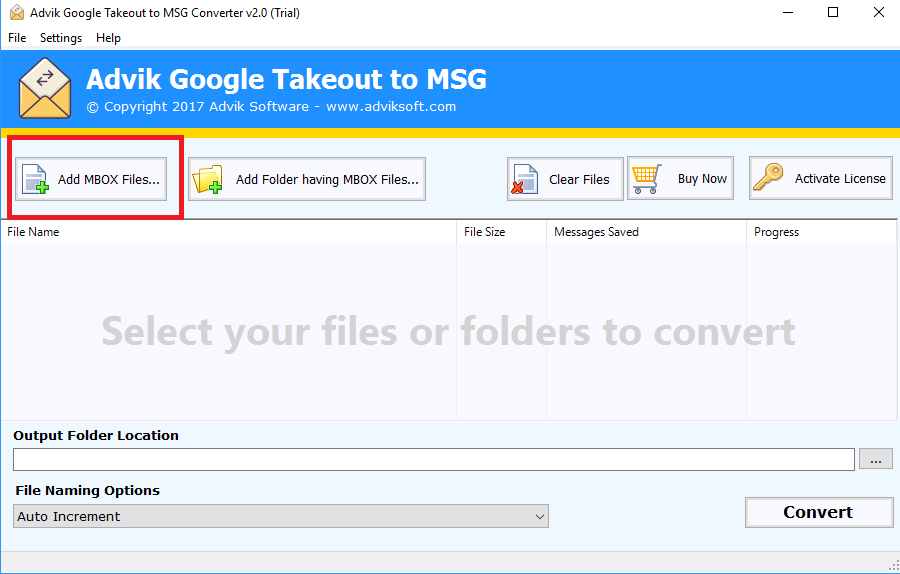
google takeout converter to MSG free

Step 1 : Launch Tool and Add your MBOX Files.

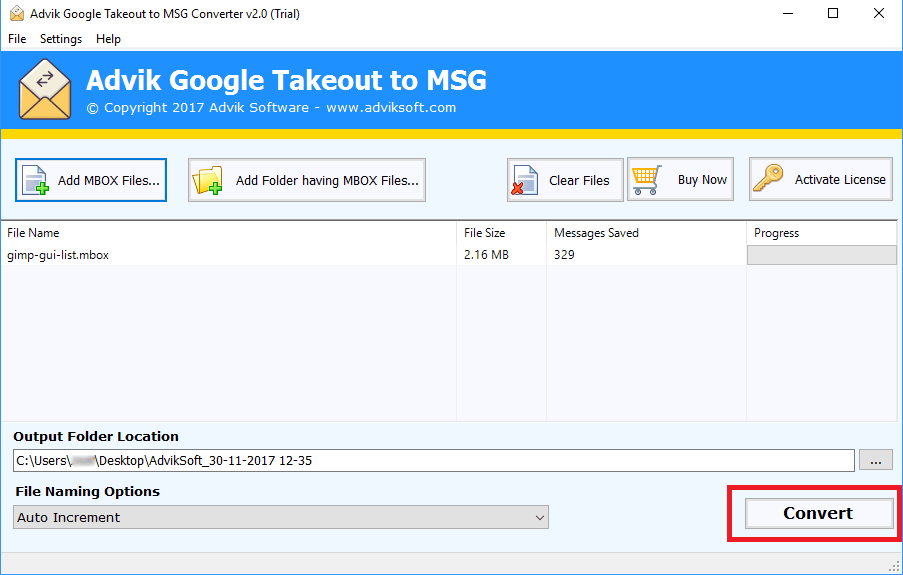
google to MSG converter

Step 2 : Choose destination path and click on Convert.

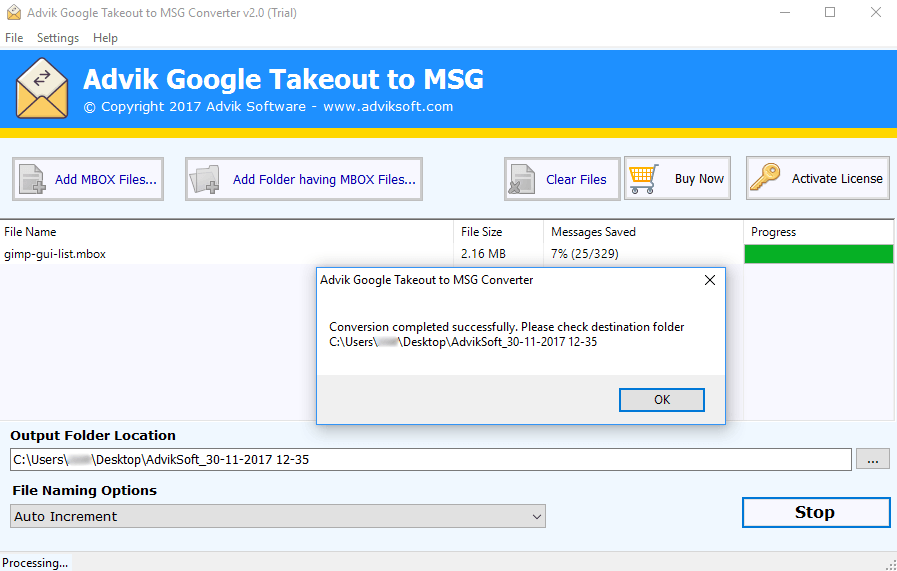
google takeout to MSG converter

Step 3 : That's it, files are converted.

What Our Clients Says

3.4 / 5 · Based on 226 reviews ✍ Write a Review

FAQ's on Google Takeout to MSG

Ans: No, there's no requirement of any additional application for converting google mails to eml.

Common Problems & Solutions

"I am having Windows 10 installed on my PC. May I know whether this software is compatible with this version?"
A: Yes, this tool is compatible with machines having Windows 10 installed in it. Google Takeout to MSG Converter tool also supports all the OS versions below Win 10.
A: Yes of course, this software is having easiest interface which makes it simple to use.

Interested? What are you waiting for!

Get the best Google Takeout to MSG Converter today so you can have peace of mind tomorrow.

30-day money-back guarantee