Advik MBOX to PDF Converter

Best Tool to Convert MBOX Emails into PDF Documents

( 4.9 Rating  Based on 2,975 Reviews )

Advik MBOX to PDF Converter
How It Works

Converter for MBOX to PDF – Overview and Working

To help you in this conversion, MBOX to PDF Tool provides an easy and efficient solution. It allows users to convert single or multiple MBOX files into PDF format while keeping all email details like sender, receiver, subject, date, and attachments intact. The tool supports batch conversion, maintains folder structure and offers options like file naming and email filtering for better management.

01

Install and Launch MBOX to PDF Converter

Download the MBOX File to PDF Conversion and install it by following simple on-screen instructions. The setup is quick and does not require any technical knowledge, so even beginners can start easily.

02

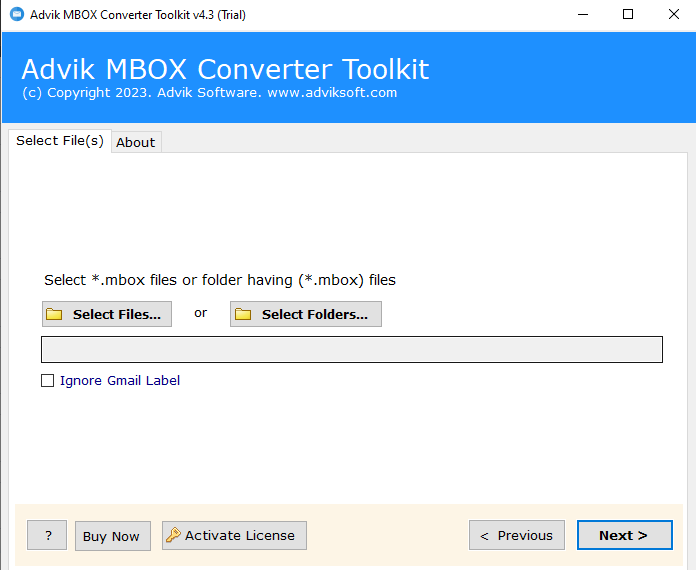
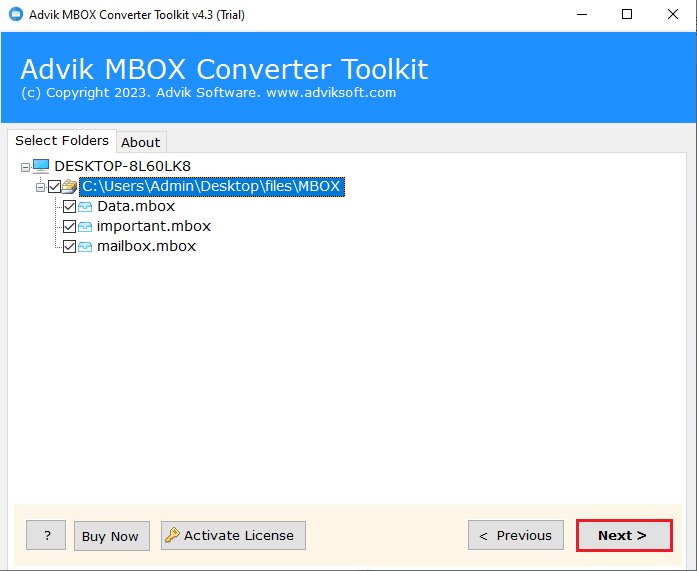
Add MBOX Files or Folders

The software provides flexible options to upload your MBOX data. Select individual MBOX files or add an entire folder for bulk conversion, depending on your requirement.

03

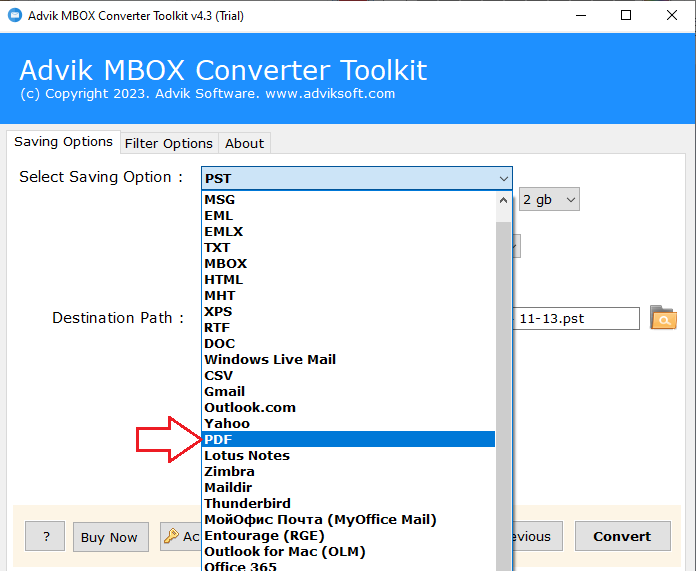
Select PDF as a saving option

Once loaded, then choose PDF as a saving option from the list.

04

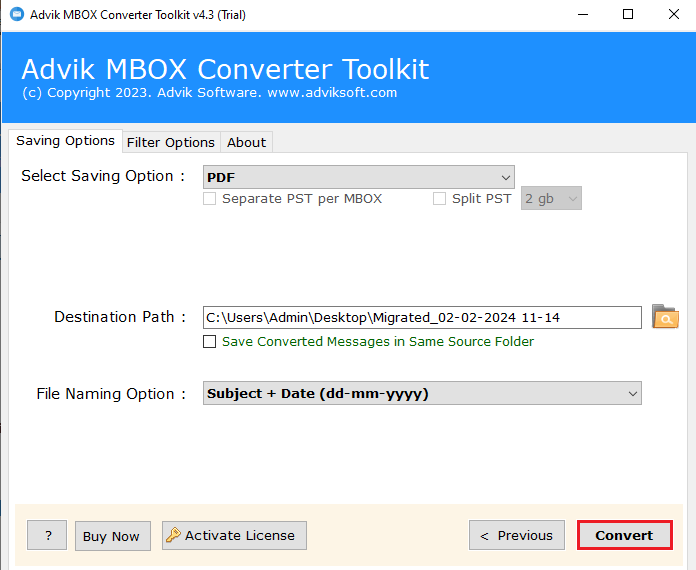
Start the Conversion.

Select you desired saving path, you file naming option (how you want to name you file that will helps you to find those files later) and then click the Next buttomn to start the conversion.

Install and Launch Advik MBOX to PDF Converter
Step 1 Screenshot
Add MBOX Files or Folders
Step 2 Screenshot
Select PDF as a saving option
Step 3 Screenshot
click on the convert button
Step 4 Screenshot
Step 1 of 4
How It Works

Watch How to Convert MBOX to PDF With Attachments

Check out the step-by-step video tutorial and understand how to use this software to convert selective or batch MBOX files into PDF documents.

  • Simple Software GUI for Non Technical Users
  • Include or Exclude Attachments
  • Apply Filter to Convert Specific emails into PDFs
  • Easily perform conversion with MBOX, MBS and MBX Files
  • Generate Log Report after completion of process
convert mbox to pdf
Watch Video

Watch How to Convert mbox to PDF Files

Use Case

When to Choose MBOX to PDF Converter?

Situations Where You Have to Use This Conversion Tool

MBOX files can only be opened in specific email applications like Thunderbird or Apple Mail, which makes it difficult to access them everywhere. By converting MBOX files to PDF format, you can open and read your emails on any device, such as a laptop, mobile, or tablet, without installing any email client. PDF files are supported by all major platforms, so you can view your important emails anytime, anywhere without any compatibility issues.

PDF is a secure and reliable format for storing important information for a long time. When you convert MBOX emails to PDF, you create a permanent backup that can be easily saved on your system, external drive, or cloud storage. This helps protect your data from accidental deletion, corruption, or email client issues. You can also organize and manage your backup files easily for future reference.

In many situations, like legal cases, audits, or investigations, emails are required as proof. Converting MBOX emails to PDF makes them more professional, readable, and easy to present. PDF files also keep the original email details like sender, receiver, date, and subject intact. Since PDF files are difficult to edit, they are considered more reliable and acceptable in legal and official processes.

PDF files are one of the most commonly used formats for sharing documents. After converting MBOX to PDF, you can easily send your emails via email, USB drive, or cloud platforms without worrying about compatibility. The receiver does not need any special software to open the file. This makes sharing simple, quick, and hassle-free, especially when you need to share important email conversations or reports with others.

Convert MBOX Emails to PDF from Multiple Email Platforms

Advik MBOX to PDF Converter is designed to work with MBOX files created by various email applications. It allows users to easily convert their email data into PDF format without worrying about the source email client. The software ensures that all emails, attachments, and details are accurately converted while maintaining the original structure.

No matter where your MBOX file comes from, the tool can easily convert it into PDF format without any data loss:

  • Thunderbird
  • Apple Mail
  • Eudora
  • Postbox
  • Opera Mail
  • SeaMonkey
  • Netscape Mail
  • Spicebird
  • Claws Mail
  • Evolution
  • Horde
  • Entourage
  • Google Takeout
  • Backup MBOX Files
  • The Bat
  • Mulberry

With its wide compatibility, Advik MBOX to PDF Converter makes it easy to handle MBOX files from different email platforms and convert them into a universally accessible PDF format.

Features

Notable Features of the Best MBOX to PDF Converter Software

Explore the premium advantages of trusting this tool for MBOX to PDF conversion

Different Modes to Add MBOX Files

This software provides multiple options to load MBOX data. You can add single/multiple files at a time or select an entire folder consisting of your MBOX files. This makes it easy for users to import data according to their needs. It saves time because you don’t need to add files one by one. This feature is especially useful when handling large email data and helps in quick and smooth conversion without confusion.

mbox to pdf tool advanced filtering
bulk mbox emails to pdf file conversion

Support MBOX of All Sources

The tool supports MBOX files from almost all popular email applications like Thunderbird, Apple Mail, Postbox, Eudora, and more. No matter which email client you used earlier, the software can easily read and convert its MBOX files into PDF format. This gives users flexibility and removes compatibility issues so that the conversion process becomes simple for everyone.

Convert Data with Advanced Settings Option

Advik MBOX to PDF Converter offers advanced settings that help users control how their PDF output looks. You can choose options like file naming style, date filters, attachment handling, and folder structure preservation. This gives more control over the conversion process and helps users get organized and professional-looking PDF files based on their requirements.

multiple mbox 2 pdf conversion formats
More Features

Additional Benefits to Simplify MBOX to PDF Conversion

Take advantage of extra options to get desire and accurate results.

Quickly Convert MBOX File to PDF

This feature allows users to convert MBOX files into PDF format within a few simple steps. It significantly reduces manual effort and processing time and makes email migration fast and efficient. With the help of this tool, users can complete bulk conversions without technical complexity and fulfill both personal and business needs.

Export MBOX to PDF with Attachments

This function ensures that emails are exported along with their attachments, such as images, documents, and files. It maintains complete data integrity during conversion, so nothing important is lost. The tool makes sure users get a fully structured PDF output that includes all email components in one place.

Multiple File Naming Conventions

Users can choose how their output PDF files are named, such as by subject, date, sender, or custom format. This helps in better organization and quick file identification after conversion. It improves workflow efficiency as it allows users to manage large email datasets easily.

Export MBOX to Other File Formats

Apart from PDF, this feature supports exporting MBOX files into multiple formats like PST, EML, DOC, and more. It offers flexibility for users who need data in different file types for different platforms. The tool acts as a multi-purpose solution for varied email conversion requirements.

Preserve All Email Attributes

This feature ensures that original email properties such as formatting, metadata, headers, and structure remain unchanged during conversion. It guarantees 100% data accuracy and reliability. With this software, users can trust that their emails retain their original appearance and authenticity.

Print MBOX File with All Components

Users can directly print MBOX emails along with attachments and formatting without needing extra steps. This is useful for documentation, reporting, or offline record-keeping. It simplifies the printing process by integrating it within the conversion workflow.

Save Resultant File at Desired Path

This option allows users to select a custom location to save converted files. It improves file management and makes data retrieval easier. The software gives full control over output storage so that you will get a more organized system.

Preview Before Conversion

Users can view emails before converting them into PDF format. This helps in selecting only the required data and avoiding unnecessary conversion. The software enhances accuracy by letting users verify content beforehand.

Simple and User-Friendly GUI

The software comes with an easy graphical interface that is suitable for both beginners and professionals. No technical knowledge is required to operate it. The Advik MBOX to PDF Converter ensures a smooth user experience with a clean and intuitive design.

Get Complete Conversion Report

After conversion, the tool generates a detailed report showing successful and failed conversions. This helps users track the process effectively. It provides transparency and reliability through clear reporting.

Compatible with All Windows OS

The tool works smoothly on all major Windows operating systems without compatibility issues. This ensures wide usability across different devices. It is designed for maximum accessibility and performance stability.

Free Trial Available

Users can test the software before purchasing to evaluate its features and performance. This builds trust and ensures satisfaction before investment. It offers a risk-free trial experience for informed decision-making.

Availability

Supported by Trusted Marketplaces

cnet logo

SaaSCounter

Advik got a 4.5 rating on SaaSCounter, a trusted software platform. It is appreciated for its simple design and smooth performance in converting MBOX files into an accessible PDF format.

capterra logo

TechnologyCounter

On TechnologyCounter, the software is recognized as a dependable solution for email file conversion needs. It is highlighted for its consistent results and easy handling of MBOX data without complications.

software suggest logo

SoftwareOne

This tool is also listed on SoftwareOne, where it is acknowledged as a practical tool for users looking to manage and convert email data in a secure and readable format.

Specifications

Advik MBOX to PDF Converter Wizard - Specification

Software Download

Download Now for Windows
Size 68.1 MB
Version 5.0

Trial Limitations

Advik MBOX to PDF Converter Trial Version will allow you to preview and process the first 25 items from each folder of MBOX file.

System Requirements

Processor Pentium Class or higher
Operating System Windows 11, 10, 8.1, 8, 7
Memory 4 GB recommended
Hard Disk 500 MB of free space

License Delivery

Electronic via Email

Product Guides

License & Version

Personal License Activation up to 2 Machines
Business License Activation up to 5 Machines
Migration License Activation up to 10 Machines
Pricing

Advik MBOX to PDF Converter - Free vs Paid Version Comparison

Choose the right plan for your software

Features

Free Demo

$0

Try before you buy

Convert MBOX File Data First 25 Items
Preview Email Data Before Conversion ✓ Available
Advanced Email Filters ✓ Included
Bulk MBOX File Conversion ✓ Included
Compatible with All Windows Versions (11 & Below) ✓ Compatible
Technical Support Basic Support
Commercial Use License Personal Use Only
Free Updates Not Included
Free Download

Note: The Advik MBOX to PDF Converter free demo version allows you to process 25 items per folder. Upgrade to the full version to unlock unlimited conversion and commercial use rights.

Reviews
Who Loves Advik MBOX to PDF Converter Wizard?
4.9 ★★★★★ out of 5  ·  Based on 2,975 verified reviews
195,000+ Downloads & Counting

Download the #1 MBOX to PDF File Converter

Download in seconds. Convert your first MBOX file in under a minute. Completely free to try.

No Credit Card No Signup Required No Time Limit Virus-Free & Safe Works on Windows 11/10/8/7
Advik MBOX to PDF Converter Wizard
Size • 68.1 MB • Windows • Version • 5.0
Download Free Now
Convert 25 Items Free Per folder, all conversion options available
Multiple Output Formats PST, EML, PDF, CSV, HTML, MSG & more
Ready in 60 Seconds Install, load MBOX, convert — done
Safe & Secure No data leaves your PC

Trusted by teams at

Microsoft
Google
IBM
DELLDell
HPHP
ORACLEOracle
AWSAmazon
PayPalPayPal
Spotify
LinkedIn
Slack
CISCOCisco
Microsoft
Google
IBM
FAQ
Popular Questions

Yes, the tool provides an option to export emails along with attachments. This ensures that all important files, like documents and images, are included during conversion.

Yes, the tool supports MBX files as well. You can easily upload MBX files and convert them into PDF format without any compatibility issues.

Yes, you can select specific emails before conversion. The preview feature allows you to choose only the required emails and exclude unwanted ones.

Yes, but the manual method is lengthy. You need to open MBOX emails in an email client like Thunderbird, then use the print option and save emails one by one as PDF.

Issue: This method is time-consuming and not suitable for bulk conversion. Attachments may also not be saved properly.

You can choose the destination path before starting the conversion. The converted PDF files will be saved in the selected folder on your system.

Yes, a free trial version is available. You can test the features and functionality before purchasing the full version.

You can contact the support team through email or the official website. The support team usually responds quickly and helps resolve issues step-by-step.