Keep a complete copy of Gmail mailbox on your computer for offline access.
Create a secure backup of your Gmail data to protect your important emails from various unforeseen situations.
Sometimes, very important emails deleted by mistake cannot be recovered after a period of time. By backing up your Gmail, you can rest assured that you have a copy of your emails safely stored on your computer. It also means that when your important conversations, receipts, business communications, and documents are deleted from your Gmail account, you can still access them through a backup.
Around 3.4 B phishing emails are sent dailyGmail is safe, but cyber threats like phishing attacks, account compromise or ransomware attacks can potentially threaten your email data. Having a local backup of your Gmail is an additional safety net, as it makes a second copy of your mailbox. In case your account is compromised due to some security issue, you can still recover your important emails and attachments from the backup.
60% of businesses lose access to email annuallyEventually, many users and organisations migrate away from Gmail to some other email service or desktop email client. It is easier and safer to migrate if you have a backup of your Gmail data. You can export the emails to PST, MBOX, PDF, EML formats and then transfer them to Outlook, Thunderbird or any other email services without any data loss.
GDPR fines: €20M or 4%Important: Before you log in, enable IMAP access in your Gmail account and create an App Password if you have enables 2-Step Verification. This will allow the software to connect to your Gmail mailbox securely.
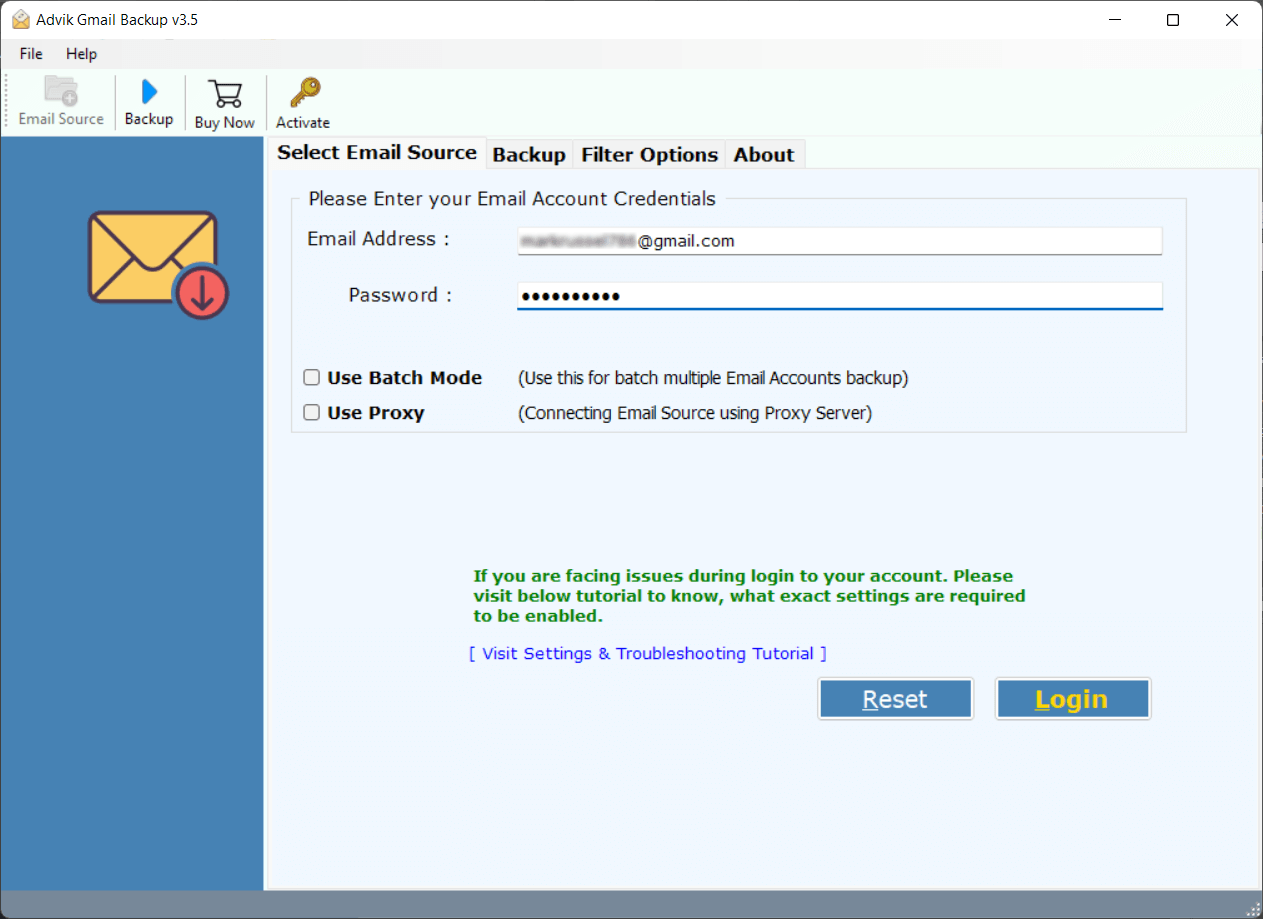
Download and install the Advik Gmail Backup Tool to your computer. Enter your Gmail account credentials such as Email ID and App Password. Then launch the application to safely sign in. Once authenticated the software will connect to your gmail account and load the available mailbox folders.
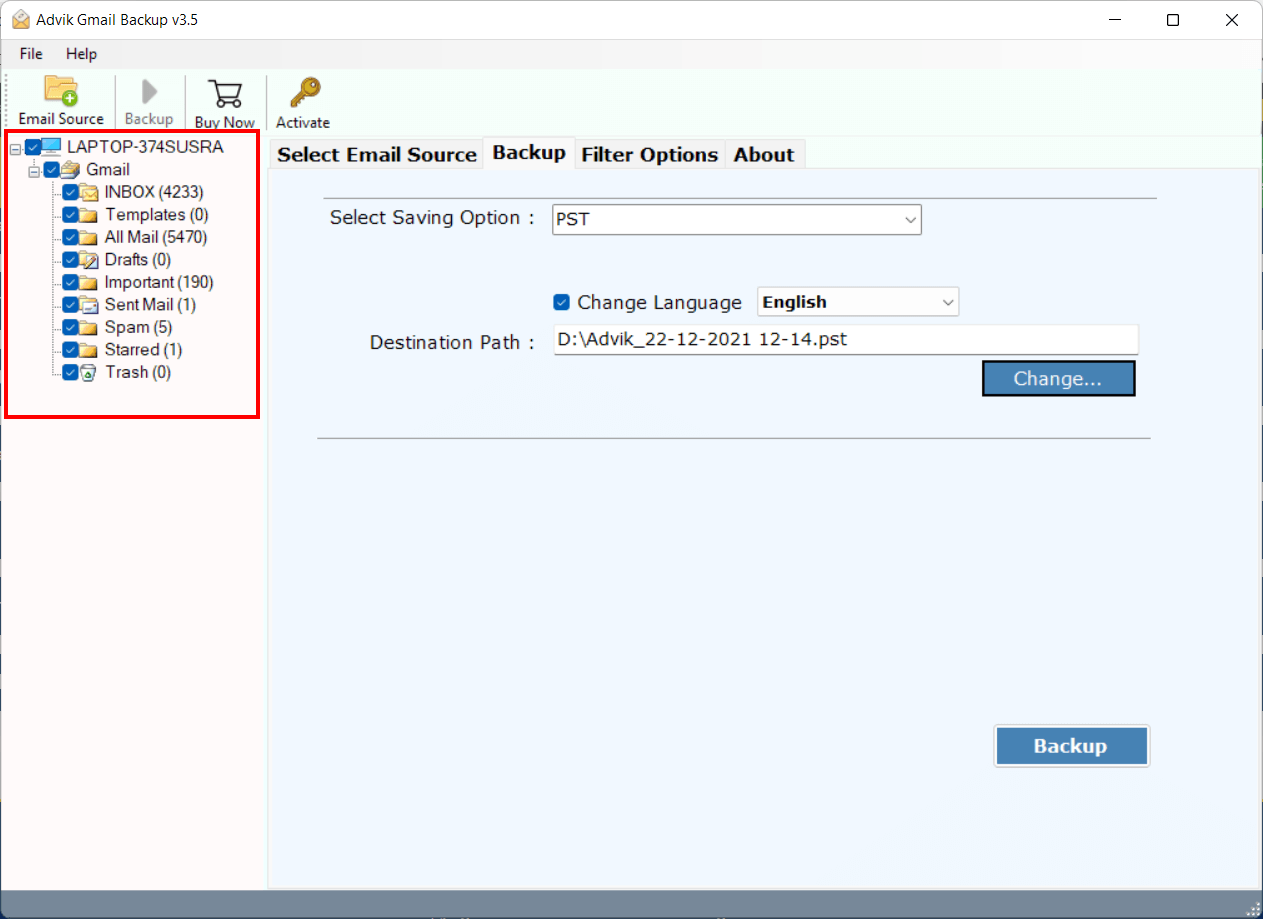
Once you login, the software will show all Gmail folders like Inbox, Sent, Drafts, Important, Spam and your custom folders. Select the folders you wish to backup. You can choose to backup the entire mailbox or backup specific folders as per your needs.
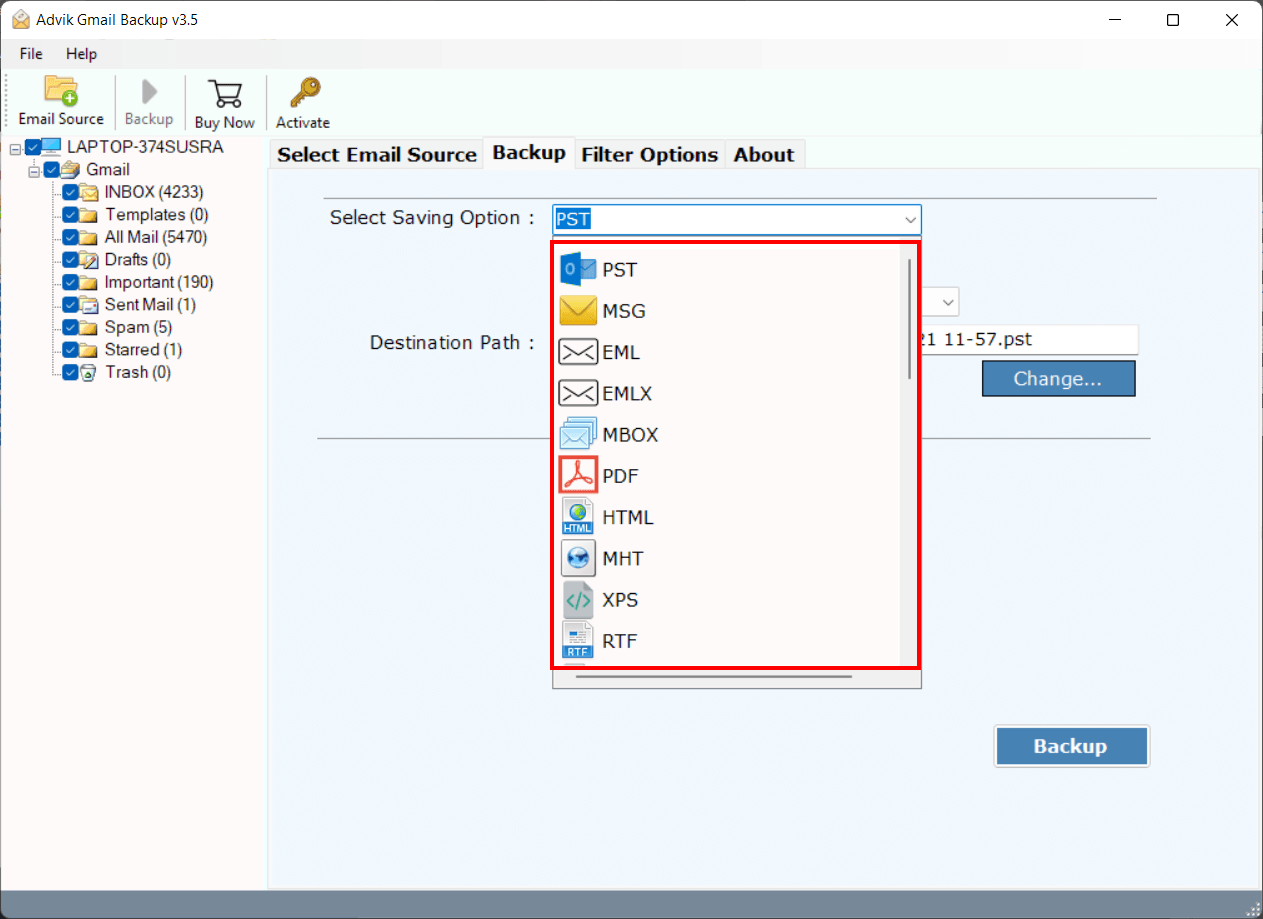
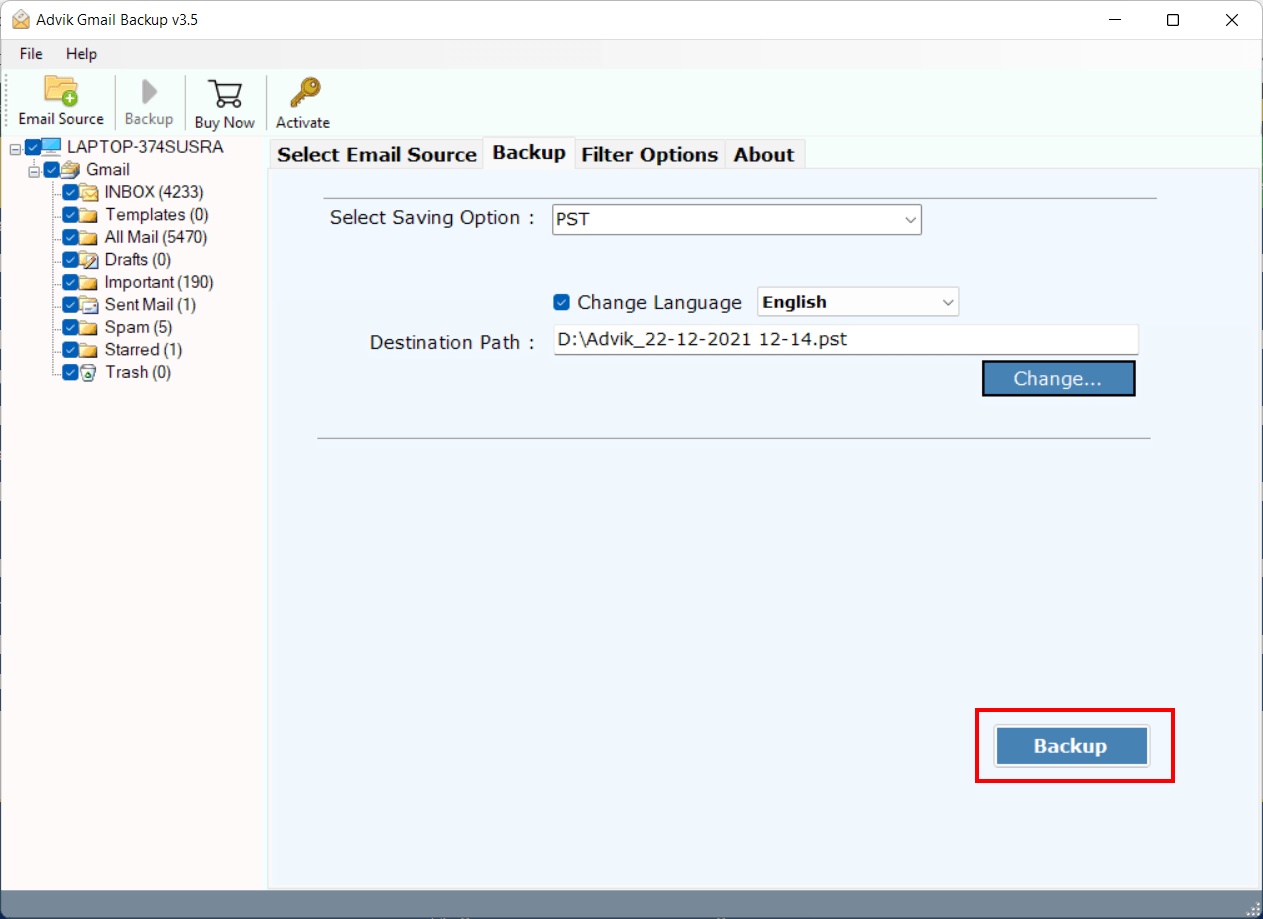
Then select the output format in which you want to backup your Gmail emails. The software provides multiple options like PST, PDF, MBOX, EML, MSG, HTML, DOC, and many more. After choosing the format, browse and select a location on your computer, external drive or storage device where you would like the backup files to be saved.
Press the Backup button to start downloading your Gmail emails locally. It will download your selected Gmail emails with attachments and save them in the desired format. Once complete, you will get a log report and then, you can directly open the Gmail backup files from the destination folder.
Choose from 25+ export options such as email formats, document formats, contacts and calendar files, email services, email clients for backup and migration needs.
The following are some helpful features of using this handy application to backup Gmail data with maximum output.
Advik Gmail Backup Tool is the best choice to save your Gmail emails directly to your computer in a secure and organised way. The software creates a full local copy of your mailbox, retaining all emails, attachments, labels and folder structure. This feature is helpful if you want to create a personal backup of important emails, prevent data from accidental deletion, or view your emails even when you are offline.
The software supports personal Gmail accounts and Google Workspace accounts, enabling businesses and organisations to backup employee mailboxes with the same application. Whether you're archiving company emails, preserving communication records, or getting ready for employee offboarding, the tool makes Google Workspace backup simple without any additional software.
It also allows you to download all Gmail attachments separately into a folder of your choice on your computer. Save documents, images, PDFs, spreadsheets and more from all your emails easily without opening each one manually. This is especially handy if you want to get to important attachments fast, create an archive of documents or if you would like to free up some space in your mailbox.
Instead of backing up the whole Gmail account, this solution allows you to select specific folders or labels from your Gmail account such as Inbox, Sent, Drafts, Important or custom folders. In this way, you will have more control over the backup process and helps you to archive only the data you need. Especially handy when you need project specific emails, legal records or important conversations without having to do a full mailbox backup.
You can move Gmail messages to almost any email service that can connect with IMAP, using the built-in IMAP feature. Just provide the destination account credentials and the software will securely migrate your Gmail data. This is useful when migrating from Gmail to business email services, webmail accounts or custom mail servers that may not be included in the predefined migration list.
The software helps you to migrate Gmail emails directly to 90+ desktop email applications and email services. You can transfer Gmail to Thunderbird, Outlook, Zoho Mail, Lotus Notes, Yahoo Mail and Zimbra. In this way you can easily switch e-mail platforms and not lose your existing e-mails. If users want to migrate or prefer managing emails from a desktop, they can migrate their Gmail data without any complicated manual steps.
More than a helpful features, it provides a simple and user-friendly interface that can easily be operated by anyone without having technical knowledge. The step-by-step process enables users to connect their Gmail account, select a backup option, and start the process within minutes. It ease the process of understanding this software and makes Gmail backup available for both home users and IT professionals.
Advik offers 24/7 technical support for product related queries, backup issues and any query related to Gmail backup for an easy user experience. The support team is available via live chat and email to help with software setup, choosing the right export option, or any other technical issues. This gives users peace of mind that they can get expert help when they need it due to any problem.
From solo freelancers to enterprise IT teams — here's what they say.
IT Administrator “We had to archive some employee Gmail accounts before deactivation. The tool exported the mailboxes to PST format with folder structure intact. “It was pretty straightforward and saved us a lot of manual work.
Start free, no credit card required. Upgrade when you need unlimited backup.
| Feature | Free Trial |
Personal License Starts from $39 |
|---|---|---|
| Gmail Backup | ||
| Backup limit per folder | 25 emails | Unlimited |
| Output formats | 25+ | 25+ |
| Preserves folder structure | ✓ | ✓ |
| Saves attachments | ✓ | ✓ |
| Filters & Options | ||
| Date range filter | ✓ | ✓ |
| Subject / sender / recipient filter | ✓ | ✓ |
| Folder selection | ✓ | ✓ |
| Save to custom location | ✓ | ✓ |
| Advanced Features | ||
| Unlimited backup (no 25 limit) | — | ✓ |
| Batch / multiple accounts | — | — |
| Cloud-to-cloud migration | — | — |
| Priority support | — | ✓ |
| Free lifetime updates | — | ✓ |
| 30-day money back guarantee | — | ✓ |
| No credit card required for free trial | Download | Buy Personal |
Need batch backup or cloud migration? View our Pricing
Advik Gmail Backup Wizard is lightweight and installs in under a minute.
| Operating System | Windows 11, 10, 8.1, 8, 7 — 32-bit & 64-bit |
| Processor | Pentium class or higher · Multi-core recommended |
| RAM | 1 GB minimum · 2 GB recommended for large mailboxes |
| Disk Space | 500 MB for installation · Additional space for backup output |
| Internet | Active connection required (IMAP / POP3 / OAuth) |
| Email Protocols | IMAP, POP3, OAuth 2.0, HTTPS |
| Output Formats | PST, MBOX, EML, MSG, PDF, HTML, DOC, RTF, CSV, ICS, vCard & 14 more |
| Supported Providers | Gmail, Yahoo, Microsoft 365, Zoho, Exchange, cPanel & 200+ more |
| Version | 13.4 · Last updated May 2026 |
| License | Free · Personal · Business |
Contracts, contacts, client history, receipts — your inbox is your business record. Download Advik Gmail Backup Tool and put a copy of it somewhere you control, today.
Free trial · 25 emails per folder · No credit card · Windows · 30-day money back on purchase
Everything you need to know about Advik Email Backup Wizard.