x MBOX to PST Converter Tool to Convert MBOX to Outlook PST

Advik MBOX to PST Converter

A straightforward, fast, and accurate utility to export MBOX file to PST format.

30+ Export Formats
175K+ Downloads
4.8★ Avg Rating
4,985+ Reviews

( 4.8 Rating  Based on 4,985 Reviews )

  • Convert MBOX to PST without any email client dependency
  • Batch mode option to export multiple MBOX files in one go
  • Advanced filter options to migrate selected emails from MBOX
  • Preserves all email attributes and properties while converting
  • Retain original folder hierarchy during the conversion
  • No file size restrictions to convert large MBOX files
  • Able to create a separate PST per MBOX
  • Support MBOX file exported from all its supported platforms
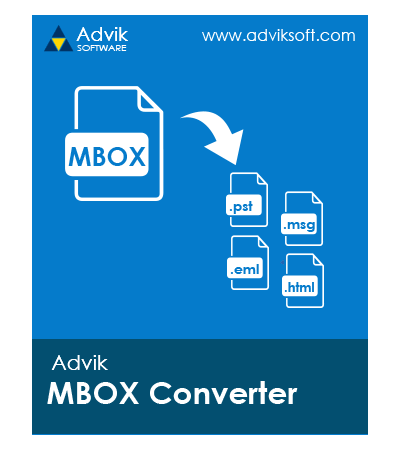
Advik MBOX to PST Converter Wizard
How It Works

Intro & Working of MBOX to PST Conversion Tool

MBOX stands for mailbox. MBOX file format represents a container for a collection of email messages. It is supported and created by many email applications. On the other hand, PST file format stands for Personal Storage Table. It is used by MS Outlook to import/export data.

Conversion of MBOX files into PST format becomes necessary when users want to access their mailbox data in Microsoft Outlook. Many users require such a solution while migrating from MBOX-supported platforms like Apple Mail, Opera Mail, or Thunderbird to Outlook. Advik Converter for MBOX to PST helps users to export emails from MBOX file into .pst format while maintaining email structure, attachments, and folder hierarchy. Follow the steps below to know the working of this program.

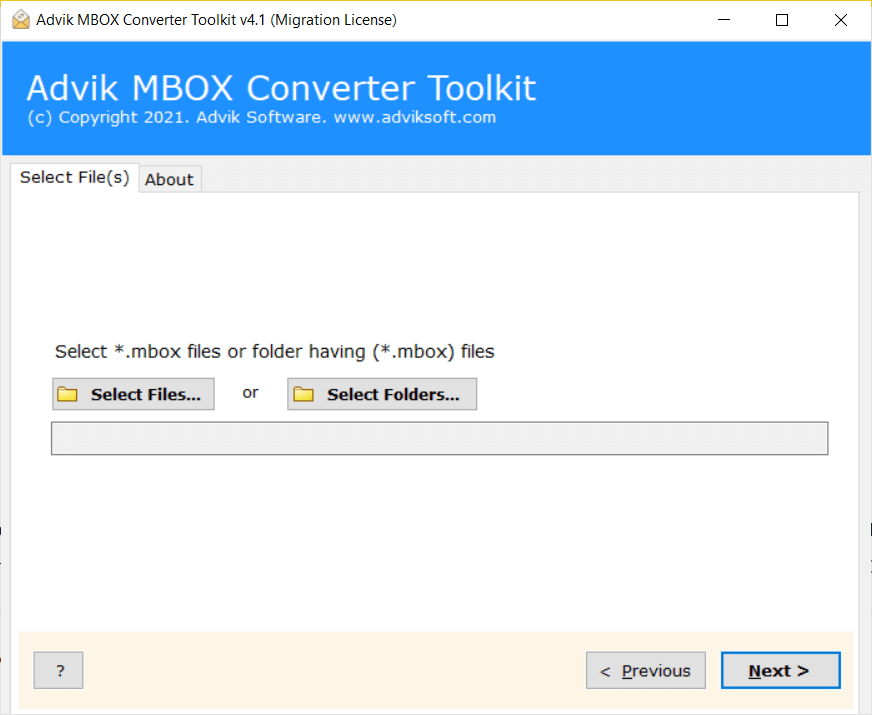
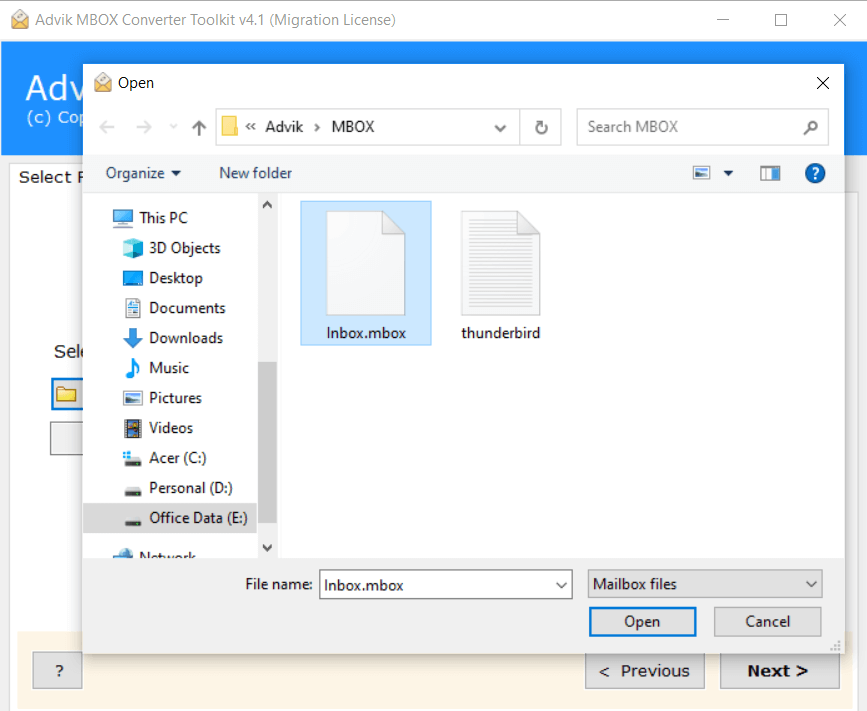
  • Step 1. Launch the software and click Select Files.
  • Step 2. Browse and add .mbox file.
  • Step 3. Select folders for conversion.
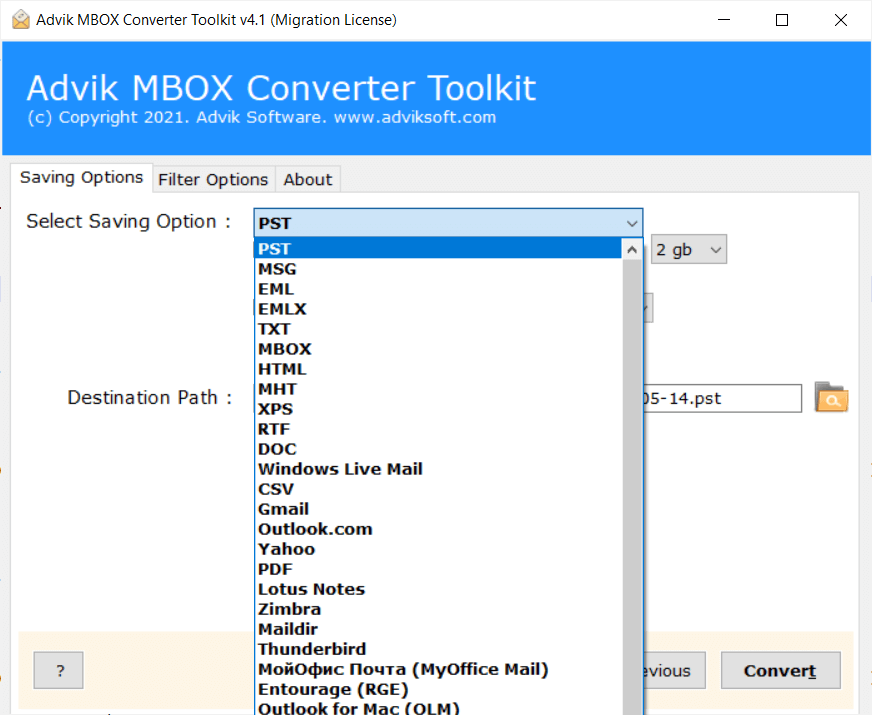
  • Step 4. Choose PST as a saving option.
  • Step 5. Click Convert to begin the process.
convert mbox to pst file
Watch Video

Watch How to Convert MBOX to PST Files

Our Impact

Completed Millions of Email Migrations Since Launch

Completed Millions of Email Migrations Since Launch. Your data privacy and security are our top priorities. We ensure safe, accurate, and confidential MBOX to PST conversion without altering or losing a single email.

0M+
Migrated Emails Securely
0TB+
Successfully Converted MBOX Data
0+
Supported Email Clients
0%
Achieved 99.9% Accurate MBOX to PST Conversion

Best Use Cases for MBOX to PST Converter Software

Following are few situation where you need professional method to export .mbox file into Outlook data file format.

Sometimes, users may need to import MBOX to Outlook application. MBOX files are not directly supported by Outlook. Users need to convert MBOX file to PST format. In that case, the Advik MBOX to PST Export tool will help you to export your emails into an Outlook-compatible format.

If you are transferring data from Mac Mail to Windows Outlook, then you cannot do it directly. Mac Mail saves mailbox data in .mbox format. So, you need to export MBOX file of Apple Mail to PST to make the data accessible in Microsoft Outlook.

Linux-based email applications like Evolution, Claws Mail, etc. export their data into .mbox format. When organizations want to migrate from Linux environments to Windows Outlook, they need to convert mailbox data into PST format to access in Outlook.

Features

Premium Features

Discover the powerful and customizable features of Advik Software to Convert MBOX file to PST Format

Export 30+ Email Applications MBOX Files to PST Format

MBOX files are supported by several email platforms. Different email applications generate MBOX files in different structures, which may create a problem while converting mailbox data. This software solves this issue by supporting all MBOX files. With this program, you do not need to install the original email application to export your .mbox files. It can easily convert MBOX files from any source to PST without any compatibility issues.

  • Export MBOX files from multiple email platforms into PST format
  • Convert old or archived mailbox data into Outlook PST files
  • Avoid compatibility issues caused by different MBOX file structures
  • Handle multiple MBOX files from different sources in a single process

MBOX Compatibility with following clients

  • Mozilla Thunderbird
  • Apple Mail
  • SeaMonkey
  • Postbox
  • Entourage
  • Eudora
  • Opera Mail
  • Spicebird
  • PocoMail
  • Evolution
mbox supported clients
bulk mbox file conversion

MBOX Input Options

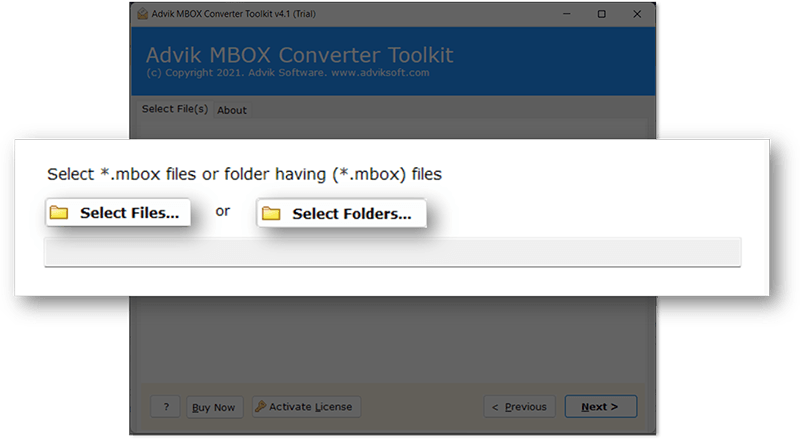
This well-programmed tool is designed in such a way that it supports the conversion of single as well as multiple MBOX files in one go. In this software, you will get two options to add your .mbox files into the software and convert them into PST format. This feature saves your time and effort if you have a large number of files for conversion. It can process all files in a single attempt rather than handling each file separately.

  • Select Files: This option allows you to choose single and selected files to export into Outlook PST format.
  • Select Folders: It is used to upload an entire folder containing multiple MBOX files.

With these options, you can load your MBOX data to the software panel quickly. It is suitable for both small and large-scale tasks.

Advanced Filter Options

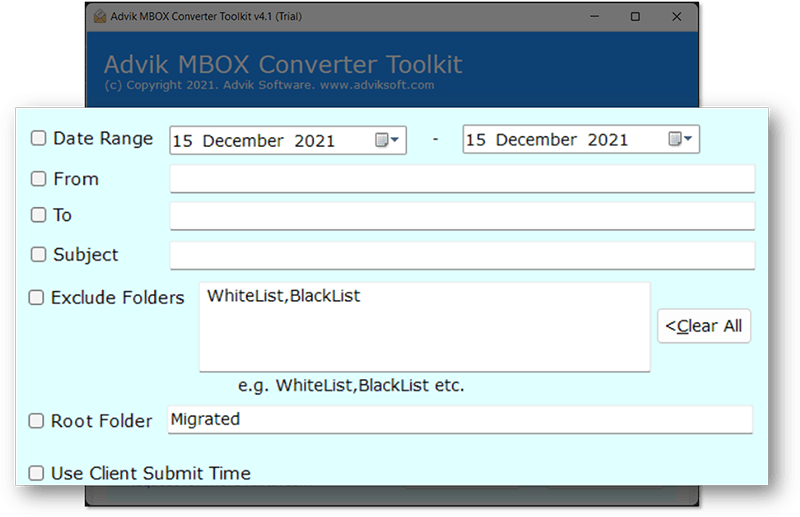
The software provides various advanced filter options for selective email conversion. If your MBOX file is too large and you don't want to export all emails, simply apply these filters and convert only selected data. With this feature, you can eliminate the unnecessary emails and export only the required data. Check out the available filters offered by this MBOX to PST converter tool:

  • Date Range: If you want to export emails within a specific time period, then enable the Date Range option and set a start and end date.
  • From: Choose this option if you want to convert emails from a particular email address.
  • To: You can specify a particular recipient email address to export only selected emails by that user.
  • Subject: Type a particular subject to convert only those emails that have the same subject line.
multiple mbox conversion formats
More Features

Converter for MBOX to PST - Additional Key Features

Maintain Folder Hierarchy

The tool is designed to maintain the original folder structure of your mailboxes and it ensures that no changes are made during the conversion. For example, emails in the INBOX of the MBOX file will remain in the Inbox folder of the output file. By preserving the mailbox tree, the software makes it easy to access your emails without any confusion, keeping all emails in their original folders and subfolders.

Preserve Email Attributes

This is a safe and secure solution for converting MBOX files into Outlook PST format. It preserves key elements of emails such as CC, BCC, date, time, inline images, attachments, hyperlinks, folders, contacts, calendars, journals, tasks, junk emails, notes, deleted items, text formatting, email headers, signatures, and subject lines. Hence, no data modification or omission will take place during the process.

Create Single PST File for Each MBOX

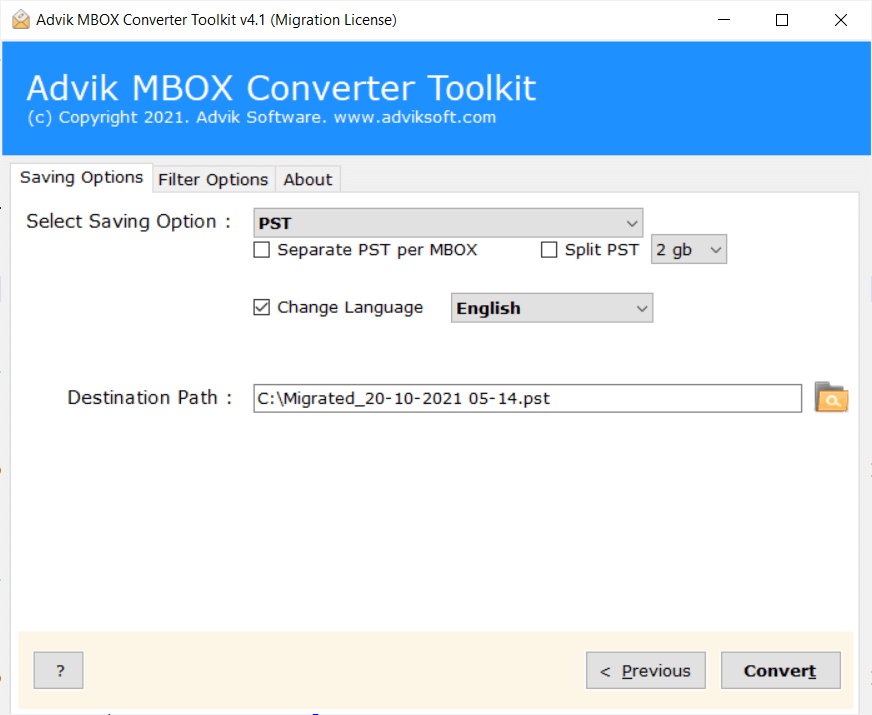
The software provides the flexibility to create single or multiple Outlook data files as per user's needs. It allows you to merge multiple MBOX files into a single PST file. Additionally, if you want to create a separate PST file for each MBOX then enable the "Separate PST per MBOX" option. For e.g. if you want to convert 5 MBOX mailboxes, then this program will create 5 separate PST file for each MBOX file.

NO File Size Limitations

While adding the MBOX files into the software panel, there are no restrictions on the number and size of files. Our tool is capable of converting large-sized MBOX files to PST without imposing any file size restrictions. It can easily handle large files without any complications. You can convert a large MBOX file for unlimited number of times using this tool.

Option to Split Resultant File

Another best feature of this utility is that it provides an option for splitting the resultant PST file by its size into multiple smaller parts. If you want your output PST files to be small in size, then enable the Split PST file option and choose size variation as per your needs. Once, you select this option, the resultant PST file will be divided the resultant PST file into multiple parts of the mentioned size.

Export Corrupted MBOX Files

With the help of MBOX to Outlook PST Converter, you can export corrupted MBOX files. If you are having a damaged, corrupted of inaccessible MBOX file, then you can quickly repair MBOX file, and recover its emails to a healthy Outlook PST file format.

Create Outlook PST in Unicode Format

While exporting MBOX files to PST format, the software creates a Unicode-type PST file by default. As a result, users will not face any compatibility issues accessing their files. They can open the output PST file in any Microsoft Outlook version, including Outlook 2021, Outlook 2019, and earlier versions.

Choose Destination Location

If users want to save the exported files at the desired location, then this program will give the flexibility to do it. They can click on Browse to choose the location according to their preference and easy access. If the users do not choose a destination path, it will automatically store the resultant data on the desktop.

Generate a Complete Report

After completing the conversion, you will get a complete log report. that include all the aspects of the process. It contains all the details about the live conversion like what kind of data you have converted, the exact date and time of conversion, the source and destination location, the number of files converted, and size of your file. So, you can easily analyze the complete procedure.

Dedicated Customer Support

If you are facing any issues while running the MBOX Converter, then you can contact our support team. They are available for you 24*7 via live chat or through email. Our technical experts are always on standby to resolve all types of queries related to installation, performance, billing, etc.

Free Trial for Evaluation

The software provides a free demo version to test its functionality and compatibility with your system. The trial version allows the conversion of 25 MBOX emails per folder to PST format. It is recommended to try the free demo first to evaluate the tool before upgrading to the full version for unlimited access.

Supports all Windows OS Versions

The best part of this handy utility is that users can use this tool on any Windows OS-based system. It shorts all types of Windows latest and previous OS editions, including Windows 11, 10, 8.1, 8, 7, XP, Vista, etc. It is compatible with both 32-bit and 64-bit Windows OS versions.

Availability

Available on Top-Tier Platforms

cnet logo

Software Suggest

Software Suggest gives this converter a 5-star rating for being the most effective software for converting MBOX files to Outlook PST format.

capterra logo

Microsoft Marketplace

Advik MBOX to PST Converter Tool is now listed on the official Microsoft Marketplace, so users can easily access our newest and most powerful version from a reliable source.

software suggest logo

G2

This best MBOX to PST software is rated as 100% secure and a powerful utility by G2 to provide an intuitive interface to instantly convert MBOX file to PST and import in Outlook.

System Requirements

Advik MBOX to PST Converter Wizard - Specification

Software Download

Download Now for Windows
Size 68.1 MB
Version 5.0

Trial Limitations

Advik MBOX to PST Converter Trial Version will allow you to preview and process the first 25 items from each folder of MBOX file.

System Requirements

Processor Pentium Class or higher
Operating System Windows 11, 10, 8.1, 8, 7
Memory 4 GB recommended
Hard Disk 500 MB of free space

License Delivery

Electronic via Email

Product Guides

License & Version

Personal License Activation up to 2 Machines
Business License Activation up to 5 Machines
Migration License Activation up to 10 Machines
Pricing

Free vs Paid Version Comparison

Choose the right plan for your software

Features

Free Demo

$0

Try before you buy

Convert MBOX File Data First 25 Items
Preview Email Data Before Conversion ✓ Available
Advanced Email Filters ✓ Included
Bulk MBOX File Conversion ✓ Included
Compatible with All Windows Versions (11 & Below) ✓ Compatible
Technical Support Basic Support
Commercial Use License Personal Use Only
Free Updates Not Included
Free Download

Note: The Advik MBOX to PST Converter free demo version allows you to process 25 items per folder. Upgrade to the full version to unlock unlimited conversion and commercial use rights.

Reviews
Who Finds Advik MBOX to PST Tool Helpful?
4.9 ★★★★★ out of 5  ·  Based on 4,985 verified reviews
195,000+ Downloads & Counting

Download the Best MBOX to PST Converter

Download in seconds. Convert your first MBOX file in under a minute. Completely free to try.

No Credit Card No Signup Required No Time Limit Virus-Free & Safe Works on Windows 11/10/8/7
Advik MBOX to PST Migration
Size • 68.1 MB • Windows • Version • 5.0
Download Free Now
Convert 25 Items Free Per folder, all conversion options available
Multiple Output Formats PST, EML, PDF, CSV, HTML, MSG & more
Ready in 60 Seconds Install, load MBOX, convert — done
Safe & Secure No data leaves your PC
4.9/5 from 4,985 verified users

Trusted by teams at

Microsoft
Google
IBM
DELLDell
HPHP
ORACLEOracle
AWSAmazon
PayPalPayPal
Spotify
LinkedIn
Slack
CISCOCisco
Microsoft
Google
IBM
FAQ
Popular Questions

Steps to export MBOX to PST for Outlook

  • Launch this MBOX File to PST Converter Tool on your PC.
  • Click Add Folder and locate the folder having MBOX files.
  • Select PST as a saving option from the list.
  • Browse the destination path and Click Convert to start the process.

The software will start converting MBOX file to PST automatically

Yes, the software will help you convert MBOX file from 30+ email clients.

Yes, the tool is capable of converting MBX/MBS and MBOX to PST format.

Yes, you can manually export MBOX data into PST format, but this is a lengthy and time-consuming process.

  • Launch the Thunderbird application on your system.
  • Now, import MBOX to Thunderbird.
  • Add an email account like Gmail in Thunderbird.
  • Drag and drop MBOX emails to the configured account.
  • Next, open Outlook on your system.
  • Configure the same email account with Outlook.

Now, export MBOX data into PST from the recently configured account via the Import/Export feature.

Yes. The software allows you to include or exclude specific folders during conversion. This helps you avoid exporting unnecessary folders and keeps your PST file organized.

Yes, you can extract emails from MBOX file along with their attachments. The tool also supports bulk extraction for faster processing.

No, an internet connection is not required for converting MBOX file into Outlook PST.

Yes, all email attachments are preserved exactly as they are. Nothing is deleted or lost during the MBOX to PST conversion process.

No, Outlook is not required to run the tool or perform the conversion. However, you will need Outlook if you want to open and view the converted PST files.

The free trial version allows you to convert up to 25 emails per folder. To unlock unlimited conversions, you can purchase the full version.