Advik PST Password Remover Tool

Remove passwords from Outlook PST files permanently and access its data without entering any password again.

stars

( 4.8 Rating  Based on 713 Reviews )

  • Unlock Outlook PST files without using an old password
  • Offer an option to batch remove password from PST files
  • Remove Password from Damaged or Corrupted Outlook PST File
  • Supports all PST files exported from any Outlook version
  • No MS Outlook installation is required for password recovery
  • Maintains folder structure and data integrity during the process.
Advik PST Password remover product image
How It Works

PST Password Recovery Tool Intro & Working

PST file format is used by Microsoft Outlook to store emails, contacts, calendars, notes, tasks, journals, and other mailbox data. Many users protect PST files with passwords to secure their important mailbox data from unauthorized access. However, users often forget their passwords and are unable to access their Outlook PST data.

Advik PST Password Remover Tool is a secure and reliable solution to unlock PST files instantly. The software allows you to open password protected PST file without the password. Just add your password-protected file into the software, it will create a new PST file without containing any password. After that, you can easily open and access the newly created file in MS Outlook without entering any password.

pst password removal video tutorial
Watch Video

Watch How to Remove Password Locked PST File?

Use Cases

When Should You Use PST Password Remover?

Unlock Your PST Files Instantly and Recover Your Emails, Contacts and Attachments

Many users protect PST files with a password to secure their data. But when the PST file is not used for a long time, users forget the password most of the time. Due to this, they are unable to access their important data. In such cases, a PST Password Remover tool helps users to remove forgotten password from PST file and regain access to their emails, contacts, calendars and attachments easily.

Sometimes, users get a password-protected PST file from a colleague, client, or an old backup and they cannot open the file without the password. With this tool you can unlock such files easily, open them and immediately start using them. It's useful for teams, businessess or personal use, when you need access to shared PST files without using it's original password.

Audits, legal cases and compliance checks often require organizations to access old Outlook emails. But password protected PST files can make it difficult to get to important communication records. In such case the software helps to unlock secured Outlook PST files and allows users to access important email conversations and records without any loss of data.

Features

PST Password Remover Tool - Features

Explore the benefits of the software to Remove Password from PST Files

Supports Multiple PST Files Types

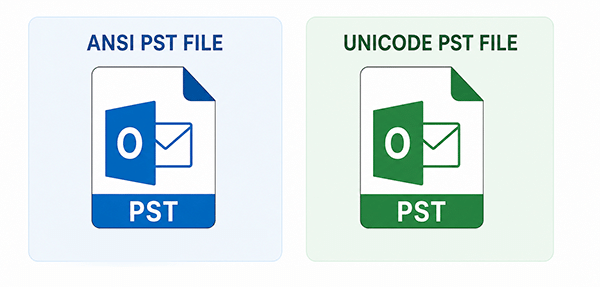
Microsoft Outlook stores mailbox data in .pst format. There are two main types of PST files used by Outlook: ANSI and Unicode.

ANSI PST

  • Earlier Outlook versions support this format
  • Its maximum size is 2 GB
  • Limited character set support for personal folders

Unicode PST

  • Newer format created by Outlook 2003 and later
  • Larger size limits (20GB, then 50GB+)
  • Supports international characters in personal folder structures

The Outlook Recovery Tool is able to remove password from both types of PST files. Just add your .pst file into the software and remove password protection from PST file.

mbox-supported file
pst to MBOX feature

PST Source Selection Flexibility

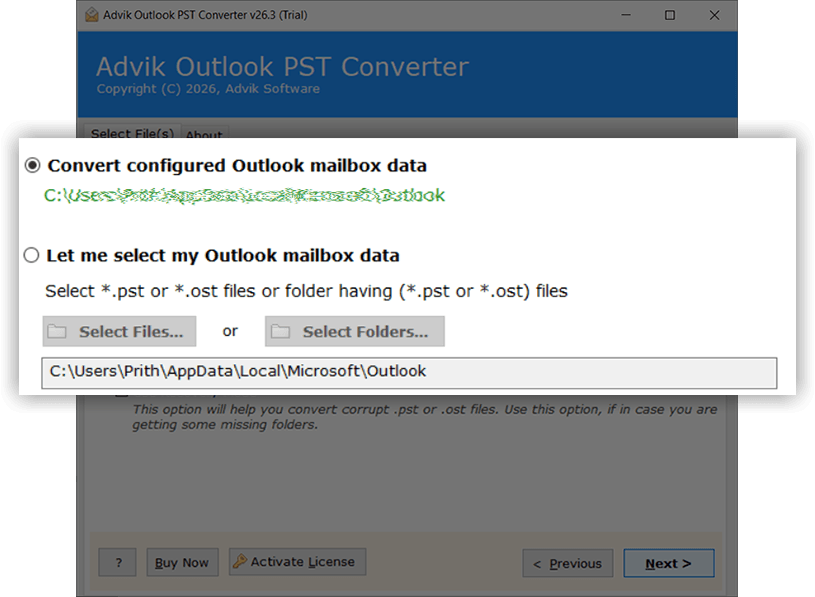
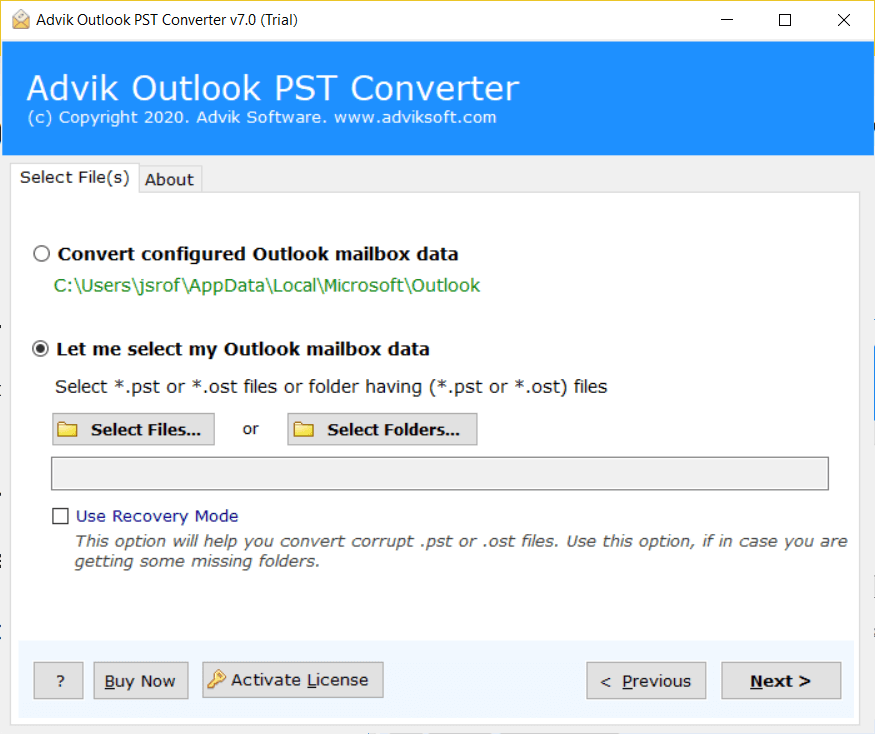
The software provides dual options: manual and automatic modes to add PST files into the software. You can choose between two options: "Convert Configured Outlook mailbox data" and "Let me select my Outlook mailbox data".

If your Outlook account is currently configured with your system, then simply select the "Convert Configured Outlook mailbox data" option. By using this, you can directly access PST files to remove the password.

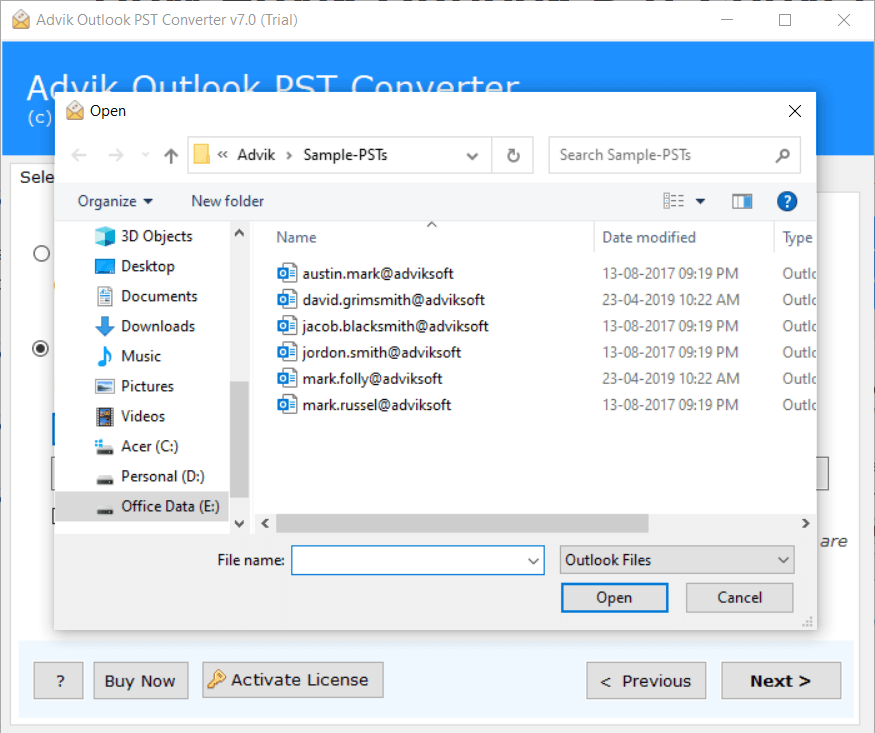
On the other hand, if you have orphaned .pst files, then you can choose "Let me select my Outlook mailbox data". Using this option, you can browse locally stored Outlook files.

By using these options, you can add your files to the software panel in different situations.

Batch Unlock PST Files

Outlook Password Recovery Tool is designed in such a way that it can remove passwords from multiple Outlook data files in one go without repeating the same steps again and again. Instead of processing files individually, it allows you to add multiple PST files in a single attempt. This feature will be beneficial if you have a large number of .pst files for removing password. This advanced utility is equipped with the following options to bulk unlock PST files.

  • Select Files: Input single or multiple PST files to the software panel.
  • Select Folders: Add a folder that contains multiple PST files.
pst to mbox advance filter
Key Features

Generate a New PST File Without Password

Generate a New PST File Without Password

After adding your encrypted .pst file to the software, it helps you to create a new Outlook PST file that can be opened without any password. The exported password-free PST file can be opened in Microsoft Outlook easily without any restrictions. This feature will be very helpful when you forget the password or want to open the Outlook data file freely on any other system.

Preserve Data Integrity

You do not have to worry about your PST data integrity while using this tool to remove password from PST file. The software complies with the strict rules and regulations of data privacy. In this process, the application retains all the attributes like attachments, inline images, sender & receiver information, subject, email components, hyperlinks, etc.

Maintains Folder Hierarchy

Unlocking your PST files will not change anything in your files. The software does not change anything but removes the password and leaves your content as it is. The resultant file will retain the folders & subfolders structure. It keeps the original folder structure and data structure. So that users can easily locate their data in the output file.

No File Size Restrictions

This certified solution enables you to process large PST files and mailboxes without file size limits. This is a utility that is specifically designed for enterprise level users to make the PST password removal easy and error-free without compromising on the accuracy and perfection. Unlike other tools that usually slow down or crash on large files.

Remove Multilingual PST Password

Some user like to protect their PST files by using difficult password that contains mixture of letters, numbers and symbols. This solution helps users with these types of complex PST password recovery issues by erasing the complex password combinations also. The software can effortlessly remove Multi-Lingual Password Protection from Outlook PST files.

Flexibility of Saving Location

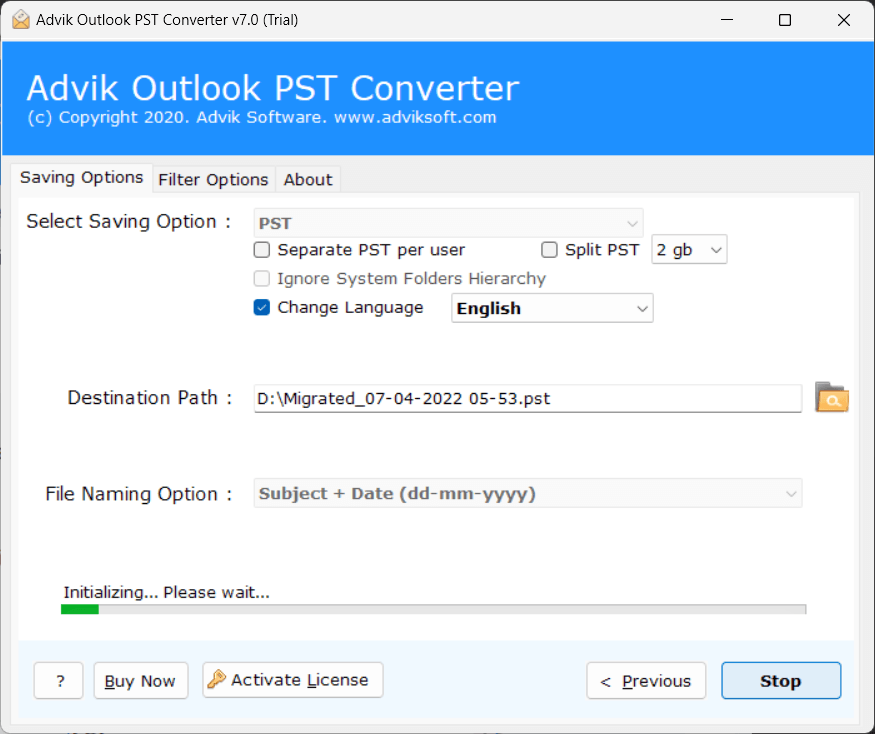
Another advantage of this PST Password removal tool is that you can also browse and select your desired destination location to save the resultant file. It may be the path of any connected external device or the local drives. This feature makes it easier to handle and access the output file when needed in future.

Standalone & Offline Utility

It is an independent tool which means you don't have to install any other application to recover PST password. It works offline and therefore your PST file and its contents never leave your device. This offline capability ensures maximum privacy, which is ideal for secure or restricted environments with limited internet access.

Simple Graphical User Interface

Our tool is designed by experts by keeping all types of users in mind so that it is accessible for everyone, with a user friendly GUI. With our self-explanatory interface you can remove password protection from PST file even if you are a newbie or have no technical skills at all, without installing Microsoft Outlook or calling any technical support.

Windows Compatibility

It has been built to run efficiently on all versions of the Windows Operating System. That means you’ll be able to install and run the tool whether you’re running Windows 7 or Windows 11. It is a Windows based program and has a wide range of compatibility. It works on both 32bit and 64bit machines.

Specifications

PST Password Remover Software - Specification

Software Download

Download Now for Windows
Size 47.2 MB
Version 26.3

Trial Limitations

Outlook PST Password Remover Trial Version will allows you to Remove Password from 25 items from each folder of PST file.

System Requirements

Processor Pentium Class or higher
Operating System Windows 11, 10, 8.1, 8, 7
Memory 4 GB recommended
Hard Disk 500 MB of free space

License Delivery

Electronic via Email

Product Guides

License & Version

Personal License Activation up to 2 Machines
Business License Activation up to 5 Machines
Migration License Activation up to 10 Machines
Pricing

PST Password Remover Tool - Free vs Paid Version Comparison

Choose the right plan for your software

Features

Free Demo

$0

Try before you buy

Remove Password from PST File First 25 Items
Preview Email Data Before Password Removal ✓ Available
Email Filters ✓ Included
Unlock Corrupt or Inaccessible PST File ✓ Included
Compatible with All Windows Versions (11 & Below) ✓ Compatible
Technical Support Basic Support
Commercial Use License Personal Use Only
Free Updates Not Included
Free Download

Note: The PST Password Remover free demo version allows you to remove password from 25 items per folder. Upgrade to the full version to unlock unlimited password removal and commercial use rights.

Availability

Listed on Trusted Platforms

SaaSHub logo

SaaSHub

According to SaaSHub, it is rated as the best tool to remove Outlook PST password. This software easily unlocks password-protected PST files and extracts data.

SoftwareSuggest Logo

SoftwareSuggest

PST password removal tool by Advik got a 4.5 star rating from Software Suggest for its excellent performance to remove PST file protection without any data loss & modification.

CNET Logo

CNET

Featured on CNET, this is a trusted and verified product by technical experts to unlock password-protected .pst files, preserving all email elements and also offers modern features.

Reviews
Who Loves Advik PST Password Remover Tool?
4.8 ★★★★★ out of 5  ·  Based on 713 verified reviews
115,000+ Downloads & Counting

Download the Best PST Password Remover

Download in seconds. unlock your first file in under a minute. Completely free to try.

No Credit Card No Signup Required No Time Limit Virus-Free & Safe Works on Windows 11/10/8/7
Advik PST Password Remover
Size • 47.2 MB • Windows • Version • 26.3
Download Free Now
Remove Password from PST file Unlock ANSI and UNICODE PST File
30+ Output Formats PDF, MSG, EML, MBOX, HTML & more
Ready in 60 Seconds Install, load PST, unlock — done
Safe & Secure No data leaves your PC

Trusted by teams at

Microsoft
Google
IBM
DELL Dell
HP HP
ORACLE Oracle
AWS Amazon
PayPal PayPal
Spotify
LinkedIn
Slack
CISCO Cisco
Microsoft
Google
IBM
DELL Dell
HP HP
ORACLE Oracle
AWS Amazon
PayPal PayPal
Spotify
LinkedIn
Slack
CISCO Cisco
FAQ
Knowledge Base

Follow the steps below to unlock Outlook PST file;

  • Step 1. Launch software and click Select Files to add encrypted PST file.
  • Step 2. Select the password-protected PST file and click Next button.
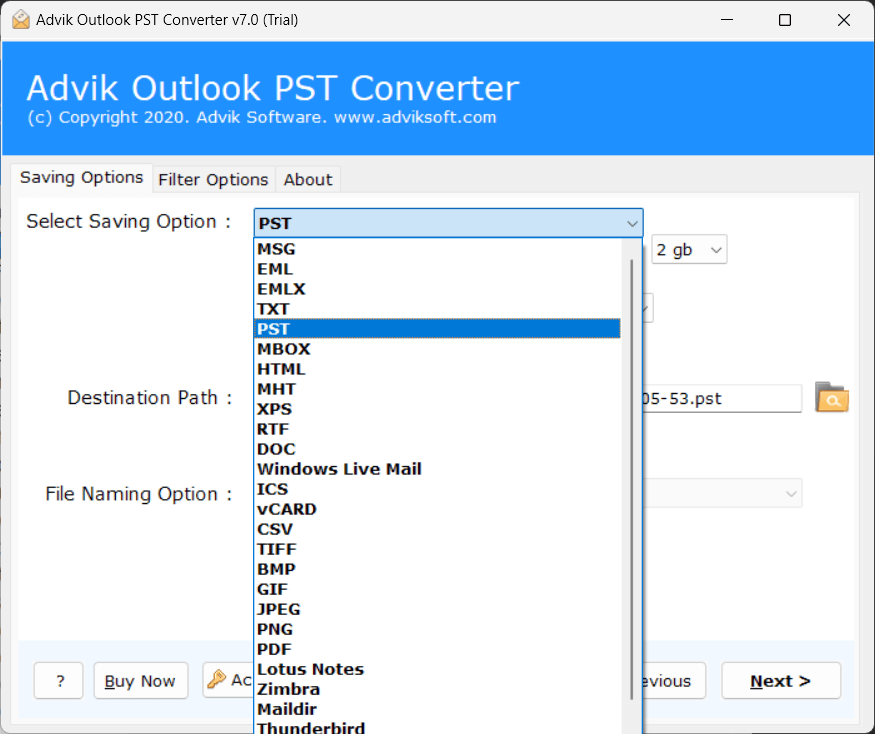
  • Step 3. Choose PST as a saving option from the list.
  • Step 4. Click Convert button.

The software starts generating a new PST file with no encryption.

How to unlock PST file steps

No, internet connection is not required to remove password from Outlook data file.

If you know your current PST password, you can remove it from PST by following below steps.

  • Open Microsoft Outlook on your computer.
  • Click on the File tab.
  • Select Account Settings and select Account Settings.
  • Go to the Data Files tab.
  • Choose the password-protected PST file.
  • Click on Settings.
  • Select the Change Password option.
  • Enter the current password in the old password field.
  • Leave the New Password and Verify Password fields blank.
  • Click OK to save the changes.

Yes, PST File Password Remover doesn't require installation of Classic MS Outlook for removing protection from Outlook data file.

Yes, PST Password Removal software support ANSI and UNICODE file types for password deletion.

Yes, simply use this software to delete PST password and open it in Outlook without entering password.