Advik PST to PDF Converter Tool

A well-checked solution for all to export PST files to PDF format.

stars

( 4.9 Rating  Based on 2045 Reviews )

  • Batch Export PST Emails to PDF with attachments
  • Convert Corrupted or Damaged PST file data to PDF file
  • Support ANSI and UNICODE Outlook PST Files
  • Preserves email components like cc, bcc, date etc.
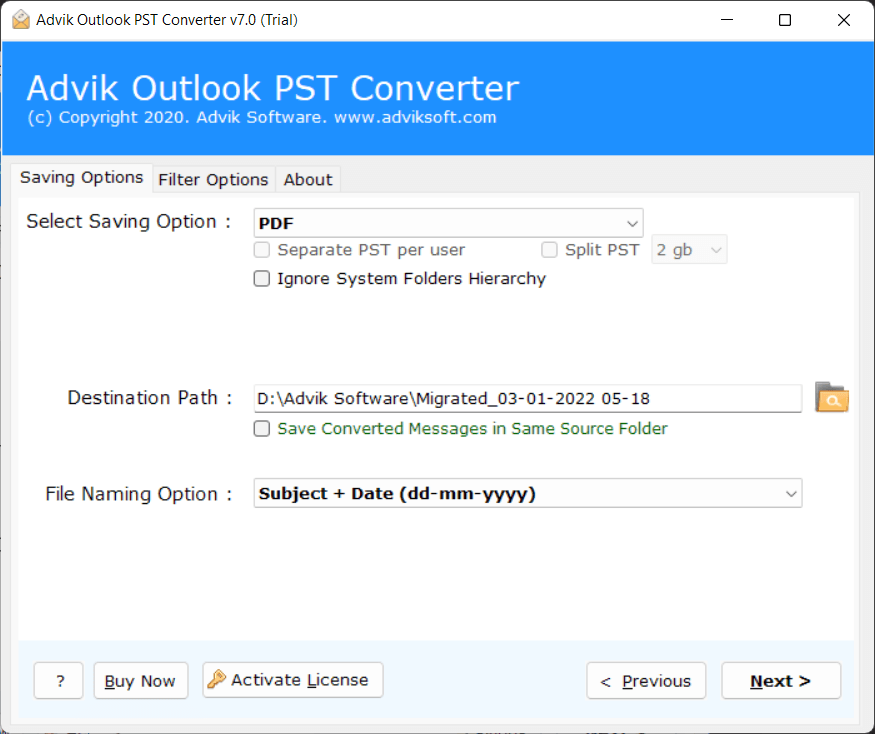
  • Multiple File Naming options to save PST as PDF file
  • Option to choose the desired destination path to save resultant data
  • Advanced filter options to convert selective emails from PST file
  • Support PST files exported from MS Outlook 2021, 2019 etc.
  • Compatible with Windows 11/10 and older versions
Advik PST File to PDF Converter
How It Works

Intro & Working of PST to PDF Conversion Tool

Advik PST to PDF Converter simplifies the process of transforming complex Outlook PST files into easily readable and secure PDF documents. This will not only make your email data more accessible across different devices but also ensure long term preservarion without depending on Outlook. This is particularly beneficial for professionals who need to present an email records for legal, business or document purposes. PDFs are widely accepted and can be opened anywhere.

The program is designed for users who have no technical experience in past and can easily convert PST file without any assistance.

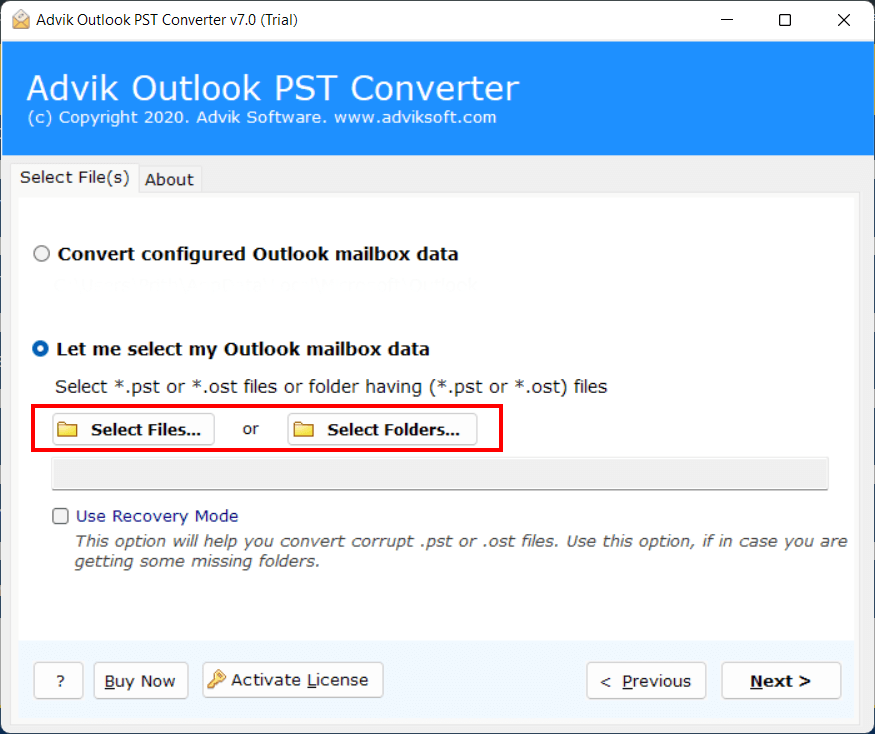
  • 1. Run software and click Add File.
  • 2. Browse and add PST file.
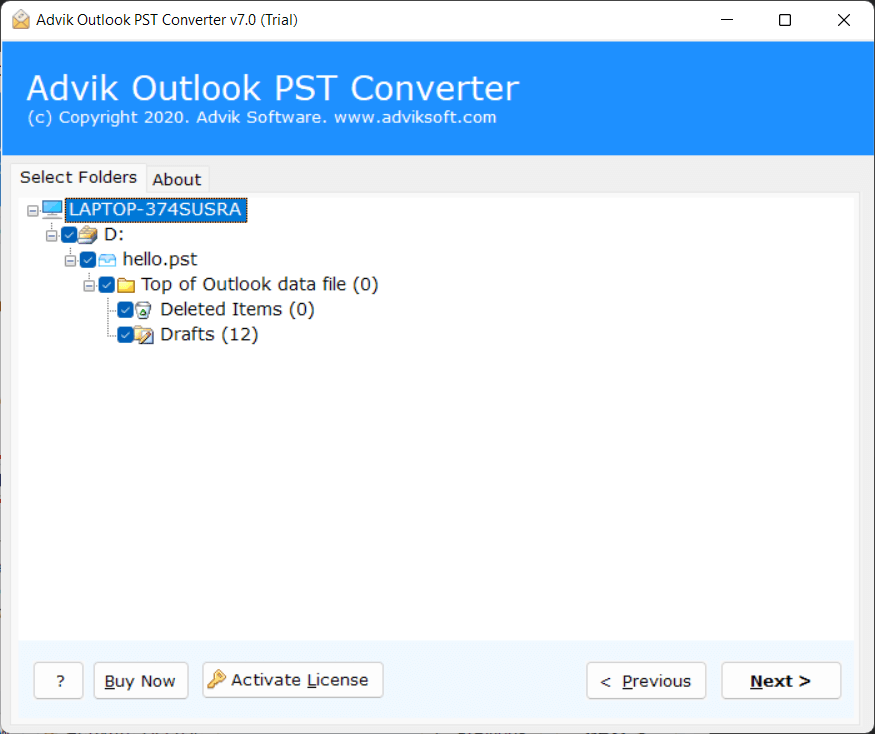
  • 3. Select folders for conversion.
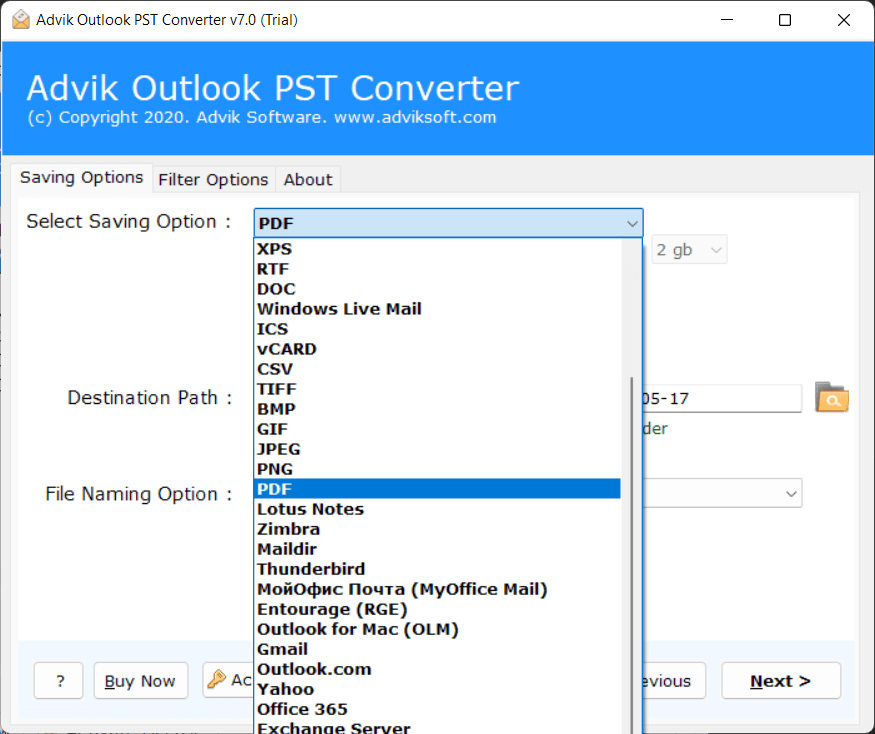
  • 4. Choose PDF as saving option.
  • 5. Click Convert to start process.

convert pst to PDF file
Watch Video

Watch How to Convert PST to PDF Files

Trustworthy

Available on Trusted Platform

software suggest logo

Software One

SoftwareOne states that this utility is the best solution for converting PST to PDF files with 100% accuracy.

cnet logo

SAAS Counter

Accorting to SaasCounter, PST to PDF Converter by Advik Software is 100% clean and result oriented tool.

g2 logo

Software Suggest

Software Suggest had honoured us with best User Interface for our Outlook to PDF Exporter.

Features

PST to PDF Converter - Main Capabilities

Explore the benefits of the software to convert Outlook PST file to PDF format

Batch Export PST to PDF Files

If you have multiple PST files or a large number of emails, then this software provides a batch conversion option to save Outlook PST emails as PDFs in one go. This feature is very useful for users who want to save time and effort. Instead of converting files one by one, you can simply add multiple PST files or folders and start the conversion process. The tool will convert all emails into PDF format without losing attachments, formatting, or email properties. It ensures fast and accurate results even with large PST files.

batch export pst to pdf
pst to pdf advanced options

Convert PST to PDF with Advanced Options

To make the conversion more flexible, the tool offers several advanced settings. Users can apply filters to export only selected emails based on date, subject, or sender details. You can also choose naming conventions to save PDF files as per your preference. This feature helps avoid unnecessary data conversion and allows users to get accurate results. Simply set your required options, and the software will convert only the selected Outlook emails into PDF format.

Maintain On-Disk Folder Hierarchy

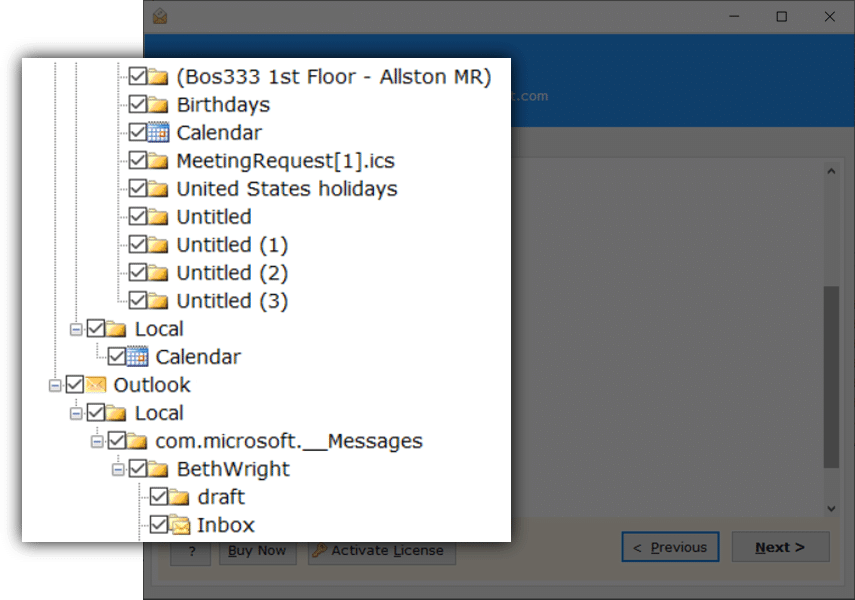
The PST to PDF Converter keeps the original folder structure intact during the conversion process. If your PST file contains multiple folders such as Inbox, Sent, Drafts, or custom folders with subfolders, the software will maintain the same hierarchy in the output. It creates a root folder and stores all converted PDF files in their respective folders.

For example, if your PST file contains a main folder (Mailbox) with 4 subfolders, then the software will create a similar folder structure in the destination location. All PDF files will be saved within their respective folders without any changes in hierarchy.

pst to pdf folder hierarchy
Key Features

Additional Notable Features

Simple User Interface

The software offers an easy-to-use and simple Graphical User Interface for technical and non-technical users. Anyone with little to no technical knowledge can easily convert PST file to PDF with attachments.

Convert PST to PDF with Attachments

The tool preserves email components when converting PST into PDF. It maintains email attributes, attachments, send/receive info, subjects, emails, email folders and more.

Preserved MetaData

This Tools ensures that every detail of your email remains unchanged after conversion. All key metadata elements, such as sender, recipient, subject line, date, time, and attachments, are preserved accurately in the output PDF files. This helps maintain the authenticity and originality of your Outlook emails.

Convert Corrupted PST to PDF File

In this software, there is a recovery mode feature that helps repair corrupted PST file. Add your data file, select the recovery mode checkbox, and choose the saving option. The tool will efficiently convert PST to PDF without any hassle.

Multiple File Naming Options

The Advik Outlook to PDF Converter lets you export PST files to PDF with different file naming options. This helps organize the resulting PDFs in various styles, such as original file name, subject+date+from, date+subject+from, from+date+subject, etc.

Destination Freedom

The software gives you complete control over where your converted files are saved. With the desired destination path option, you can choose any folder or drive on your system to store the exported PDF files.

20+ File Formats

Besides converting PST to PDF, the tool offers users the conversion of many other file formats. You can use this solution to convert PST to MSG, EML, TXT, MBOX, HTML, MHT, XPS, RTF, DOC, CSV, vCard, etc. You can also import PST into Thunderbird, Lotus Notes, and Zimbra.

Migrate PST to Cloud-Based Email

You can use this software to backup email from PST to Gmail account instantly. This software gives users some advanced options to migrate their emails to cloud-based email services. Hence, this wizard will allow you to directly migrate PST file to your webmail account.

Support All Outlook Versions

The tool has a very wide range of support for PST files. This smart utility supports PST file of Outlook 2021, 2019, 2016, 2013, 2010, and other versions below. You just need to add a PST file to save emails into PDF format in a few simple clicks.

Hold Attachments Precisely

Attachments are the most important files after emails, that you don't want to loose. The software make sures all the email attachments remain intact with the PDFs after file conversion.

Supports ANSI & Unicode PST Files

It supports both ANSI and Unicode PST file formats. Whether your PST file is created in older or newer versions of Outlook, the tool can easily process it without any compatibility issues. This makes the software suitable for all types of users.

Standalone Utility

The software works independently and does not require Microsoft Outlook installation. You can easily add PST files and convert them into PDF format without configuring Outlook. This makes the tool more convenient and easier to use for all users.

Generate Conversion Report

After completing the PST to PDF conversion process, the software provides a detailed conversion report. This report includes important information such as the number of emails converted, skipped items, and the status of the process. It helps users to verify whether the conversion was completed successfully.

Windows Compatibility

It runs on all versions of Windows Operating Systems such as Windows 10, Windows 8.1, Windows 8, Windows 7, XP, Vista, etc. This tool supports both 32-bit and 64-bit machines.

24*7 Dedicated Support

We are here to support you and keep your network running. Feel free to contact us anytime for any product-related queries. We are available 24/7 to provide you with the best assistance.

Specifications

Oulook PST to PDF Converter - Specification

Software Download

Download Now for Windows
Size 47.2 MB
Version 26.3

Trial Limitations

Outlook PST to PDF Converter Trial Version will allows you to convert first 25 items from each folder of PST file.

System Requirements

Processor Pentium Class or higher
Operating System Windows 11, 10, 8.1, 8, 7
Memory 4 GB recommended
Hard Disk 500 MB of free space

License Delivery

Electronic via Email

Product Guides

License & Version

Personal License Activation up to 2 Machines
Business License Activation up to 5 Machines
Migration License Activation up to 10 Machines
Pricing

PST to Adobe PDF Converter - Free vs Paid Version Comparison

Choose the right plan for your software

Features

Free Demo

$0

Try before you buy

Convert PST File Data First 25 Items
Preview Email Data Before Conversion ✓ Available
Email Filters ✓ Included
Convert Corrupt or Inaccessible PST File ✓ Included
Compatible with All Windows Versions (11 & Below) ✓ Compatible
Technical Support Basic Support
Commercial Use License Personal Use Only
Free Updates Not Included
Free Download

Note: The PST to PDF Converter free demo version allows you to convert 25 items per folder. Upgrade to the full version to unlock unlimited conversion and commercial use rights.

Reviews
Who Loves PST to PDF Converter?

See our client's feedback and opinions about this conversion tool.

JC
James Carter
CEO, BrightPath Solutions (USA)

This tool made my work very easy and smooth. I converted all my Outlook PST emails into PDF without any issues. The process was fast and accurate. I am very satisfied with the results.

EW
Emma Williams
Marketing Director, GrowthHive (UK)

The interface is clean and easy to understand. I didn't need any technical knowledge to use it. Everything is well organized in the software. It is perfect for beginners.

LO
Liam O'Connor
Founder, ScaleForge (Ireland)

I really liked how it keeps the original email formatting. The PDF files look exactly like the original emails. No changes in layout or structure. Very impressive output quality.

OB
Olivia Brown
Brand Manager, Elevate Digital (Canada)

The batch conversion feature is very useful. I converted multiple PST files at the same time. It saved me a lot of time and effort. Great for bulk tasks.

NM
Noah Muller
CTO, TechNova GmbH (Germany)

I tested the tool with a large PST file. It handled everything smoothly without any errors. The performance is stable and reliable. Good for heavy data conversion.

SR
Sofia Rossi
Product Lead, Innovare Labs (Italy)

All attachments were saved properly with emails. Nothing was missing after conversion. The tool maintained complete data integrity. That's very important for me.

LD
Lucas Dubois
Head of Operations, NexaCorp (France)

This software is perfect for creating email backups. I can now store my important emails in PDF format. It helps in safe and long-term storage. Very helpful tool.

MG
Mateo Garcia
Growth Manager, ImpulsoTech (Spain)

The software is lightweight and runs smoothly. It did not slow down my system during conversion. The process was quick and efficient. Good for daily use.

IS
Isabella Silva
Digital Strategist, MarketUp (Brazil)

I used this tool for my office work. It converted all emails accurately without any data loss. The results were exactly as expected. Very professional solution.

HT
Hiroshi Tanaka
Director, ZenTech Solutions (Japan)

The steps are very simple and easy to follow. I completed the conversion in just a few clicks. No confusion at all during the process. Good for all types of users.

AP
Arjun Patel
Founder, NextGen Commerce (India)

The selective conversion feature is very helpful. I converted only the emails I needed. It saved both time and storage space. Very smart functionality.

LW
Li Wei
VP Strategy, DragonScale Tech (China)

The folder structure remained the same after conversion. It helped me easily locate files later. Everything was well organized. Very useful feature.

MK
Min-Jun Kim
Product Manager, Seoul Innovations (South Korea)

I liked that it works without Outlook installation. This makes it more flexible and easier to use. No need for extra setup. Very convenient software.

AA
Aisha Al-Farsi
Marketing Head, DesertBloom (UAE)

It supports bulk conversion without any issues. I added multiple PST files and processed them together. The speed was good. No performance problems.

OH
Omar Hassan
CEO, NileTech Ventures (Egypt)

The output PDF files are clean and well-structured. Everything is properly arranged and readable. It looks very professional. Easy to share and print.

ES
Ethan Smith
Co-Founder, LaunchLabs (Australia)

This tool is great for archiving emails. I can keep my records safe in PDF format. It helps in managing important data. Very useful for long-term use.

CM
Chloe Martin
UX Designer, PixelWave Studio (New Zealand)

I didn't face any data loss during conversion. All emails were converted safely and accurately. The tool is very reliable. I trust it for important tasks.

DN
Daniel Novak
Business Analyst, DataBridge (Czech Republic)

The preview option helped me a lot. I checked emails before converting them. It ensured I selected the right data. Very helpful feature.

AO
Amara Okafor
Operations Lead, AfriScale (Nigeria)

It supports both old and new PST files. I didn't face any compatibility issues at all. It worked smoothly with all files. Very flexible tool.

TN
Thabo Ndlovu
Director, GrowthCore (South Africa)

Overall, this is a time-saving and effective software. It is simple, fast, and accurate. Anyone can use it easily. I would definitely recommend it.

Write a Review
247,000+ Downloads & Counting

Download & Try for Free
Best PST to PDF Converter

Download in seconds. Convert your first file in under a minute. Completely free to try.

No Credit Card No Signup Required No Time Limit Virus-Free & Safe Works on Windows 11/10/8/7
Advik PST to PDF Converter
Size • 47.2 MB • Windows • Version • 26.3
Download Free Now
Convert 25 Items Free Per folder, all formats available
30+ Output Formats PDF, MSG, EML, MBOX, HTML & more
Ready in 60 Seconds Install, load PST, convert — done
Safe & Secure No data leaves your PC
4.9/5 from 2045 verified users

Trusted by teams at

Microsoft
Google
IBM
DELL Dell
HP HP
ORACLE Oracle
AWS Amazon
PayPal PayPal
Spotify
LinkedIn
Slack
CISCO Cisco
Microsoft
Google
IBM
DELL Dell
HP HP
ORACLE Oracle
AWS Amazon
PayPal PayPal
Spotify
LinkedIn
Slack
CISCO Cisco
FAQ
Commonly Asked Questions

Follow these 5 simple steps:

  • Step 1. Download and run the Advik PST to PDF Converter Tool.
  • Step 2. Add PST File(s) into the Software Panel.
  • Step 3. Preview and Select Required Folders/Emails.
  • Step 4. Choose PDF as the Saving Format.
  • Step 5. Click on the Convert Button to Start the Process.

The software will convert PST data into PDF/A. This file type is designed for long term archiving and preservation of electonic documents.

No, installation of Microsoft Outlook is not required. The software can convert PST files into PDF format independently.

Yes, the software allows you to convert multiple PST files into PDF format at once. This helps save time and effort when dealing with bulk data.

Yes there are few methods to convert PST to PDF manually. One of them is using Outlook Application. Steps for the same are as follows:

  • Step 1. Open Outlook on your system.
  • Step 2. Go to File > Open & Export > Open Outlook Data File (.pst).
  • Step 3. Navigate > Open the email that you want to print.
  • Step 4. Click on File > Print.
  • Step 5. Save the File as PDF in your system.
  • Step 6. Repeat the same process to print another emails.

Yes, the tool preserves all attachments during the conversion process. You can also choose whether to embed attachments in PDF or save them separately.

Yes, the software provides selective conversion options. You can choose specific folders or emails before starting the process.

Yes, the tool keeps the original folder structure intact. All converted PDF files are saved in the same hierarchy as the source PST file.

For UNICODE PST Files, there is no size limitation. You can convert large PST files without any issues using this software. However, ANSI PST Files comes with 2 GB of size limitation.

Yes, the software preserves email formatting, including font style, images, hyperlinks, and layout. The PDF files look exactly like the original emails.

Yes, the tool provides advanced filter options such as date filter. This helps in converting only the required emails.

Yes, the software supports the conversion of password-protected PST files without any issues.

You can choose the destination location before starting the conversion. All PDF files will be saved in the selected folder.

Yes, the tool provides a detailed conversion report after the process is completed. This helps in tracking the results.

Yes, it supports PST files created by all versions of Microsoft Outlook, including 2021, 2019, 2016, 2013, and earlier versions.

AE
Written & Maintained by Alora Eve — email migration specialists with 8+ years of hands-on experience building Windows-based conversion tools. Every feature is tested in-house before release.
Linkedin Profile