Divide oversized Outlook PST files into smaller parts by Size, Date, Year, Folder, Email ID & Category

Follow the guide to reduce Outlook PST file size safely.
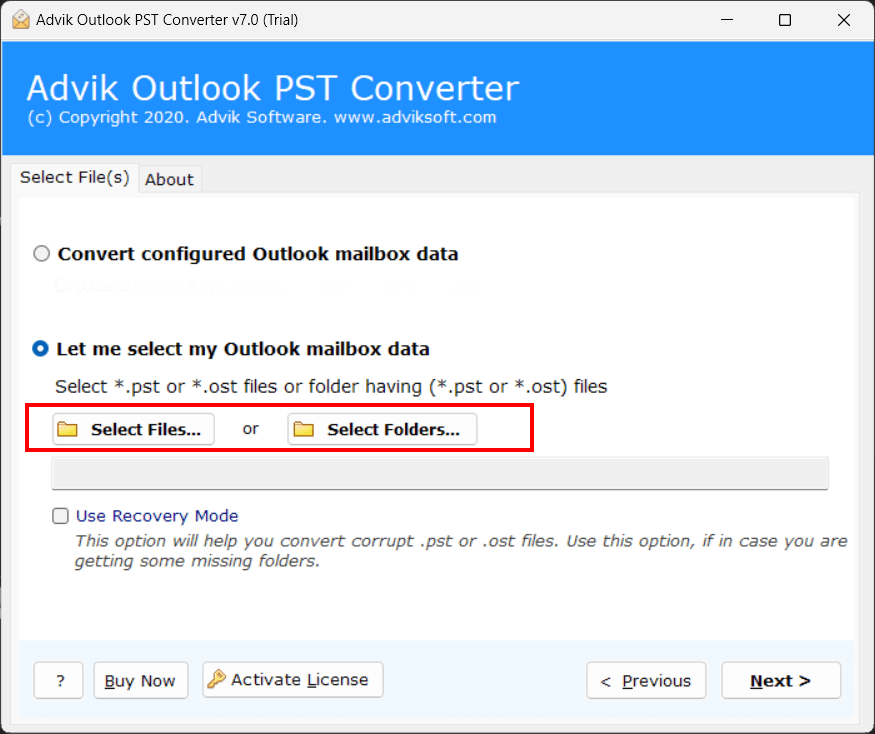
Download and launch the software on your system to start the PST splitting process.
Choose "Convert Configured Outlook Mailbox Data" to load PST data directly from Outlook, or select "Let Me Select My Outlook Mailbox Data" to browse PST files manually.
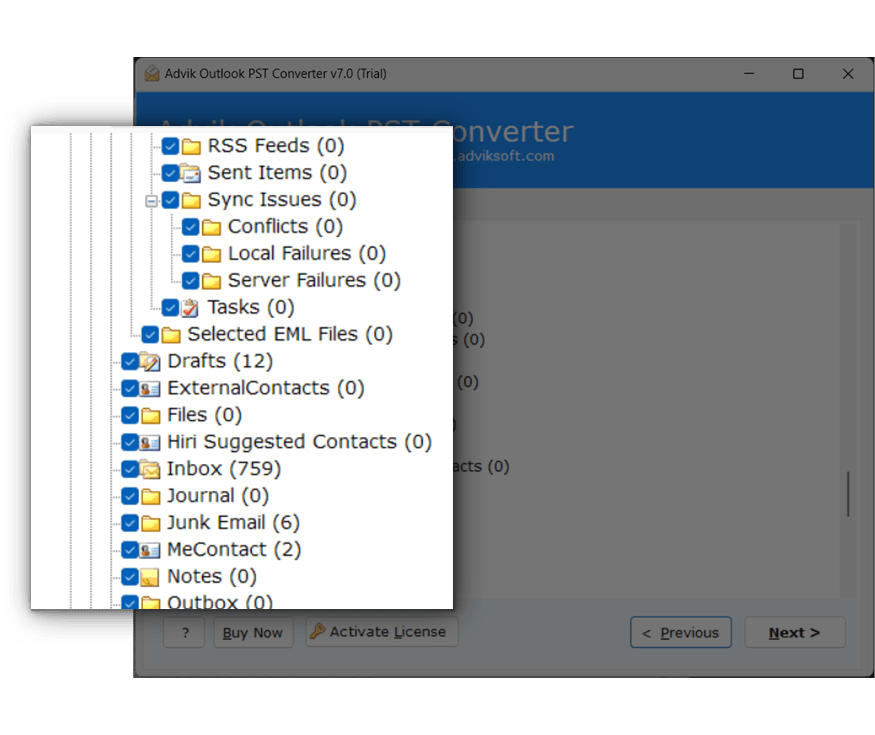
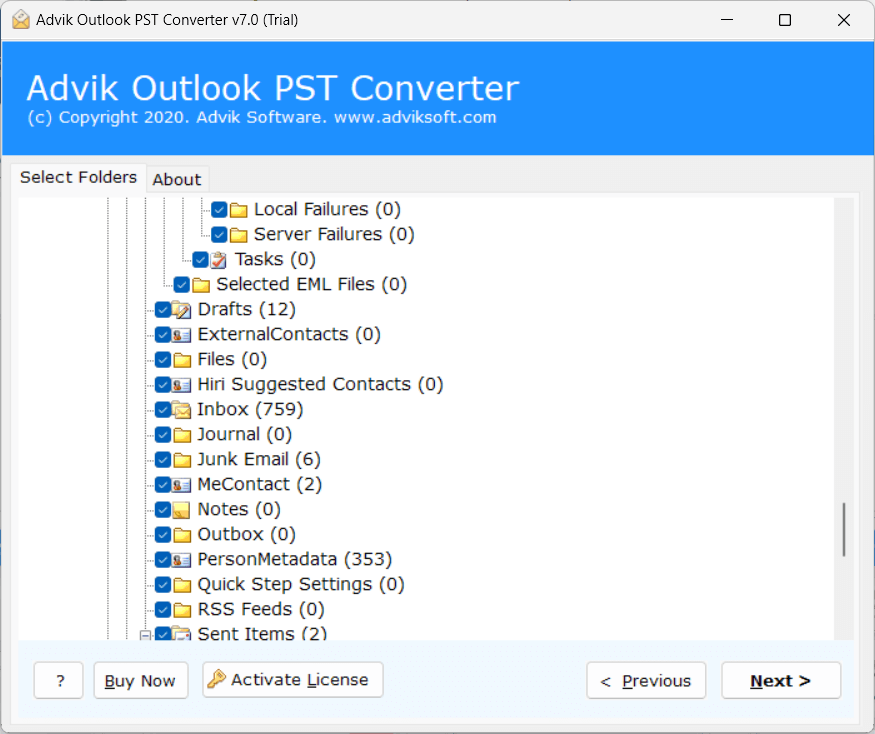
Choose the mailbox folders & subfolders that you want to split. It will help you to process only the required data.
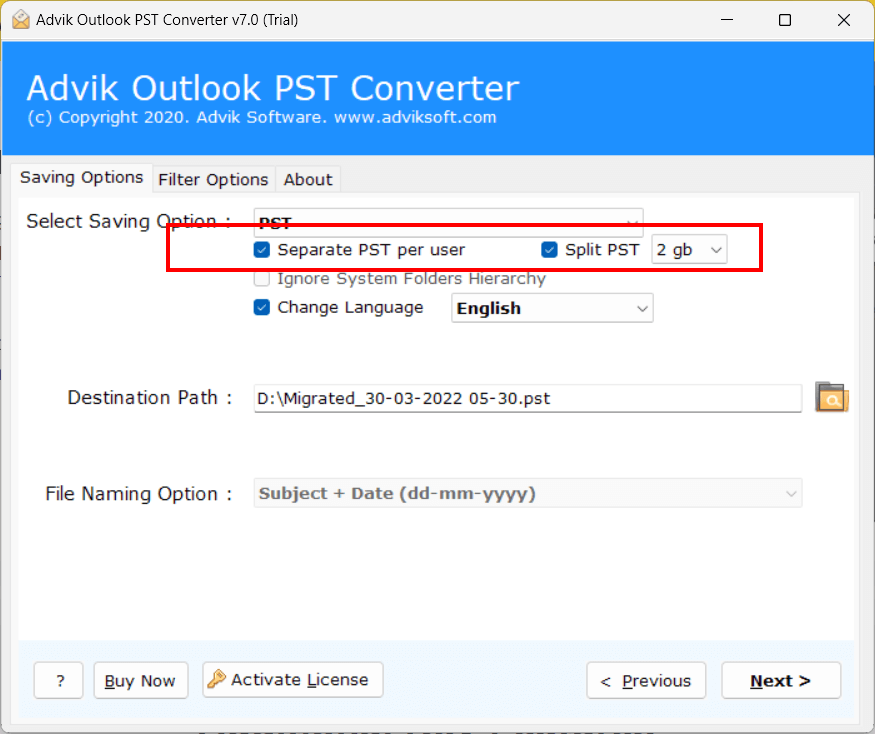
Select PST as the output format from the given list to create separate PST files.
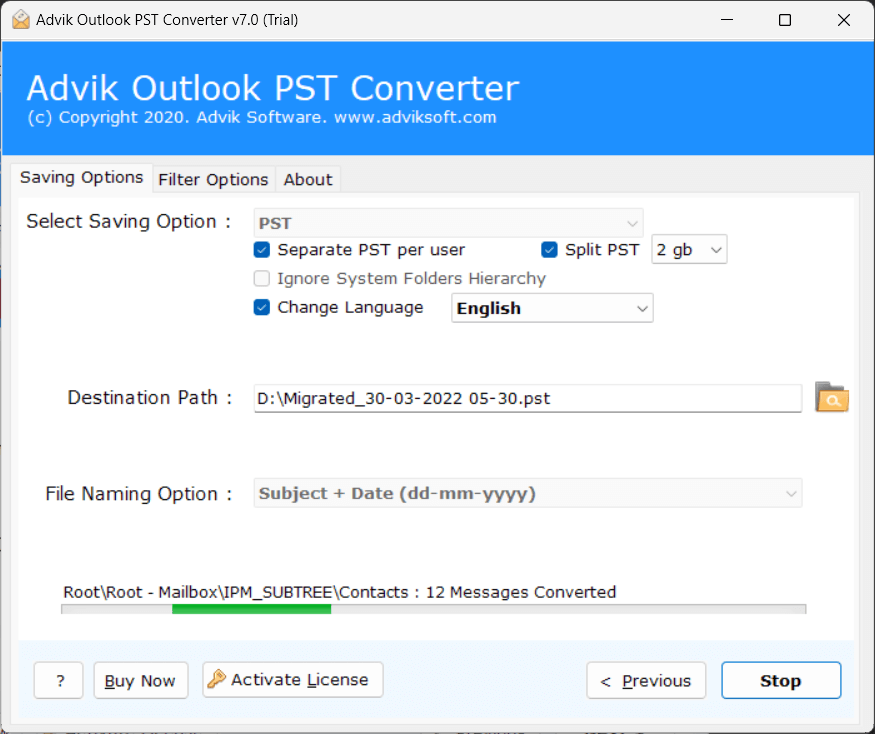
Enable the "Split PST" option to divide large Outlook .pst file.
Set the PST file size to 2GB, 5GB, 10GB, and 20GB according to requirements.
Choose the destination folder where the resultant files will be saved. After that, click on the Convert button to begin the process. The software will automatically create new PST files based on the selected size.
See how businesses and individuals use this tool to solve real Outlook PST management challenges.
One of the most common causes of Outlook performance issues that can cause the application to slow down or become unresponsive is large PST files. Splitting them into smaller .pst files helps a lot to improve outlook performance. If these types of situation, an effective PST Split Tool will help you manage emails in more easy way and keep your Outlook running smoothly by using manageable PST file after splitting.
Large PST file is more prone to corruption. Hence, you can lose your important data. Splitting them into smaller files can reduce the risk of corruption as well. If your Outlook data file is reached to the maximum size, then you can divide it into many small files easily by using a professional tool to save your valuable email data.
For data migration and transfer purpose, smaller PST files are more preferred. It's so because small PST files are easy to move between systems, share with others and upload to backup locations than large files. A PST splitter makes the process easier and helps users to split mailbox data without manual effort.
Advik PST File Splitter Tool has been awarded 100% clean, Ad/Virus/Spyware free software award by SoftwareSuggest to split a large PST file into smaller parts.
SoftwareOne has tested the tool and said it can easily handle large PST files. They liked its simple interface, stable processing, and the benefits it provides to corporate teams that frequently work with Outlook data.
This is great and one of the best software to handle large PST files. The application can split oversized Outlook .pst file for users easily.
Explore the powerful features of the software to split large PST files efficiently
Large PST files are difficult to handle. Splitting PST file helps you to create manageable PST files. The software provides Size variation options for large size Outlook Archives. You can split Outlook PST files in the following sizes:
You can choose any of those according to your requirement. The tool will automatically create multiple PST files according to the selected size. It also helps to reduce the risk of PST corruption that may be caused by large PST files.
Most of the time, a single PST file contains emails of several users, accounts or departments. Having all the data in one file is confusing. The program offers an option to split PST file by separate user. It helps to organize the mailbox data into separate PST files for each user
You don't need to sort emails manually account-wise as it takes long time. So, to save your time and effort this tool is designed in such a way to also split your PST file per use also to maintain better organization of Outlook data.
In some cases, the user does not want to split the entire PST mailbox and only needs data from selected folders like Inbox, Sent Items, Archive, Drafts, etc. from their PST file. This software lets them select a folder before the split process begins. Just check what folders you need and split them.
The feature to choose particular folders to split gives the user full control over what mailbox data needs to include in the process and saves time and efforts to keeps the output in an organized manner.
Split PST File by Year
This option allows users to split large PST files into small files based on year. For example, if users enter years from 2012 to 2016 in the year field, they will get five Outlook files for each year. Each PST file will consist data for one year. It will be helpful to make your data easy, organized and accessible for you as per your convenience.
Supports Both ANSI and Unicode PST Files
PST files are available in different formats for different Outlook versions. It comes in two standard formats: ANSI & Unicode. The tool supports splitting PST file of any type of PST file like old PST file of Outlook 2002 and earlier versions or Unicode PST file, used in the latest Outlook versions. It is compatible with version from Outlook 2000 to Outlook 2024 and Outlook 365.
Preserves Data Integrity
One does not need to worry about the integrity of their PST file data while splitting Outlook data file using this tool. It is a safe, secure solution that loses not a single bit of data in the whole process. Once the process is complete, users will receive their PST data with all attributes and metadata properties intact.
Standalone Functionality
Advik PST Splitter Tool works independently which means that you don’t need to install any other program or application to split your PST files. Also, you don't required Outlook or any other software to perform splitting task. You only need Outlook to view the resultant divided PST files as the tool effectively does all its functions on its own.
PST Split by Advanced Filters
Sometimes you have just a few items in your PST file that you want to separate out into its own PST file. This program can do it easily with filters like To, From, CC, BCC, date ranges etc. Just use ‘advanced email filter’ option, select as per your need and it will split .pst file as per your applied preferences.
Break Password-Protected PST Files
With this solution, you can easily split a password protected PST file too. You don't need to know or enter the password. Just upload the file and the tool will do the rest automatically. This feature is particularly useful if you’re working with old, secure or restricted Outlook data file and you need to break it down into smaller pieces.
Shows Folder List with Item Count
When you add PST file in the software, it will show you all folders (system generated or user generated) with item count in each folder. For example, if there are 2,000 emails in the inbox folder, it will show as Inbox (2,000). This way you’ll know which folders have a lot of data and which folders are important for processing.
Split Corrupted Outlook PST File
In many cases, users need to split orphan Outlook PST files. This solution can cut active and corrupted PST files. It supports conversion of all types of Corrupted, Damaged and Inaccessible PST files. The user has to enable the Recovery Mode option to let the tool to split the file into a healthy file format.
Change Language Option
Advik PST Splitter Tool provides an option to save Outlook PST files data in different language formats while splitting. This is helpful when users want to view their data based on another language setting in MS Outlook. With this feature, users can change the language settings during the PST file creation.
No File Size Restrictions
The best thing about this application is that there are no file size limitations. It is compatible to split large UNICODE PST files without any limitation. The tool enables users to process large size Outlook PST files smoothly without worrying about the performance issues or data loss during the splitting operation.
Choose Destination Path
The software also allows users to save the split PST files in the desired location. It provides the Browse option to choose any drive or folder path including an externally attached drive to save the resulting files after splitting.
Simple and Intuitive Interface
This software is designed with advanced algorithms and a simplified graphical user interface. It is user friendly for technical and non-technical users with no technical training or guidance needed. Its workflow is step-by-step and makes the splitting process fast and easy.
Software Download
Trial Limitations
Advik PST Splitter Trial Version will allow you to preview and process the first 25 items from each folder of PST file.
System Requirements
License Delivery
Product Guides
License & Version
Choose the right plan for your software
| Features |
Free Demo $0
Try before you buy |
Full Version Starts from $39
One-time payment |
|---|---|---|
| Split PST File Data | First 25 Items | Unlimited Items |
| Preview Email Data Before Splitting | ✓ Available | ✓ Available |
| Advanced Email Filters | ✓ Included | ✓ Included |
| Split Corrupt or Inaccessible PST File | ✓ Included | ✓ Included |
| Compatible with All Windows Versions (11 & Below) | ✓ Compatible | ✓ Compatible |
| Technical Support | Basic Support | 24/7 Priority Support |
| Commercial Use License | Personal Use Only | Allowed |
| Free Updates | Not Included | 1 Year Free Updates |
| Free Download | Buy Now |
Note: The PST Splitter free demo version allows you to process 25 items per folder. Upgrade to the full version to unlock unlimited splitting and commercial use rights.
Download the Best PST Split Tool
Break Large Outlook Data File into Smaller Parts
Download in seconds. Split your first PST file in under a minute. Completely free to try.
Trusted by teams at
Follow the steps below to break the Outlook file:
The software will start dividing your .pst file into smaller parts.
MS Outlook usually shows the "Outlook Data File Too Large to Open" error when the PST file exceeds its size limit. By splitting this file into smaller files using the Advik PST Splitter Tool, you can easily solve this issue.
The software will allow you to set the size limit of your PST files, for e.g. 2GB, 5GB, 10GB, 20GB, according to your needs.
Yes, the tool can divide Outlook PST files without size restrictions. We have tested approx. 200 GB size of PST file with this tool to split it and it worked fine.
Yes, turn on the option called Recovery Mode to fix a corruption of PST file as well. After splitting, the software will generate healthy PST files.
The tool is compatible with all versions of MS Outlook including Outlook 2000, 2003, 2007, 2010, 2013, 2016, 2019, 2021 and Microsoft 365. You can use the resultant PST file after splitting it in any Outlook application.
Yes, this software successfully works on all versions of Windows OS, 32-bit and 64-bit. It is compatible with Windows 11, 10, 8.1, 8, 7, Vista, XP, etc.
No. Installing MS Outlook in the system is not mandatory to split PST files using this tool.
The software provides selective email filtering feature that allow you to divide PST files on the basis of date ranges. Just turn on the date range filter and enter your start and end date before you start the split process.
Yes, you can save small PST files directly to an external device by selecting the path of the device before initiating the process. You can use the browse option to select an externally attached drive path to store the resultant files.