Download a Trusted Email Backup Tool to Create a Safe Offline Copy of Your Entire Mailbox.
The inbox is a place where every signed contract, every client conversation, every invoice stores. Here’s what can happen when you depend on the cloud.
Every day, some 3.4 billion phishing emails are sent out globally. A single account compromise means losing your whole inbox forever and email providers are not responsible to restore it.
Around 3.4 B phishing emails are sent dailyEmail providers can raise storage limits, cut free trials or face huge server failures. In December 2020 a major Google services outage temporarily impacted access to Gmail and other Google services. There were no reports of permanent loss of data, though users experienced outages.
60% of businesses lose access to email annuallyGDPR, HIPAA and SOX regulations require businesses to keep email records for 3–7 years. There is no requirement to rely entirely on your cloud providers for email security as it expose you to large fines.
GDPR fines: €20M or 4%Go through each card and find out the real story behind what most people think about cloud email safety and security.
Google can terminate accounts for violations of policies, inactivity, or abuse flags, often without warning. It's written in their Terms of Service. Suspended accounts are completely cut off and stops accessing even old emails for years. In the cloud your data is not yours, it’s theirs. So, backup is important.
Gmail Trash is emptied after 30 days. Yahoo deletes after 7 days. Retention in Microsoft 365 depends on policies set by your organization and mailbox settings.. And when that window closes, no provider side recovery is possible, even with paid support.
Cloud storage is about accessibility not for disaster recovery. You don’t control it so you can’t guarantee its uptime and have no legal ownership of data stored there. A real backup is a copy you have on your device on your terms.
From personal Gmail to enterprise Microsoft 365 — one tool handles them all.
No configuration required. This tool guides you through sign-in and finishes the backup in less than 10 minutes.
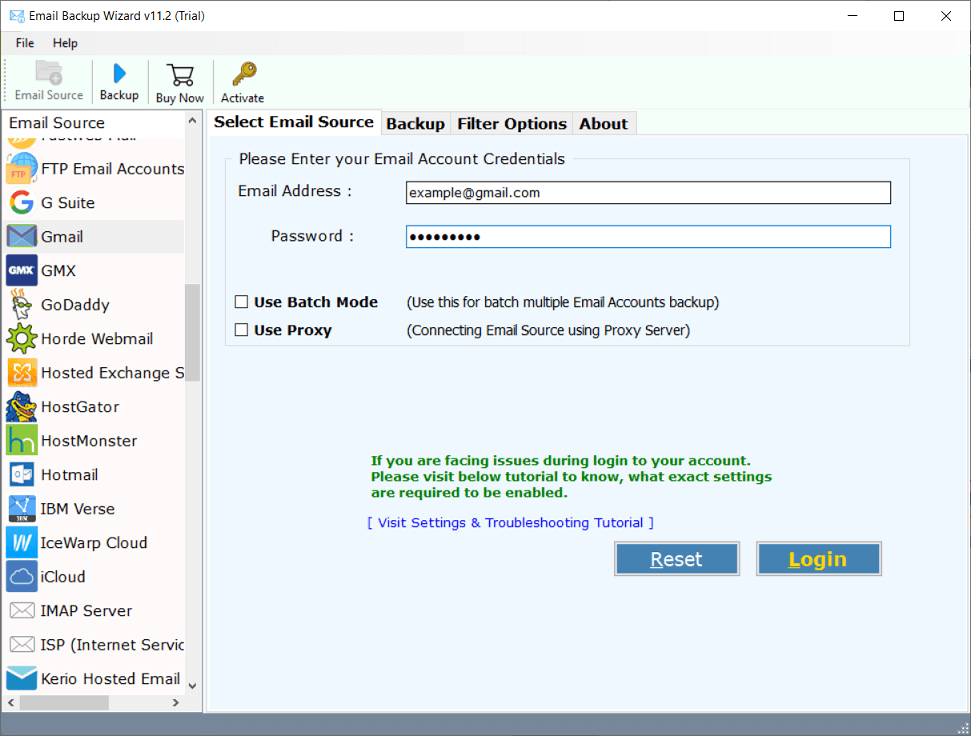
Launch the software and select your email provider from the list – Gmail, Yahoo, Microsoft 365 or provide IMAP settings manually.
Login using OAuth 2.0 (for Gmail/M365) or IMAP credentials. The tool never stores your password.
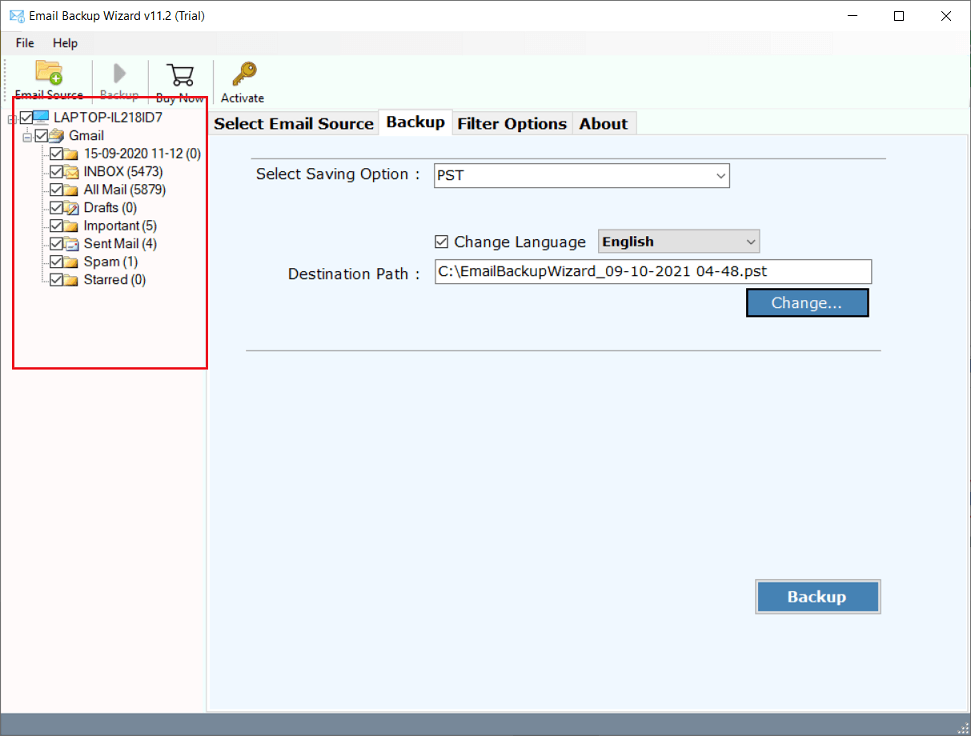
Select specific mailbox folders - Inbox, Sent, Drafts or any custom folder. Select everything or just what only you want.
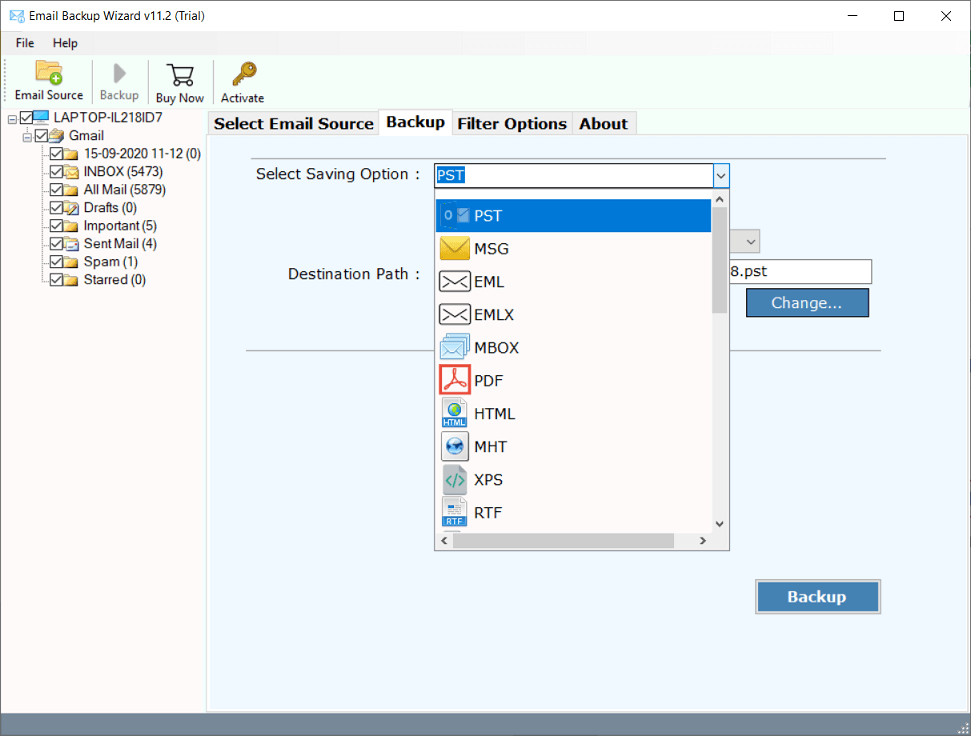
Choose from 25+ saving options. Filter by date range, subject, sender or recipient and backup only required emails.
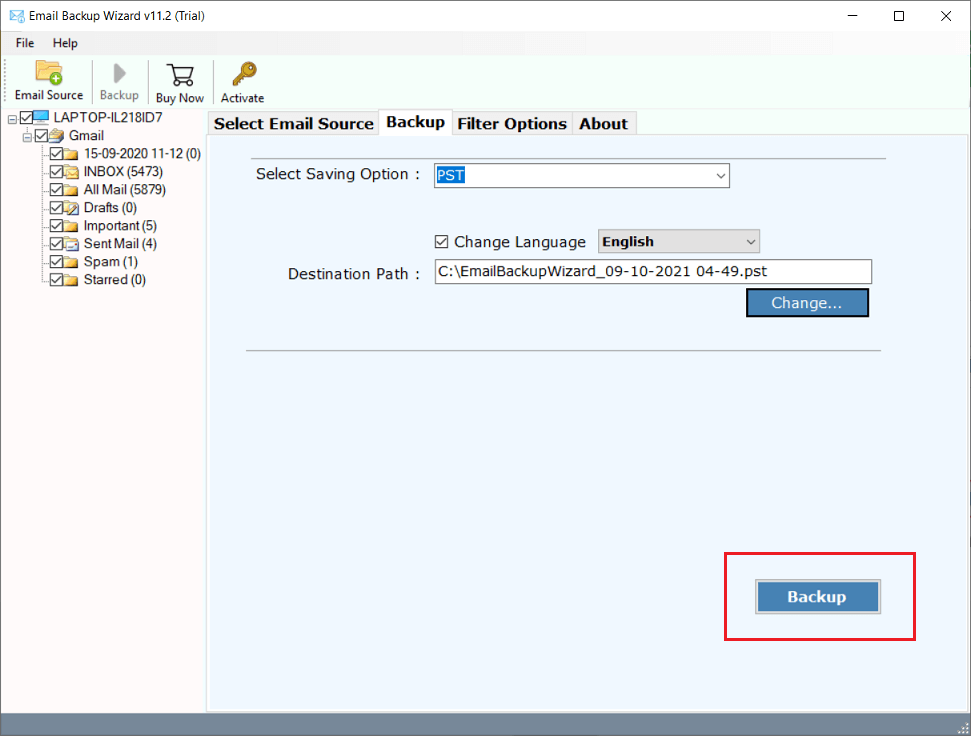
Tap on the Backup button and see how it works. After completion, a full log report will be generated. Now, your emails are stored safely on your device.
Export emails in PST, Gmail and in any other as per your requirement for backup, sharing or compliance needs.
Designed for people who need reliable email backup without a manual, a consultant or an IT degree.
Advik Email Backup Wizard works with more than 200 email services, including Gmail, Yahoo Mail, Microsoft 365, Zoho Mail, GoDaddy, cPanel, AOL, Exchange Server and any IMAP enabled accounts. This single software allows users to backup emails from multiple accounts without using any specific method. It makes the backup process convenient for personal and business users.
It offers users to backup emails in 25+ file formats like Gmail to PST, PDF, MBOX, EML, MSG, HTML, etc. It depends on the user’s specific needs as what format they want to select. For example, PST files supports Outlook, PDF files are useful for legal records and MBOX files are compatible with Thunderbird etc.
It also provides an advanced filter options that lets you to backup only the selected emails and not the whole mailbox. Users can filter the email by date range, sender address, recipient address etc. With this feature you can save storage space, reduce backup time and backup email selectively for personal, legal or business reasons.
The software includes a Batch Mode feature in the Pro and Migration editions that allows users to backup multiple email accounts in a single time using a CSV file. This helps businesses, IT administrators and migration professionals manage and backup large numbers of email accounts without using them one by one.
It’s needed to maintain the original folder hierarchy and it’s possible with this tool. It preserves complete mailbox with all folders, sub-folders and labels during the backup process and delivers exactly as they are shown in the email account. This helps users to easily find and manage emails after backup without confusion.
Sometimes, users need to save email backup to their desire location to remember it. With this tool, users can save backup files to their selective location such as computer’s hard drive, USB flash drive, external hard disc etc. This allows the users to keep the backup copies in safe and convenient locations as per their needs.
It provides live backup process with real time status & other updates during the process. Users can easily see what emails are being downloaded and the other progress details. When the process is complete, it automatically generates a detailed log report with backup information and status.
By using this software, you can also perform cloud to cloud email migration from one email platform to another like Gmail to Outlook, Yahoo to Zoho, Thunderbird to Exchange and so on. Users can directly move emails from one account to another without any other steps.
From solo freelancers to enterprise IT teams — here's what they say.
I tried everything possible to backup my emails before switching from Yahoo to Gmail. Their native export was not working and all other tools failed or were costly. Advik imported 6 years of Yahoo Mail in under 2 hours, kept all my folders and attachments and exported it as MBOX so I could import it directly into Gmail. Absolutely workable. It was worth it.
Start free, no credit card required. Upgrade when you need unlimited backup.
| Feature | Free Trial |
Lite License Starts from $99 |
|---|---|---|
| Email Backup | ||
| Backup limit per folder | 25 emails | Unlimited |
| Email providers supported | 200+ | 200+ |
| Output formats | 25+ | 25+ |
| Preserves folder structure | ✓ | ✓ |
| Saves attachments | ✓ | ✓ |
| Filters & Options | ||
| Date range filter | ✓ | ✓ |
| Subject / sender / recipient filter | ✓ | ✓ |
| Folder selection | ✓ | ✓ |
| Save to custom location | ✓ | ✓ |
| Advanced Features | ||
| Unlimited backup (no 25 limit) | — | ✓ |
| Batch / multiple accounts | — | — |
| Cloud-to-cloud migration | — | — |
| Priority support | — | ✓ |
| Free lifetime updates | — | ✓ |
| 30-day money back guarantee | — | ✓ |
| No credit card required for free trial | Download | Buy Lite |
Need batch backup or cloud migration? View our Pricing
Advik Email Backup Wizard is lightweight and installs in under a minute.
| Operating System | Windows 11, 10, 8.1, 8, 7 — 32-bit & 64-bit |
| Processor | Pentium class or higher · Multi-core recommended |
| RAM | 1 GB minimum · 2 GB recommended for large mailboxes |
| Disk Space | 500 MB for installation · Additional space for backup output |
| Internet | Active connection required (IMAP / POP3 / OAuth) |
| Email Protocols | IMAP, POP3, OAuth 2.0 (Gmail, Microsoft 365), HTTPS |
| Output Formats | PST, MBOX, EML, MSG, PDF, HTML, DOC, RTF, CSV, ICS, vCard & 14 more |
| Supported Providers | Gmail, Yahoo, Microsoft 365, Zoho, Exchange, cPanel & 200+ more |
| Version | 13.4 · Last updated May 2026 |
| License | Free · Lite · Pro · Migration |
Contracts, contacts, client history, receipts — your inbox is your business record. Download Advik Email Backup Wizard and put a copy of it somewhere you control, today.
Free trial · 25 emails per folder · No credit card · Windows & Mac · 30-day money back on purchase
Everything you need to know about Advik Email Backup Wizard.