Advik PST Repair Tool

Simple & Straight-forward Solution to repair Outlook PST file

stars

( 4.9 Rating  Based on 3325 Verified Customer Reviews )

  • Batch repair multiple PST files at once.
  • Repair bad sectors from Outlook Data File & create healthy PST file.
  • Offers Two options to load PST files into the software panel.
  • Support for ANSI and UNICODE PST Files.
  • Repair PST file When Outlook Not Showing All Emails
  • Preserve metadata like To, From, Subject, date and attachments.
  • Recover Old, corrupted, orphaned or damaged PST file.
  • No file size limitation for PST repair and recovery.
Advik PST File Repair
How to Use

Repair PST File in 3 Simple Steps

Follow the below instructions to recover data from inaccessible Outlook .pst file

01
Step 1

Install Outlook PST Repair Software

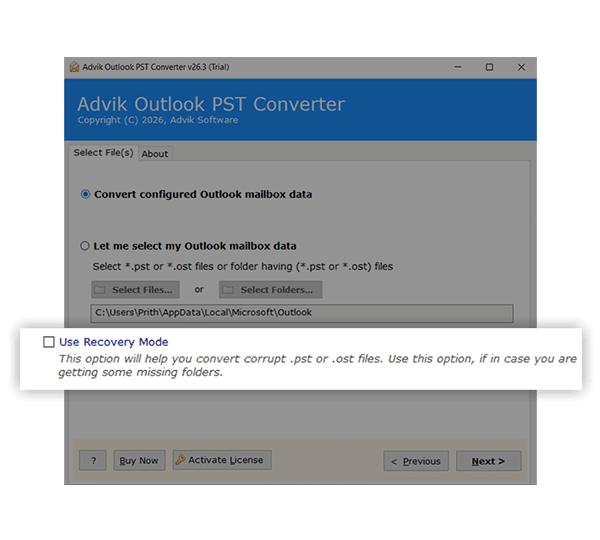
Initially, download and install the tool on your Windows system. Launch the application and click the Add Files or Add Folder button to load single or multiple PST file then select Recovery Mode.

  • Compatible with Windows 11, 10, 8.1, 8, and 7 (32 & 64-bit)
  • Use Add Files for single PST or Add Folder for batch repair
  • Supports ANSI and UNICODE PST files from all Outlook versions
02
Step 2

Choose the Desired Files/Folders

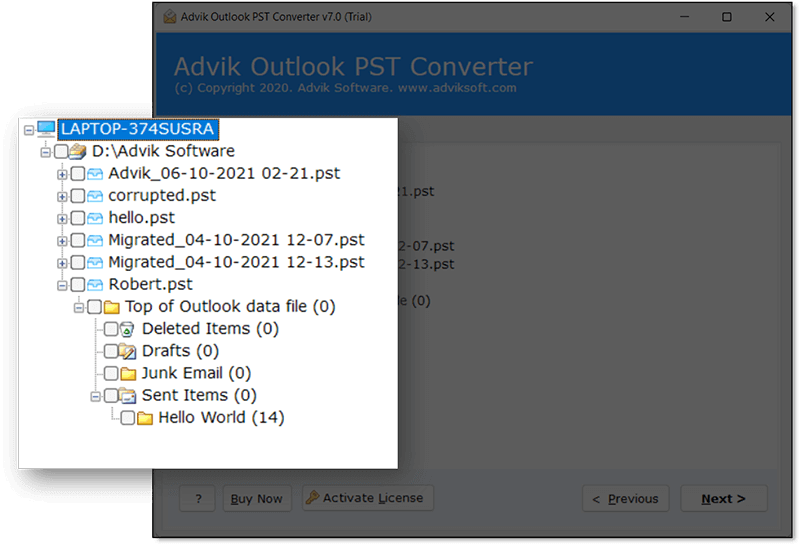
After the PST files are loaded, the tool scans and displays a live preview of all recoverable data. Browse the folder tree and select the specific files, folders, or individual emails you want to repair and restore.

  • Preview emails, contacts, calendars & attachments before saving
  • Selectively choose specific folders or individual mailbox items
  • Apply date-range filters to narrow down your recovery scope
03
Step 3

Select Options and Repair PST Files

Finally, choose your preferred saving option and set the destination path. Click the Next button to start the repair process. The tool will recover and restore all your data while preserving the original folder structure.

  • Save repaired data as PST, EML, MSG, MBOX, PDF, and more
  • Export directly to Outlook or define a custom destination path
  • All metadata, attachments & folder hierarchy preserved intact
How It Works

Watch Tutorial to know How to Repair Outlook PST File

This video shows how Advik Software safely recover complete data from corrupted, damaged or inaccessible PST file. It supports all types of PST files exported from Outlook 2007, 2009, 2011, 2013, 2016, 2019, 2021, and many more.

It efficiently recover emails form inaccessible PST files. It supports severely damaged, encrypted, or oversized PST files while maintaining the original folder hierarchy.

The software performs a deep scan of the PST file to recover all mailbox items, including emails, contacts, calendars, and attachments, while preserving data integrity, formatting, and metadata throughout the process.

convert pst file
Watch Video

Watch Tutorial

Recognition

Trusted by IT Professionals & Enterprises Worldwide

software suggest logo

Cnet

CNET recognized this tool as a 100% clean, secure, and reliable utility, free from any kind of adware, malware, or spyware. It ensures a safe environment for users to repair and recover their data without any risk to system security.

software one logo

SoftwareOne

Advik PST Repair Tool is considered one of the most reliable solutions among various tools available for repairing corrupted PST files across all major Outlook versions. It is appreciated for delivering consistent performance and helping users restore their Outlook data smoothly without complications.

software suggest logo

Software Suggest

Software Suggest has rated this tool highly recommendable for handling large damaged PST files effectively.

Features

Key Features of Outlook PST Repair Software

See how the Software is advantageous for better data recovery

Repair PST Files in Bulk

It allows users to recover multiple Outlook data files efficiently without repeating the same process again and again. Instead of repairing each file manually, this feature allows you to upload and process multiple PST files in a single operation. It will be beneficial for IT administrators, MSPs, and organizations managing large volumes of email data. The tool uses an advanced scanning engine to detect and fix various types of corruption, such as header damage, internal structure issues, and indexing errors, in each file independently, so that there will be no overlap or data mix-up.

It significantly reduces time, effort, and the risk of human error while delivering consistent and reliable recovery results. This feature is especially important in enterprise environments where data availability and continuity are critical.

repair pst file screenshot
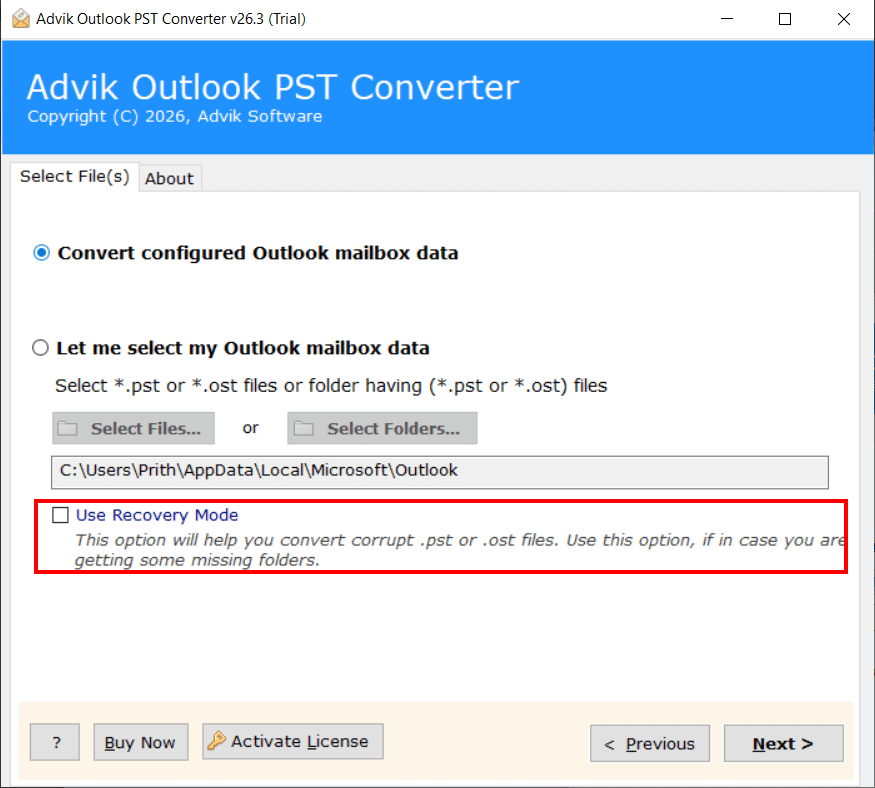
Ui of advik software showing recovery mode feature

Special Recovery Mode Feature

The software has a special recovery mode feature that provides advanced options to recover PST files immediately. PST Recovery Tool will help you to get maximum data retrieval even in severe cases. It typically includes special types of scanning algorithms for a deep scan of heavily damaged or inaccessible PST files.

The deep scan works using low-level algorithms that analyze raw data blocks and reconstruct the entire file structure, allowing recovery of emails, attachments, and other mailbox items even when the file is severely corrupted or fails to open in Outlook. This feature is particularly useful in scenarios involving system crashes, malware attacks, or unexpected shutdowns that lead to serious data damage. By offering flexible recovery options and higher success rates, it reflects expert-level data recovery practices and ensures users can trust the tool in critical situations.

Preserve Data While Converting

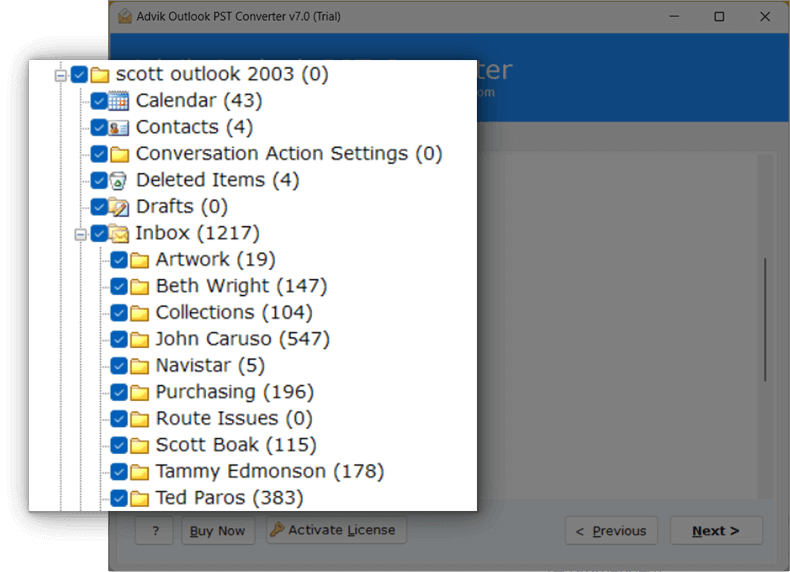
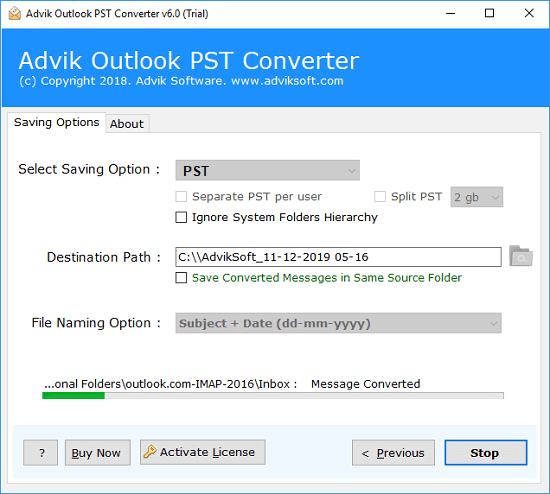
When you are dealing with corrupted or damaged files, data preservation becomes an important factor. To ensure 100% data safety and security, the tool works efficiently and effectively to keep all original information intact during the repair and conversion process, which is essential for maintaining data accuracy and reliability. It carefully retains email formatting, metadata such as sender, receiver, subject, and timestamps, as well as attachments, inline images, and folder hierarchy.

The tool operates in a read-only mode, meaning it does not alter the original PST file, and uses advanced data mapping techniques to ensure that the converted output matches the original structure precisely. This is especially important for business, legal, and compliance-related use cases where even minor data changes can create issues.

Screnshot of pst repair tool showing repair while preserving data
Key Features

Additional Key Features of PST Recovery Tool

Support for Large PST Files

The tool can easily repair and handle large PST files without slowing down or crashing. Many users face Outlook performance issue with large PST file, which often leads to corruption. It helps users to process heavy files so that it will be suitable for both personal and business users. The main benefit is that users don’t need to split files or worry about size limitations.

Multiple Saving Options

After repairing the PST file, the tool provides multiple saving formats, so, you can also try to convert PST to MBOX, EML, MSG, MBOX, and many more file formats other than PST. This helps users choose the format they need based on their requirements. For example, users can migrate emails to different email clients or create backups in different formats. The benefit is that users get complete control over their data and can use it across different platforms without any compatibility issues.

Advanced Search and Filter Option

You will also get smart filters to find specific emails based on date, subject, sender, or folder. It will help you to recover only the required data instead of the entire mailbox. It is especially useful when users are looking for specific emails or want to reduce data size. The benefit is faster recovery, better control, and saving storage space.

User-Friendly Interface

PST Repair Software comes with a simple and easy-to-use interface that does not require technical knowledge. Even beginners can repair PST files by following a few simple steps. This makes the tool accessible for all types of users, including non-technical individuals. The benefit is that users can perform complex recovery tasks without needing expert help.

Safe and Secure Processing

To ensure complete data safety during the repair process, it works offline and does not upload data to any server, keeping your information private and secure. This is important for users dealing with sensitive or confidential emails. The benefit is peace of mind, knowing that your data is fully protected.

Option to Change Language

This feature allows users to switch the software interface to different languages based on their preference. It will make it easier to understand and use the tool comfortably. It is especially helpful for users who are not familiar with English, as they can work in their native language without confusion. You can change your language to Dutch, French, German, Spanish, Polish, Finnish, etc.

Create Separate PST Per User

This feature enables users to split and save recovered data into separate PST files for each user or mailbox. It is very useful in organizations where multiple user accounts are involved, and data needs to be managed individually. Instead of storing everything in one large file, the tool automatically creates different PST files. Just click on the "separate PST per user" option in the last step.

Facility to Choose Destination Path

With this feature, users can select the location where they want to save the repaired or converted PST file. This gives full control over file storage & allows users to save data on a preferred drive, external storage, or network location. It is especially useful to organize files or save them directly to backup locations. The benefit is convenience and flexibility, as users can easily manage and locate their recovered data without having to search for it later.

Supports ANSI and Unicode PST Formats

The tool supports both ANSI and Unicode PST file formats, which means it can repair and process PST files created in older as well as newer versions of Outlook. ANSI format is used in older Outlook versions (like Outlook 2002 and earlier), while Unicode is used in modern versions. This compatibility ensures that users can repair PST file regardless of its version or size limitations. The benefit is wider usability, as users do not have to worry about compatibility issues when dealing with different Outlook versions.

Specifications

PST Repair Tool - Specification

Software Download

Trial Limitations

Outlook PST File Repair tool Trial Version will allows you to repair first 25 items from each folder of PST file.

System Requirements

Processor Pentium Class or higher
Operating System Windows 11, 10, 8.1, 8, 7
Memory 4 GB recommended
Hard Disk 500 MB of free space

License Delivery

Electronic via Email

Product Guides

License & Version

Personal License Activation up to 2 Machines
Business License Activation up to 5 Machines
Migration License Activation up to 10 Machines
.
Pricing

PST File Repair Tool - Free vs Paid Version Comparison

Choose the right plan for your software

Features

Free Demo

$0

Try before you buy

Convert PST File Data First 25 Items
Preview Email Data Before Conversion ✓ Available
Email Filters ✓ Included
Convert Corrupt or Inaccessible PST File ✓ Included
Compatible with All Windows Versions (11 & Below) ✓ Compatible
Technical Support Basic Support
Commercial Use License Personal Use Only
Free Updates Not Included
Free Download

Note: The PST Repair Tool free demo version allows you to convert 25 items per folder. Upgrade to the full version to unlock unlimited conversion and commercial use rights.

Reviews

Who Loves Advik PST Repair Software?

4.9 ★★★★★ out of 5  ·  Based on 1,817 verified reviews
148,000+ Downloads & Counting

Download and Try
#1 Best PST Repair Tool

Download in seconds. Convert your first file in under a minute. Completely free to try.

No Credit Card No Signup Required No Time Limit Virus-Free & Safe Works on Windows 11/10/8/7
Advik PST Repair Tool
Size • 47.2 MB • Windows
Download Free Now
Convert 25 Items Free Per folder, all formats available
30+ Output Formats PDF, MSG, EML, MBOX, HTML & more
Ready in 60 Seconds Install, load PST, convert — done
Safe & Secure No data leaves your PC
4.9/5 from 3325 verified users

Trusted by teams at

Microsoft
Google
IBM
DELL Dell
HP HP
ORACLE Oracle
AWS Amazon
PayPal PayPal
Spotify
LinkedIn
Slack
CISCO Cisco
Microsoft
Google
IBM
DELL Dell
HP HP
ORACLE Oracle
AWS Amazon
PayPal PayPal
Spotify
LinkedIn
Slack
CISCO Cisco
FAQ

Common Questions With Answers

Follow the steps below to recover data from PST file;

  • Step 1. Download and install the Advik PST Repair Tool on your Windows computer.
  • Step 2. Launch the tool and add your corrupted or damaged PST file.
  • Step 3. Select the mailbox folders you wish to recover.
  • Step 4. Choose "PST" as the saving format from the list of options.
  • Step 5. Browse the destination path and click the convert button.

This is how you can repair PST file without Scanpst.

PST repair tool screenshot

Scanpst.exe is buil in Microsoft Inbox Repair tool that diagnoses and repair corruption errors in Outlook data files. It is a free utility that installs with MS Office to resolve bugs and errors..

  • Locate ScanPST.exe on your system
  • Double click on it and run the tool
  • Browse and select the corrupted PST file.
  • Click on Start to begin scanning.
  • After scanning, click Repair.

You may notice signs like:

  • Outlook crashes or freezes
  • Errors while opening PST file
  • Missing mailbox data
  • Slow performance

These are strong indicators that your PST file might be corrupted.

Yes, large PST file crashes Outlook while opening. They are more likely to get corrupted, especially when they exceed the size limit (20GB or 50GB depending on Outlook version). You can prevent this situation by regular archiving it.

No, you can repair PST file using ScanPST but it only fixes minor corruption. It may not recover all emails, attachments, or severely damaged data.

Repeated corruption can happen due to large file size, Outlook PST was not cleanly closed by the last program, virus attacks, Outlook data file is too large to open or improper Outlook closing. Regular maintenance and backups can help avoid this.

It depends on the file size and level of corruption. Small files may take a few minutes, while large or damaged files can take longer.

You can reduce the risk by;

  • Keeping PST file size within limits
  • Regularly backing up Outlook data
  • Avoiding abrupt system shutdowns
  • Using antivirus protection
  • Archiving old emails.
AE
Written & Maintained by Alora Eve — email migration specialists with 8+ years of hands-on experience building Windows-based conversion tools. Every feature is tested in-house before release.
Linkedin Profile