Simple & Straight-forward Solution to repair Outlook PST file

Follow the below instructions to recover data from inaccessible Outlook .pst file
Install Outlook PST Repair Software
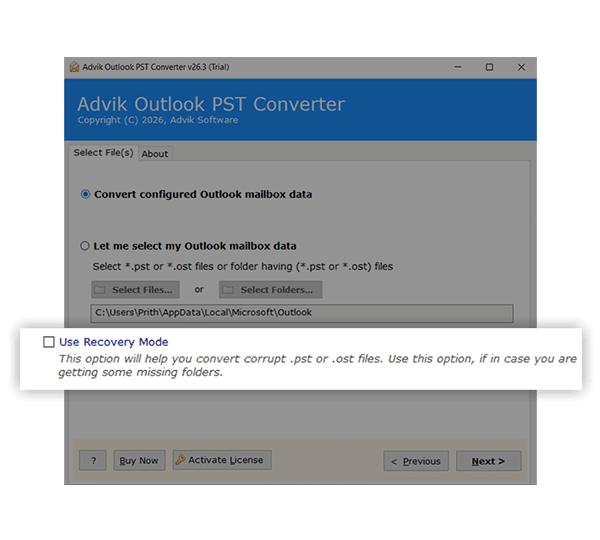
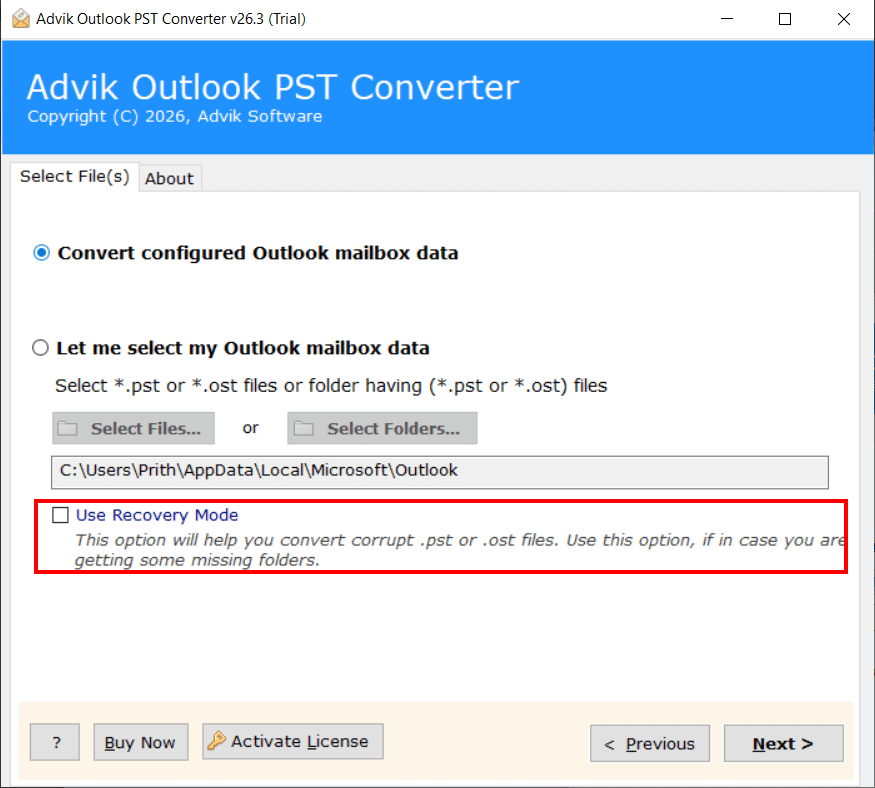
Initially, download and install the tool on your Windows system. Launch the application and click the Add Files or Add Folder button to load single or multiple PST file then select Recovery Mode.
Choose the Desired Files/Folders
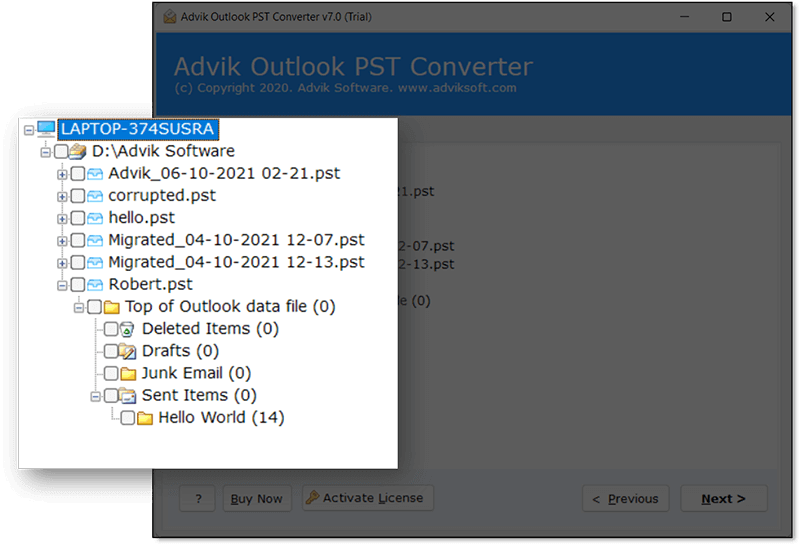
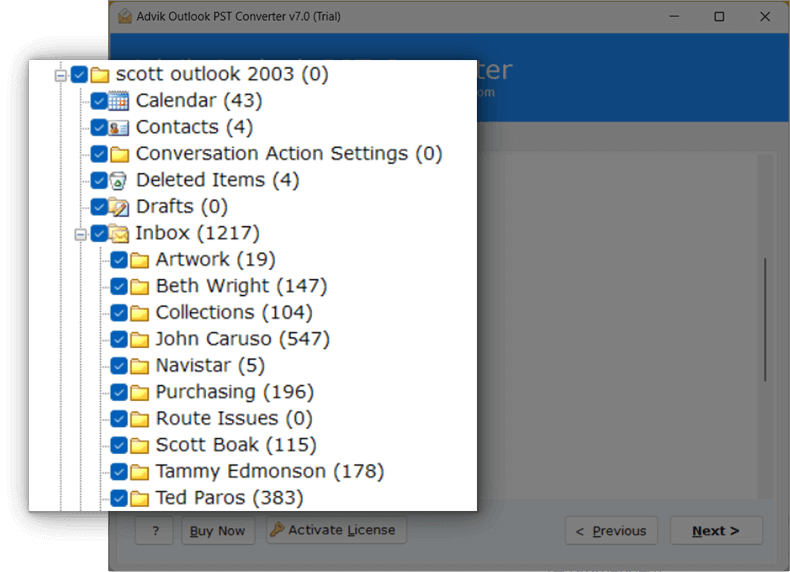
After the PST files are loaded, the tool scans and displays a live preview of all recoverable data. Browse the folder tree and select the specific files, folders, or individual emails you want to repair and restore.
Select Options and Repair PST Files
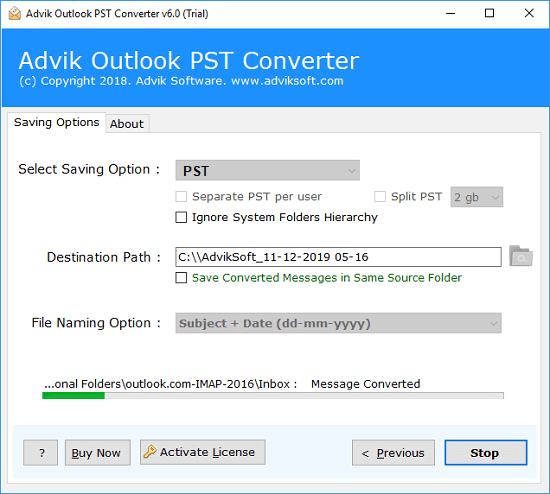
Finally, choose your preferred saving option and set the destination path. Click the Next button to start the repair process. The tool will recover and restore all your data while preserving the original folder structure.
This video explains how Advik Software safely restore complete data from corrupted, damaged or inaccessible PST file. It supports all types of PST files exported from Outlook 2010, 2016, 2019, 2021, 2024, 2026 and many more.
It helps to recover emails from inaccessible PST files in a fast way. It handles badly corrupted, encrypted or oversized PST files and preserves the original folder hierarchy.
The tool scans the PST file deeply to recover all mailbox items such as emails, contacts, calendars, attachments, etc., while maintaining data integrity, formatting, and metadata.
CNET has recognized this tool as a secure and reliable utility with no adware, malware or spyware of any kind. It provides a safe environment for the users to fix and recover their data without any risk to system security.
Advik PST Repair Tool is one of the best trusted solutions among other tools available to repair corrupted PST files for all major Outlook versions. It is known to provide stable performance and assist users to restore their Outlook data smoothly without any difficulty.
Software Suggest marks this tool as a highly recommendable to resolve large damaged PST files efficiently.
See how the Software is advantageous for better data recovery
The bulk recovery mode feature helps users to repair multiple Outlook data files in minimum time without repeating the same steps again and again. You can upload and process multiple PST files at a time with the help of this feature which is also beneficial to save your time from the hassle of repairing each file manually. This will be handy for IT Admins, Organisations & MSPs working with large amounts of email data. It has also a very advanced scanning engine which itself detects and fixes all types of corruption such as header damage, internal structure issues and indexing errors in every file. No overlapping or mixing up of data.
It significantly reduces time, effort and risk of human error and gives consistent and reliable recovery results. This is all the more important in enterprise environments where data availability and continuity are critical.
The software provides an advanced recovery mode with advanced features for instant recovery of PST files. In extreme cases, PST Recovery Tool helps to recover maximum data. It typically includes special types of scanning capabilities to deep scan the severely corrupted or inaccessible PST files.
The deep scan uses a specialized algorithms to scan the raw data blocks and rebuild the entire file structure without affecting the actual content of your PST file data. This allows to recover emails, attachments and other mailbox items even if the file is severely corrupted or does not open in Outlook. This is especially useful in cases such as system crashes, malware attacks or unexpected shutdowns which can lead to serious data corruption. It provides best practices of data recovery professionals and builds user confidence in the tool at critical moments by offering a variety of flexible recovery options and improved success rates.
When you have corrupted or damaged files, keeping data intact is an even bigger factor. During the repairing and conversion process, the tool aims to retain all original information to ensure 100% data safety and security which is important to maintain the data accuracy and reliability. It carefully preserves email formatting, metadata such as sender, receiver, subject and timestamps, attachments, inline images and folder hierarchy.
The software works in read-only mode so that it does not changes the original PST file and it also uses data mapping techniques so that the resultant output is same as that of original one. This is especially useful for business, legal and compliance use cases where small data changes can cause issues.
Support for Large PST Files
The tool can easily repair and manage large size PST files without causing any issues such as slow down or crash. Many users face Outlook performance issues with large PST file which leads to corruption. This solution is helpful for users to process heavy files so it will be suitable for both personal users and business users. The biggest benefits is that users don't have to split their files or worry about size limits.
Multiple Saving Options
By using this the tool, you can also convert the repaired PST file in multiple saving formats such as that you can convert PST to MBOX, EML, MSG, PDF, and many other file formats other than PST. This allows users to select the format they require as per their needs. For example, users can export their email to other email clients or save their backup data in a variety of formats. This will help you to maintain full control over your data and can use it on different platforms other than PST without facing incompatibility issues.
Advanced Search and Filter Option
This software also comes with a smart filters to find specific emails by date, subject, sender or folder. It will help you to recover necessary data instead of whole mailbox. It is especially handy when users are looking for particular emails or want to cut down the data size. The will assist you to repair PST file with fast recovery, better control features.
User-Friendly Interface
This PST Repair Software has a simple and user-friendly interface and doesn’t require any technical know-how. Even a beginner can easily repair PST files by following few simple steps. This makes the tool easy to use for all kinds of users even non-tech savvy users. The advantage of this is that users can run complex recovery task without requiring specialist assistance.
Safe and Secure Processing
It works offline and does not upload data to any server so rest assured about data safety and security as the information remains private and secure during the repair process. This is important for users who handle sensitive or confidential emails. It provides a peace of mind in knowing that your data is fully protected.
Option to Change Language
This feature allows users to change the resultant PST file (healthy format) into different languages according to their preference. This will make the tool more comfortable to use and easier to understand. This is particularly useful for users who need to repair their resultant data in languages other than English then which is possible with this tool as well. You may change your language to Dutch, French, German, Spanish, Polish, Finnish etc.
Create Separate PST Per User
By using this feature, you can divide and save recovered data into separate PST files in each mailbox or user. This is very helpful for organizations that have multiple user accounts and need to manage data on an individual basis. This solution produces multiple PST files instead of having all data in one large file. Simply select the “separate PST per user” option in the final step to make this happen.
Facility to Choose Destination Path
With this software, users can choose the location where they want to save the repaired PST file. This means users have full control over file saving location and can choose to save data to a preferred drive, external storage or any location. It will be helpful to organize files or save them direct to backup locations. The advantage is that it’s easy and flexible, so users can easily manage and find their restored data without having to go looking for it later.
Supports ANSI and Unicode PST Formats
The tool can repair and process PST files created in older as well as newer versions of Outlook as it supports both ANSI and Unicode PST file formats. Older versions of Outlook (eg Outlook 2002 and earlier) use ANSI format, whereas modern versions use Unicode. This compatibility helps users to fix PST file despite of its version or size limitations. The advantage is better usability, as users do not have to worry about compatibility problems when using different versions of Outlook.
Software Download
Trial Limitations
Outlook PST File Repair tool Trial Version will allows you to repair first 25 items from each folder of PST file.
System Requirements
License Delivery
Product Guides
License & Version
PST File Repair Tool - Free vs Paid Version Comparison
| Features |
Free Demo $0
Try before you buy |
Full Version Starts from $39
One-time payment |
|---|---|---|
| Repair PST File Data | First 25 Items | Unlimited Items |
| Preview Recoverable Data | ✓ Available | ✓ Available |
| Email Filters | ✓ Included | ✓ Included |
| Recover Corrupt or Inaccessible PST File | ✓ Included | ✓ Included |
| Compatible with All Windows Versions (11 & Below) | ✓ Compatible | ✓ Compatible |
| Technical Support | Basic Support | 24/7 Priority Support |
| Commercial Use License | Personal Use Only | Allowed |
| Free Updates | Not Included | 1 Year Free Updates |
| Free Download | Buy Now |
Note: The PST Repair Tool free demo version allows you to restore 25 items per folder. Upgrade to the full version to unlock unlimited conversion and commercial use rights.
Download and Try
#1 Best PST Repair Tool
Download in seconds. Repair your first file in under a minute. Completely free to try.
Trusted by teams at
Following are the steps to recover data from PST file;
This is how you can repair PST file without Scanpst.
Scanpst.exe is an in-built Microsoft Inbox Repair tool that identify and fixes corruption errors in Outlook data files. It is a free method that comes with MS Office to correct bugs and errors.
If you are seeing the following signs, then there are chances that your PST file is corrupted.
These are the strong factors that your PST file might have been corrupted.
Yes, large PST file crashes Outlook while opening. They are more prone to corruption , especially when they go beyond the size limit ( 20GB or 50GB depending on Outlook version ). You can prevent this by archiving it regularly.
Repeated corruption may be due to large file size, Outlook PST was not cleanly closed by the last program, virus attacks, Outlook data file is too large to open or improper closing of Outlook. Regular maintenance and backups can help prevent this.
It depends on the size of the file and the level of corruption. Small files can take a few minutes; larger or corrupted files can take longer.
No, you can repair PST file with the help of ScanPST but it only repairs minor corruption. It may not recover all emails, attachments or severely damaged data.
You can lower the risk by;