Amazon WorkMail End of Support: How to Export and Migrate Emails
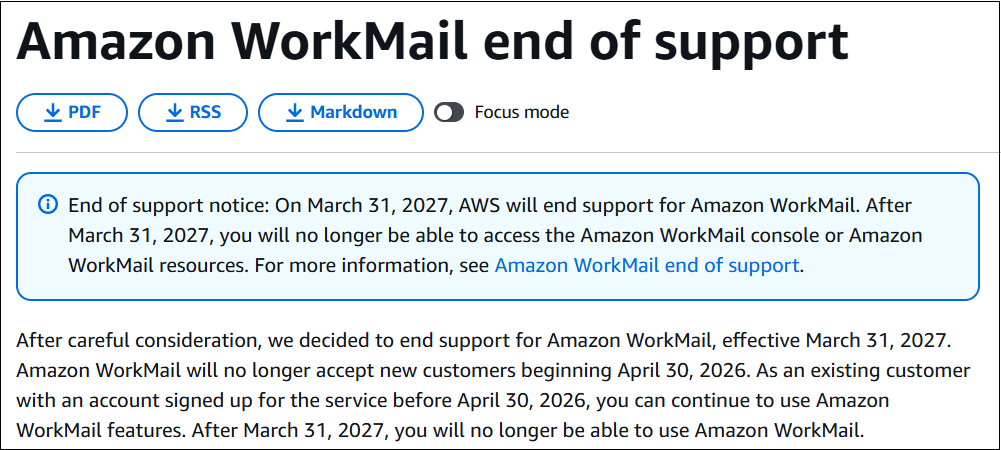
As you know that, Amazon WorkMail is reaching to it’s end of support which means you won’t get any support assistance related to your AWS WorkMail and you need to start planning on what will happen to your email data before your services becomes unavailable. AWS has announced that it will end it’s email support after 31st March 2027. It also stated that, customers who signed up before April 30, 2026 can still use the service till that data but after end of support, AWS WorkMail and it’s services will no longer available.
If your organization still using Amazon WorkMail, it’s right time to review your mailbox data, export it, migrate it or choose a replacement to prevent losing of your data after end of support.
In this article, we will discuss complete timeline of Amazon WorkMail end of support, how to export or migrate your mailbox data, what it includes and other details that are being asked on multiple platforms.
Amazon WorkMail End of Support: Important Dates
AWS has provided important dates that you all must know to prepare your data within the prescribed timeline.
| Date | Event |
|---|---|
| March 31, 2026 | AWS officially announced the Amazon WorkMail end of support plan. |
| April 30, 2026 | Amazon WorkMail stopped accepting new customers and registrations. |
| March 31, 2027 | AWS Mail will shut down completely and customers will no longer be able to access the service. |
Existing customers with an account created before April 30, 2026 may continue to use Amazon WorkMail features until the end-of-support date. They said that organisations shouldn’t wait until the last minute to start their export or migration planning.
Why Did AWS Announce the End of Amazon WorkMail?
AWS announced that after various consideration they are ending support for Amazon WorkMail effective from March 31, 2027. However, the company has not given a detailed breakdown of the specific business, financial, technical or strategic reasons for the decision.
Here are the main points from the official announcement of AWS. It will explain the scenarios and why existing customers will now have to prepare for data migration.
1. AWS Has Opted to Retire the WorkMail Service: The primary confirmed reason is simply that AWS is ending its support for Amazon WorkMail. Amazon Web Services says it was “after careful consideration” but gives no further details on the internal factors that led to the retirement.
2. AWS is directing Customers to other email solutions: AWS is not leaving customers without options. Its end of support guide recommends existing WorkMail users to migrate to third-party email solutions including Kopano Cloud, Zoho Mail and Zoom Mail.
3. Closing the Service Prior to Final Shutdown: Amazon WorkMail will start the retirement process by stopping the new users since April 30, 2026. Existing customers who registered before this date will continue to have access to the WorkMail features available until March 31, 2027.
4. AWS is providing time for users to export and migrate their data: AWS is giving customers about a year to transfer from the date it stops accepting new customers until the final end of support date instead of ending the service immediately.
5. Existing Customers now need to migrate their emails: The most important practical consideration for customers in the announcement is that Amazon WorkMail will no longer be available after March 31, 2027. Organizations using the service today must choose a new platform and migrate before that date.
What Will Happen When Amazon WorkMail Support Ends?
Amazon WorkMail will not be available to access for it’s users after March 31, 2027 stated in the official document released by AWS Mail. AWS also clarify in its API documentation that the WorkMail console and WorkMail resources will also be not available after the end of support date.
For organizations that still use WorkMail as their daily communication, they have two critical tasks to be done before the deadline:
- Export or save important mailbox data.
- Transfer users to another email platform.
Your migration plan should cover more than about old messages. Before you migrate to a new service, review your current WorkMail data to identify active users, shared or resource mailboxes, email addresses, domains, calendar requirements and any business processes.
It will save your time to manage your data effectively and efficiently if you start early. You will have sufficient time to test the new platform before your organization relies on it for day-to-day communication.
What Should You Do Before Amazon WorkMail Shuts Down?
You need to plan before you proceed to perform email migration. Use the following checklist to get ready.
- Check all Amazon WorkMail users and their mailboxes.
- Identify important email and calendar information.
- Choose the mailboxes that you want to migrate or keep.
- Export or backup Amazon WorkMail mailbox content.
- Pick a new email provider in place of AWS WorkMail.
- Create user accounts on the destination platform.
- First, test the migration with a small number of mailboxes.
- Confirm migrated data before making the final switch.
- If possible, keep the old emails available during the transfer.
These checklists will help you to reduce the risk of missing data or configuration issues after users have moved to the new platform.
What Are Some Alternatives to Amazon WorkMail?
AWS will end the support of Amazon WorkMail on March 31, 2027 and current users will need to switch to a new platform to meet their business email and collaboration needs. AWS specifically recommends looking at third-party solutions such as Kopano Cloud, Zoho Mail and Zoom Mail and also stated that the customers can migrate to other third-party services that are available.
Choosing the right Amazon WorkMail alternative depends on factors like the number of users, mailbox storage requirements, budget, security needs, existing software ecosystem and the type of data that needs to be migrated.
1. Microsoft 365
Microsoft 365 is a suitable option for organizations that are already using Microsoft applications like Outlook, Teams, OneDrive and other Microsoft productivity tools. So, users who wish to transfer Amazon WorkMail to Office 365 will get advantage of using email with various other collaborative apps. It is beneficial for companies that wish to maintain their email and team collaboration within the Microsoft environment.
2. Google Workspace
It is an another good option for businesses that like Gmail for business email, but also want tools like Google Drive, Google Meet, and Google Calendar.
3. Zoho Mail
AWS specifically mentions Zoho Mail as an alternative solution for Amazon WorkMail users. Zoho also offers specific migration guidance for users who wish to move organizational data from Amazon WorkMail to Zoho Mail.
4. Kopano Cloud
Kopano Cloud is another alternative email platform mentioned by AWS in their end of support guide. It offers business email and collaboration features and is one of the third-party options AWS lists for customers to consider as an alternative to WorkMail.
5. Zoom Mail
AWS also lists Zoom Mail as an option for their existing Amazon WorkMail customers. If your organization already using Zoom for communication and collaboration, you may look to see whether their email features satisfy your business requirements.
Conclusion
The Amazon WorkMail end of support effective from March 31, 2027 gives existing customers time to plan but email migration can take longer than we assume. It cane be due to large mailboxes, domains and various business activities that are based on AWS WorkMail.
First, you need to review your Amazon WorkMail environment to determine what data you need to keep. Use the official mailbox export process from AWS where appropriate. But, keep it in your mind that it exports supported email and calendar content but not contacts or task data. Then, pick an email platform to replace it then test the migration with a small number of users and check the outcomes before migrating the entire email data.