How to Export Yandex Mail to PST File? – Complete Guide
Quick Answer: Users can export Yandex Mail emails to PST in two ways. First, either configure your Yandex Mail account in Microsoft Outlook and with it’s export feature, or by using a dedicated Yandex backup tool to create PST file without Outlook. This guide explains both methods with step-by-step instructions, it’s advantages, limitations and compatibility details so you can choose the option that best fits your requirements.
Table of Contents
- Testing and Verification Details
- Why Export Yandex Mail to PST?
- Methods to Export Yandex Emails to PST File
- Method 1: Convert Yandex Mail to PST Using Outlook
- Method 2: Export Yandex Mail to PST Professionally
- What Data Gets Exported to PST?
- Watch Video Tutorial
- Manual vs Automated Method Comparison
- Conclusion
- Frequently Asked Questions
Testing and Verification Details
The procedures in this article were tested on:
- Yandex Mail Personal Account details
- Outlook 2021 from Microsoft
- Microsoft 365 Outlook
- Windows 11 Professional
- Opened and verified exported pst files in Outlook.
During testing, i have analysed that the Outlook export method is working successfully after the mailbox was fully synced with Outlook.
The steps may vary a little bit and it depends on the version of Outlook you are using, your Yandex account settings or any future changes to the interface.
Why Do Users Export Yandex Mail to PST?
Yandex Mail saves it’s emails on cloud servers which means that you can access your emails from anywhere with just an internet connection. So, it is necessary to have internet connection to access your mailbox data. And, when you export emails to PST, a local copy of your mailbox is created which can be accessed with Microsoft Outlook and stored safely on your computer or external storage devices.
The main reasons for users to export Yandex Mail to PST are:
- Backup important emails to a local hard drive.
- Access to Microsoft Outlook mailbox data
- Business record retention for compliance purposes.
- Move your email data to another Outlook profile or computer
- Avoid accidental deletion of mailbox data or account problems.
- To keep an updated backup of emails and attachments.
Methods to Export Yandex Emails to PST File
You can’t export PST directly from Yandex Mail. Therefore, users usually prefer to use Microsoft Outlook or a specific email backup solution to create PST files. The methods below explain step by step method of each and when to use it.
Method 1. How to Convert Yandex Mail to PST Manually?
Microsoft Outlook has inbuilt export option that helps the users to make PST files from the configured email accounts. If you have already linked your Yandex Mail account with Outlook, you can export Yandex mailbox data to PST format using this method.
Follow the steps below to configure your Yandex account in Outlook first and then export Yandex Mail to PST file.
1. Launch MS Outlook on your system.
2. Click on File tab and select Add Account.
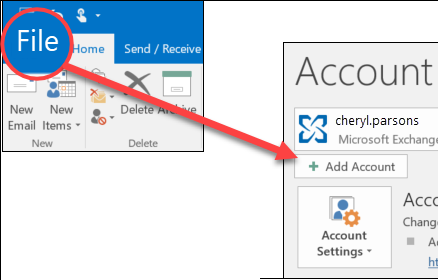
3. Add Yandex.Mail account and let Outlook sync emails.
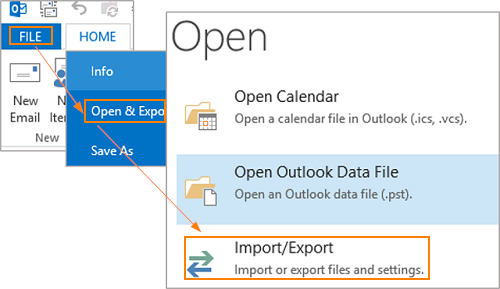
4. Navigate to File>>Open/Export>>Import/Export.
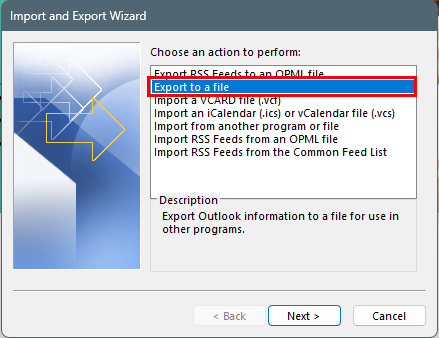
5. Select Export to a file option and click Next.
6. Choose Outlook Data File (.pst) and press Next.
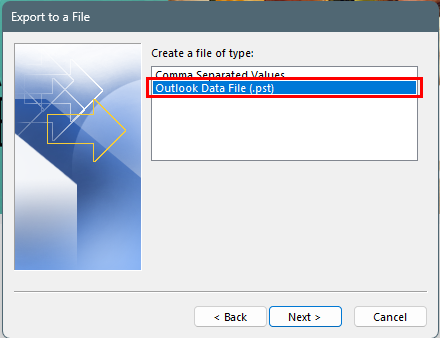
7. Select Yandex mailbox folders and click continue.
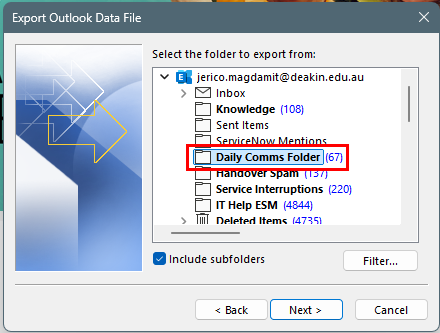
7. Choose the output location and click Finish.
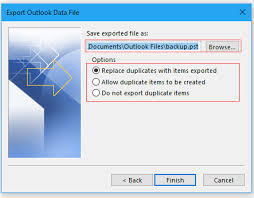
Done! MS Outlook will export PST from Yandex Mail account.
Important Points:
- Microsoft Outlook installation is necessary.
- No advanced options for email filtering.
- No batch processing support.
- Can be slow with large mail boxes.
- Exporting multiple accounts means repeat the same step again and again.
How to Export Emails from Yandex Mail to PST Directly?
To avoid manual complications, download and install Advik Yandex Backup Tool on your Windows machine. This software will export Yandex Mail to PST file safely. The best thing is that you don’t have to install Microsoft Outlook on your system. This is a safe and secure solution that keeps the original structure of mailbox folders throughout the process.
The tool exports complete mailbox data, including attachments, in a single attempt. Also, it allows you to choose specific email folders as per your needs.
Tap on the link below to download it for FREE.


Steps to Export Yandex Emails to PST File Format
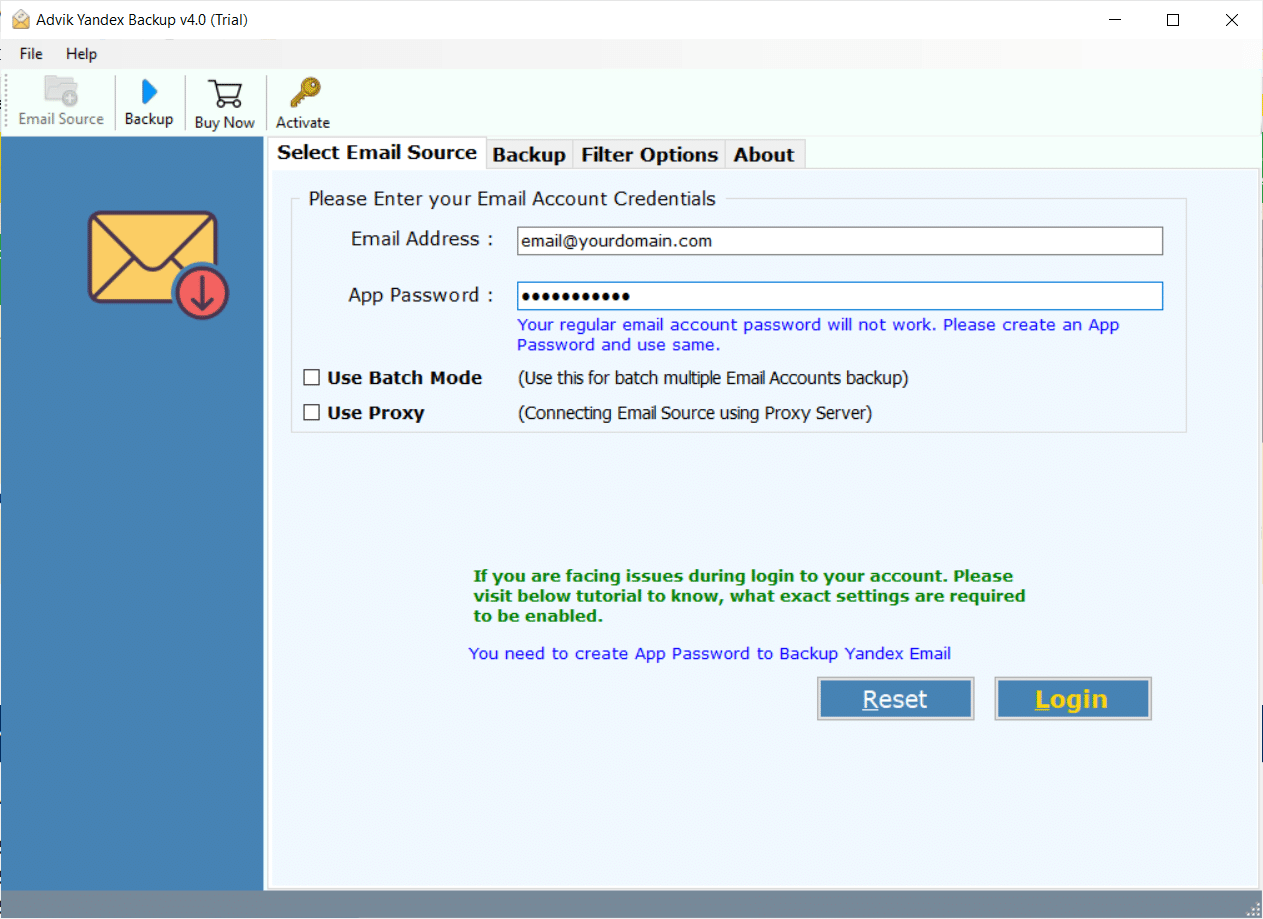
Step 1. Run the software and Sign in with your account details of Yandex mail.
Step 2. Select mailbox folders to export.
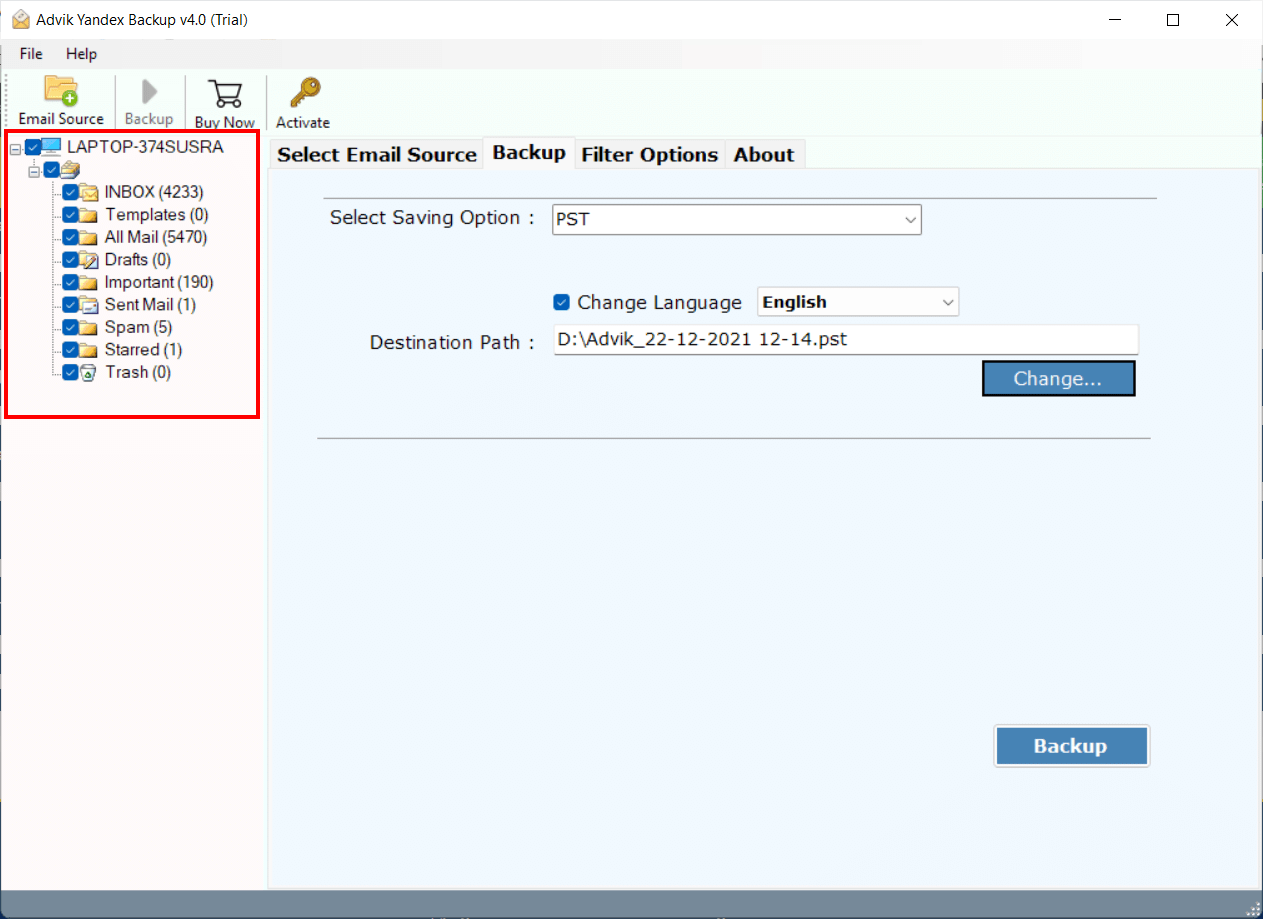
Step 3. Choose PST from the saving option.
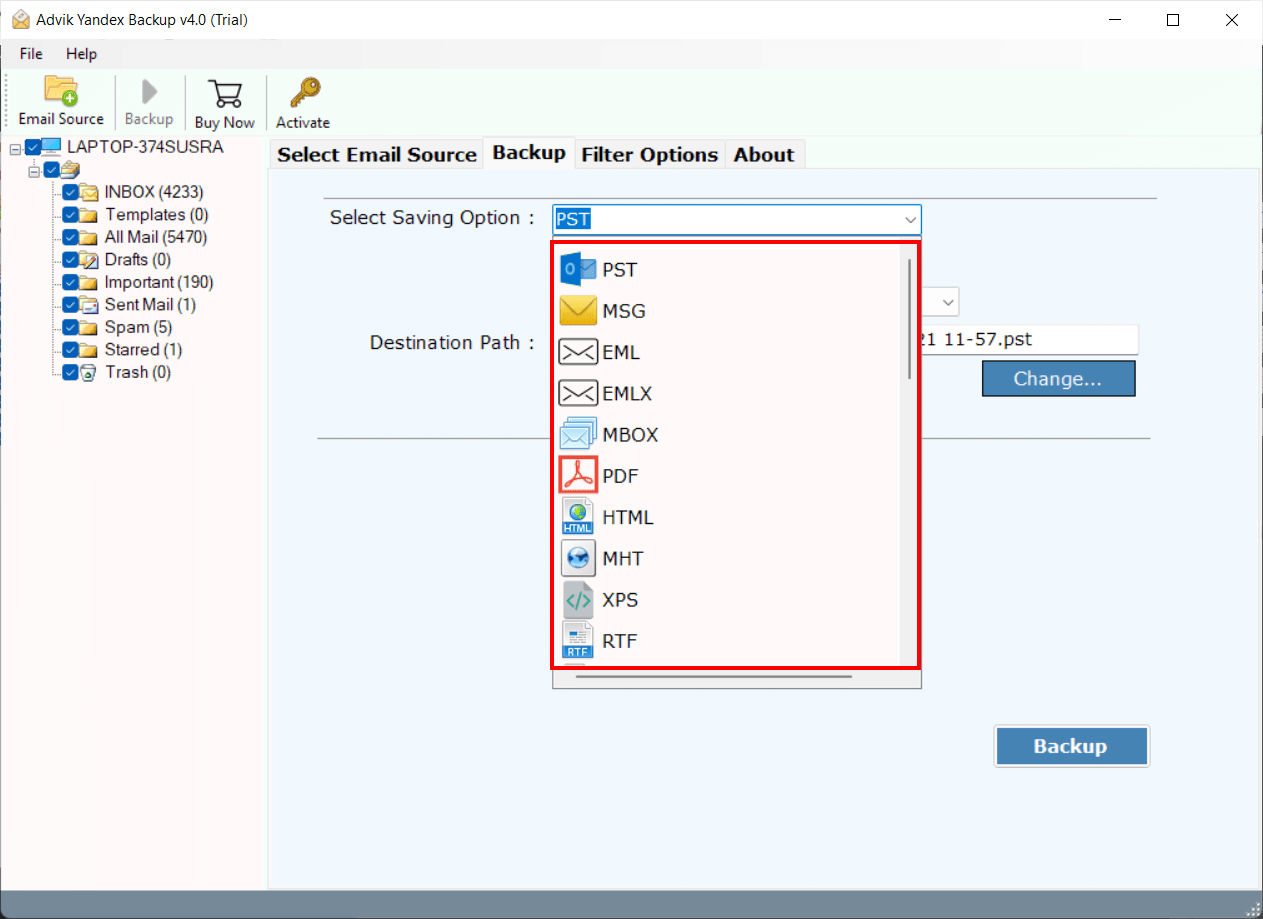
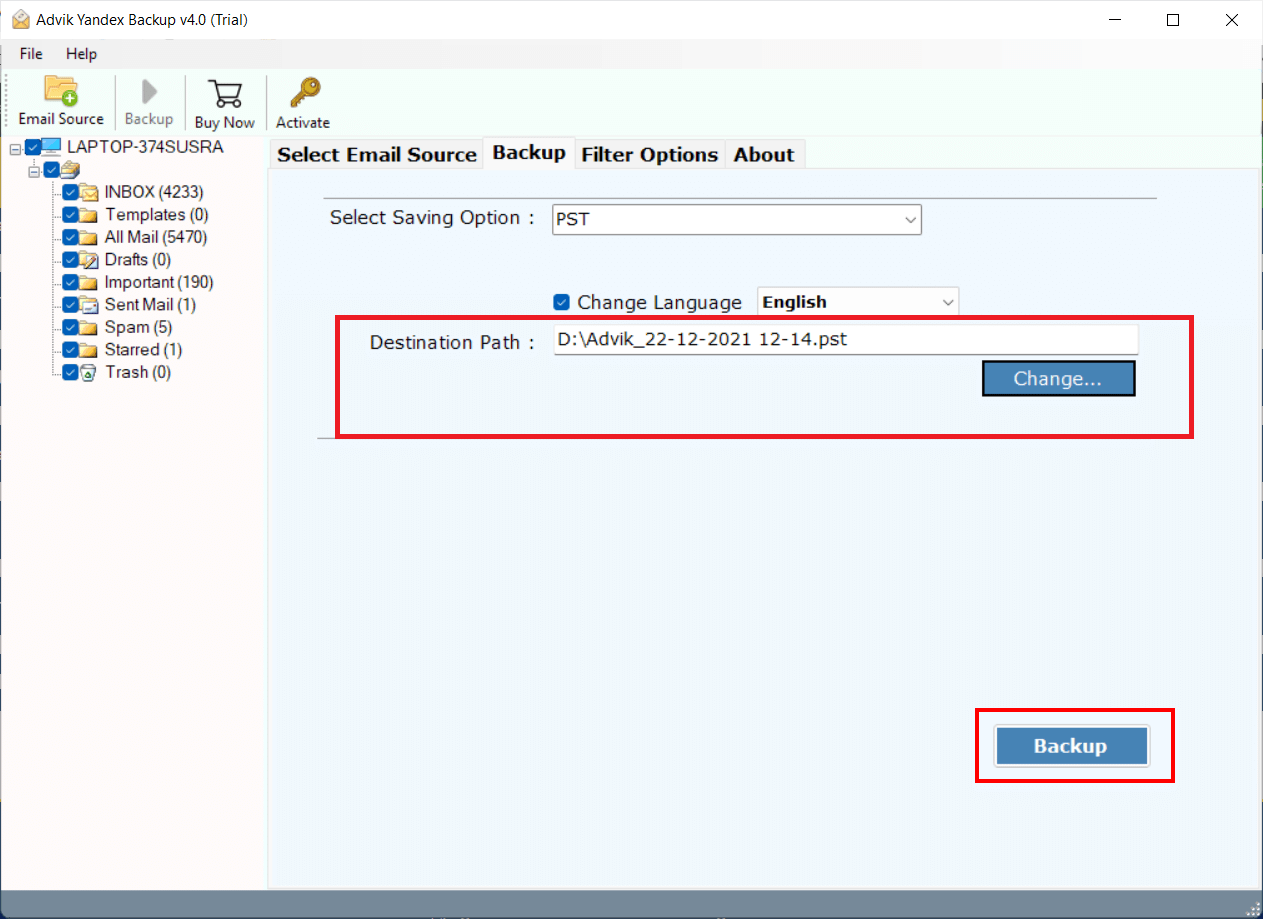
Step 4. Select the Output target location to save the PST file.
Step 5. Now, apply email filters if required and click the Convert button.
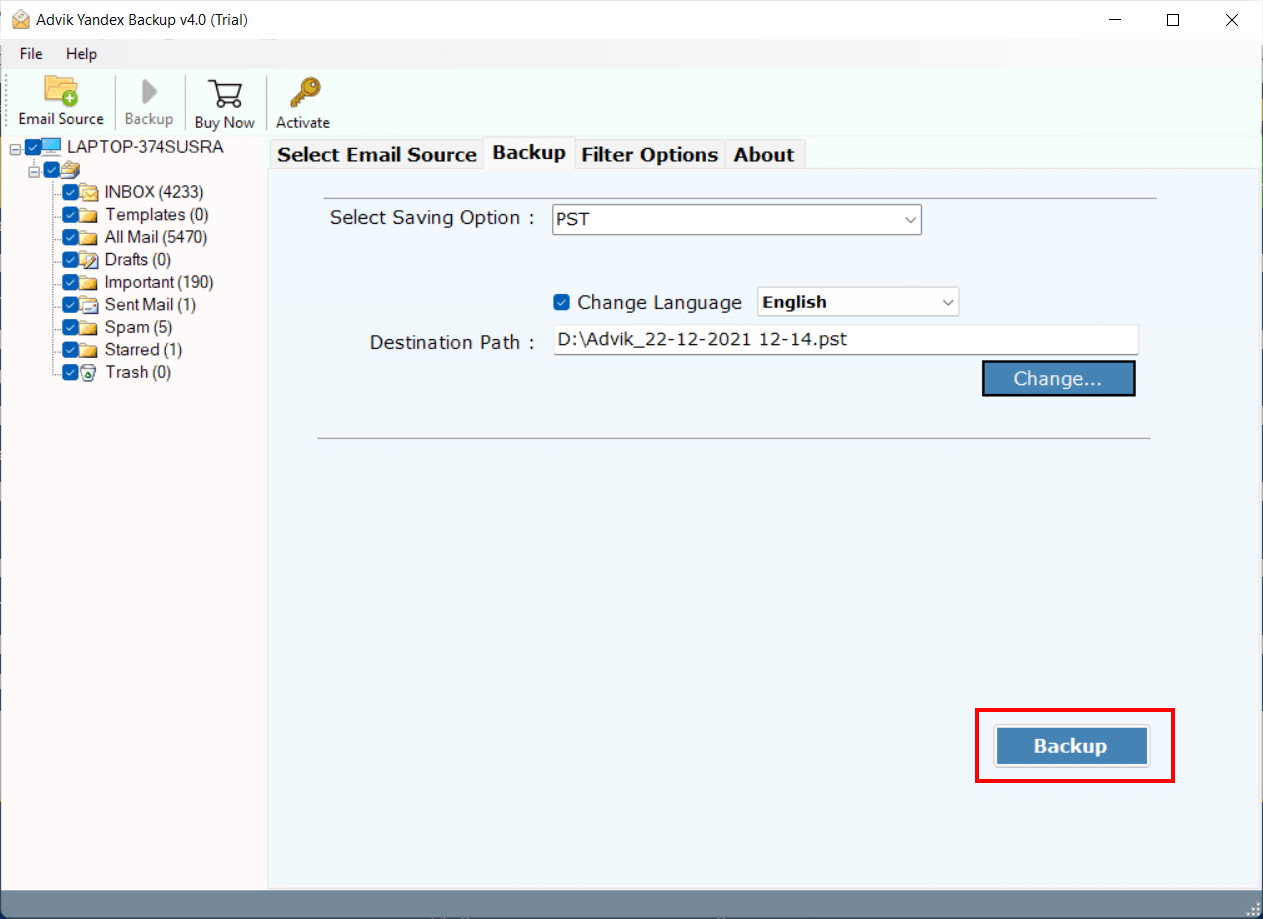
Finished! This is how you can export Yandex Mail to PST file without Outlook. No manual configuration is required.
What Gets Exported to PST?
When you export Yandex Mail to PST format, a very common question might occur in your mind: what mailbox data will be included in the resultant PST file.
Most of the time, the PST file includes:
- Inbox messages
- Sent Items
- Drafts
- Mailbox custom folders
- Email attachments
- Sender and receiver info
- Subject lines
- Time/Date stamps
- Email headers
- Read/unread status
After the completion of export process, you can open PST file in Microsoft Outlook to access the mailbox data locally without the need of an internet connection.
Now, we will go through this video tutorial to understand it better.
Watch How to Export Yandex Emails to PST File
Watch the video tutorial to see the complete process of Yandex Mail to PST conversion.
Manual vs Automated Method Comparison: Which Method Should You Choose?
| Feature | Manual Approach | Automated Tool |
|---|---|---|
| Outlook Required | Yes | No |
| Technical Knowledge | High | Low |
| Multiple Accounts | Limited | Yes |
| Email Filters | No | Yes |
| Batch Export | No | Yes |
| Folder Selection | Limited | Yes |
| Large Mailbox Support | Limited | Yes |
Final Words
In this article, i have reviewd two effective ways to export Yandex Mail to PST format. If you already have Microsoft Outlook installed and you just need to export few emails then the manual method can be a good option. However, if you have a large mailbox, multiple accounts or want a simple way without Outlook then a professional tool may be more convenient. Think about things like mailbox size, technical requirements and other needs before you decide on a method. This will help you choose the right approach for your situation.
Frequently Asked Questions
Q1. Is it possible to export Yandex Mail to PST without Outlook?
Ans. Yes, you can use any third-party tool like one which i mentioned in this article. As, these software can easily export Yandex Mail emails to PST format directly without installing Microsoft Outlook.
Q2. Can i export emails with attachments with this software?
Ans. Yes, this software exports your Yandex emails along with attachments, embedded images, hyperlinks, email headers and complete message properties.
Q3. Is it possible to export several Yandex accounts at once?
Ans. You can export multiple Yandex accounts in a single PST file with it’s Batch mode feature. It is helpful for users who deal with multiple email accounts.
Q4. Can the tool handle large mailboxes?
Ans. Yes, it supports large mailbox export. Also, there is no limits on mailbox size or number of emails usage.
Q5. Can I export the selected folders only?
Ans. Yes. Users can select the particular folders before starting the export process.
Q6. Is my account information stores on software?
Ans. No, the software does not store your account credentials as it accesses your mailbox data via secure authentication methods.
Q7. What Outlook versions are supported for the exported PST file?
Ans. You can open exported PST file in Outlook 2024, 2021, 2019, 2016, 2013, and earlier supported versions.
Q8. Is PST format good for long term email backup?
Ans. Yes. The PST is very popular for mailbox archiving because it offers offline access, Outlook compatibility and secure local storage.
Q9. Are there any limits on the trial version?
Ans. Yes. The trial version allows users to try out the software before buying it. The trial version has export limitations. Check the product page for current trial restrictions.