How to Extract Email Addresses from PST File?
Christopher Plummer | May 18th, 2026 | Data Conversion
If you are a business owner or a marketer who wants to sell more of your products to clients via email marketing. You will need email addresses, but sometimes happen when we have email addresses in PST file. It’s common to encounter situations in which you need to extract email addresses from PST file but are unsure of how to do so.
No need to go anywhere else, you will get all your answers here. This guide covers different methods to export email IDs with the help of manual and professional solutions. So stay tuned with us till the end and complete email address extraction process easily.
Table of Contents
Why Is It Beneficial to Extract Email Addresses from PST File?
Here are some common reasons that support why users want to retrieve email addresses from Outlook PST file:
- Saving email addresses separately creates a secure backup copy to safeguard data against loss due to system failure, corruption of files, accidental deletion, etc.
- Extracting email addresses from PST file makes it easy to access them without Outlook.
- If you have all email addresses in a single file, then you can easily send emails to many users at once.
- Exporting email addresses helps in marketing and promotional campaigns.
How to Export Email Addresses From PST File for Free?
In this method, we use an Outlook desktop client for PST email address extraction. First, we need to import PST file into Outlook to do this task
Follow the below steps to perform this extraction process.
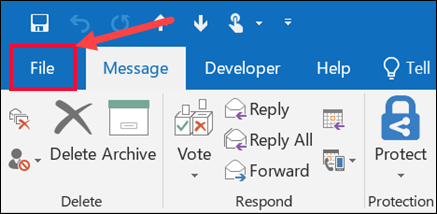
- First of all, launch the Outlook application on your system and choose File menu from the ribbon.
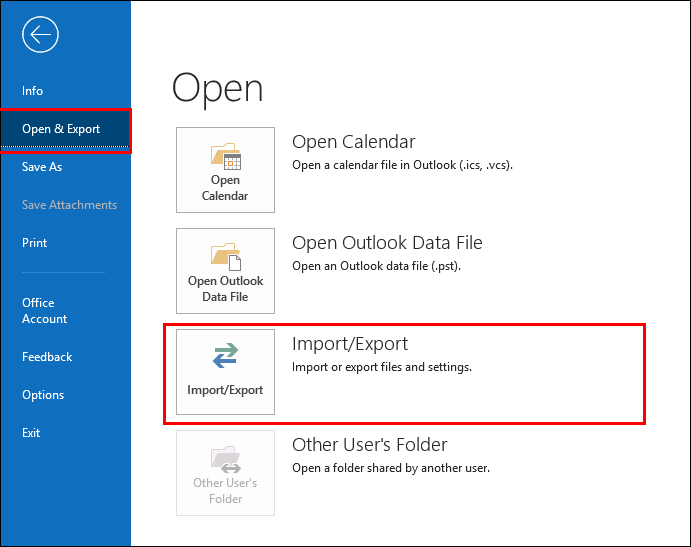
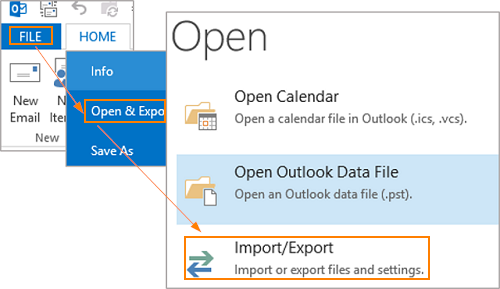
- Next, click on Open & Export option and choose Import/Export section.
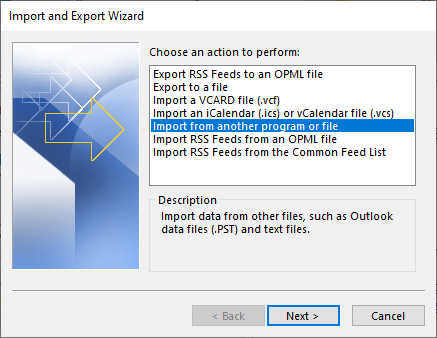
- Select Import from another program or file from Import and Export Wizard and then click Next.
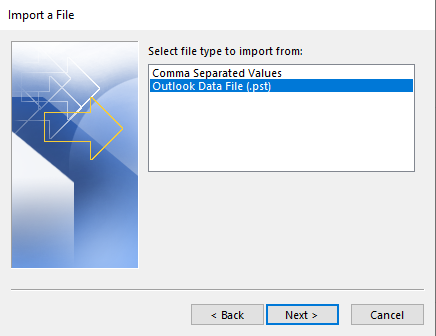
- Choose Outlook Data File (.pst) from Select file type and press Next.
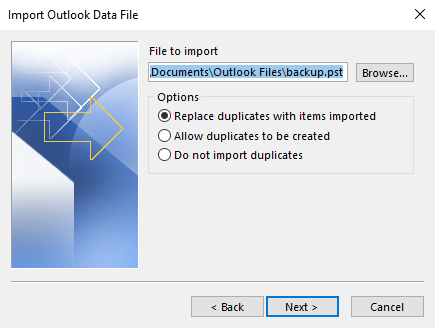
- Browse the specific PST file to import and hit on Next.
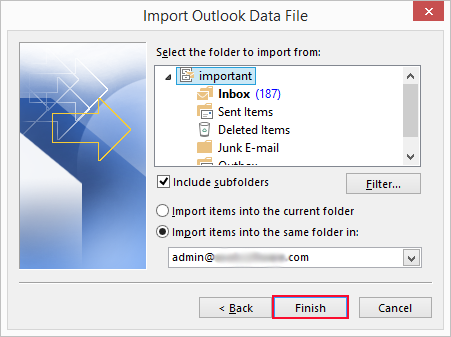
- Choose a folder to import and click the Finish button.
- Again go to File tab, click Open&Export and choose Import/Export.
- Choose the action to perform as Export to a file and click Next.
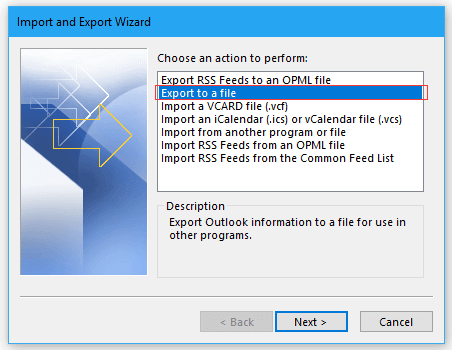
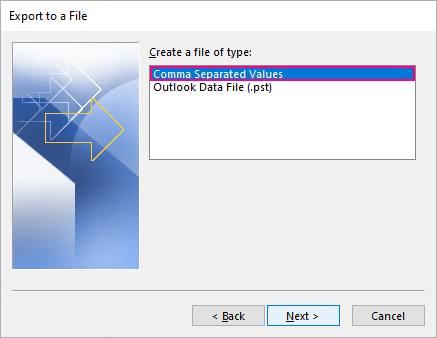
- Then, select Comma Separated Values as create a file of type and press Next.
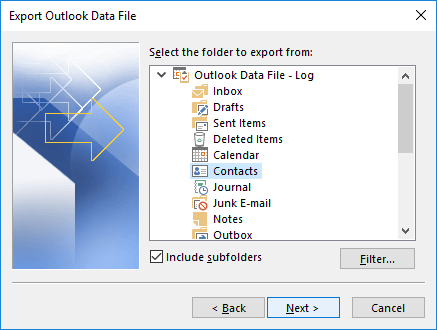
- Select the contacts folder to export and hit Next.
- Browse the location to save the exported file and click on the Finish button.
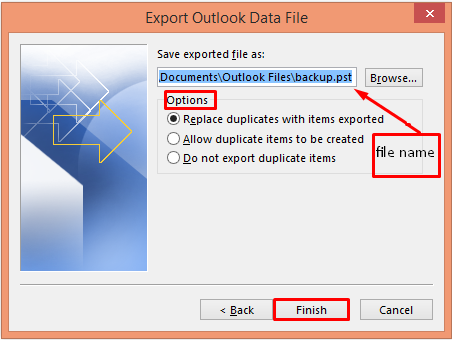
Here, complete the process, and you will extract all email addresses from PST file using the manual method.
Note: To perform manually, MS Outlook must be installed on your syste. Ans, this method won’t work if the PST file is corrupted.
How to Extract All Email Addresses from PST File in Single Attempt?
If you are trying to export PST email addresses without Outlook, a tool like Advik PST Converter can make the process easier. It supports PST file to extracted from Outlook Outlook 2021, 2019, 2016, 2013, and other below versions. Moreover, it can extract email addresses even if the Outlook PST file is corrupted or damaged.
This is capable enough to export all email addresses in a single attempt. With this software, you can filter and extract specific email addresses based on To, From, Date Range, and other criteria.
Tap on the below link and give it a free try!


Steps to Extract Email Addresses from Outlook PST File
- Run the tool on your system.
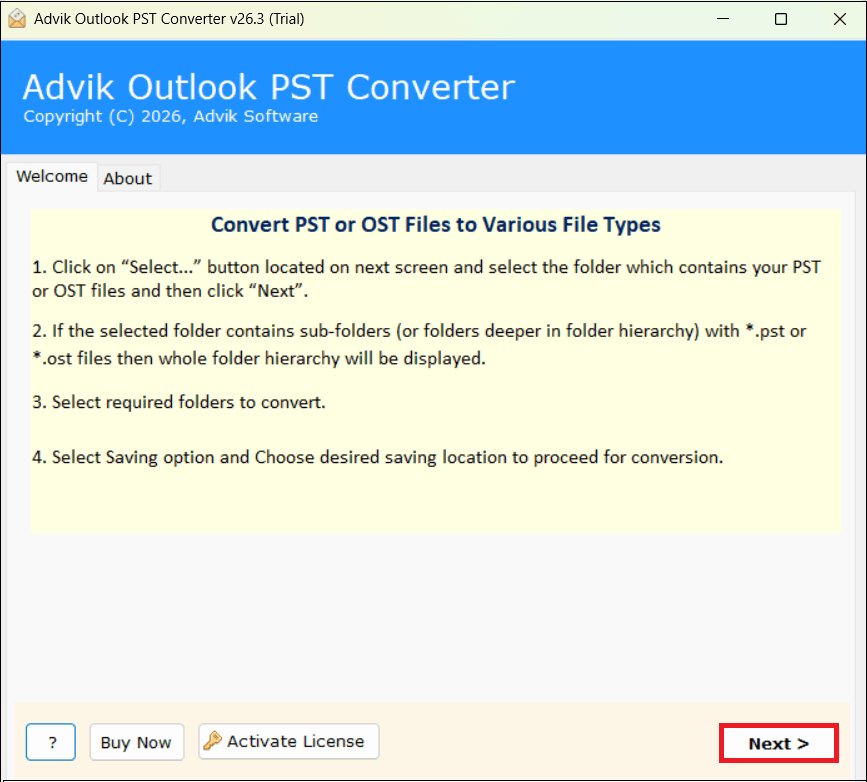
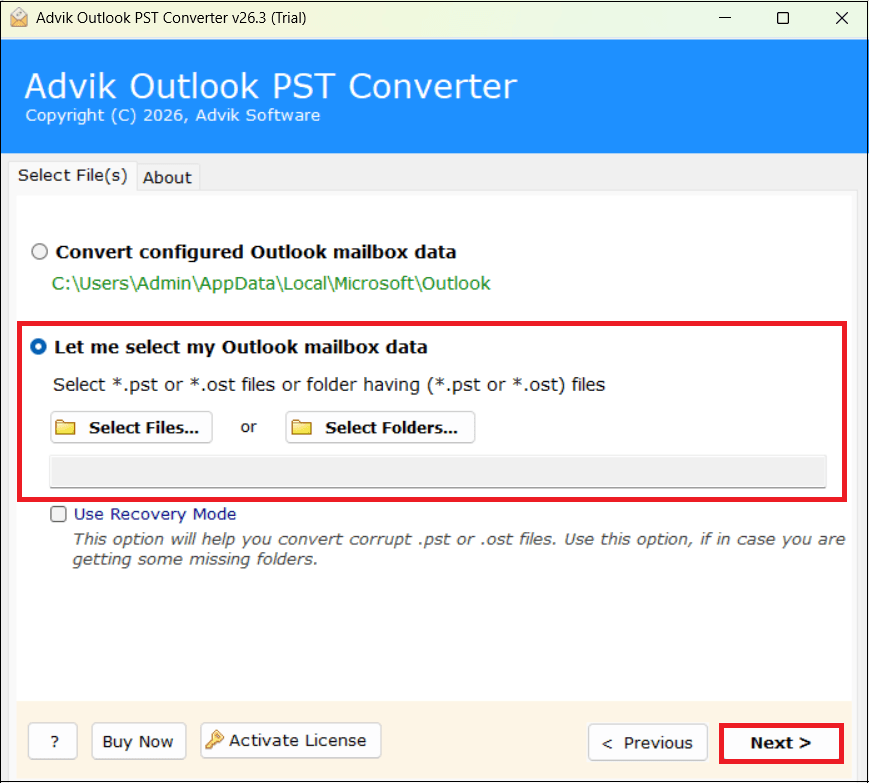
- Now, add Outlook data files to the software GUI.
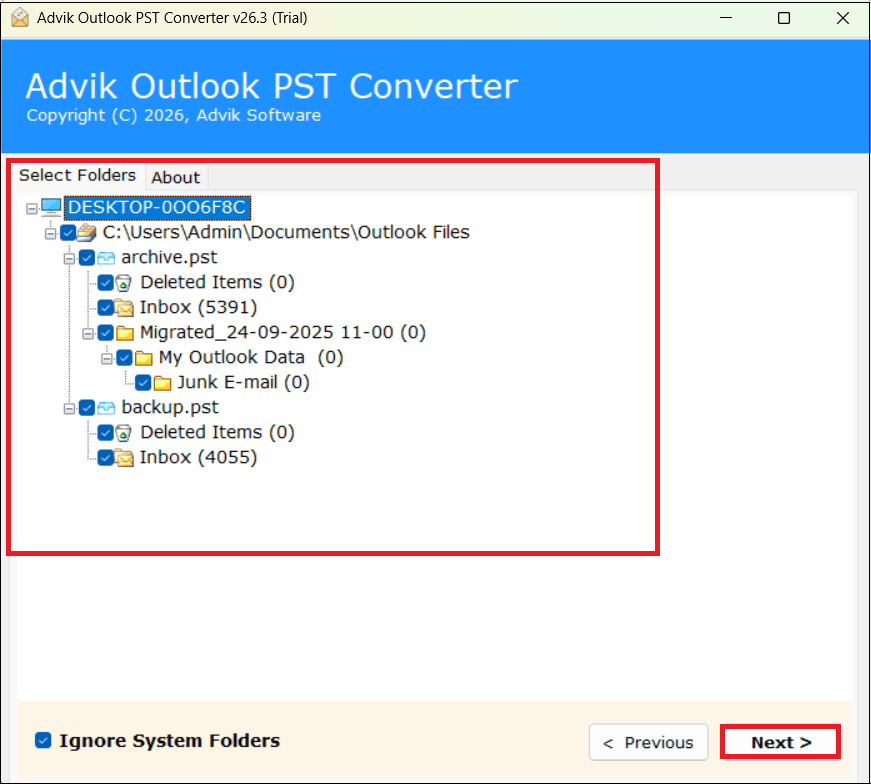
- Select the necessary folders where you want to extract email addresses and click Next
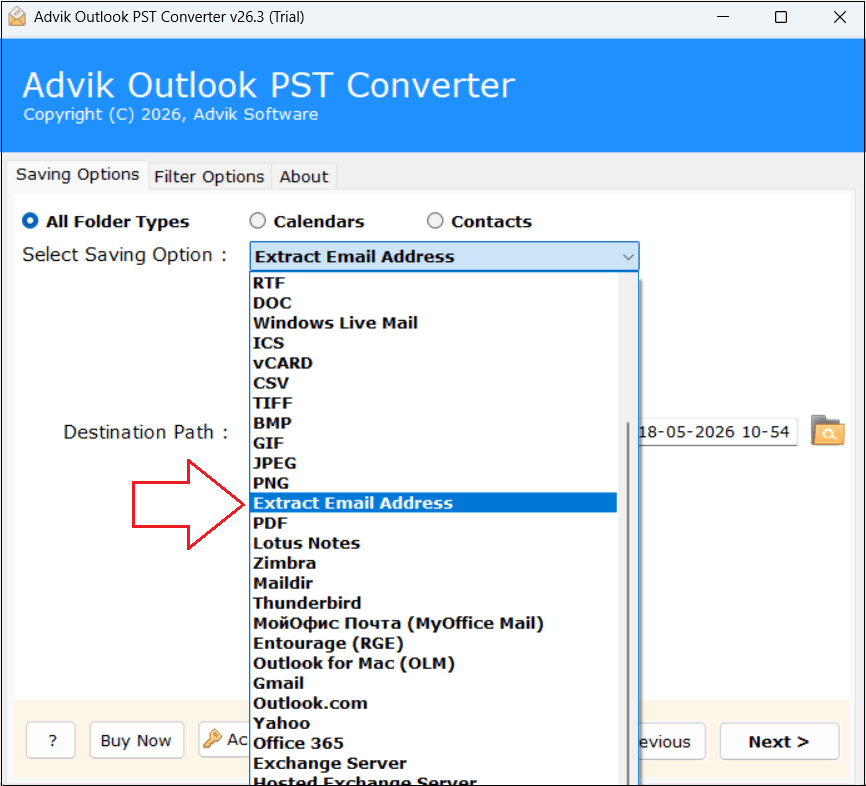
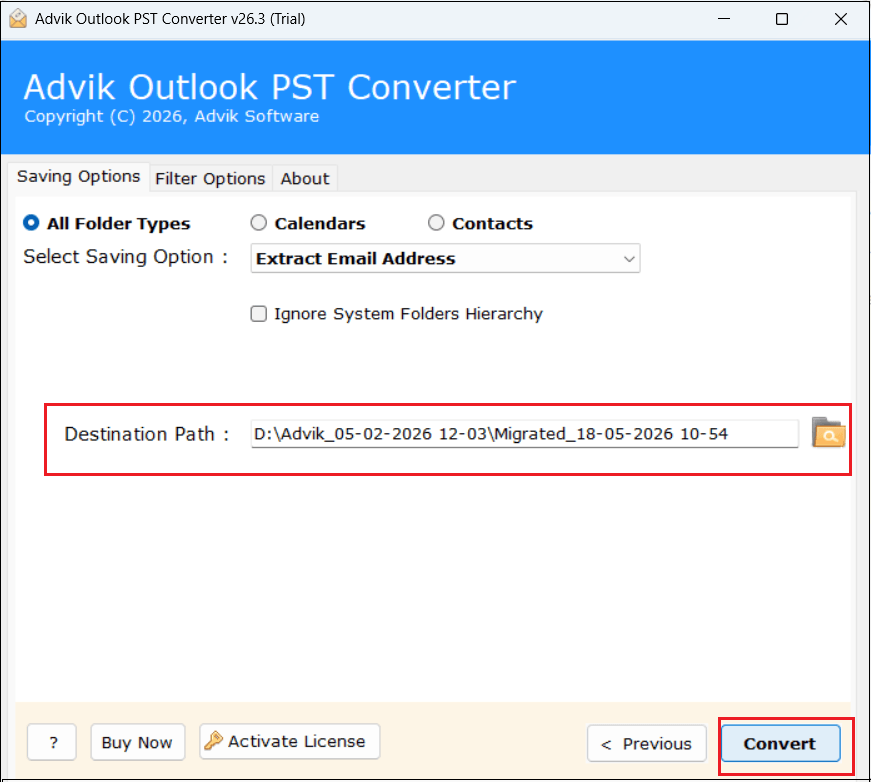
- Afterward, select Extract Email Address from the Select Saving Option.
- Browse the destination path to store exported email addresses and click the Convert button.
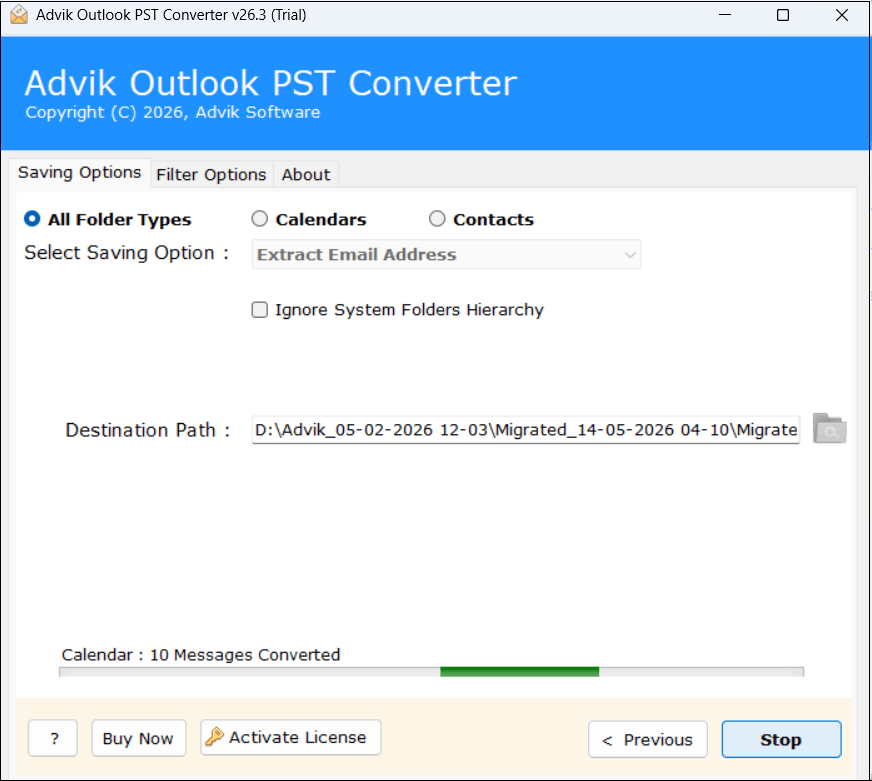
- The software will start extracting email addresses from Outlook PST files.
Watch How to Extract Email Addresses from PST File Without Outlook
Why Choose Advik PST Email Address Extractor?
Some outstanding features of this tool that make it unique;
- Extracts Email Addresses in Bulk: Quickly exports all email addresses from multiple PST files in a single attempt. You can add as many PST files and folders need to export email addresses from it.
- Support All Outlook PST: This tool is compatible with all Outlook versions and supports all PST files created by them. It supports PST from Outlook 2019, 2016, and other previous versions without facing any glitches.
- Extracts from Corrupt PST Files: If your Microsoft Outlook PST file is damaged and unable to open, the Recovery Mode in this software will help you. By enabling the Recovery Mode, it extracts the email address from corrupted or damaged PST files.
- Ignore System Folders Hierarchy: The tool provides an option to avoid system folders hierarchy before starting the process. You can leave it unchecked if you want to maintain the actual system folder hierarchy. You can use this feature according to your preference.
- No System Compatibility Issue: Whether you are using an older version of Windows or the latest Windows 11, this utility works seamlessly. It is compatible with all Windows operating systems.
- Standalone Entity: It is completely independent software that doesn’t need any other application to perform the email address extraction. There is no need to install an Outlook email client to perform any operation.
Conclusion
In this guide, we have explained two ways to extract email addresses from PST file. If you are a home user, then go with manual method to export PST email addresses. While, if you are a professional user and want to finish thia task quickly then use the automated tool. Now, you can decide which method is best for you.
Questions and Answers
Q1. Recently, my team manager assigned me a task of extracting email addresses from a PST file. Now, the problem is that Outlook is not configured on my system.
Is there any way to export PST email addresses without Outlook?
Ans. Yes, with a professional PST Email Address Extractor, you can extract email addresses from PST without Outlook.
Q2. Can I export email address data from multiple PST files?
Ans. Yes, the software allows you to export email IDs from multiple Outlook data files.
Q3. Does the software support Microsoft Windows Server 2022 edition?
Ans. Yes, the tool supports all editions of Microsoft Windows operating systems, including Windows Server 2022.