How to Import PST to Kerio Connect?
Jenny Lowrence | April 1st, 2026 | Import Emails
Many users rely on Microsoft Outlook for email management. It stores emails, contacts, calendars, attachments, and other mailbox data locally in PST files. When users switch from Outlook to Kerio Mail Server, they need to import PST to Kerio Connect to continue accessing their old data. Since Kerio Connect is a server-based email solution designed for business communication. However, Kerio Mail Server does not directly support PST files. Therefore, users need a professional solution to migrate PST emails into Kerio account.
Before moving ahead, let’s understand the benefits of transferring PST data into Kerio Mail server.
Reasons to Import PST to Kerio Connect
Here are some reasons why we prefer to move PST data to Kerio:
- Kerio Mail Server allows users to store data on a centralized server, making access and management easier.
- It offers better security features, including server backups and controlled access.
- It is ideal for organizations that need a scalable and professional email management solution.
- Kerio supports shared calendars and contacts, making it easier for teams to collaborate.
How to Import PST Files to Kerio Connect?
Download and install the Advik PST Converter on your system. The software will help you to directly upload PST files to Kerio Connect in just a few simple clicks. With this utility, you can import multiple PST files at once. It allows you to transfer all or selected folders of PST files as per your needs. This is a secure and authetic program that preserves data integrity and mailbox folder hierarchy during the process.
Click on the below link to download it for FREE.


Steps to Import PST into Kerio Connect
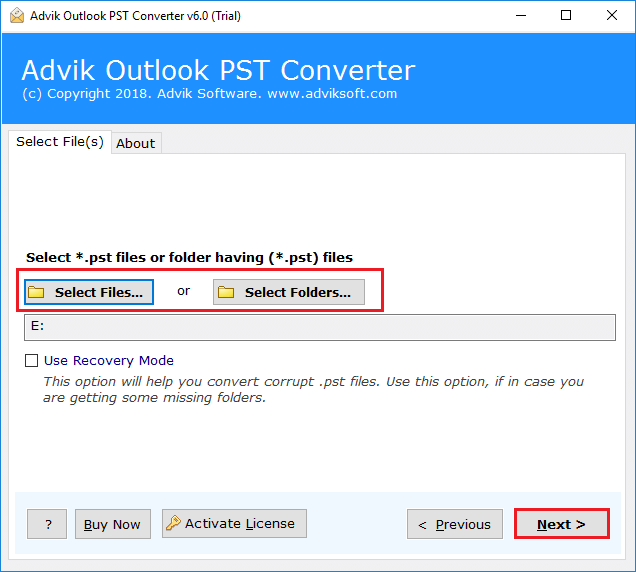
1. Run the tool and add PST file into software.
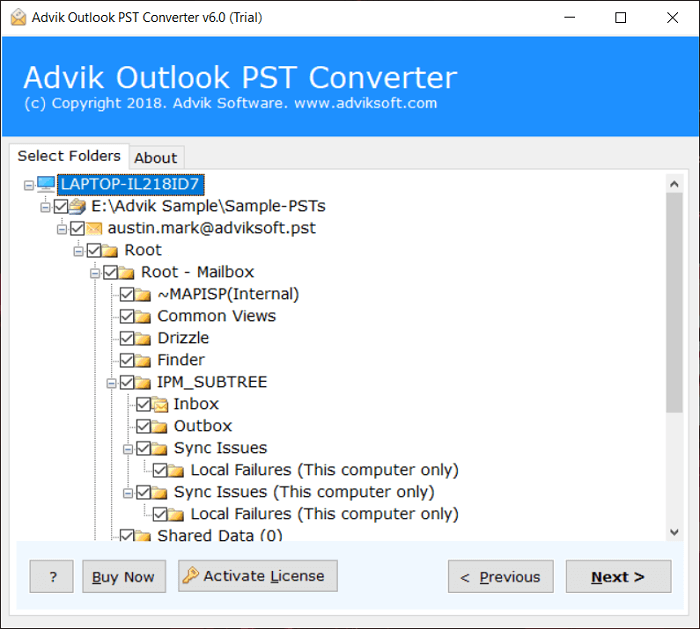
2. Choose the mailbox folders & subfolders.
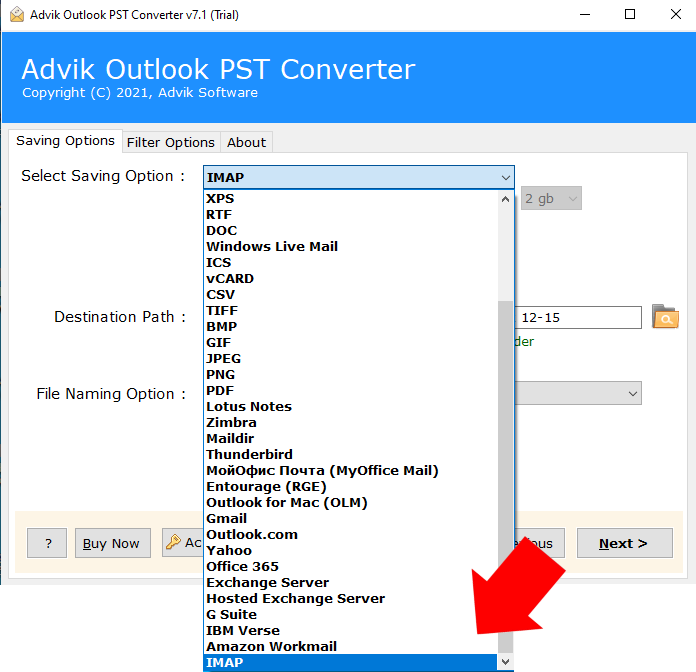
3. Select IMAP as a saving option.
4. Enter the Kerio Mail server login details and click Next.
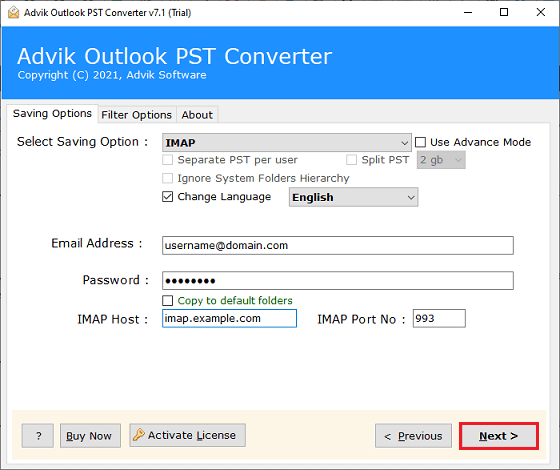
The software will start importing PST file to Kerio. Once the process is complete, open Kerio Server and check the imported emails here.
Key Features of PST to Kerio Import tool
- Bulk Importing: The software can import multiple PST files in a single attempt.
- Selective Migration: It offers adavanced filter options to import selected emails.
- Preserves Data Integrity: This utility retains all email attributes while importing.
- Maintains Folder Structure: It preserves the original structure of PST email folders.
- Multiple Saving Options: The tool offers various saving options to export PST files.
- Easy-to-Use: The software is designed with a simple graphical user interface.
- Windows Supportive: It is compatible with all versions of Windows OS.
Final Words
In this post, we have discussed how to import PST to Kerio Connect. Since Kerio Connect does not support PST files directly. So, using a professional solution becomes the easiest and safest option. The above-suggested tool helps users to convert Outlook PST to Kerio Connect while preserving all email data and structure.