How to Import PST to Zoho Mail Account?
If you want to import a PST file into Zoho Mail, then you can use three major options. You can use Zoho Mail’s native migration method, move PST emails to Zoho Mail manually through Outlook and IMAP, or use an automated PST Migration Tool. We will discuss all these methods one by one so that you can choose the method as per your requirement. However, the right method depends on your specific need and we will explain different methods so you have many options to choose from among them.
Can You Import a PST File Directly into Zoho Mail?
PST file is an Outlook data file that contains emails, contacts, calendar, tasks, notes and other Outlook items. So, you can’t simply log in to your Zoho Mail account and transfer your PST file by just dragging and dropping. Instead, you need to use a supported migration method. Here, we have three options;
1. Zoho Migration Wizard
2. Classic Outlook with IMAP option
3. An automated alternative
Tips Before Importing PST File into Zoho Mail
- Always take a backup of your PST file, so that you can restore them in case anything goes wrong.
- Enable IMAP option in Zoho Settings.
- Generate an app password in Zoho Mail.
- Ensure that your Zoho Mail has enough space.
- Check large, duplicate, archived PST file before import.
- Configure Zoho account properly with IMAP.
- Ensure you are using a stable internet connection for interruption free migration.
Method 1: Import PST Files to Zoho Mail Using Zoho Migration Wizard
Zoho provides migration option for both single and multiple users using desktop based migration wizard. It’s not normal webmail upload feature, instead you need to install on your computer.
Before using the Zoho Migration Wizard, please ensure that:
- You have install Zoho Migration Wizard.
- Your Zoho Mail account is associated with an organization.
- PST files are available on the same computer you are installing Zoho Migration Wizard.
- You have a good connection to the Internet.
- Backup copy of the original PST files.
- For a multiple-user migration, destination user accounts are already exist.
- If your PST file is password protected then make it ready as per Zoho migration needs.
Use clear folder names for best results. If the PST file contains folder names in languages other than English, make sure that your system supports the required language.
How to Open PST File in Zoho Mail With Outlook?
- Log in to Zoho Mail on your browser using your credentials.
- Click on Settings and choose Mail Accounts under the Mail section.
- Click on POP/IMAP and enable IMAP Access.
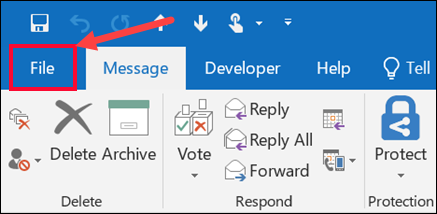
- Launch the Outlook application and click on File tab.
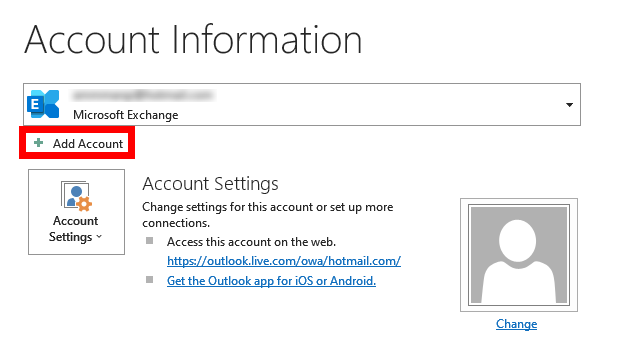
- Click on Add Account.
- Enter your Zoho Mail account login credentials and hit Connect.
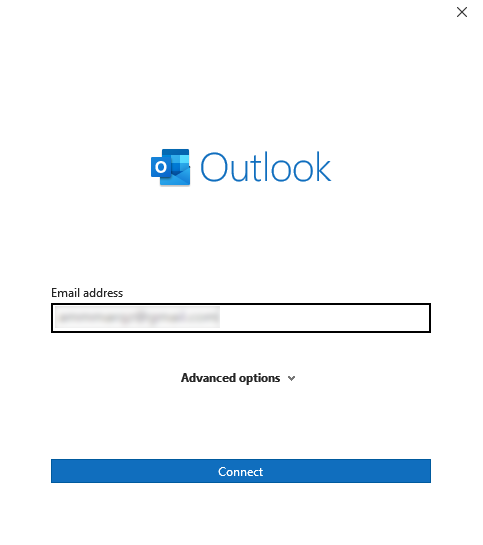
- Type the IMAP setting details of Zoho Mail account to configure it.
- Once added, go to File >> Open & Export >> Import/Export.
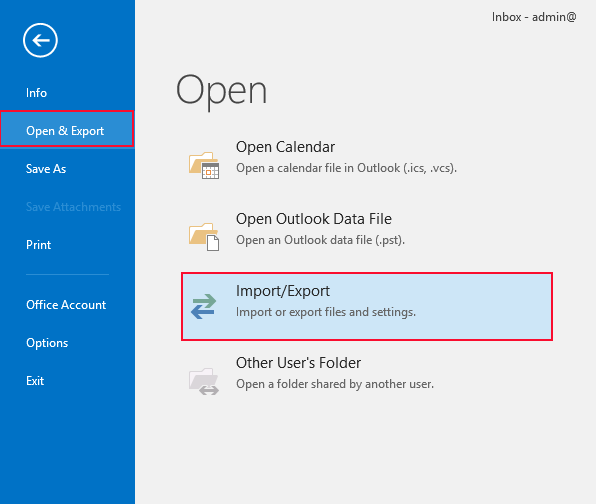
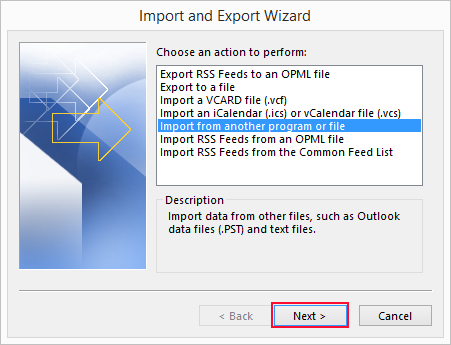
- Choose Import from another program or file from Import/Export wizard.
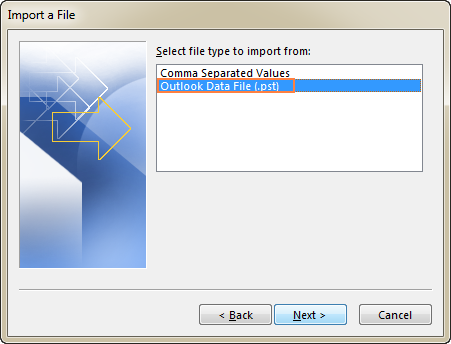
- Select Outlook Data File (.pst) from Import a file.
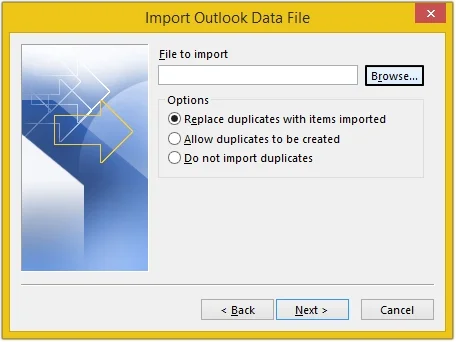
- Browse and select your PST file and then hit on Next.
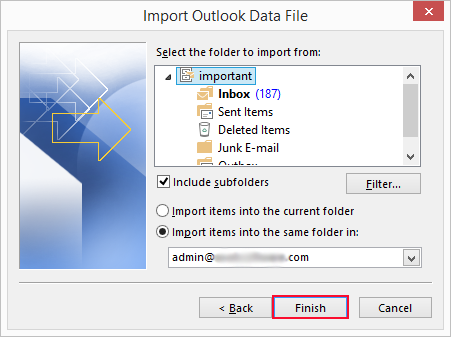
- Select a folder to import PST items and click Finish button.
- Drag and drop imported PST data under configured Zoho Mail account.
- Now, PST file will start syncing with Zoho Mail.
The importing process is complete!
How to Import PST File in Zoho Mail Without Outlook?
Check out the Advik PST File Converter toolkit. This software is specially designed to directly import PST to Zoho email account. It will maintain the folder structure during the PST migration to Zoho Mail process. Thus, no data loss will take place. With this tool, you can upload PST files to Zoho Mail in bulk. The user interface is very simple and self-explanatory. Whether you are a student or a professional, you can use this utility without any difficulty.
For trial purposes, click below and download the software to try it for free.


Note: We advise users to use the demo edition and get fully satisfied before making any purchase.
Steps to Import PST to Zoho Mail
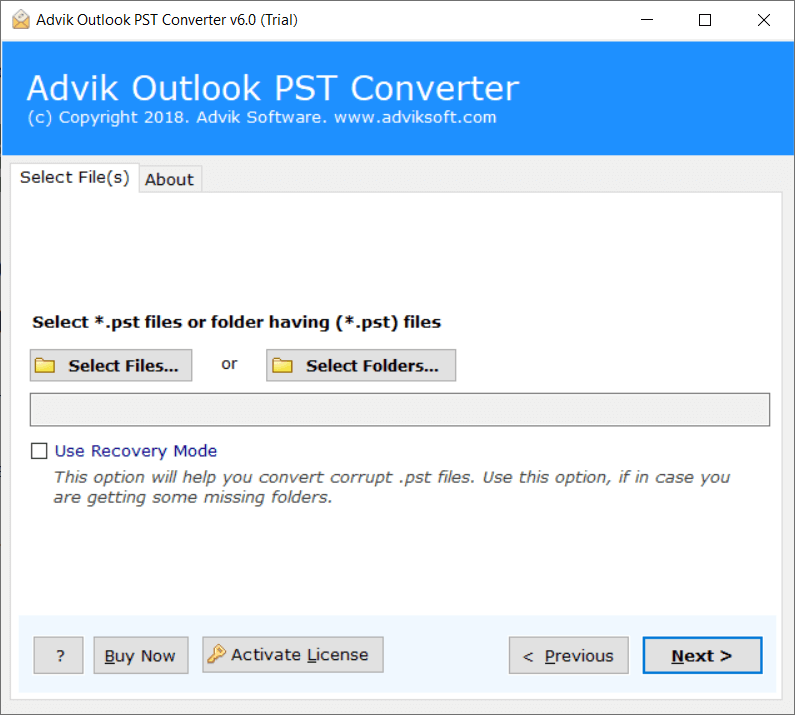
Step 1. Run the software and click Select Files.
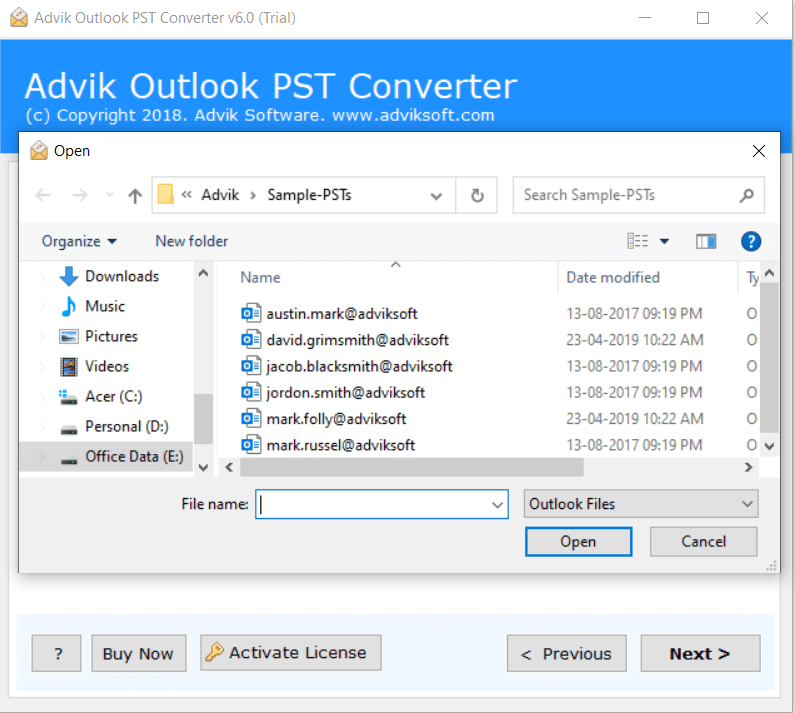
Step 2. Browse and add Outlook .pst file into software.
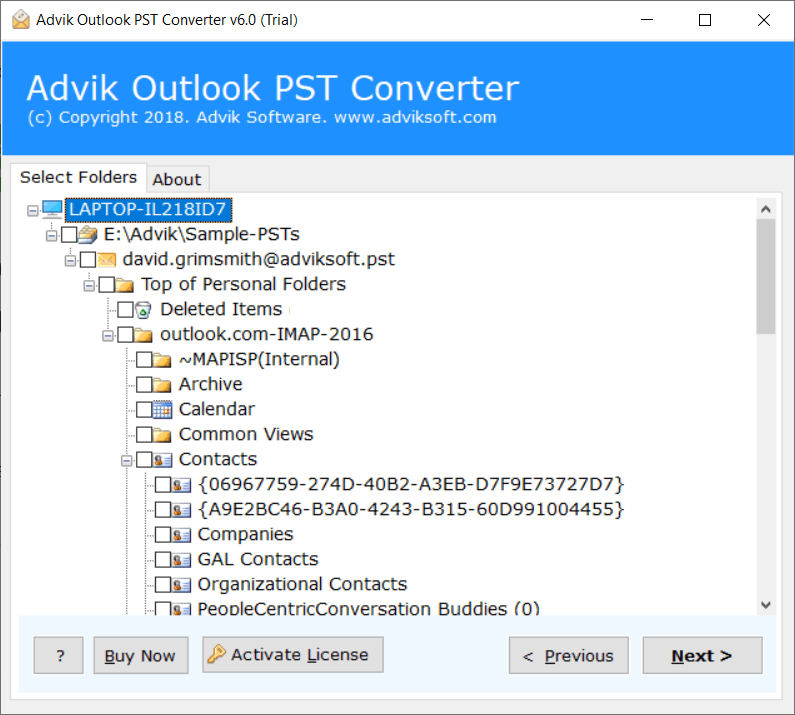
Step 3. Next, choose the folders to import and press Next.
Step 4. Choose IMAP option from the 30+ saving option list.
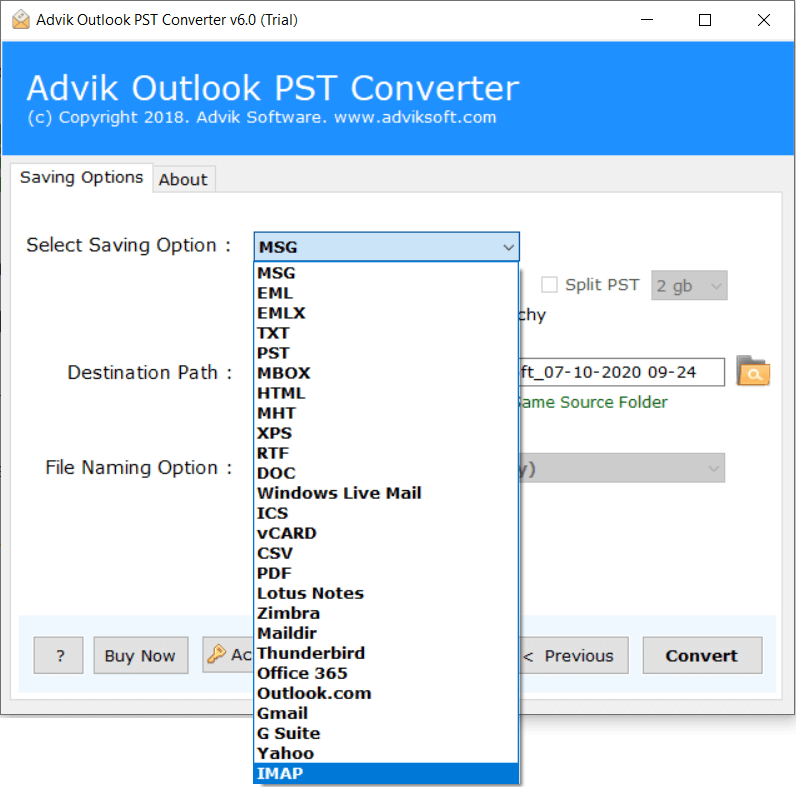
Step 5. Enter your Zoho Mail login credentials and then click Convert button.
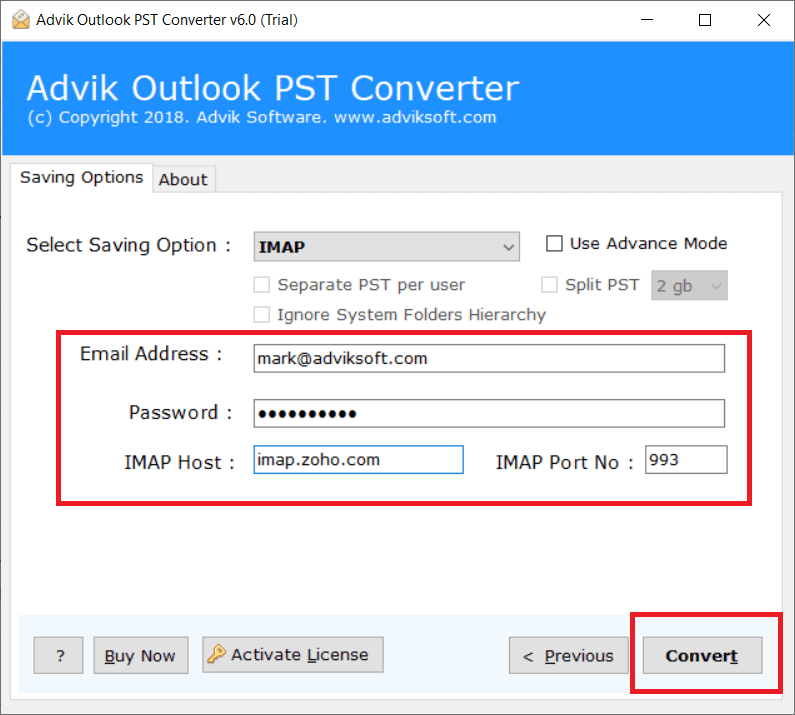
Now the software will start transferring emails from PST file into Zoho Email account.
Once, the entire process is finished, the software will display a successful notification.
This is one of the best ways to import PST to Zoho Mail automatically without facing any trouble.
Watch How to Migrate Outlook PST File to Zoho Mail
Advantages of Using PST to Zoho Mail Import Tool
Along with that, the software also shares some extremely impressive features. Here are some.
- Batch Import: If users have multiple PST files containing unlimited data, they shouldn’t worry. The software has the option to choose PST files or folders to migrate single or multiple files at once.
- Select Data Migration: When you add .pst file to the software panel, it shows all folders and subfolders. Here, users can choose folders and subfolders as per their needs to import.
- Preserve All Attributes: This is a secure and authentic program. It preserves all attributes of emails such as attachments, hyperlinks, signature and other data while importing.
- Import Corrupt PST File. The tool offers a Recovery mode option. This is beneficial for users who need to move corrupted .pst files into Zoho Mail account.
- Multiple Saving Options: The software has 30+ saving options. Apart from importing Outlook PST file into Zoho Mail, it can convert PST file to PDF, EML, MSG, MBOX, TGZ, XPS, etc.
- Maintain Folder Structure: PST files has multiple folders to save email messages like Inbox, Outbox, Sent items, Drafts and User generated folders. This program is able to complete the process without changing the folder and sub folder hierarchy.
- Import ANSI and Unicode Files: The software supports both ANSI and Unicode PST files. As a result, with this utility user can import PST file exported from any Outlook version such as Outlook 2021/2019/2016/2013 etc.
Real World Use Case
A few days ago, I needed to migrate 18GB Outlook PST file into my Zoho Mail account that contains years of client communication. Initially, I tried the manual IMAP method but Outlook synchronization continuously failed after several hours.
I did not want to take a risk with file as it is very crucial for me. So, I decided to use a professional solution. After searching several software I found Advik PST Converter. This tool helps me to import this large PST file to Zoho Mail directly in a short frame of time. It successfully uploaded all mailbox folders while preserving their original structure.
Conclusion
In this article, we have explained how to import PST to Zoho Mail account. Here, we will provide both manual and automated solutions to open PST file in Zoho Mail. If you are facing any issues with the manual approach, then you can use the above-mentioned solutions to complete the process without any glitches. The software comes with a demo edition that you can use to check the process before investing your money.
Frequently Asked Questions
Q 1: How to import PST file in Zoho Mail in bulk?
Ans. Use the Advik software mentioned above to open PST files in Zoho Mail with complete mailbox items. As there is no manual method available to solve this query, we are left with using automated software only.
Q 2: Can I import emails from Outlook to Zoho Mail using software?
Ans. Yes, you can migrate Outlook to Zoho Mail account with this utility. You can either load a PST file or use a configured Outlook profile with this software.
Q 3: Do I have need to install Outlook?
Ans. You need to install Outlook for manual method. However, the software isn’t required to carry out this task.
Q 4: I have the latest MS Outlook 2021 exported PST file. Is the software capable of migrating Outlook 2021 PST to Zoho Mail?
Ans. Yes, the software supports all PST files, exported from MS Outlook 2021, 2019, 2016, 2013, 2010 and all below versions.