Microsoft Outlook OST File Too Big? How to Fix It Easily
Jackson Strong | December 30th, 2025 | Outlook Errors
Are you unsure about how to handle the Outlook OST file too big issue? Well, fear not! In this guide, we will help you resolve errors related to OST files being too large. Here, we are going to explain multiple solutions that you can use to fix your query easily. So, stay tuned to understand the complete procedure.
But before we move ahead, let’s take a moment to understand the causes you are facing with this issue.
Why is my OST file so large? Know Here!
Large OST files can be caused by many factors, such as OST file mailbox size, large email attachments, cache mode, multiple account sync issues, and many more.
So, now let’s understand these issues in more detail, so you will have a better clarity before you choose an appropriate method as per your concern.
- Large Mailbox Size: If your email account has multiple emails, then it’s most probable that your OST file size will increase because of your large mailboxes.
- Emails with Large Attachments: Sometimes, large email attachments can also cause to increase OST file size.
- Cache Mode: When Outlook is in cache mode, it automatically saves complete data in OST file, leading to an increase in OST file size.
- Multiple Accounts: When you add multiple email accounts in Outlook, it increases the amount of data in your OST file. And it makes the OST file too large to open or access.
- Corrupted OST File: A damaged or inaccessible OST file can also cause abnormal growth in OST file size.
We hope that you have understood the major reasons that might be responsible for Outlook OST file too big issue.
Now, let’s move on to learn the solutions that we have researched well, and we are presenting them.
Manual Tips to Fix Microsoft Outlook OST File Too Big Issue
Here are a few tried and tested ways you can try to deal with Outlook OST file size issue. So, go through each method one by one and then decide which one to choose as per your needs.
#1. Reduce Mail Sync Time
Here, you can create a limit on Outlook to fix how much email is stored offline.
- Open Outlook.
- Click on the File tab and choose Account Settings >> Account Settings.
- Select your email account, then click Change.
- Use the Mail to keep the offline slider.
- Choose sync duration as per your needs: 3 months / 6 months / 1 year.
- Click Next >> Finish and restart Outlook.
This immediately reduces OST file size without deleting emails from the server.
#2. Remove Large Mail Items
Here, you have to delete emails with large attachments.
- Go to the File tab.
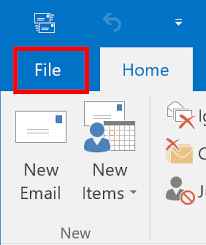
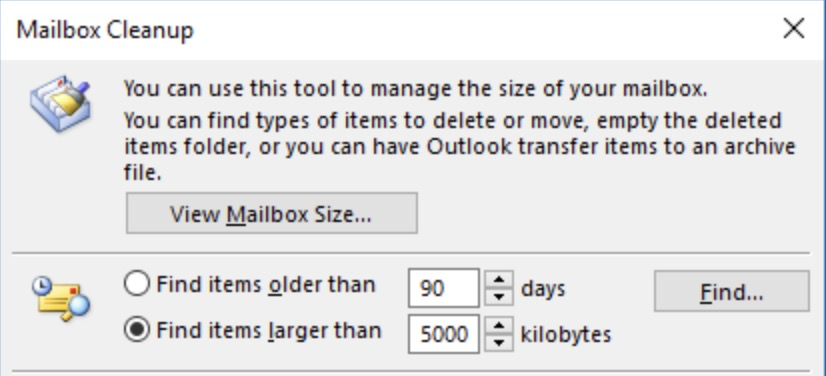
- Next, tap on the Tools and choose Mailbox Cleanup.
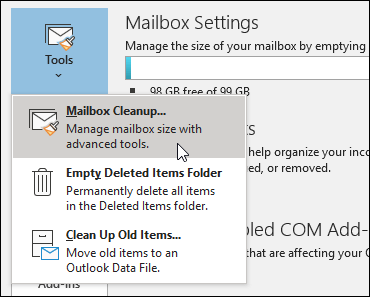
- Click View Mailbox Size.
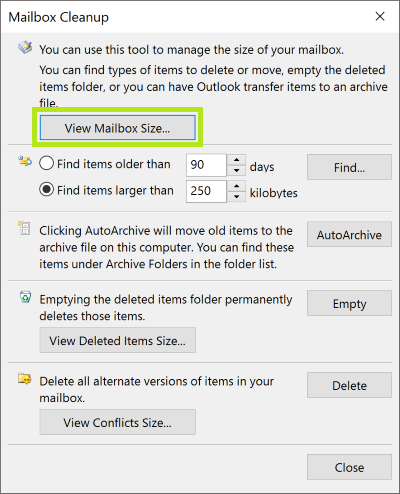
- Choose Find items larger than (e.g., 10 MB).
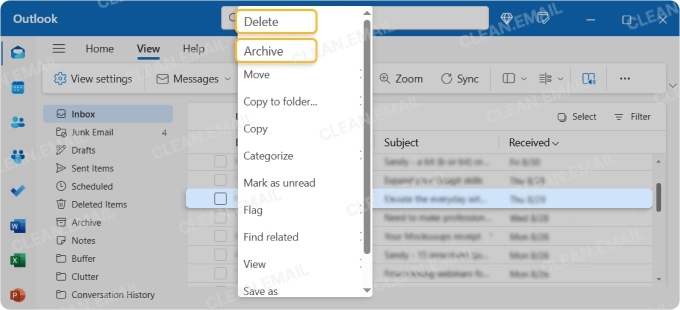
- Delete or archive unnecessary emails.
#3. Archive Old Emails
Here, you have to move old emails out of the OST file to free out some space.
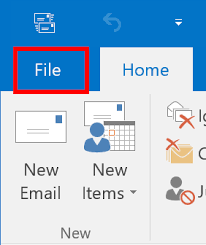
Step 1. Click the File tab in Outlook.
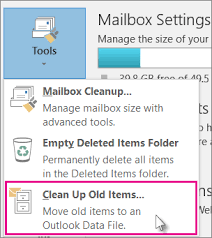
Step 2. Next, click Tools and choose Clean up old items.
Step 3. Select the required folders, date ranges, and click OK.
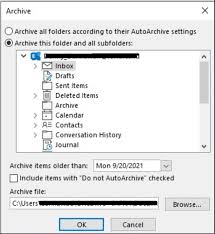
Step 4. Choose the archive location and tap on the OK button.
Thus, in this way, you can archive emails separately and fix the Outlook OST file size issue.
When are manual solutions not enough for you?
We agree that these solutions might help you get back to the previous situation easily. But on the other side, it’s also true that these fixes are not workable in some circumstances. Such as;
- If the OST file is already too large to access or open.
- Outlook won’t open at all.
- There is an issue in the OST file that is not easily possible without repairing.
At this point, manual methods are of no use. So, you need a safer option. You might be wondering what it can be? We have an alternate solution for you that you can use to try when these manual fixes won’t work. Let’s see how!
What to Do If the OST File Is Still Too Large?
You have understood that manual methods are not useful; using an automated solution is suggested. Here, you can use a third-party tool like Advik software to easily convert OST to PST to fix errors detected in OST file. It can help you to reduce OST file size, manage multiple mailboxes, and solve any issues. The complete procedure is simple and straightforward. You can go through the link mentioned below to know more.
Final Words
Dealing with Microsoft Outlook OST file too big issue can be a real challenge, if it contains your important data. But, no worries, this blog is a complete how-to guide to understand the whole issue with the right methods to use. We have discussed every solution in more detail, so you can easily Outlook OST file very large issue.
Just go through this blog completely and choose the method as per your needs.