How to Recover Deleted Photos from Hasselblad Camera?
Jim Backus | November 14th, 2025 | Data Recovery
If your photos were deleted from your hasselblad camera and looking for a perfect solution, then you are on the right page. This article explains how to recover deleted photos from Hasselblad Camera. We have covered both manual and professional methods to restore photographs. Read this complete guide to know more.
Alright, here we go!
Before we start, we need to understand the reasons for photo deletion from Hasselblad camera.
How do Photos Get Deleted from Hasselblad Camera?
There are various reasons why photos might be deleted from your digital camera. Here are some of the most common reasons that most users face:
- Formatting SD card
- Damaged or corrupt photographs
- Camera Damage
- Memory Card gone Corrupt
- Mistakenly deleted
- Improper removal SD card
These are some of the situations due to which it mostly occurs. Whatever the situation, the chances to restore deleted photos are very less. Check out below recovery methods to retrieve your photographs.
How to Recover Deleted Photos from Hasselblad Camera Manually
To restore deleted photographs from the camera, we use the windows inbuilt application command prompt. Safely eject SD card from the camera and connect it to your computer with card reader or directly.
- Open the search bar or start menu and type Command Prompt.
- Run the command prompt as an administrator.

- Here we are using F: you can use the right name of your SD card.
- Now type ‘recover + file name plus file type’ (for example, 7496395.png) command. Then hit ENTER.
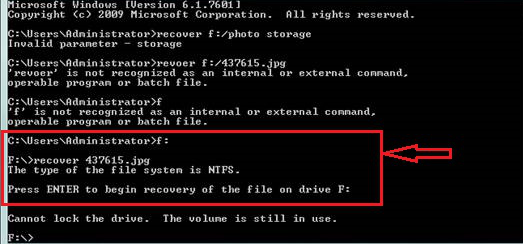
Your recovery will begin soon.
The command prompt is useful for basic recovery, but errors in the prompt lead to permanent loss and are also not easy for non-tech users.
If this doesn’t work, you can try professional method.
How to Restore Deleted Photos from Hasselblad Camera
If you want to recover your deleted photos quickly and easily, you should try Advik Data Recovery Wizard. This tool thoroughly scans your SD card, and recovers deleted photos easily. It not only restores photos from the SD card, but also from any storage devices. The software works on any Windows operating system and can retrieve photos, videos, and more.
Download the software and recover photos up-to 5GB for absolutely FREE.

Steps to Recover Deleted Photos from Hasselblad Camera
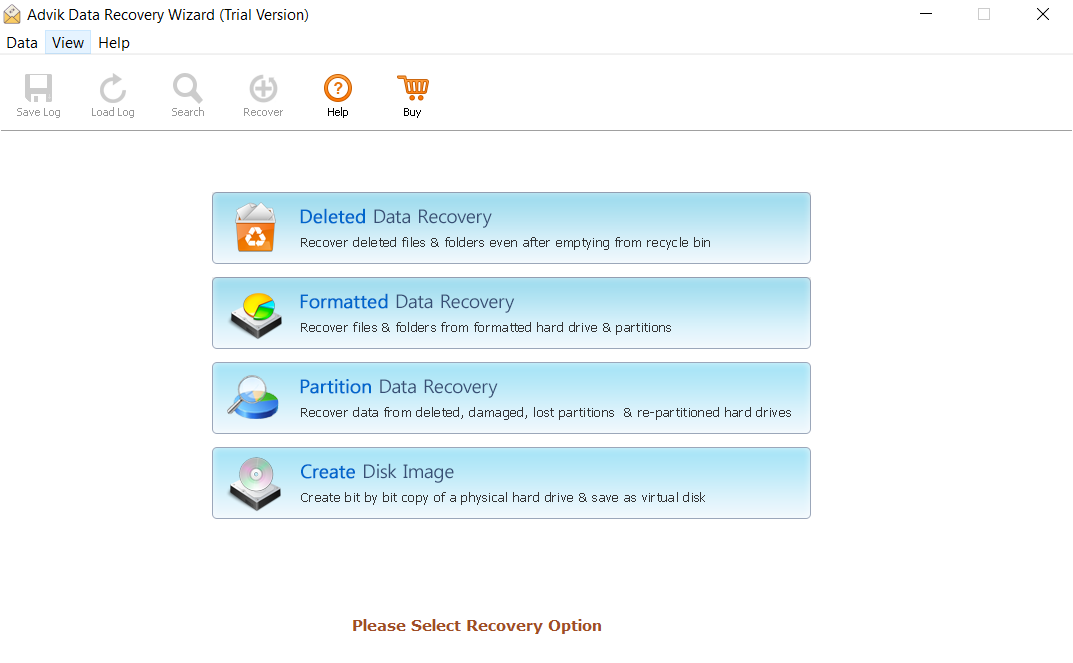
Step 1. Open the application and choose the recovery option.
Step 2. Choose the SD card, then click NEXT to start the scan.

Step 3. Now select the photos and click on save.
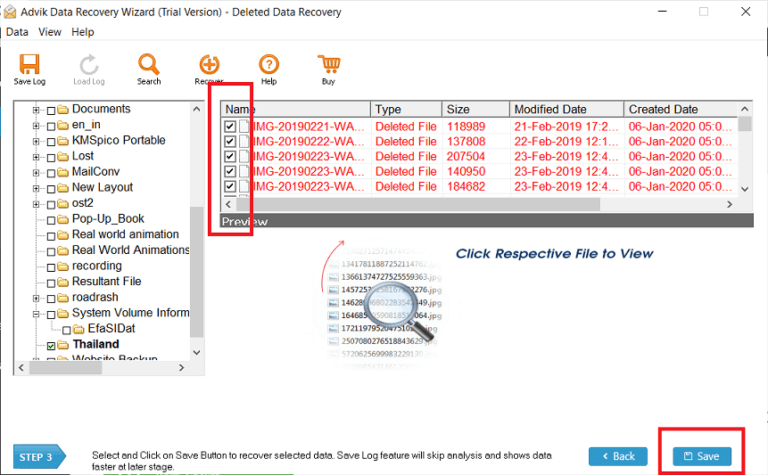
Step 4. The recovery process has started. Click OK to complete.

Done! Your deleted photos will be restored in a few minutes.
Advantages of Using Automatic Tool
- Recover up-to 5GB photos for free.
- The wizard also recover data from corrupted SD card.
- Can recover photos with any file extension, e.g.: jpg, png, jpeg and others.
- This can also recover lost photos from vivitar digital camera.
- The tool scans and preview the results quickly.
Final Thoughts
In this article, we discussed both manual and professional methods, and found that recovering deleted photos from the camera via the command prompt is difficult. However, the use of suggested tool makes recovery easy. This mentioned wizard can recover deleted photos from hasselblad camera safely in few easy steps. It also restore permanently deleted photographs from SD card and other storage devices.