How to Fix “Thunderbird UID Fetch Server Error”?
Jenny Lowrence | March 20th, 2026 | Mozilla Thunderbird
Have you encountered the UID Fetch Server Error Thunderbird? You’re not alone! Many users are facing the same issue. This error often appears without warning and can make it difficult to access or sync the mailbox. In this guide, we’ll walk you through the causes and provide step-by-step solutions to resolve the “Thunderbird UID Fetch Server Error”.
Thunderbird uses IMAP protocol to sync all data between the mail server and local storage. In email protocols, UID (Unique Identifier) is a number assigned to each email on the server. Thunderbird uses this UID to fetch and sync messages. When Thunderbird tries to download the email using this particular UID, but it is unable to properly communicate with the server to fetch email data, then it displays the error.
Common Causes of Thunderbird UID Fetch Server Error
- When the Thunderbird index files get corrupted, the UID could be mismatch which can lead to an error.
- Sometimes, the problem is with the mail server, it fails to respond properly to Thunderbird’s fetch request.
- If an email was deleted or moved to another device, Thunderbird might still try to access it using its old UID.
- Large mailbox files or damaged email data often cause UID sync failures.
- Wrong server settings can prevent proper communication, which may lead to Thunderbird UID fetch server error.
- Sometimes, security software may block or scan incoming emails, interfering with IMAP communication.
- Older versions of Mozilla Thunderbird may have bugs or compatibility issues with modern mail servers.
How to Fix “Thunderbird UID Fetch Server Error”?
In this section, we’ll discuss several manual techniques that will help you to solve Thunderbird UID fetch failed issue.
#1. Repair the Corrupted Folder
- Open Thunderbird on your system.
- Right-click on the affected folder.
- Click on Properties.
- Choose Repair Folder.
- Wait for Thunderbird to rebuild the Index.
- After that, restart Thunderbird and check the issue is fixed or not.
#2. Delete and Rebuild Thunderbird Index File
If the index files are damaged, it may cause the UID search failed internal error Thunderbird.
- First of all, close Thunderbird application.
- Now, open the Thunderbird Profile Folder.
- Go to Help >> More Troubleshooting Information >> Open Folder.
- Locate .msf files and delete them.
- After that, restart Thunderbird
#3. Compact Thunderbird Folder
- Go to File and click on Compact Folder.
- Right-click on the folder and choose Compact.
#4. Check IMAP Server Settings
Incorrect server settings can lead to “Thunderbird UID Fetch Server Error”. Ensure the settings are correct.
- Open Thunderbird on your system.
- Go to Tools >> Account Settings and check the server settings.
- Incoming server type: IMAP, Port: 993, Authentication: Normal password, Connection security: SSL/TLS.
#5. Disable Antivirus Email Scanning
Some antivirus programs interfere with IMAP connections. Temporarily disable email scanning and restart Thunderbird to check if issues is solved or not.
Effective Way to Fix Thunderbird UID Fetch Server Error
If you are still facing Thunderbird UID search failed internal error, then use the professional tool to fix it. Try the Advik Thunderbird Converter to resolve this error. This software allows you to backup your Thunderbird data that will help you in any uncertain situation. This is a secure solution that preserves all email attributes and folder hierarchy during the process. It also allows you to import Thunderbird data to another platform.


Steps to Solve Thunderbird UID Fetch Failed
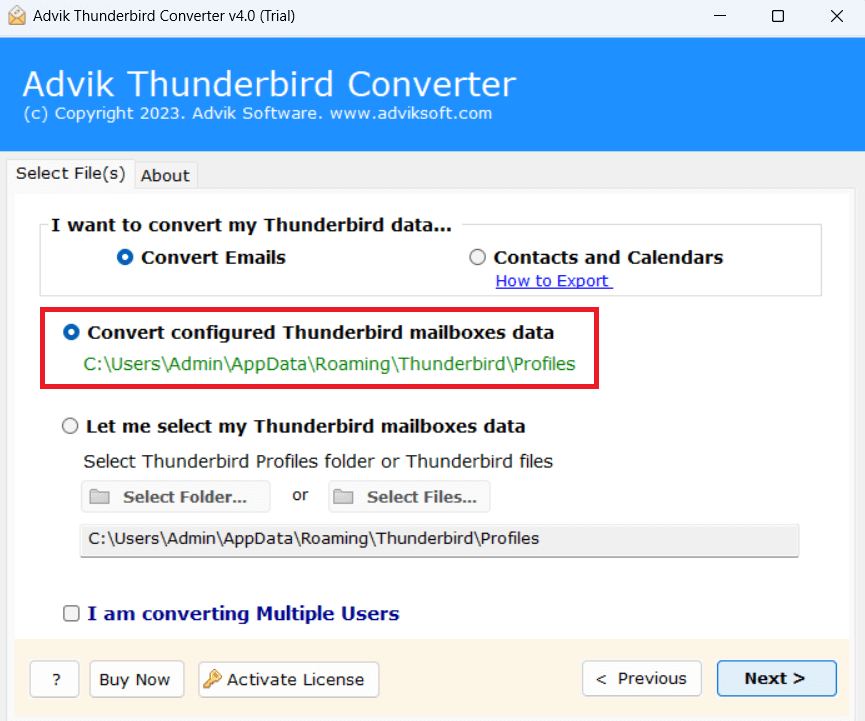
1. Run the tool and choose your Thunderbird profile.
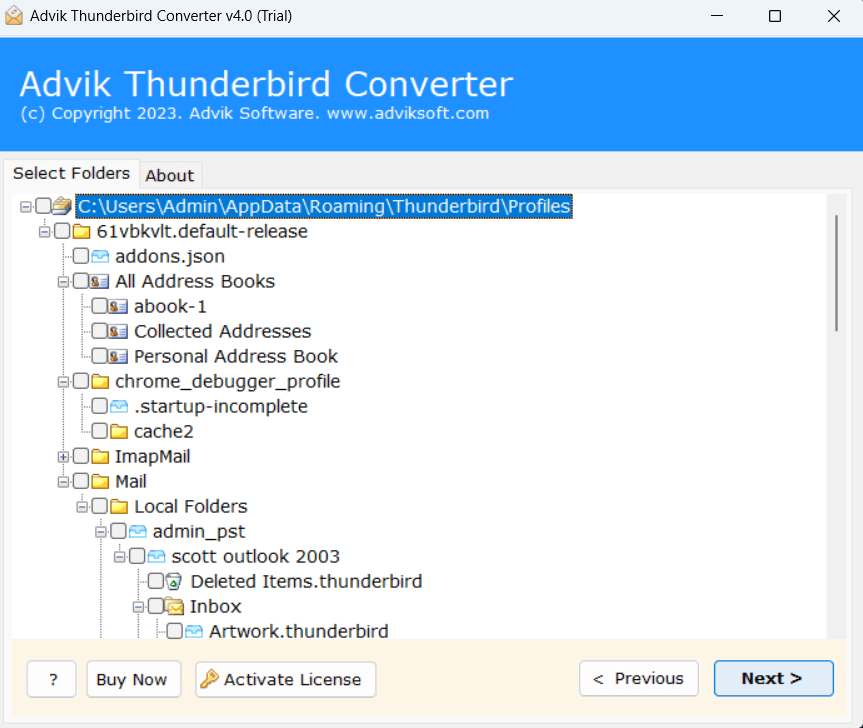
2. Select the mailbox folders and subfolders.
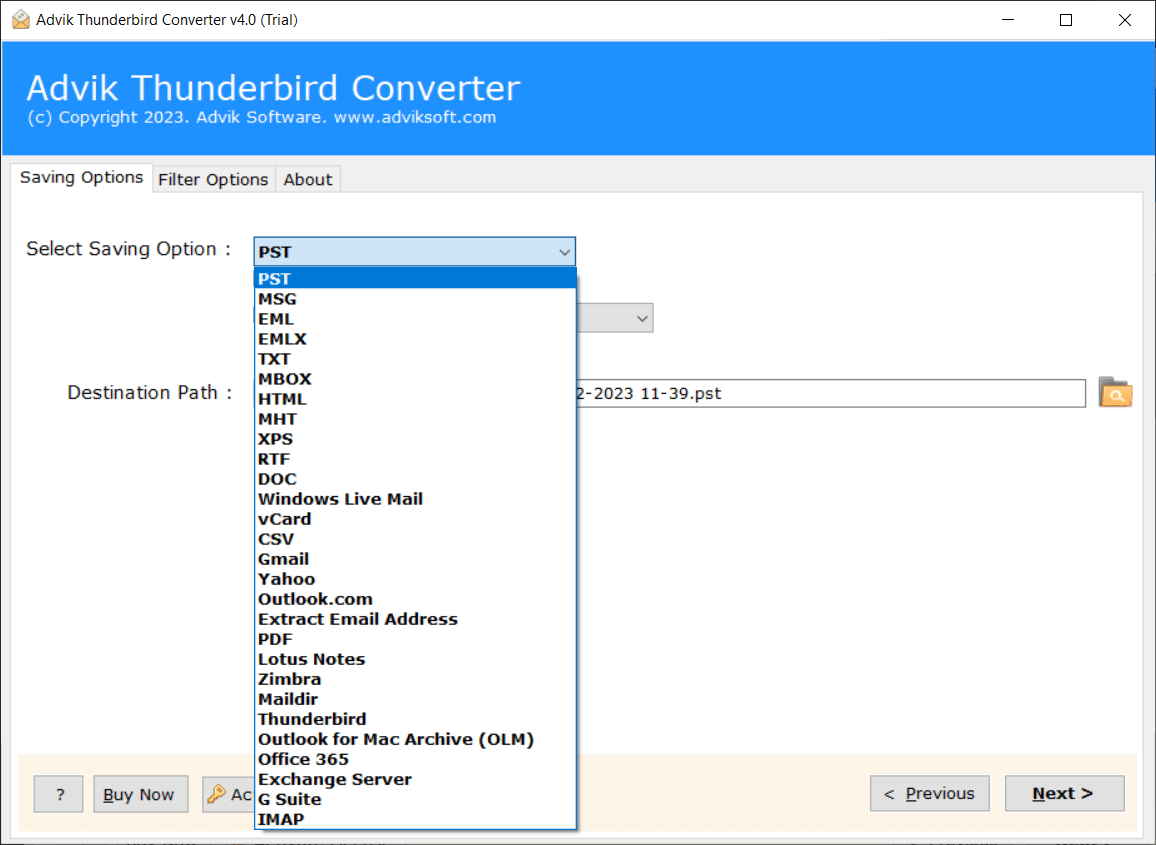
3. Choose a saving option from the given list.
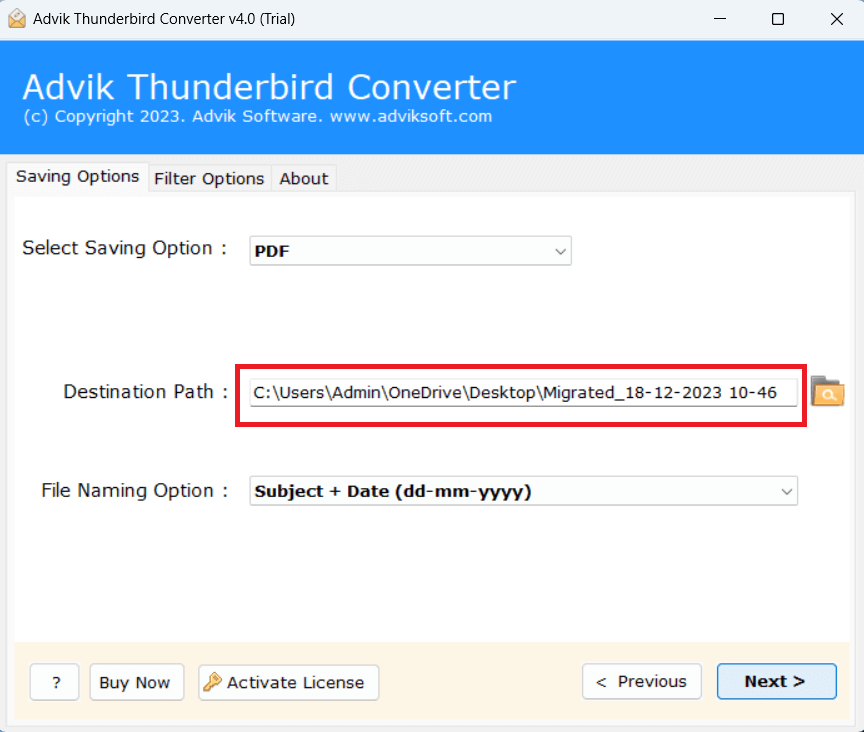
4. Browse target location and click Next.
Final Words
The UID fetch server error in Thunderbird is a complex issue where the client cannot retrieve certain emails from the server due to sync, server, or data issues occurs while accessing IMAP emails. In this post, we have discussed several troubleshooting steps to fix the “Thunderbird UID Fetch Server Error”.