How to Import PST to Yahoo Mail Account?
Quick Answer: You can import PST to Yahoo Mail in two ways. One way is to utilise Outlook: import the PST file using the Import/Export Wizard, add your Yahoo account to Outlook using IMAP, and then drag the imported folders into your Yahoo account. Another way is to use a professional PST converter that uploads PST files in bulk and connects directly to Yahoo Mail.
The PST file format stands for Personal Storage Table. It is created by the Microsoft Outlook application for storing emails, contacts, calendars, tasks, journals, and other mailbox items.
On the other hand, Yahoo Mail is an email service launched in 1997 through Yahoo Inc. It is the third-largest email service in the world. This is free of cost and runs on any computer. It provides various advanced features to maintain data like emails, contacts, calendar, etc.
A lot of users are looking for a method to transfer emails from PST file to Yahoo Mail. This blog describes the two best techniques to convert PST to Yahoo Mail with or without the Outlook email client. Stay tuned with us till the end to know complete information.
Table of Contents
- Why Import PST to Yahoo Mail?
- Important Prerequisites Before Importing
- How to Open PST File in Yahoo Mail Using Outlook
- How to Import PST File into Yahoo Mail Without Outlook
- Watch Video Tutorial
- Key Features of Advik PST to Yahoo Migration Tool
- Manual vs Professional Solution: Which Method Should You Choose?
- Troubleshooting Common Errors
- Size Limits & How Long It Takes
- Final Words
- Commonly Asked Questions
Why Import PST to Yahoo Mail?
There are several reasons why users might need to migrate PST to Yahoo Mail account:
- Yahoo Mail is a web-based email service so it can be accessed from anywhere at any time using any device. Hence, users may prefer to import Outlook PST to Yahoo Mail account.
- Users may have orphan PST files, but they don’t have any application to open them. Hence, users may decide to migrate it into Yahoo Mail to access its data.
- If you are transitioning from Outlook to Yahoo Mail, importing PST file ensures that you don’t lose any important information.
- Store a cloud-based copy so nothing is lost if the computer fails.
Important Prerequisites Before Importing
Either complete the following before initiating either manual or automated PST to Yahoo migration:
- Outlook must be installed and active on your device if you use manual method.
- Check that there is enough storage space in your Yahoo Mail account.
- Yahoo no longer lets Outlook or third-party tools sign in with your normal Yahoo password. You must create App Password.
- Check the PST file is in a healthy format.
- Take a backup of your PST file that you will use in this migration.
- Stable internet connection.
After understanding the requirements, you can move on to learn how to import PST file to Yahoo Mail.
How to Open PST File in Yahoo Mail Using Outlook?
The free method works if you already have Outlook installed and PST file on your PC. You will connect Yahoo to Outlook using IMAP then import and sync.
Step 1. Add Your Yahoo Account to Outlook
1. Open Outlook on your system.
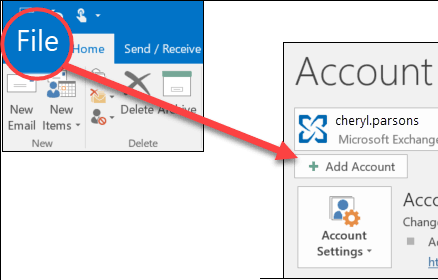
2. Go to File tab and click on Add Account.
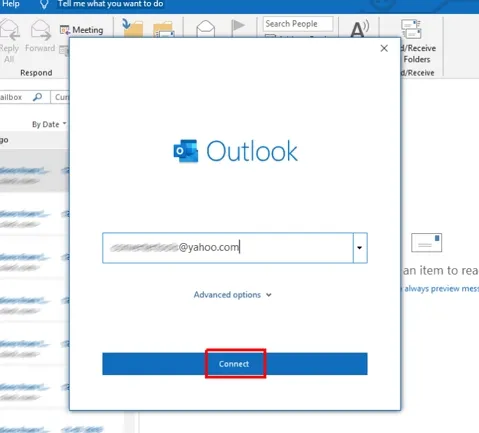
3. Enter the Yahoo email address and click Connect.
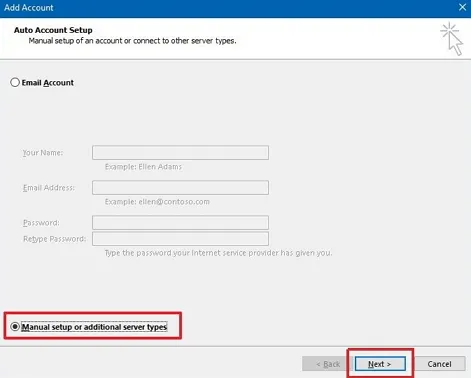
4. Select the radio button for manual setup or additional server types option.
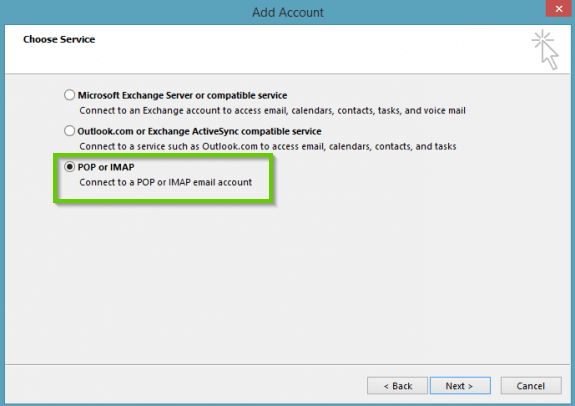
5. Choose POP or IMAP and click Next.
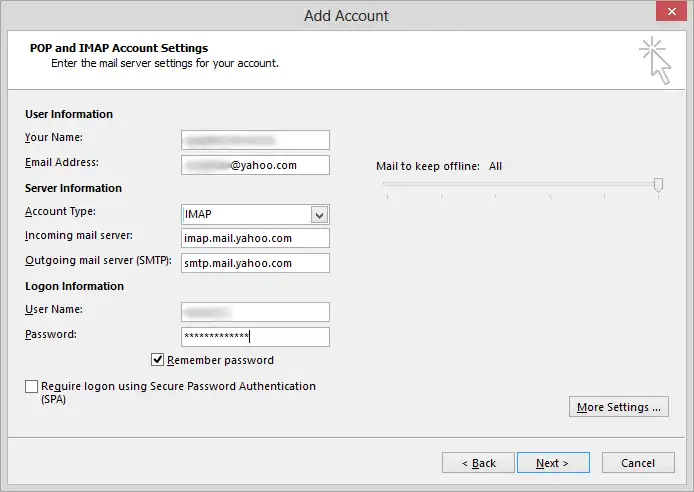
6. Enter your Yahoo credentials and server information as below:
- Account type: IMAP
- Incoming Mail Server: imap.mail.yahoo.com
- Incoming port: 993 (SSL/TLS)
- Outgoing (SMTP) server: smtp.mail.yahoo.com
- Outgoing port: 465 (SSL) or 587 (TLS)
- Password: Yahoo App Password
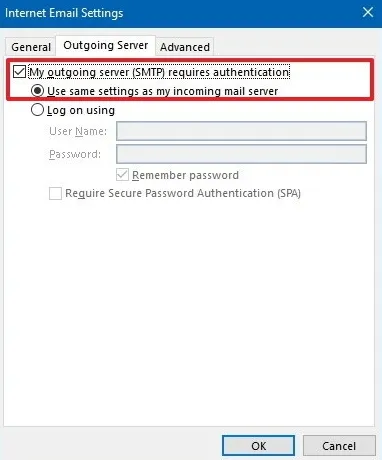
7. Click on More Settings and Outgoing Server tab.
8. Check My Outgoing Server Requires Authentication and pick Same Settings as Incoming Mail Server.
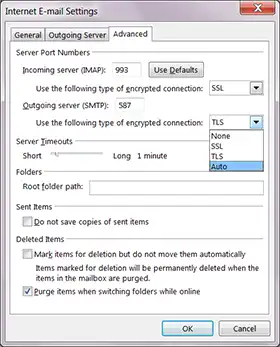
9. Click on Advanced tab and enter server port details below:
- Incoming Mail Server (IMAP): 993
- Incoming Server Encrypted Connection: SSL
- Outgoing Server (SMTP): 465 or 587
- Outgoing Server Encrypted Connection: TLS or Auto
10. Click Next and then Finish to complete the Yahoo Mail IMAP setup process.
11. Now Yahoo Mail shows up inside Outlook.
Step 2. Import PST File to Outlook
1. After configuration, go to File > Open & Export > Import/Export option.
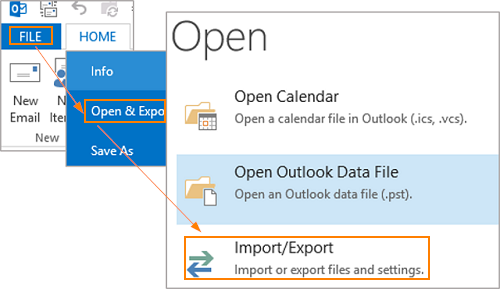
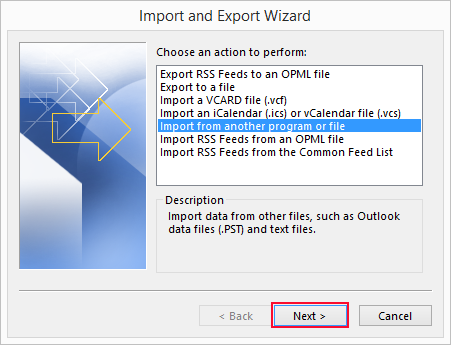
2. Select Import from another program or file and tap Next.
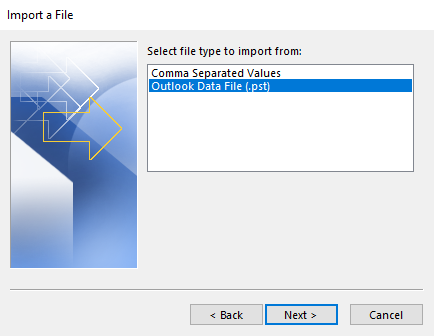
3. Choose Outlook Data File (.pst) and click Next button.
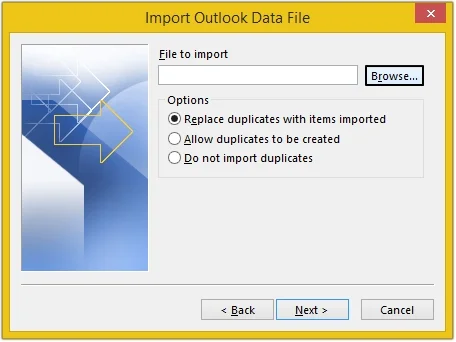
4. Browse PST file from your computer and press the Next button.
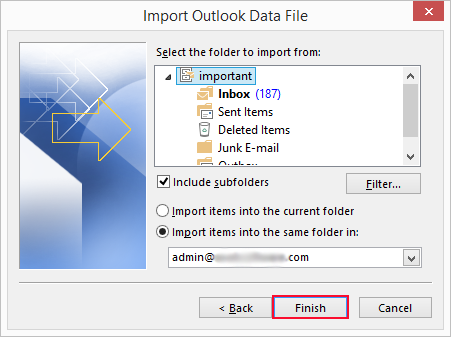
5. Select a folder to import PST items and press the Finish button.
Step 3. Sync the PST data to Yahoo
Drag and drop the imported PST folders onto your configured Yahoo account in Outlook’s folder pane. Outlook uploads them and they will appear in Yahoo Mail on the web once syncing completes.
Drag and drop imported PST data under the configured Yahoo account.
Then PST file will start syncing with Yahoo Mail.
Important Note: It needs Outlook installed, the account setup is difficult, large PST file sync slowly and there is no way to filter or batch import multiple files.
How to Import PST File into Yahoo Mail Without Outlook?
If you do not have Outlook, have several PST files or want to skip the manual configuration then dedicated software is faster and more reliable. Advik PST Converter is specialized tool to directly migrate PST file to Yahoo Mail without installing Outlook or any other application. With this tool, you can import large and any type of PST files such as ANSI or Unicode without losing any information and details. It allows you to import PST mailbox folders with exact formatting.
This utility comes with a free trial version that permits the importation of 25 items from each PST folder with all associated components. So, first, check the software working process using the demo version and after getting complete satisfaction you can get its license keys to avoid the 25-item limitation.


Steps to Import PST to Yahoo Mail
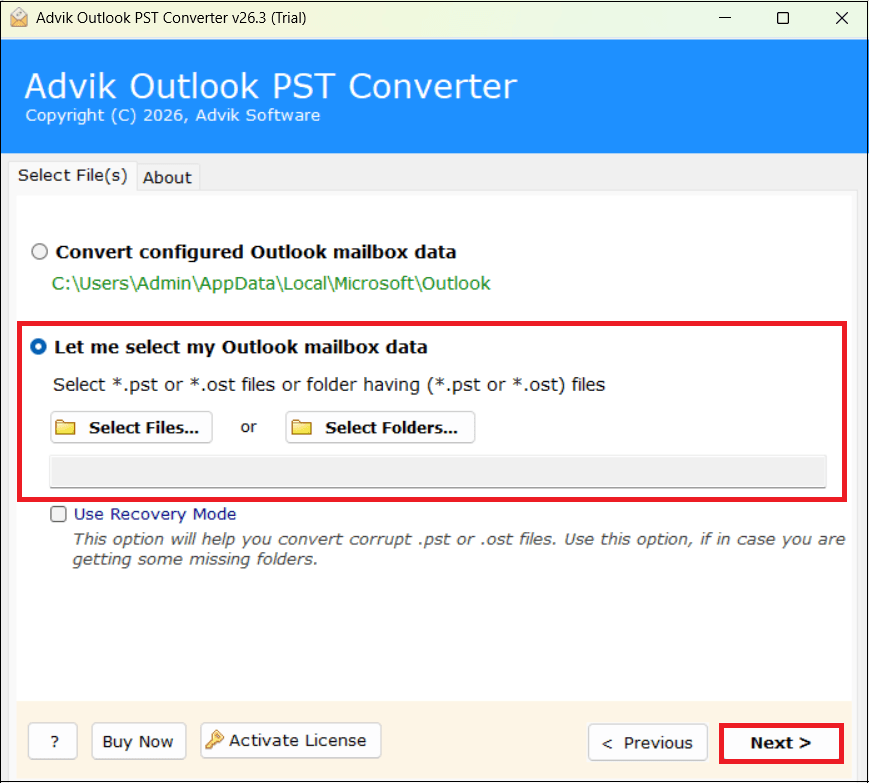
- Run the software and click on Select Files or Select Folders to add PST file.
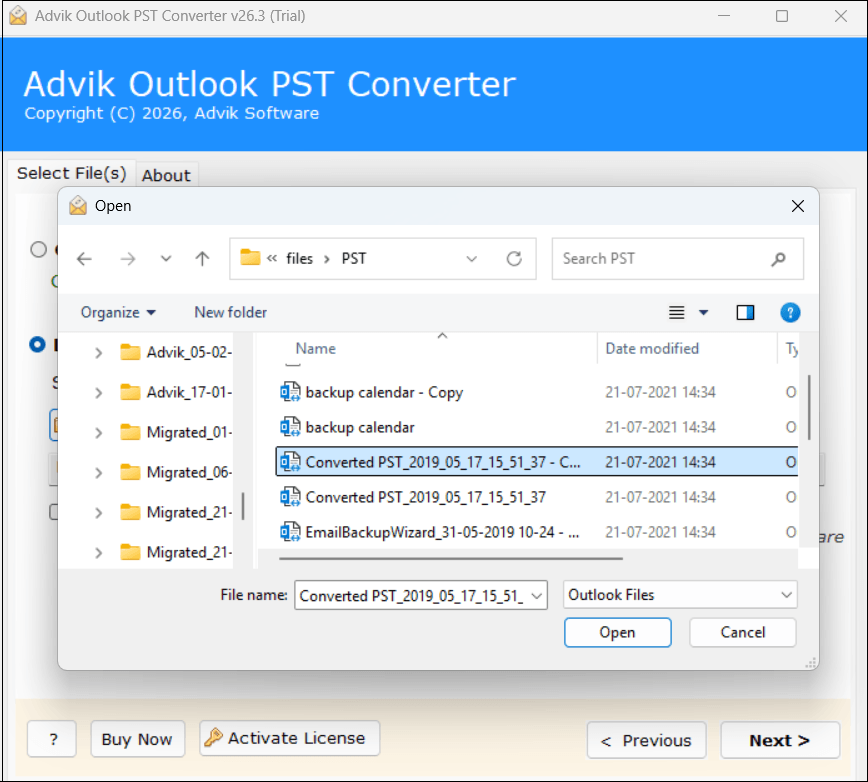
- Browse and choose .pst file from your system to import.
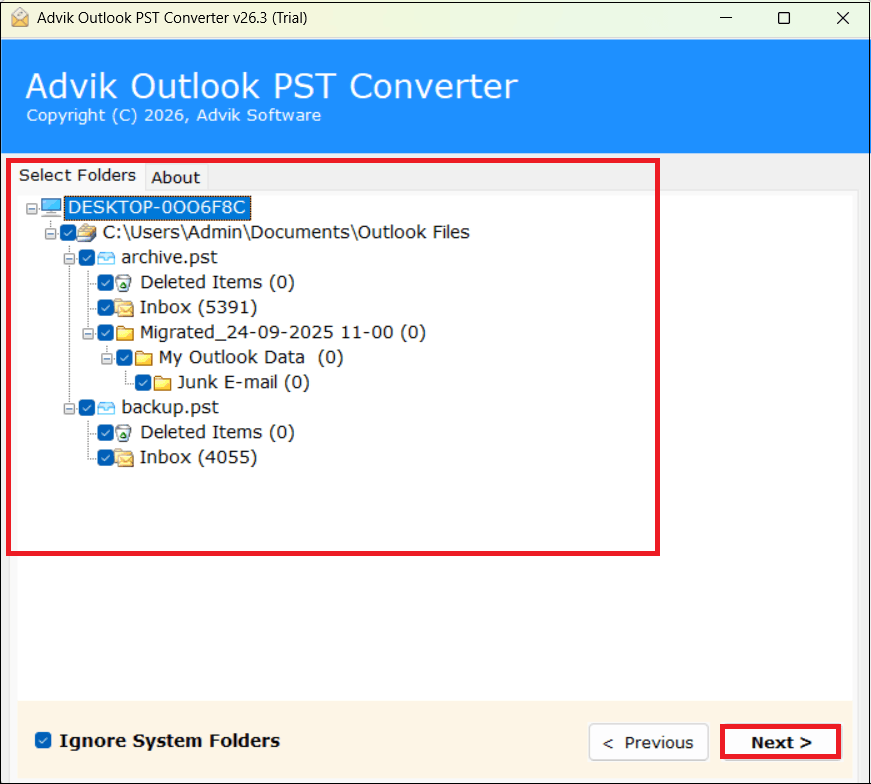
- Choose the required mailbox folders and click Next.
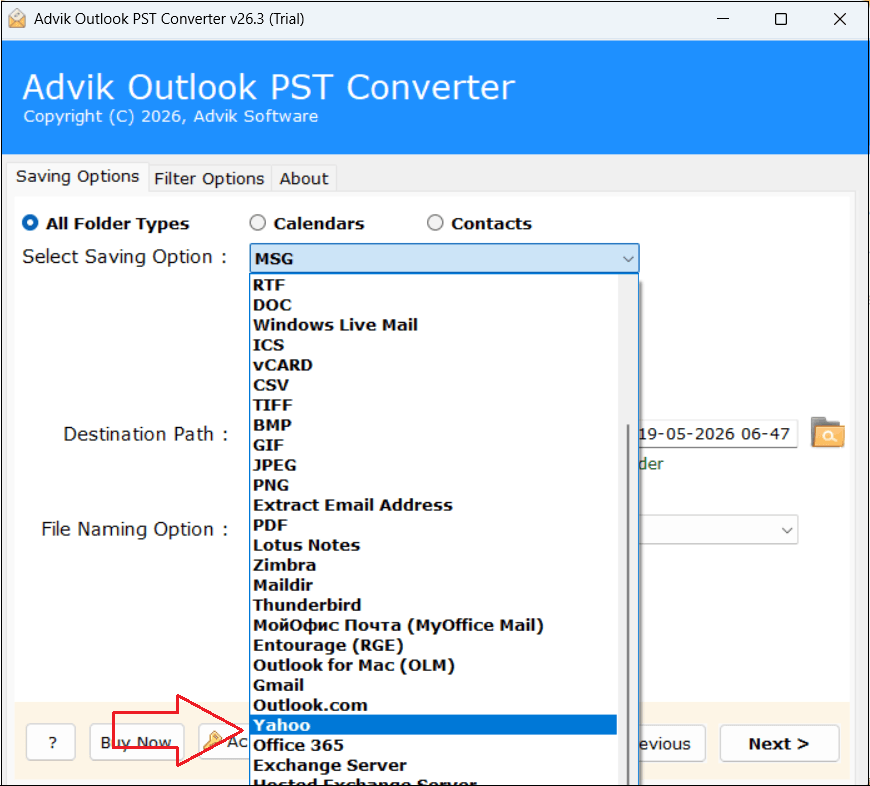
- Next, select Yahoo as a saving option from given list.
- Enter your Yahoo email address and App Password.
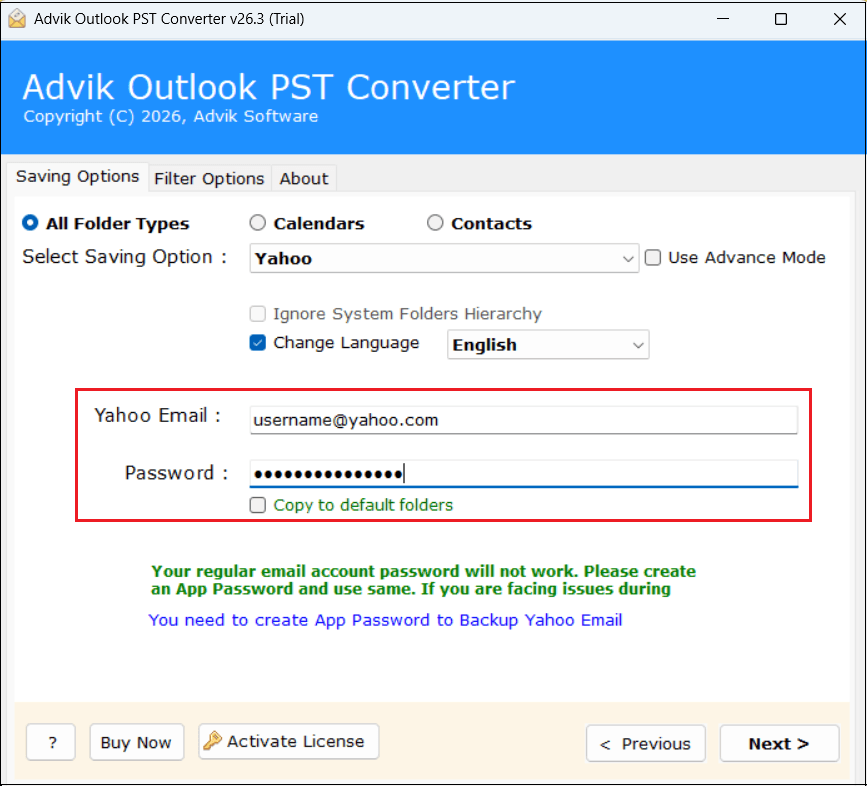
- Click the Next button and analyze the importing process.
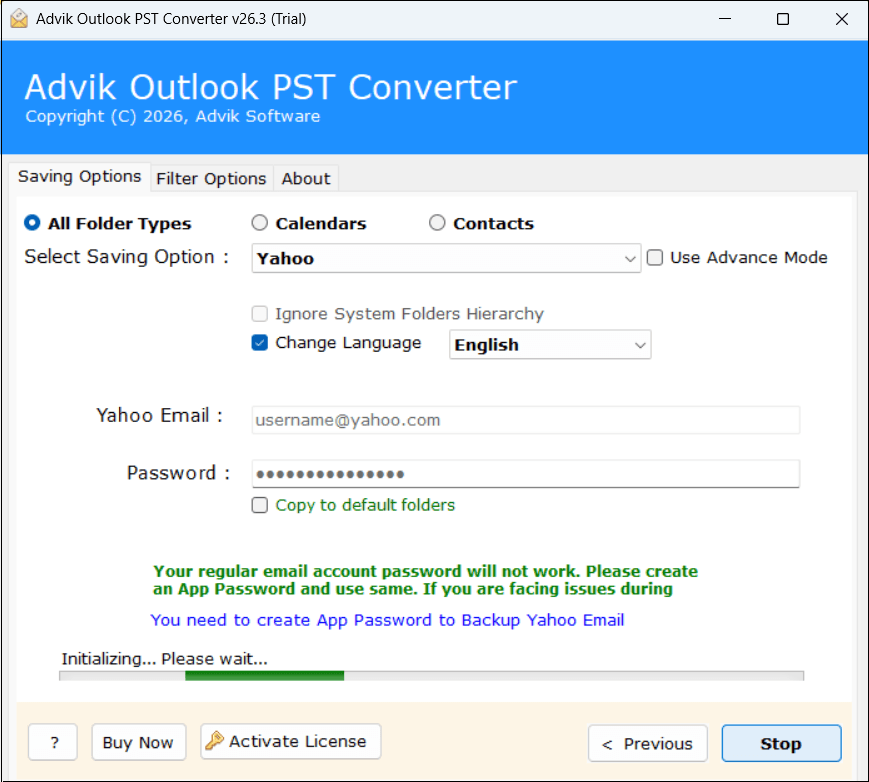
Once the process is complete, a confirmation message will appear on your screen. After that, log into your Yahoo Mail account and check the transferred Outlook PST file here.
Watch Video Tutorial
Key Features of Advik PST to Yahoo Migration Tool
- Batch Mode: With this PST to Yahoo Import Utility, you don’t have to undertake the same import process over and over again to import individual files as it can perform batch conversion of multiple PST files.
- Quick Email Transfer: This software is quite comprehensive, and it quickly and flawlessly imports Microsoft Outlook emails to Yahoo Mail Account. You can import PST to Yahoo Mail without Outlook installation.
- Maintains Folder Structure: While the software is performing email migration, it has been programmed to preserve or maintain the mailbox folder hierarchy as it is formed. Hence, you can find your emails in Yahoo Mail without any confusion.
- Safe & Secure: Our technology enhances the security feature by providing high & strong authentication, which never saves your Yahoo credentials. Hence, making it the best and secure application for easy migration.
- Support UNICODE: If your emails contain non-English text (such as in Chinese, Japanese, Russian, Korean, etc.) then you need not worry about the data. The software will not edit the content of your emails.
- For Windows OS: This software is workable on all editions of Windows versions such as Windows 10, Windows 8.1, Windows 7, Windows XP, Windows Server 2000, and all older versions of Windows.
- 24*7 Support: If you are facing any trouble importing PST files to Yahoo mail; Advik Software provides official Chat support offering 24/7 assistance to their valuable customers. You can contact us via Live Chat anytime.
Manual vs Professional Method: which Method Should You Choose
| Features | Manual method | Automated Tool |
|---|---|---|
| Requires Outlook | Yes | No |
| Batch PST Import | No | Yes |
| Large PST Support | Limited | Better |
| Time Consumption | High | Lower |
| Ease of Use | Complex | Simple |
| Selective Import | Not Supported | Supported |
Troubleshooting Common Errors
Login Failed or Incorrect Password When Connecting Yahoo
You are almost certainly using your normal password. Generate and use an APP Password instead of normal password.
Import Runs but Nothing Appears in Yahoo on the Web
The data imported into Outlook locally but was not dragged on to the Yahoo account, so it never synced. Move the folders under the Yahoo account and wait for sync to finish.
Large PST Stalls, Freezes or Times Out
Outlook struggles with big files. Split PST file or use a tool that uploads in batches.
Duplicate Folders or Emails After Import
Choose do not import duplicates during the Outlook import or use selective import in the tool.
Only Some Emails Transferred
Yahoo Mail may slow down or limit large email uploads. If not all emails appear immediately so wait for the sync process to finish. For large mailboxes, try importing emails in smaller batches to ensure all messages are transferred successfully.
Size Limits & How Long It Takes
There is no fixed PST size cap but IMAP sync speed depends on your PST size, number of items and connection. A few thousand emails can take from several minutes to a couple of hours over the manual method. Tools are generally faster because they uploads directly and can resume. For very large mailboxes, automated tool is the best option.
Final Words
In this post, we have discussed complete guidance to import PST to Yahoo Mail using 2 tried and tested approaches. Using MS Outlook, you can easily complete the importing process. However, an automated solution suitable for bulk PST migration. Now, you pick any method that is most suitable for you as per your needs.
Commonly Asked Questions
Ques 1. Do I need Outlook to import PST file to Yahoo Mail?
Ans. If you use the manual method, then Outlook installation is mandatory but if you use PST to Yahoo Converter, then you do not need to install MS Outlook.
Ques 2. Which Outlook version’s PST files are supported?
Ans. PST files exported from all Outlook versions such as Outlook 2021, 2019, 2016, 2013 and older are supported.
Ques 3. I want to transfer only the Inbox folder from PST file to Yahoo Mail. How can I do it?
Ans. Using automated software, you can import only Inbox folder as per your requirements.
Ques 4. Will the folder structure be preserved during the process?
Ans. Yes, both methods keep the original structure of mailbox folders even after the process.
Ques 5. Are there any file size limitations to import?
Ans. No, there are no file size restrictions. However, very large PST file sync more slowly in manual approach. While the software can import it faster.
{
“@context”: “https://schema.org”,
“@type”: “FAQPage”,
“mainEntity”: [
{
“@type”: “Question”,
“name”: “Do I need Outlook to import PST file to Yahoo Mail?”,
“acceptedAnswer”: {
“@type”: “Answer”,
“text”: “If you use the manual method, Outlook installation is required. However, if you use a PST to Yahoo Converter, you can import PST files to Yahoo Mail without installing Microsoft Outlook.”
}
},
{
“@type”: “Question”,
“name”: “Which Outlook versions’ PST files are supported?”,
“acceptedAnswer”: {
“@type”: “Answer”,
“text”: “PST files created by all major Outlook versions, including Outlook 2021, 2019, 2016, 2013, and earlier editions, are supported.”
}
},
{
“@type”: “Question”,
“name”: “Can I transfer only the Inbox folder from a PST file to Yahoo Mail?”,
“acceptedAnswer”: {
“@type”: “Answer”,
“text”: “Yes. Using automated software, you can select and import only the Inbox folder or any specific mailbox folder according to your requirements.”
}
},
{
“@type”: “Question”,
“name”: “Will the folder structure be preserved during the import process?”,
“acceptedAnswer”: {
“@type”: “Answer”,
“text”: “Yes. Both the manual and automated methods preserve the original mailbox folder hierarchy during the import process.”
}
},
{
“@type”: “Question”,
“name”: “Are there any file size limitations when importing PST files to Yahoo Mail?”,
“acceptedAnswer”: {
“@type”: “Answer”,
“text”: “No, there are no specific file size restrictions. However, large PST files may take longer to sync using the manual method, while automated software can handle large files more efficiently.”
}
}
]
}