How to Backup Spark Mail Emails to PC?
Jenny Lowrence | February 24th, 2026 | Data Backup
Summary: Are you worried about your Spark Mail email data to be spoiled by any means of data loss issues? So, it is important and neceassry to backup Spark Mail emails to ensure long-term accessibility and data safety. Here we are going to show the best and easiest solution to save your data without having any limitations.
Spark Mail is a popular email client known for its smart inbox and productivity-focused features. The email application allows users to add unlimited IMAP email accounts in a single environment. Whenever a user check Inbox, Spark Mai contact the server and then connect user with the messages. Many users want to create a local backup of their emails on a PC for security, legal, or offline access purposes. In this blog, we will show you a simple to download emails from Spark Mail to Computer.
Why Need to Backup Spark Mail Emails?
Here are some benefits of saving Spark Mail emails to computer;
- Saving Spark Mail emails is helpful to ensure email security and loss prevention.
- Backing up Spark Mail seems much more useful for restoring accidentally deleted emails.
- Keep a local copy for compliance or legal purposes.
- Backup provides a secure way to switch email platforms.
However, Spark Mail does not offer any option to back up emails locally, users need to rely on professional tools to accomplish this task. Here, we’ll provide a simple and quick solution to perform the Spark Mail email backup process.
How to Save Spark Mail Emails to Computer?
Download and install the Advik Email Backup Wizard on your system. The software can easily backup Spark Mail emails in just a few simple clicks. It offers various saving options to export Spark emails in 30+ formats. With this tool, you can save all or selected emails as per your needs. It preserves all email properties and mailbox folder hierarchy during the backup process.
Click on the below link to download it for FREE.


Steps to Backup Spark Mail Emails to PC
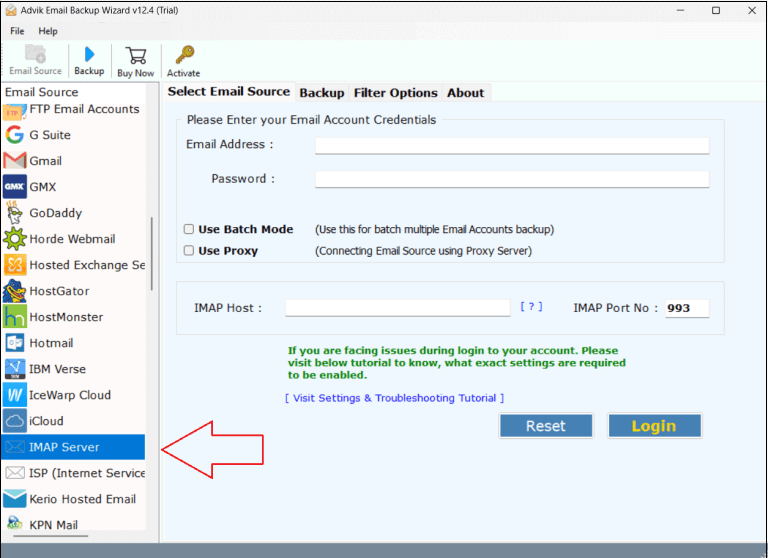
1. Run the tool and choose IMAP Server as the email source.
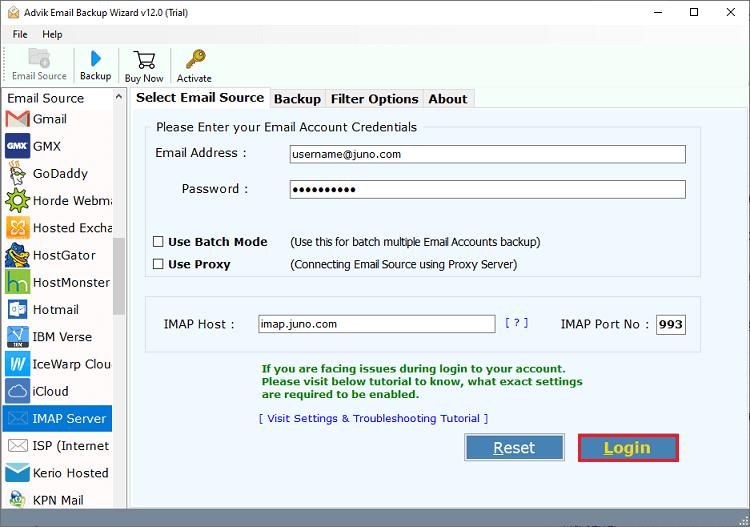
2. Enter your Spark Mail account credentials to sign in.
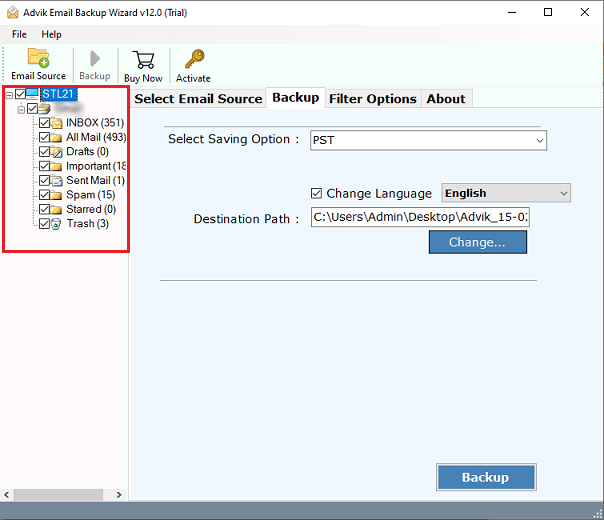
3. Choose the mailbox folders to download.
4. Next, select a saving option from the given list.
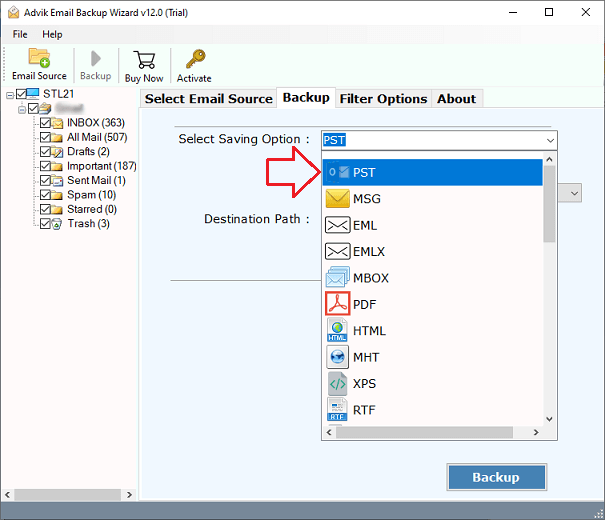
5. Browse the target location and click the Backup button.
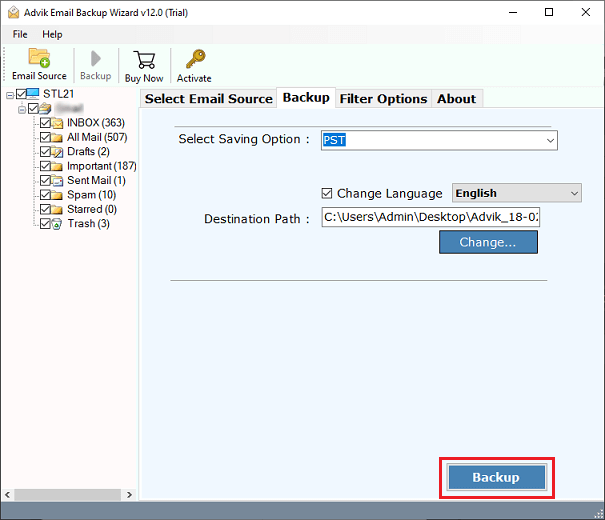
Now, the software will start downloading emails from Spark Mail account. Once completed, it will automatically redirect to the destination folder.
Prime Features of Spark Mail Backup Tool
- Save Emails in Bulk: For taking backup of Spark Mail data, you can select any number of folders without any hassle. It can save all emails from Spark Mail in a single attempt.
- Download Selective Emails: Using this tool, you can choose emails for backup in a selective manner. You can save emails based on date range, to, from, subject, etc.
- Multiple Saving Options: The software offers 30+ saving options to export Spark Mail emails. With this utility, you can save emails in multiple formats such as PST, PDF, MBOX, etc.
- Preserve Email Properties: The tool maintains all the email attributes throughout the backup Spark Mail emails process. The email components like sender/receiver details, subject, attachments, images, etc.
- Retains Folder Hierarchy: Sometimes users concerned about the structure of Spark Mail email folders. This utility keeps the original structure of mailbox folders even after the process.
- Wide Compatibility: You can run this application on both Mac and Windows based system. It supports all the latest and old versions of both Mac and Windows operating systems.
Final Words
In this blog, we have explained how to backup Spark Mail emails with attachments. Due to lack of manual method, here we have mentioned a simple and direct solution to save Spark Mail emails to PC. The entire process of this software is easy to undertstand for any technical or non-technical users. If you still have any doubts, feel free to contact to our technical support teams.
