Hyperlinks in Messages are Not Working in Thunderbird – How to Fix It?
Jenny Lowrence | March 27th, 2026 | Mozilla Thunderbird
Overview: Have you recently witnessed that the Hyperlinks in messages are not working in Thunderbird? If yes, then don’t worry anymore, as here, in this blog, we are going to discuss why Thunderbird not opening links in emails and how to fix it effortlessly.
Mozilla Thunderbird is a free and open-source email client. It is a widely used application that allows users to manage multiple accounts with ease. It offers great flexibility, customization, and security. However, like any other email platform, it can sometimes run into issues. One such issue is “Hyperlinks in Emails are Not Working in Thunderbird”. Today, in this write-up, we’ll show step-by-step techniques to resolve the issue in minutes.
Why are Hyperlinks Not Working in Thunderbird?
Here are some reasons why Thunderbird not opening links:
- If the default web browser is not set
- If the Link configuration settings are not set properly
- Conflicts of installed add-ons
- Corrupted Thunderbird preference settings
- Using an outdated version of Thunderbird
How to Fix “Hyperlinks in Messages are Not Working in Thunderbird”?
There are multiple solutions to resolve hyperlink not working in Thunderbird. You can follow to fix this issues.
#1. Update Thunderbird
1. Open Thunderbird on your system.
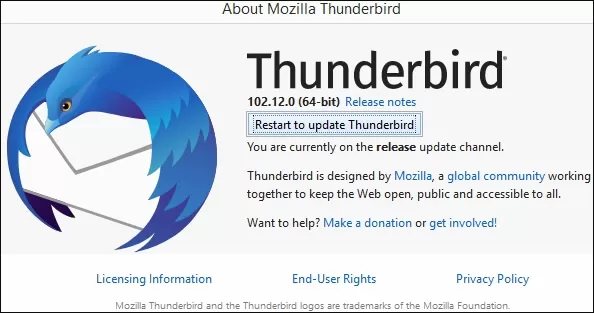
2. Click on Help and choose About Thunderbird.
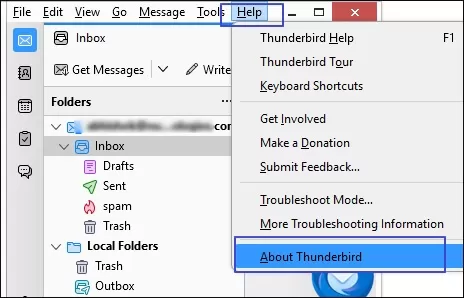
3. Follow the prompts to download and install the latest version.
#2. Check Default Browser Settings
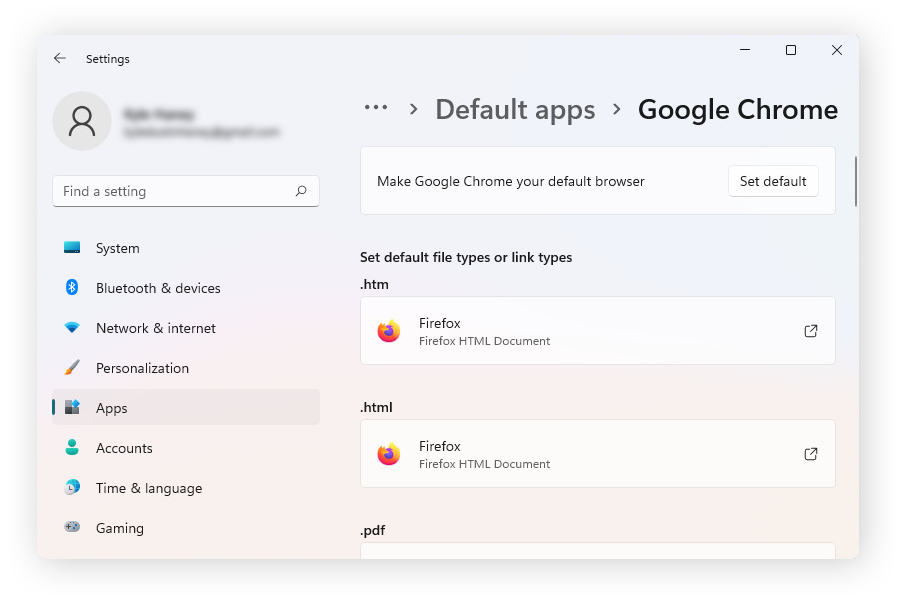
Hyperlinks in Thunderbird rely on your system’s default browser. Sometimes, the default browser settings may get corrupted for any reason, so you need to reset them as the default.
1. Go to Settings >> Apps >> Default Apps.
2. Select your preferred browser and set it as the default.
#3. Verify the HTTP Content-Type
- Open Thunderbird on your system.
- Click on Preferences.
- Go to Content section and choose File Types from Content Type column.
If you see the HTTP or HTTPs then you can:
- Delete and select action together
- Ensure the correct browser is selected for the action
#4. Check for Incorrect Preference
Sometimes, hyperlinks in messages are not working in Thunderbird due to an incorrect hidden preference. These alterations are due to the installation of new add-ons.
1. Open Thunderbird and click on Tools >> Settings.
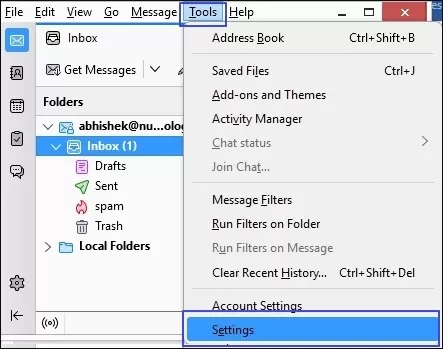
2. Choose General and click on Config Editor.
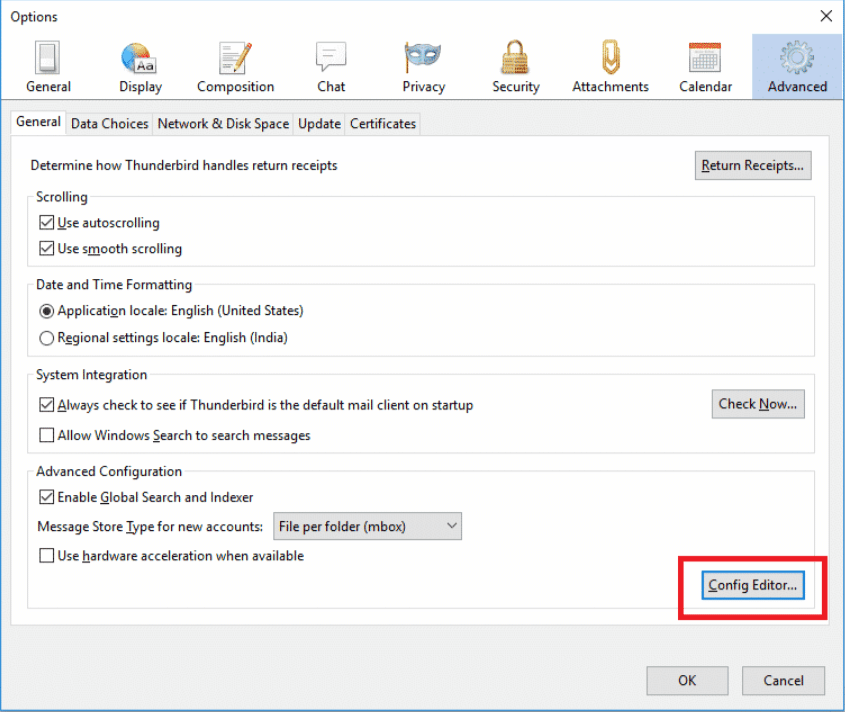
3. Type network.protocol-handler.external-default in the search field and choose the entry from the list.
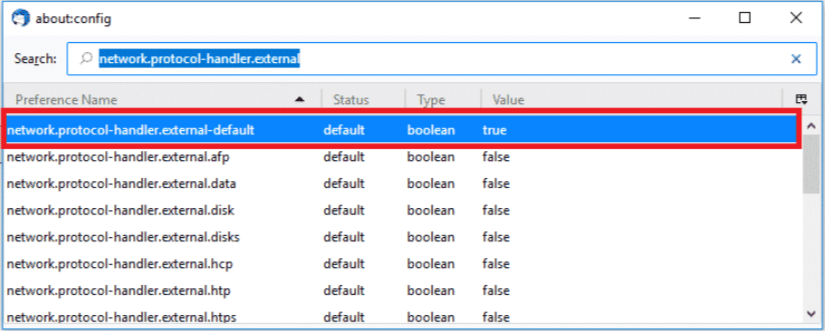
4. Now, right-click on this and choose the Reset option.
#5. Disable Add-Ons
Sometimes, add-ons can conflict with Thunderbird functionality and cause hyperlink not working issues. So, remove these add-ons to fix it.
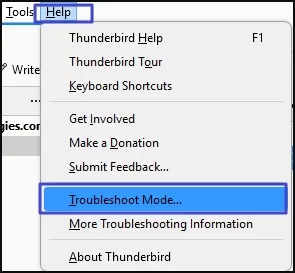
1. Open Thunderbird and click Help >> Troubleshoot Mode.
2. Click on Restart in the Restart in Troubleshoot Mode window.
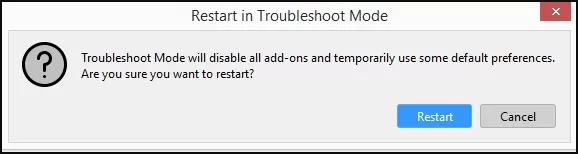
3. Next, click on Continue in Troubleshoot Mode.
4. Choose Disable all Add-ons and restart Thunderbird.
Expert Solution to Resolve Thunderbird Not Opening Links in Emails
If you are still facing the hyperlinks in messages are not working in Thunderbird, then you must migrate your Thunderbird data to another email platform to fix it. With Advik Thunderbird Converter, you can easily move your data without any data loss. The software can export Thunderbird to PST, MBOX, PDF, EML, and many other formats or cloud-based platforms. This is a safe and secure solution that preserves data integrity and mailbox folder hierarchy during the process. You can download its free demo version to analyze its working procedure.

Conclusion
Hyperlinks in messages are not working in Thunderbird can be frustrating, especially when users rely on emails for important tasks. This issue is usually related to browser settings, configuration errors, interference of add-ons, etc. In this post, we have explained several methods to fix the issue of hyperlinks not working in Thunderbird. By following these methods, you can quickly resolve this error and restore hyperlink functionality.