How to Migrate Emails from IBM Verse to Gmail?
Dear readers, today I will be showing you the step by step guide to migrate emails from IBM Verse to Gmail account. As there are several users who want to transfer IBM Verse emails to Gmail. Unfortunately, they didn’t find any suitable solution for IBM Verse to Gmail migration.
IBM Verse is developed by International Business machine Corporation. It is an enterprise email solution designed to simplify and streamline email management. It is a cloud based email and file sharing based service support focused on corporate work environments.
Gmail is one of the most popular email services in the world provided by Google. It is known for its clean interface and integration with Google ecosystem. It offers a great user experience for mailing by Google Meet integration, Google Drive Storage and Google Calendar synchronization.
Why Migrate from IBM Verse to Gmail?
In June’2020, HCL has acquired IBM products including Notes, Domino and various others. Due to this acquisition, users are now moving from IBM Verse to Gmail. The reason is quite unknown. Maybe there are other reasons
- IBM Verse is a paid email solution whereas Gmail is a free email service.
- Gmail comes with intuitive and easy to use interface but IBM Verse requires a professional user.
- Gmail has strong security features to protect important data.
- It includes search option to find out old emails quickly.
Now, we are proceeding with the solution to perform the IBM verse to Gmail migration. However, there is no manual solution to move IBM Verse emails. So, we are left using the automated tool.
How to Transfer Emails from IBM Verse to Gmail?
Download and install Advik Email Migration Tool. This software is specially designed to migrate IBM Verse to Gmail account. The best part is that you can batch transfer all email folders in a single attempt. It also offers advanced email filter options to move selected emails based on date range, to, from, subject, etc. The tool maintains mailbox folder hierarchy and data integrity during the process.
Tap on the below link to download it for FREE.


Steps to Migrate Emails from IBM Verse to Gmail
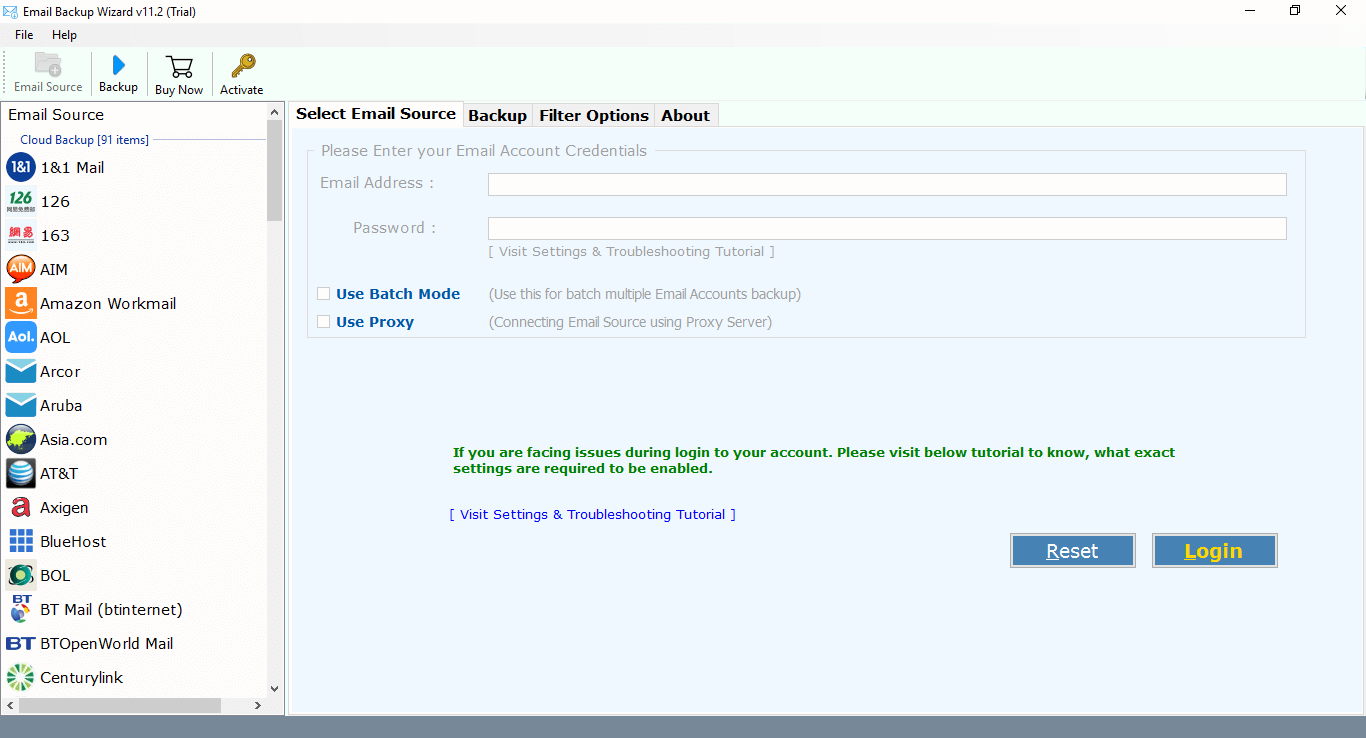
Step 1. Run Advik Email Migration Tool and select IBM Verse
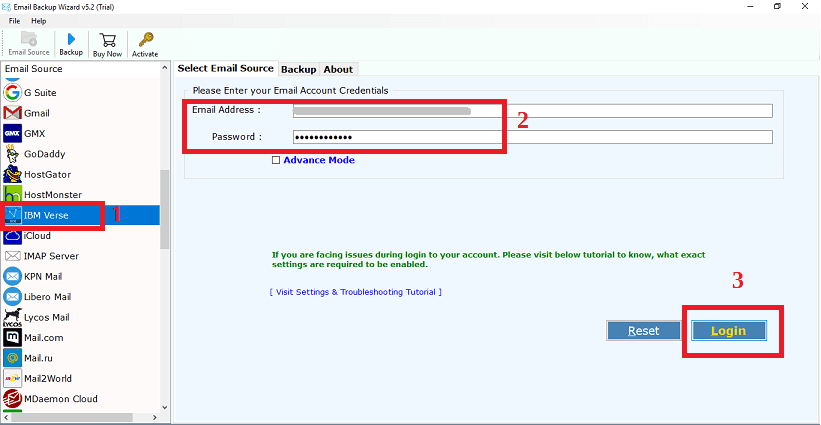
Step 2. Enter your login credentials to sign in
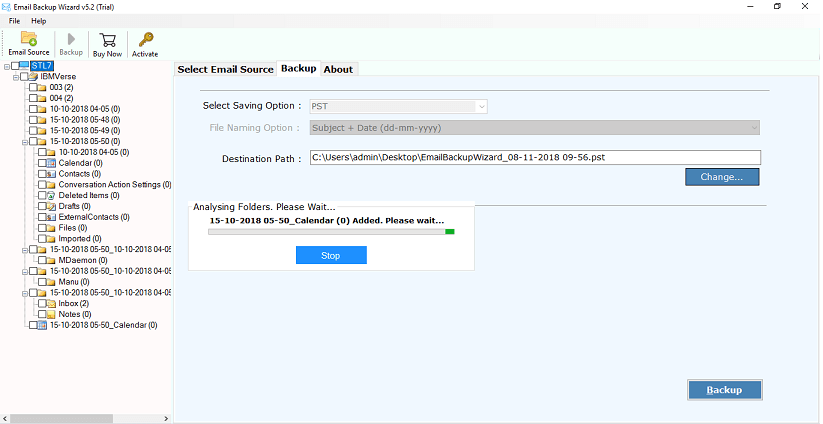
Step 3. Select mailbox folders to migrate
Step 4. Choose Gmail as saving option from the list
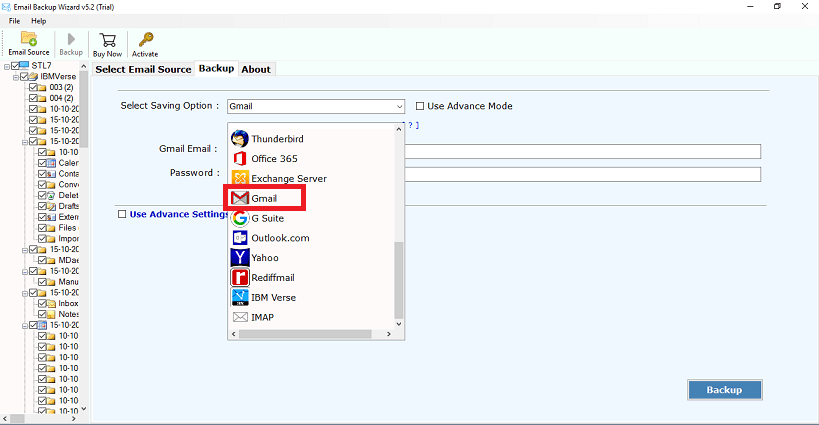
Step 5. Enter Gmail login credentials and click Backup
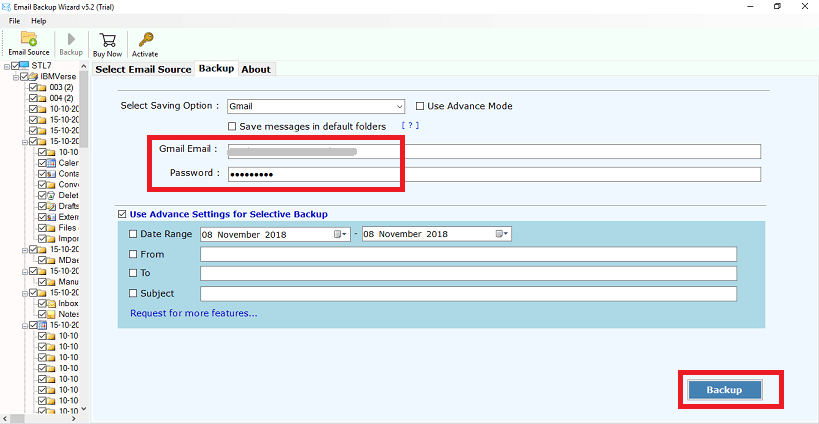
Finished, this is how you can export IBM verse emails to Gmail account. There is no manual configuration is required. The software will take care of it.
Watch How to Complete IBM Verse to Gmail Migration
Why Choose IBM Verse to Gmail Migration Tool?
There are dozens of features and benefits you will get by choosing this solution. Here are they;
- Bulk Migration: The software can transfer all mailbox folders at once. There are no mailbox size limitation on the mailbox size and number of folders to migrate.
- Batch Mode: With this utility, you can migrate emails from multiple IBM Verse accounts to Gmail at once. It has a batch mode option that allows you to add a CSV file that contains the login details of multiple accounts.
- Transfer Selective Mailbox Folders: Once you add login details of your IBM Verse account, the software displays all mailbox folders. You can select any particular folder or all folders for migration as per your requirement.
- Advanced Email Filters: The tool provides various filter options for specific email migration. Using these email filter you can move emails based on date range, to, from, subject, etc.
- 30+ Saving Options: The software offers multiple saving options to export IBM Verse emails into several file formats. With this utility, you can transfer emails from IBM Verse to Office 365, Yahoo Mail, Zoho Mail and many more.
- Preserve Data Integrity: This is a safe and secure solution that does not lose any single bit of data during the process. It preserves all email attributes like attachments, signatures, hyperlinks and sender & receiver info while migrating.
- Maintains Folder Hierarchy: There is no concern about the structure of mailbox folders. This application keeps the original structure of IBM Verse email folders even after the migration.
- Windows and Mac Supportive: You can run this tool on any version of both Mac and Windows operating system. It supports all the latest and old versions of both Mac and Windows OS.
Summary
In this post, we have discussed how to migrate emails from IBM Verse to Gmail account. Despite knowing the fact that there is no official solution available. I would like to suggest you to choose above method to transfer IBM Verse emails to Gmail. Give it a try and perform the task, hopefully you will really get a 100% satisfactory result.
Frequently Asked Questions
Q 1. Can I move emails from IBM verse Sent folder?
Ans. Yes. Once you login your IBM verse account then the software shows all mailbox folders where you can choose only Sent Item folder for migration.
Q 2. Does the tool store my login credentials?
Ans. No, the software use OAuth2.0 Authentication. It does not save your login details while migrating.
Q 3. Can I installed this migration tool on my Mac?
Ans. Yes, you can run this application on both Mac and Windows based machine.