How to Migrate SquirrelMail to Google Workspace?
Jenny Lowrence | March 24th, 2026 | Email Migration
Overview: This post will guide you on how to migrate SquirrelMail to Google Workspace. Here, we’ll show you the best technique to transfer emails from SquirrelMail to Google Workspace. Read this article till the end to get the step-by-step process for moving emails with attachments.
SquirrelMail is an open-source webmail interface. It allows users to access emails via a browser using IMAP. However, if you are still using the SquirrelMail email service, it’s time to migrate to Google Workspace. SquirrelMail is an outdated platform that is no longer supported by its developers.
In contrast, Google Workspace is a cloud-based platform that includes Gmail, Drive, Docs, and more. It offers advanced email management. better security, and seamless collaboration tools.
Why Migrate from SquirrelMail to Google Workspace?
Transferring SquirrelMail emails to Google Workspace provides better productivity, stronger security, and more professional tools for work. Let’s see more reasons:
- By migrating SquirrelMail to G Suite, users can access their emails from anywhere on any device.
- Google Workspace comes with a highly integrated suite of tools (Drive, Sheets, Docs, Meet, Calendar, etc.) that work together in real time.
- With advanced spam filtering and built-in collaboration tools, Google Workspace provides a more secure environment.
- Google Workspace works smoothly with many third-party apps like Zoom, Slack, and others. This makes teamwork easier and improves productivity.
Since there is no manual approach for migrating SquirrelMail emails to G Suite, we’ll discuss the most prominent migration method. Let’s get started!
How to Transfer SquirrelMail Emails to Google Workspace?
Download and install the Advik Email Migration Tool on your system. The software can migrate SquirrelMail to Google Workspace in just a few simple clicks. Just enter the login details of SquirrelMail account into the software, choose mailbox folders, select G Suite as the saving option, enter Google Workspace login details, and click Backup to begin the migration process.
With this tool, you can move the entire mailbox in one go. Also, it allows you to choose specific folders for migration as per your needs. It preserves 100% data integrity and mailbox folder structure during the SquirrelMail to Google Workspace migration. Thus, no data loss will take place at any step.
Tap on the below link to download its FREE version.


Steps to Migrate SquirrelMail to Google Workspace
1. Run the SquirrelMail to Google Workspace Migration Tool on your system.
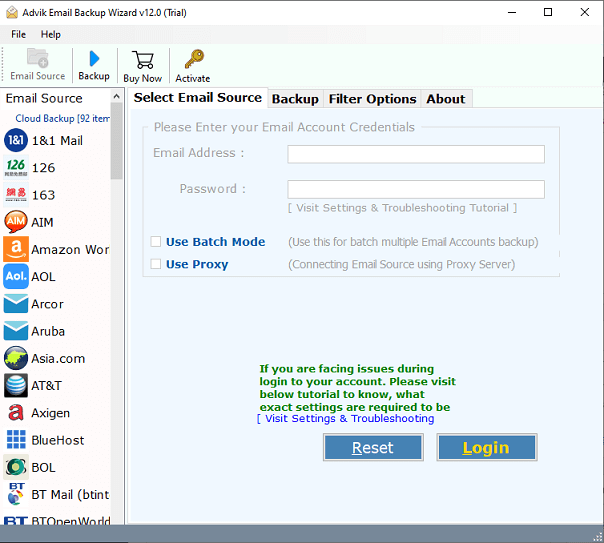
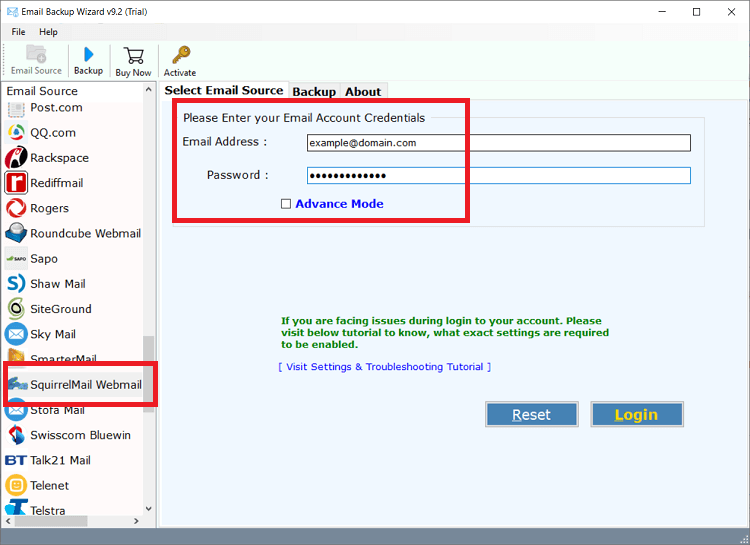
2. Choose SquirrelMail as email source and enter its login details to sign in.
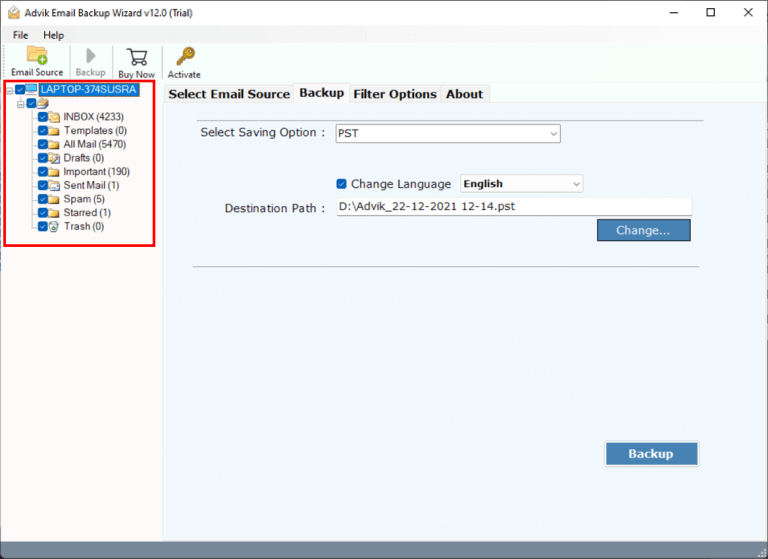
3. Select the required mailbox folders to transfer.
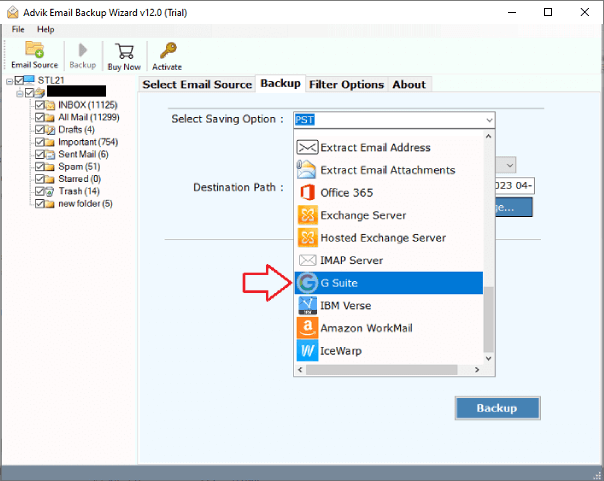
4. Choose G Suite as a saving option.
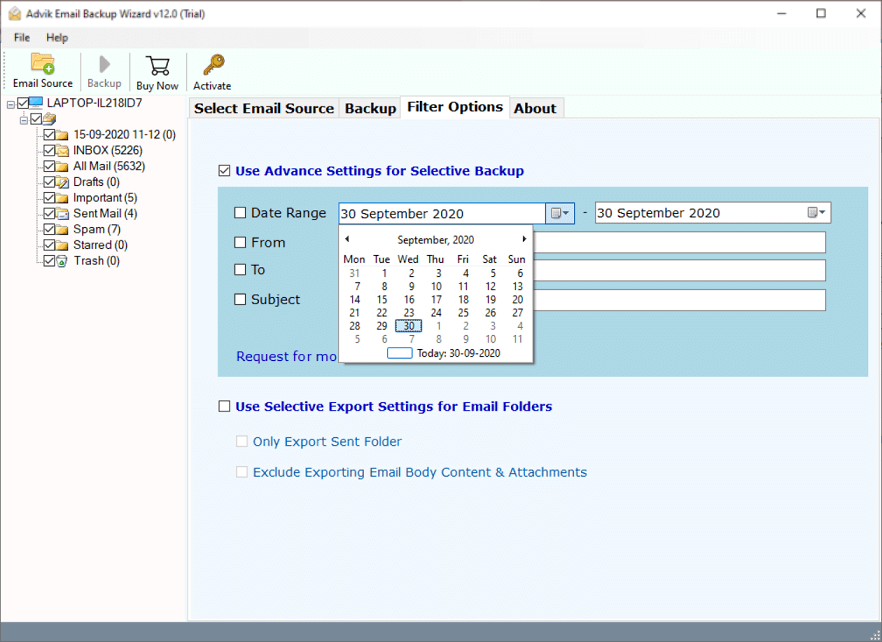
5. Apply email filter options. (Optional)
6. Enter your Google Workspace login details and press Backup.
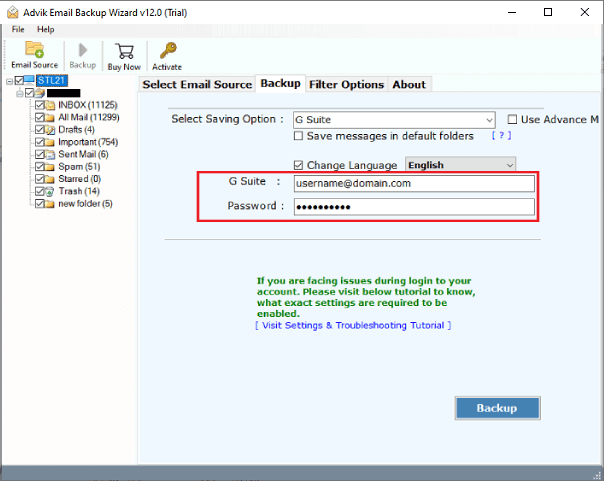
The software will start transferring emails from SquirrelMail to Google Workspace.
Once the process is complete, log in to your G-Suite account and check the migrated emails here.
Eye-Catching Features of SquirrelMail to Google Workspace Migration Tool
- Standalone Tool: This is an independent utility, which means you do not need to install any other application to move emails. Just enter the login details of both accounts to begin the migration process.
- Bulk Migration: With this tool, you can migrate all email folders from SquirrelMail to Google Workspace in a single attempt. There are no limitations on the number of emails or folders, it can move all data at once without any restrictions.
- Advanced Email Filter Options: The software offers various advanced filter options to transfer selected emails. Using filters, you can migrate Squirrelmail emails based on date range, to, from, subject, etc.
- 30+ Saving Options: The tool offers various saving options to export SquirrelMail emails into multiple formats. Also, it can transfer SquirrelMail to Office 365, Gmail, Yahoo, and many more.
- Preserves Data Integrity: This is a secure solution that does not lose any data while migrating. It preserves all email attributes and properties like attachments, sender/receiver info, hyperlinks, etc during the process.
- Maintains Folder Structure: Users’ concern about the structure of the mailbox folders during the process. It keeps the original structure of SquirrelMail email folders even after the process.
- Wide Compatibility: You can run this program on any Mac and windows based system. It supports all the latest and older versions of both Mac and Windows operating systems.
Final Words
In this post, we have discussed how to migrate SquirrelMail to Google Workspace. Due to the unavailability of the manual method, we are left using automated software only. Here, we have mentioned the best recommended approach to transfer emails from SquirrelMail to Google Workspace. You can download its free demo version, which allows you to move 25 emails from each folder without any cost.