How to Import PST to Thunderbird? Updated Guide
Jackson Strong | April 9th, 2026 | Mozilla Thunderbird
Summary: Many users struggle when they try to access PST data in Thunderbird because it does not support direct .pst imports. However, with the proper methods, they can easily do it. This guide helps users to import PST to Thunderbird by providing manual and automated methods with step-by-step instructions.
PST is a file format used by Outlook to store emails, contacts, calendars, attachments, and other mailbox data. On the other hand, Mozilla Thunderbird is a free, cross-platform email client that offers a range of features that make email management seamless. It allows users to send and receive emails along with other features like junk filters, add-ons, themes, etc.
Table of Contents
Reasons to Import PST to Thunderbird
Here are some common reasons why users want to open PST file in Thunderbird:
- To avoid Outlook licensing costs and use Thunderbird’s free & open-source environment.
- Thunderbird provides a variety of powerful add-ons and extensions that enhance functionality.
- It offers users a search filter that helps to locate required emails quickly.
- Thunderbird is compatible with Windows, macOS, Linux, and Unix.
Quick Solution: Directly transfer emails, contacts, and calendars from PST file to Thunderbird. Our Advik PST File Converter ensures a seamless migration, allowing you to access PST emails within your Thunderbird mailbox. Take control of your data today and begin the import process.

Can Thunderbird Import PST Files Manually?
No, Thunderbird can’t open PST files directly. However, you can use alternative methods to access your data. Here, we will discuss two manual approaches to accomplish this task.
Solution 1. Convert PST to Thunderbird via Outlook
Thunderbird has an inbuilt option to import from Outlook. So, if you have an orphaned PST file, first you need to upload it into Outlook and then import emails from Outlook to Thunderbird.
Follow the steps below:
1. Launch Outlook on your system.
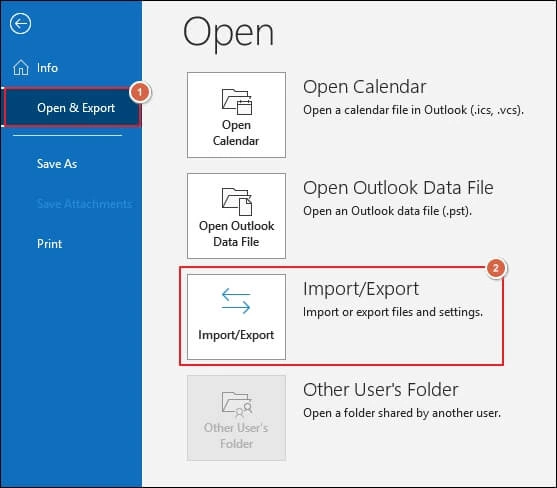
2. Click File >> Open & Export >> Import/Export.
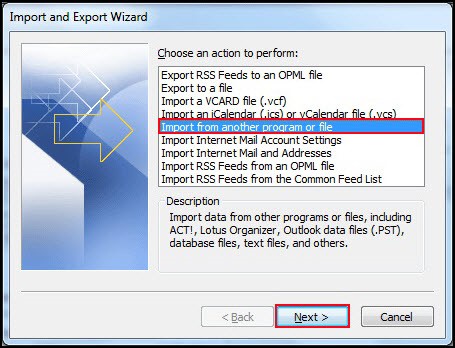
3. Choose Import from another program or file and click Next.
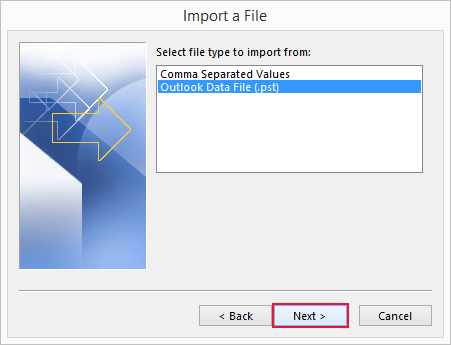
4. Select Outlook Data File (.pst) and press Next.
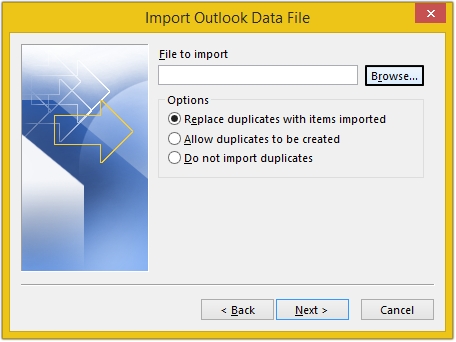
5. Click on Browse and select .pst file that you want to import.
6. Open the Control Panel and navigate to Programs.
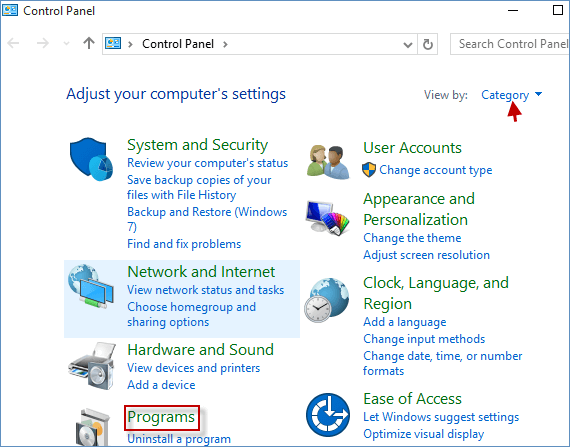
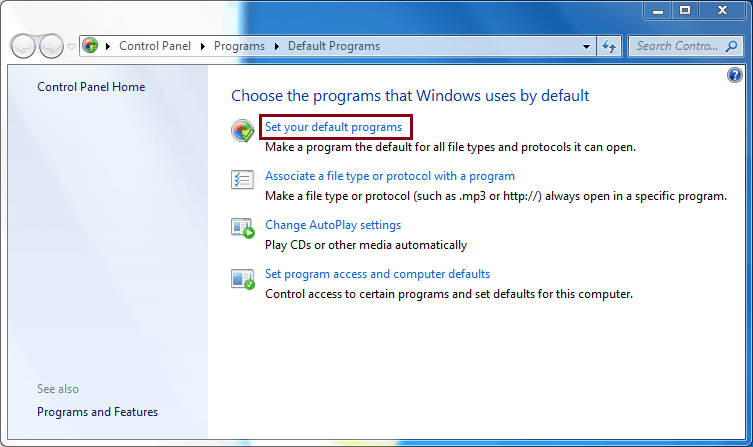
7. Click Default Programs >> Set your default programs.
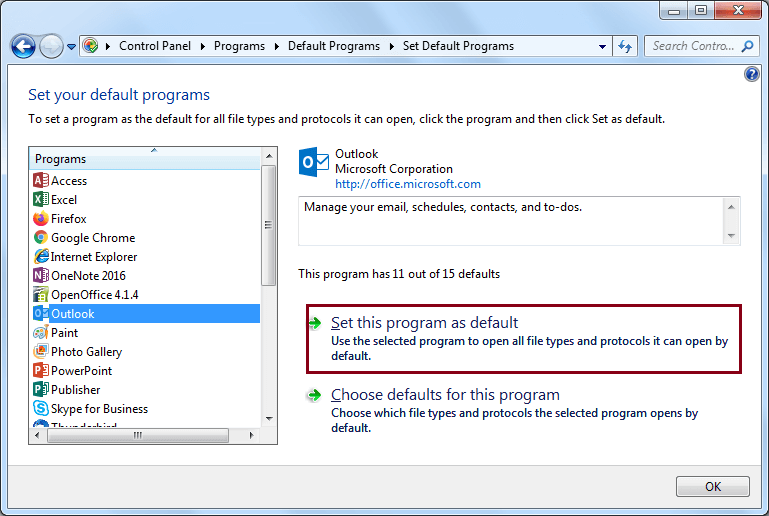
8. Select Outlook and click Set this program as default, and then press OK.
9. Now, open Thunderbird on your system.
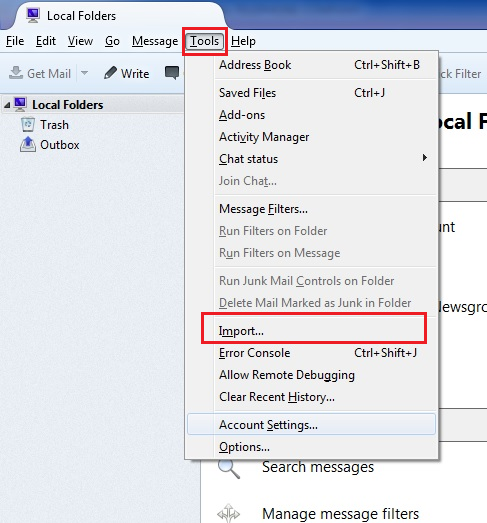
10. Go to Tools and choose Import option.
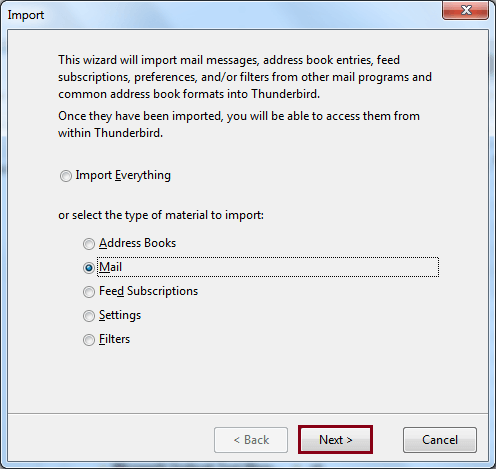
11. Select Mail and click Next.
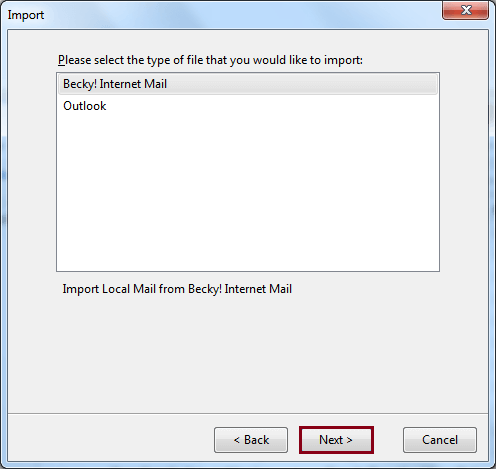
12. Next, choose Outlook and press Next.
13. Finally, click Finish to let Thunderbird import all your PST data.
In this way, you can import PST file into Thunderbird but it is not a single way to import. There is another way to do the same, which we have explained below.
Solution 2. Open PST File in Thunderbird Using Gmail
In this method, the users will be required to get help from Gmail. The complete process has been divided into several phases.
Phase 1. Enable IMAP in Gmail
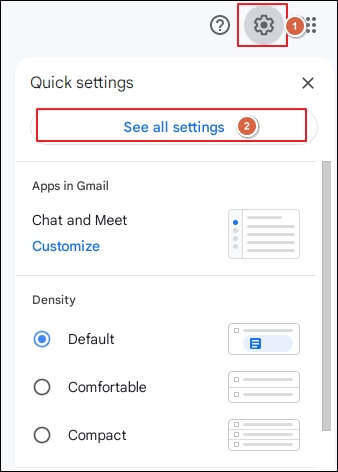
1. Log in to your Gmail account and go to Settings.
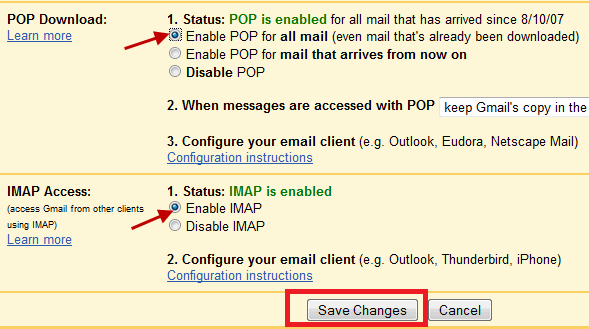
2. Enable IMAP option and click Save Changes.
Phase 2. Connect Gmail Account to Outlook
1. Launch Outlook application on your system.
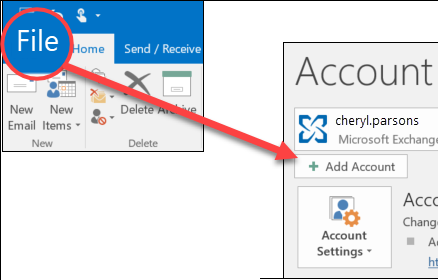
2. Click on File tab and choose Add Account.
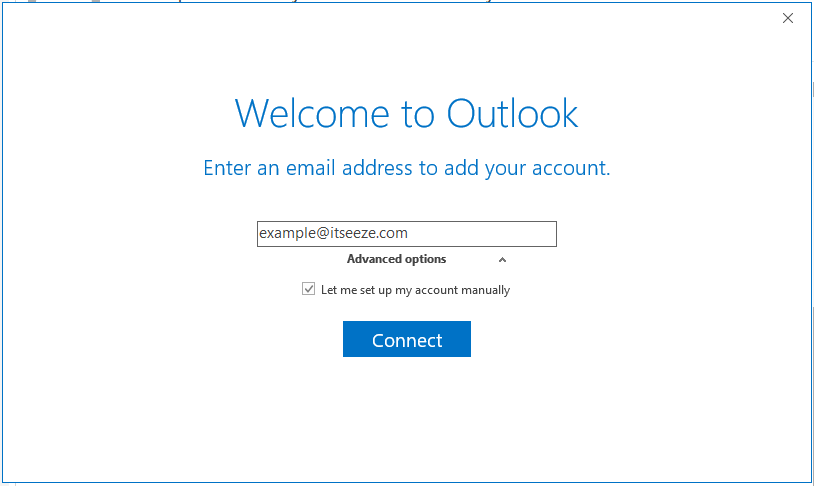
2. Enter Gmail account login details and complete the configuration process.
Phase 3. Import PST to Gmail
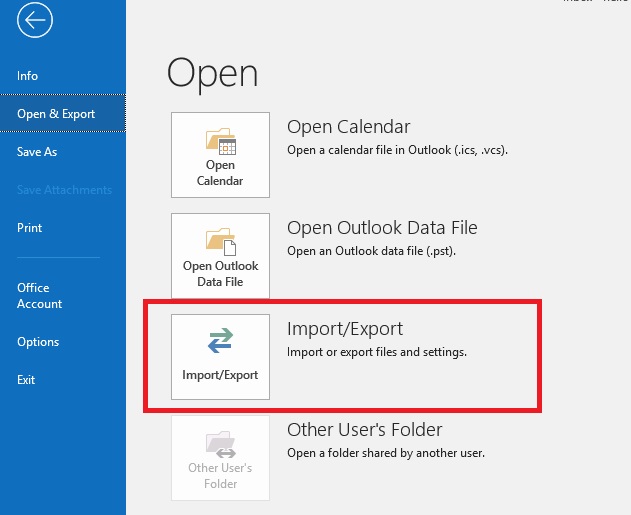
1. Navigate to File >> Open & Export >> Import/Export.
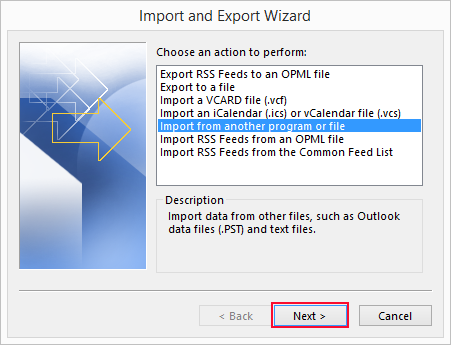
2. Choose Import from another program or file and click Next.
3. Select Outlook Data File (.pst) and press Next.
4. Browse and choose PST file that you want to import.
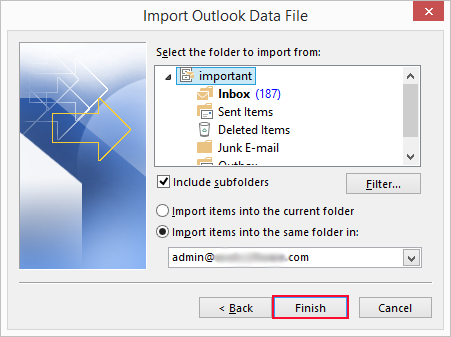
5. Select Gmail mailbox folder to upload and click Finish.
Phase 4. Add the Same Gmail Account to Thunderbird
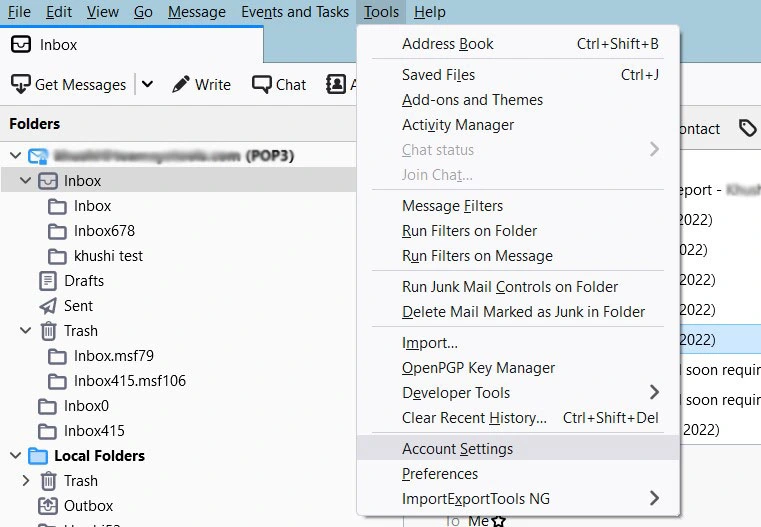
1. Now, open Thunderbird and go to Tools >> Account Settings.
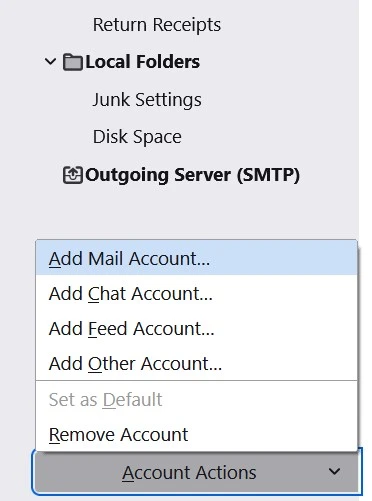
2. Choose Account Actions and select Add Mail Account.
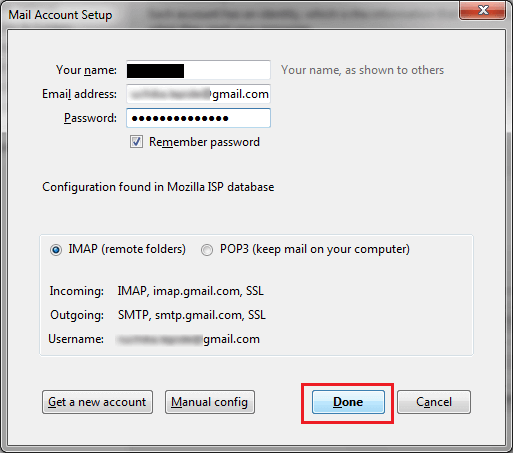
3. Enter your Gmail account login details to set up with Thunderbird.
Phase 5. Move PST Data to Thunderbird Profile
- Now, look for the imported PST folder.
- Right-click on it and choose Move To >> Thunderbird accounts profile.
Limitations of Manual Approaches
- Outlook must be installed on your system.
- Lengthy and time-consuming process.
- Complicated process for non-technical users.
- Does not maintain the folder structure.
How to Import Outlook PST File into Thunderbird Professionally?
In the manual methods, most of the users will face some issues while importing data from PST file to Thunderbird. So the need for a better solution must be considered. To fill that gap, we are here introducing Advik PST Converter. The software is able to directly upload PST file to Thunderbird without any external installation. The tool offers several advanced features such as bulk importing, preserving data integrity & folder hierarchy, advanced email filters, etc. to make the process simple and effective.
Click on the FREE download button and analyze its working process at no cost.

Steps to Transfer PST File to Thunderbird
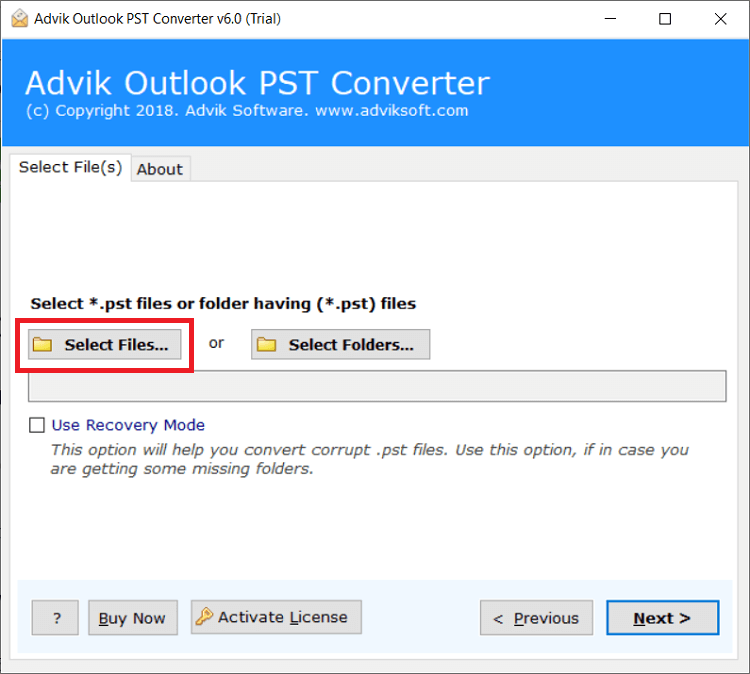
1. Run the tool and click on Select Files or Folders to add .pst file.
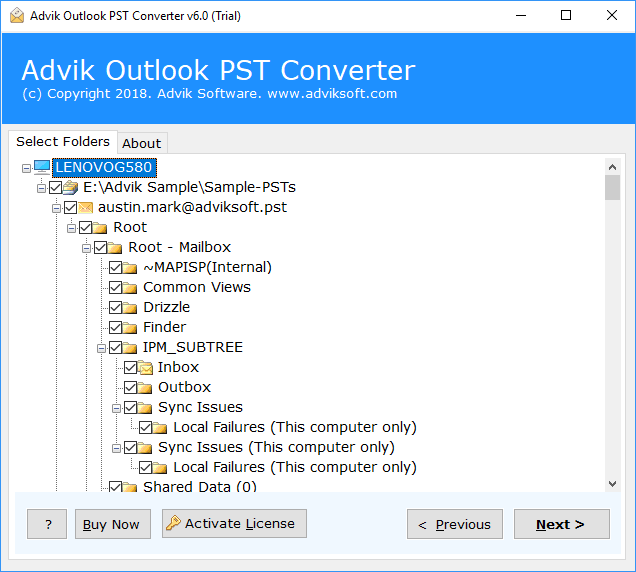
2. Choose the required mailbox folders and click Next.
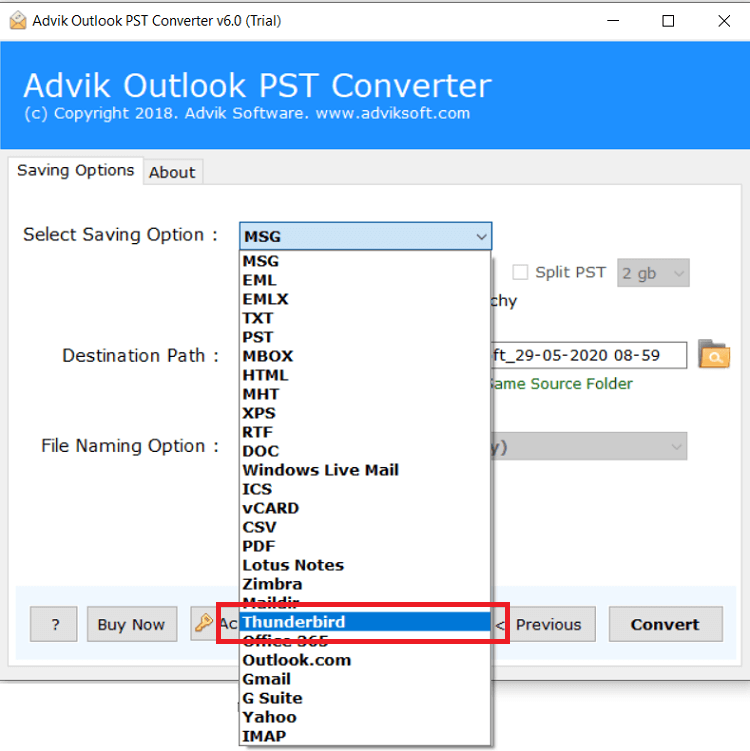
3. Select Thunderbird as a saving option.
4. Next, click the Convert button and analyze the importing process.
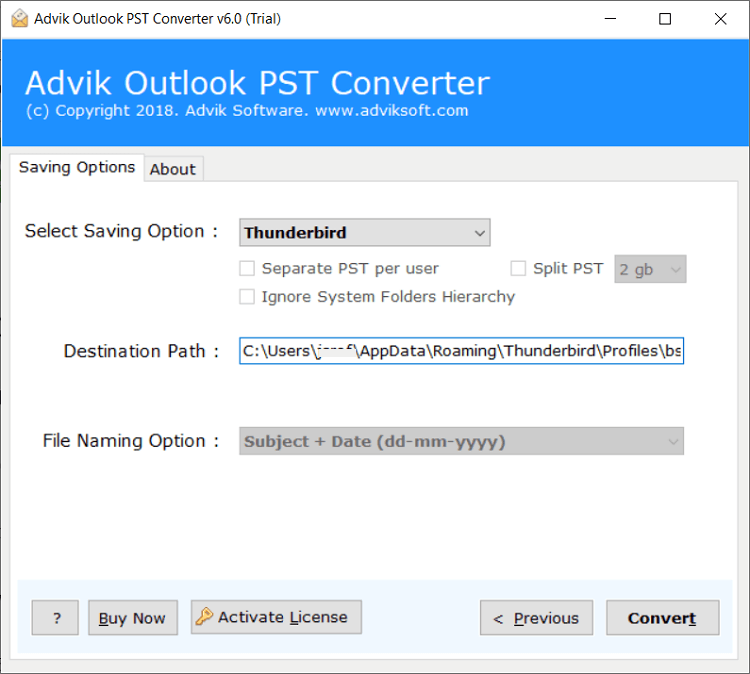
This is the complete step-by-step process for importing PST emails into Thunderbird. After completing the process, you can access your PST data in any version of Thunderbird.
Watch How to Import PST to Thunderbird Without Outlook?
Why Choose Automated Software?
The software will also help in other scenarios as well. Below are a few highlights of the software.
- Bulk Import PST Files: This tool has a dual mode, which allows you to import PST file in Thunderbird in bulk.
- Direct Importing: This is a standalone application. With this software, you can import .pst file into Thunderbird without Outlook.
- No Size Restrictions: The software can import PST file in Thunderbird without any size limit. You can easily open large PST files.
- User-Defined Location to Store Data: You can choose any location on your system to save the output files, or it will default to the desktop.
- 30+ Saving Options: The software supports various options to transfer or convert PST files. Such as that you can import PST to IMAP, Gmail, Outlook.com, O365, Zoho Mail, Yandex Mail, and many more.
- Easy-to-Use GUI: The software interface of this software is very simple and user-friendly. And it ensures 100% data accuracy as well.
- Windows Compatibility: This utility works with all Windows versions, including Windows 7, 8, 10, 11, and both 32-bit and 64-bit systems.
Final Ending
In this post, we have discussed how to import PST to Thunderbird. After knowing the fact that Mozilla Thunderbird does not have the option to import PST files, we found a loophole. The manual tricks are 100% workable in the older version of Thunderbird. It may or may not work in the latest edition due to various technical changes. If they work, then it’s great. Otherwise, you can opt for the professional automated software. You will be able to save your manual efforts and time and get the results accurately.
Frequently Asked Questions
Q 1. Will this software work to import Outlook PST file to Thunderbird on Windows 11?
Ans. Yes, this application works on all Windows versions, including Windows 11.
Q 2. How can I test the software before purchasing it?
Ans. You can take a trial of the PST to Thunderbird converter free, which allows you to transfer 25 PST emails into a Thunderbird profile. If satisfied, you can purchase the full version for complete migration.
Q3. Can Thunderbird open PST files directly?
Ans. No, Thunderbird can’t import PST files directly. You’ll need to use automated software or convert PST to MBOX which is a compatible format of Thunderbird.
Q4. Will my attachments be maintained in the PST file during conversion?
Ans. Yes, the automated software retains attachments and all other key elements of your PST emails while transferring into Thunderbird.