How to Open RPMSG File in Gmail? [2 Easy Methods]
Did you receive an RPMSG file on Gmail that you are unable to open? This can occur if the message is protected by Microsoft message encryption or rights management technology. Unlike regular email attachments, protected RPMSG messages may require you to authenticate and obtain permission from the sender before you can see their contents.
The good news is that Gmail users can view protected messages through Microsoft’s supported authentication process. You can also convert an already decrypted or unprotected RPMSG file with a compatible email conversion utility.
This guide will tell you why Gmail cannot open RPMSG file directly, how to view protected RPMSG message using Microsoft authentication method and how to process decrypted RPMSG files using Advik MSG Converter.
What is an RPMSG File?
RPMSG (restricted Permission Message) file is provided by Outlook. The contents of the RPMSG file are encrypted and only selected users can view it. Outlook has a feature i.e. Information Right Management (IRM) which helps to protect all emails. Microsoft Azure Rights Management helps users to secure email messages from unauthorized access.
An RPMSG file is encrypted file and not like a regular Outlook MSG file. Only users who have right permissions by the sender can open it and read its contents.
The RPMSG file can also prevent users from
- Copying the email content.
- Print the email message.
- Forward the email.
- Taking screenshots.
- Editing original email content.
Accessing RPMSG file is depend on the security settings applied by the sender.
Microsoft Rights Management technology provides this protection which verified that the recipient is permitted to decrypt the email or not.
Why Can’t Gmail Open RPMSG Files Directly?
Many users think that Gmail is unable to open .rpmsg file because it is damaged, locked, corrupted etc. But, it’s not the real reason. RPMSG is a protected file which is encrypted using Microsoft’s Information Rights Management technology. It is designed to prevent authorized access and to secure sensitive email messages.
Common Reasons Why Gmail Won’t Open RPMSG Files
- RPMSG files are encrypted using Microsoft Information Rights Management (IRM)
- Gmail doesn’t support Microsoft Rights Management so it cannot decrypt the protected message.
- You need permission from the sender to view the email.
- Most of the time, you won’t get the message until you authenticate with a Microsoft or authorized Google account.
An RPMSG file is not like the usual email file formats such as EML, MSG or PDF, which you can simply open by just uploading it to Gmail. Since Gmail is not connected to Microsoft’s Rights Management services, it cannot decrypt and display the actual content of the file.
Method 1. Open RPMSG File in Gmail via Using Google Authentication (Official Method)
If you have RPMSG file from Microsoft Outlook then you can use this method without any issue. Microsoft has the official way to read the protected email in Gmail. This method only works if the sender has given you permission to read the message.
Note: This method does not require Microsoft Outlook. However, you will need access to the Gmail account that received the protected email and the sender must have enabled Google account authentication.
Steps to Read an RPMSG File in Gmail
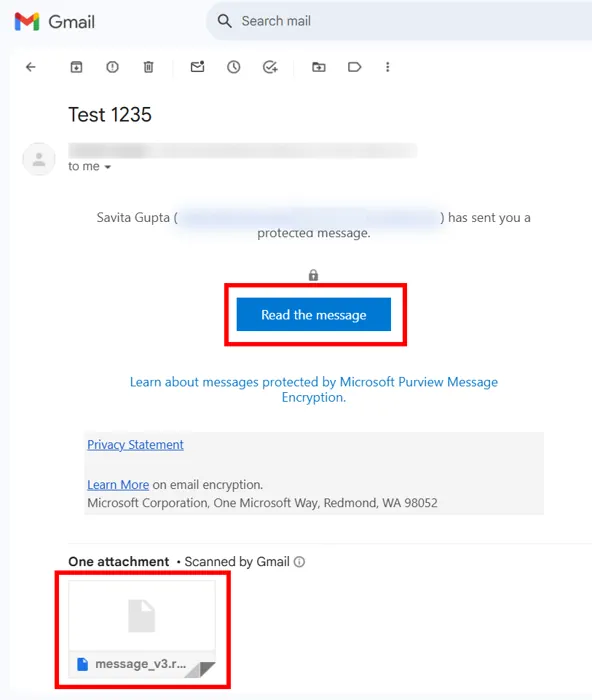
1. Sign in to your Gmail account and open the message.
2. Click on the Read the message button.
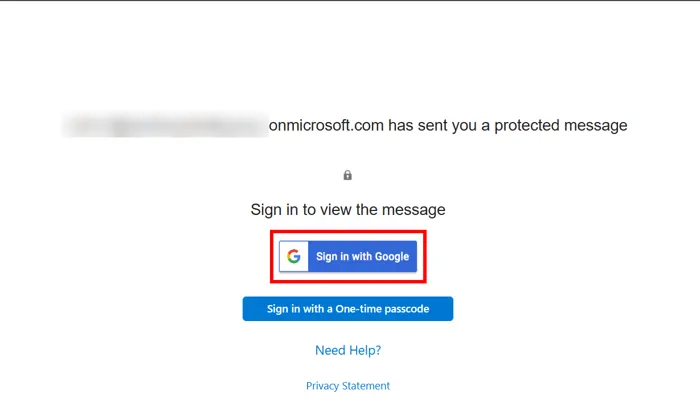
3. Now, a new tab will open with two options. Click on Sign in to Google option.
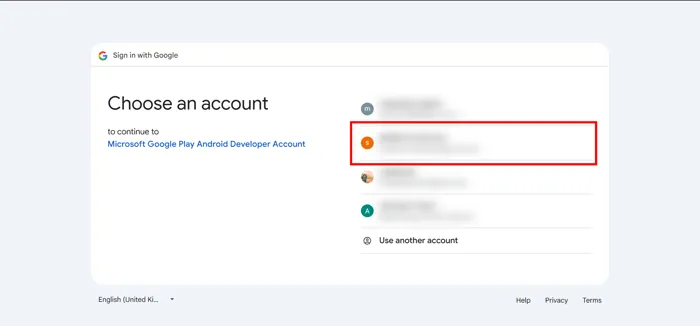
4. It will display a list of all Google accounts that are currently use in your browser. Choose the account in which you received file.
5. Now, Microsoft is asking to access some data. Click on Continue.
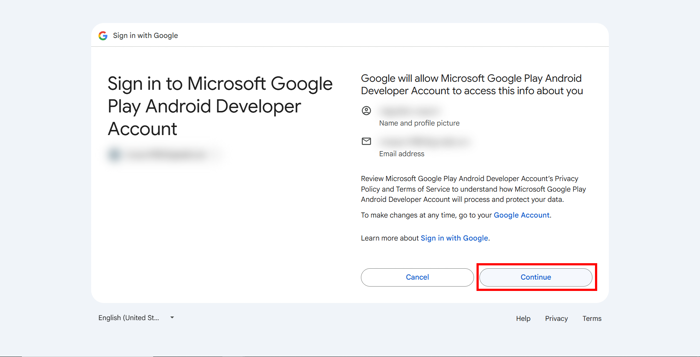
6. If the authentication is valid then you can access the content of file.
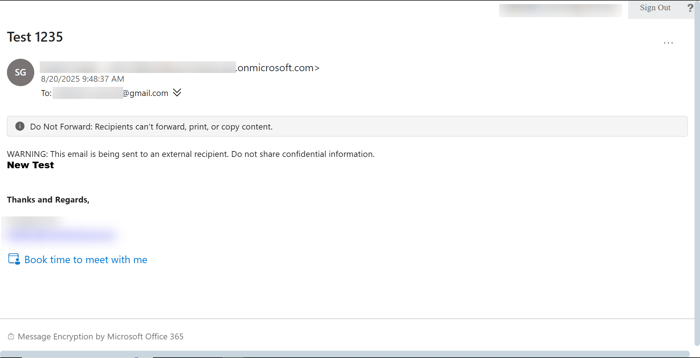
When This Method Doesn’t Work?
Though it’s an official method, it may still fail in some situations;
- If sender has not given you permission to access the email.
- Protected message only supports Microsoft account authentication.
- Organization has not allowed external users to open protected emails.
- RPMSG file was downloaded separately.
- Your organization has blocked Microsoft Rights Management authentication due to any reason.
If any of the above situations meets then you won’t be able to read your RPMSG file in Gmail using this official method.
Method 2: Process a Decrypted RPMSG File with Automated Tool
If you have a decrypted/unprotected RPMSG file already, you can use a suitable conversion tool like Advik MSG Converter to convert the file and move supported email data to Gmail.
Important This method does not decrypt protected RPMSG files. Advik MSG Converter cannot bypass Microsoft Purview, IRM or any other encryption/protection on an RPMSG message. Use this method only with decrypted/unprotected RPMSG files supported by the software.
We recommend you to try the free trial version of the software before buying it to check the possibility of conversion of the RPMSG files.
Get the trial version:


Steps to Transfer a Decrypted RPMSG File to Gmail
- Run the tool on your Windows PC.
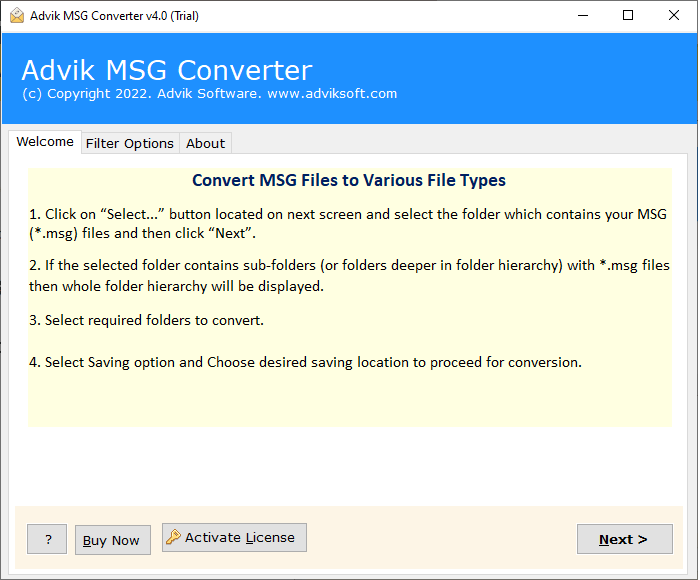
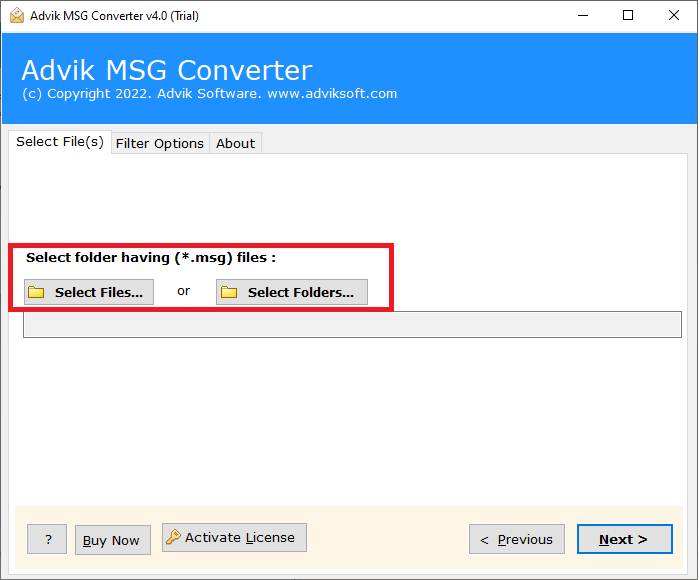
- Click Select Files or Select Folders and add the decrypted RPMSG files. Then click Next.
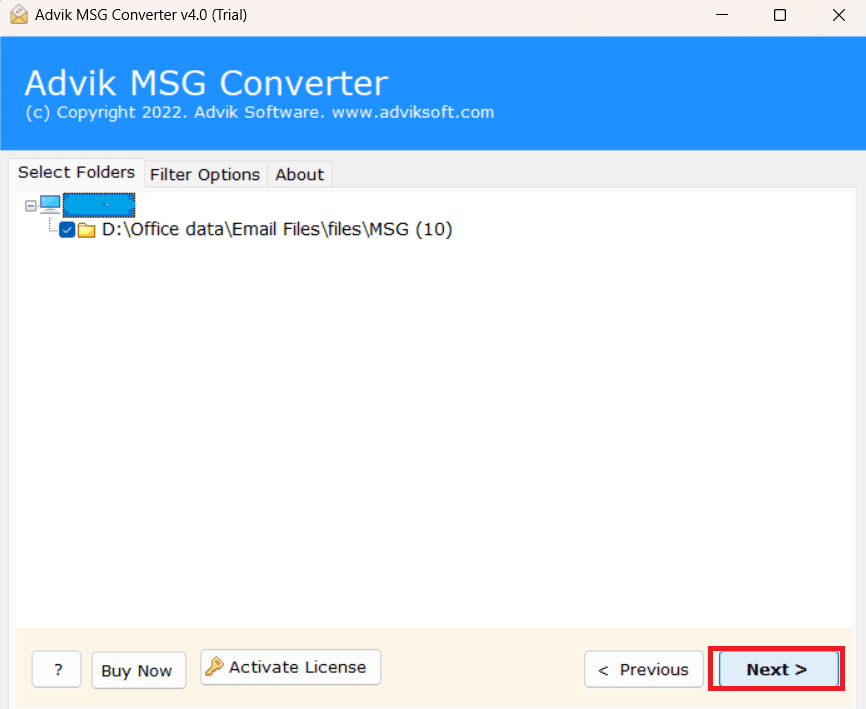
- Select RPMSG folder and click press Next button.
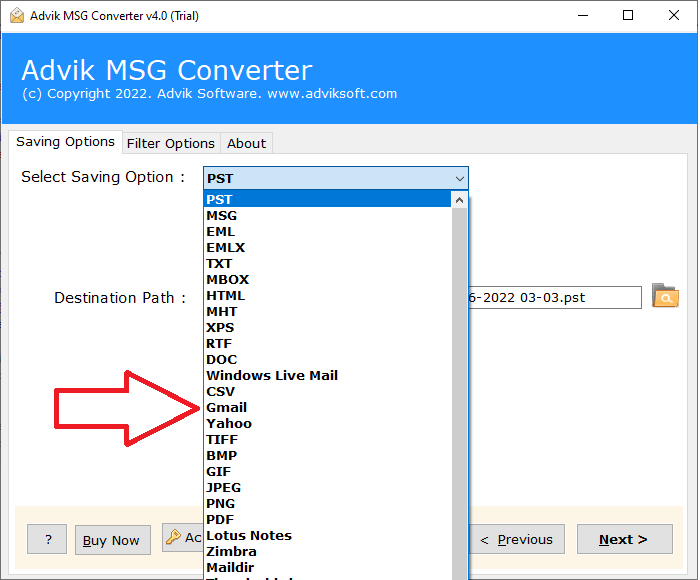
- Choose Gmail as a saving option from the given list.
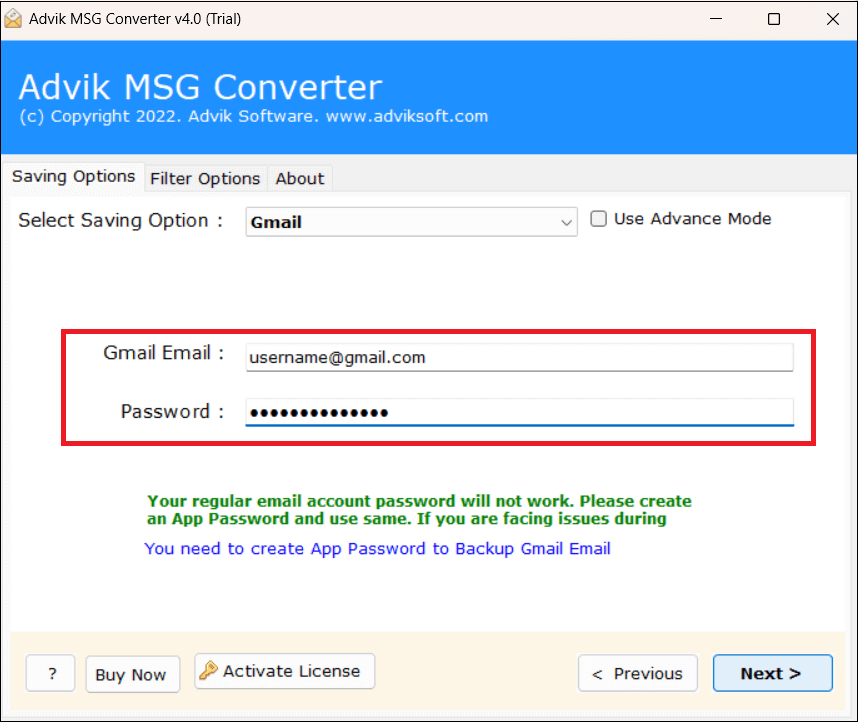
- Provide your Gmail email address and app password.
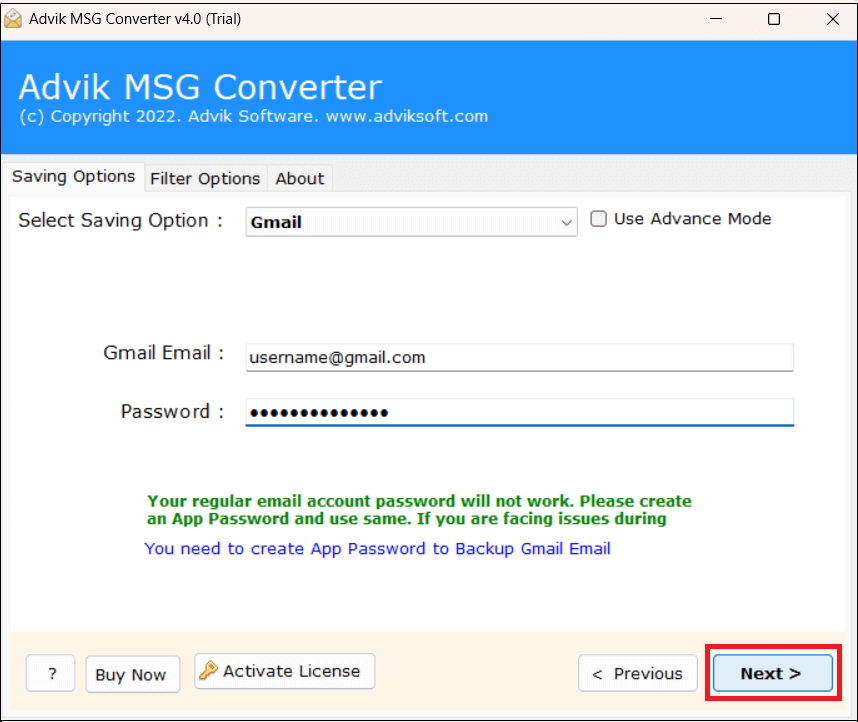
- Next press the Next button and analyze the importing process.
After the process finishes, sign in to Gmail and check the destination mailbox.
Note: The above method applies only to RPMSG files that are already decrypted/unprotected and supported by the software. It cannot turn a protected RPMSG attachment into an accessible Gmail message by itself.
Key Features of Advik MSG Converter
When working with supported, decrypted RPMSG files, the software provides features such as:
- Dual Mode: The software has a dual mode – Select File and Select Folder to open single or multiple RPMSG file in Gmail. You can create a folder and store all the needed RPMSG files and load it into the application to view multiple files at once.
- Multiple Saving Options: The tool offers various saving options to export RPMSG file into 30+ formats. With the help of this software, you can simply convert RPMSG to PST, PDF, MBOX, EML, MSG, DOC & many more. Also, it can import RPMSG file to any webmail account.
- Retains Data Integrity: The software maintains data integrity and email structure during the process. Thus, no data loss takes place at any step.
- Advanced Filter Options: Sometimes, users want to open specific emails in the Gmail mailbox. This tool has different filters like to, from, subject, cc etc. to view only selected emails.
- Windows Supportive: This tool is compatible with all Windows-based operating systems. You can run it on Windows 11, 10, 8 and all the editions below.
Important: Feature availability and supported formats can vary by software version. Test your specific RPMSG files with the trial version before purchasing.
Final Words
Gmail cannot just treat every RPMSG attachment like a standard email file, because protected RPMSG messages may require Microsoft authentication and authorization before their contents can be displayed.
For a protected message received in Gmail, the correct action is to open the message and go through Microsoft’s authentication process such as Sign in with Google or one-time passcode when that option is available.
If you have a decrypted/unprotected RPMSG file then you can use email conversion software compatible with this format like Advik MSG Converter to process the file and move supported data to Gmail.
Note: Advik MSG Converter does not decrypt, unlock or bypass protected RPMSG files. Try out the trial version of your files before purchasing.
Frequently Asked Questions
Q1. How to open RPMSG file in Gmail?
Ans. If the RPMSG message is a protected Microsoft message and you have the permission required to view it, you can authenticate and view it using the protected-message experience from Microsoft. Gmail recipients might see Sign in with Google or another supported authentication method.
Q2. Can I open a protected RPMSG attachment in Gmail?
Ans. Don’t try to view a downloaded RPMSG attachment as a regular Gmail attachment. For protected Microsoft messages, use the Read the message option found in the protected-message email and follow the authentication instructions.
Q3. Is it possible for Advik MSG Converter to decrypt RPMSG files?
Ans.No. Advik MSG Converter does not decrypt or bypass any protected RPMSG files. It supports decrypted/unprotected RPMSG files compatible with the software.
Q4. Is it possible to bulk import RPMSG files into Gmail?
Ans.If you have multiple decrypted/unprotected RPMSG files and the current software version supports those files, then you can process them in bulk using Advik MSG Converter. The software cannot decrypt protected RPMSG messages that still require Microsoft authorizations.
Q5. Will supported RPMSG data be preserved when transferring attachments?
Ans.The software is intended to preserve supported email content and attachments as they are processed. But outcomes can differ, depending on the source file and its protection status. Try your files with a trial version before buying.
Q6. I don’t have the rights to open an RPMSG message, what do I do?
Ans. You can contact your sender who has sent you the RPMSG files or ask your organization’s administrator to verify the permissions applied to that protected message. Microsoft requires the Rights Management service to confirm that the recipient is authorized to view the protected content.