How to Fix Outlook Attachment Not Opening on Double Click?
If Outlook not opening attachments when double click, users may not be able to access important documents, spreadsheets, images or email data. This issue is generally caused due to corrupt Outlook PST files, antivirus settings, Outlook add-ins, temporary folder issue, or an outdated version of Outlook. In this article, you will get 5 tried and tested solutions to solve Outlook attachments not opening on double click and an alternate way to recover attachments from Outlook Data file.
Table of Contents
- What Are Outlook Attachments?
- Why Outlook Is Not Opening Attachments on Double Click
- Ways to Fix Outlook Attachments Not Opening
- Real User Scenario of Outlook Not Opening Attachments When Double Click Issue
- Alternate Way: Recover Attachments from a Corrupted PST File
- Watch Video Tutorial to Fix Outlook Attachments Not Opening Issue
- Final Words
- Frequently Asked Questions
What are Attachments in Outlook?
Outlook attachments are attached files that are sent along with an email message. These include documents, PDFs, images, spreadsheets, presentations, ZIP archives, and Outlook data files. Usually, you can open these files directly from Outlook by double-clicking on your attachment. If this feature is not working, Outlook may not be able to open the associated application or to access the attachment correctly.
Now, let’s understand what the reasons may be for the Outlook attachment not opening on double click.
Why Outlook not Opening Attachments when Double-click?
There can be several reasons why Outlook attachments do not open on double click. Knowing the exact reason will help you apply the right method and avoid unnecessary things.
1. Damaged Outlook PST File: Outlook stores your emails, contacts and attachments in the PST file. And if your data file is damaged or corrupted, Outlook may not be able to open the attached files correctly.
2. Outlook Secure Temporary Folder is Full: Outlook saves attachments in a hidden secure folder before it opens it. If this folder becomes full, Outlook may stop opening attachments when you try to open it.
3. Antivirus Software: As a security measure, some antivirus apps scan email attachments. Sometimes they may mistakenly block safe and secure attachments due to which you can’t open them.
4. Outlook add ons: Sometimes third-party Outlook plug-ins can conflict with Outlook’s normal functionality. Issues with an add-in can cause attachments to not open correctly.
5. Previous Version of the Outlook Application: Older versions of Outlook can also cause compatibility issues. These problems can interfere with opening attachments and prevent the file from opening.
6. Wrong File Association Settings: File associations in Windows guide which application will open a particular file type. Incorrect settings in Outlook may prevent it from opening attachments.
7. Corrupted Attachments: If the email and the Outlook application are working fine, the possibility is that the attachment itself is corrupted or incomplete which Outlook cannot open.
Real User Case of Outlook Not Opening Attachments When Double Click
While researching this issue, I came across a support case published by Microsoft. In the case reported, Outlook users were unable to open attachments to emails by double-clicking on them. When i read that document i found that the attachments can be opened if you right click the file and choose Open, but double-clicking did not work as i expected.
Microsoft’s investigation explain that the problem was not caused by corruption in Outlook or damage to the attachment. The problem was not with the mouse settings but the double click speed in Windows was set too fast. This caused Outlook to fail to recognize the double click action correctly.
Microsoft suggests that if you lower the double-click speed of your mouse in Windows Mouse Settings, then you can get rid out of this issue. After the speed reduction, affected users could open Outlook attachments normally by double-clicking them again.
This real-world case is proof that Outlook attachment problems are not always related to PST corruption, Outlook settings, or security restrictions. Sometimes a simple windows configuration can be the root cause of your problem.
Source: Microsoft Learn – “Double-clicking an attachment in Outlook doesn’t open it.” Microsoft confirmed that if the mouse double-click speed is set too fast, an attachment won’t open when double-clicked.
Ways to Fix Outlook Attachments Not Opening When Double Click
This guide covers 5 proven solutions:
- Clear Outlook Secure Temp Folder.
- Check antivirus settings.
- Update Outlook to the latest version.
- Disable problematic Outlook add-ins.
- Repair corrupted PST files.
Now, let’s understand these methods in more detail;
Method 1. Remove Outlook Secure Temporary Folder
Outlook attachments not opening is one of the most common Outlook issues. One reason is that the Outlook Secure Temporary Folder is full.
Follow these steps:
1. First of all, Close the Outlook App completely.
2. Press Windows + R , type regedit.exe and hit Enter.
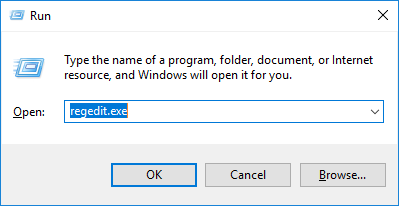
3. Open the registry key for Outlook Secure Temp Folder.
4. Find the value named OutlookSecureTempFolder.
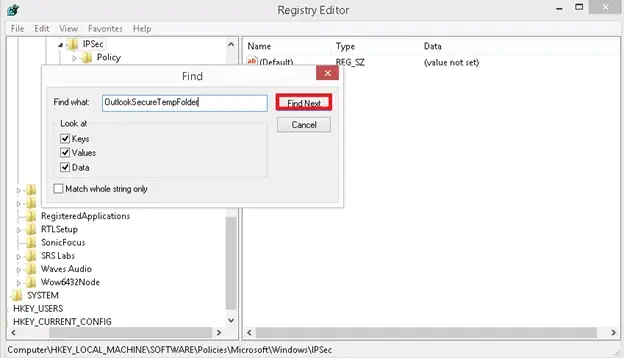
5. Copy the folder path displayed in the Data field.

Open File Explorer and paste in the path.
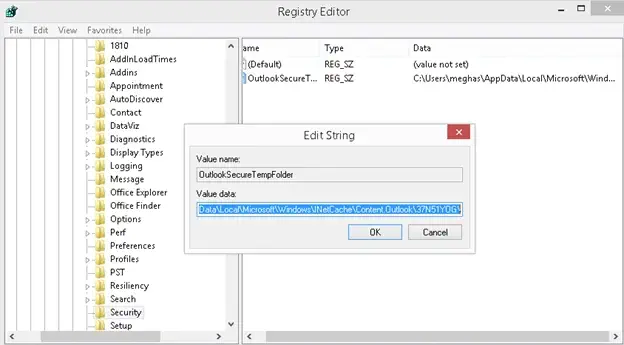
6. Delete all of the files in that folder.
7. Close Outlook and re-open.Try to open the attachment again.
Always backup the Windows Registry before making any changes to them.
Method 2. Check the Antivirus Settings
Some antivirus apps block Outlook attachments to protect users from malicious files.
What to do then? follow these steps;
- Disable your antivirus software temporarily.
- Then, Open Outlook app on your computer.
- Try to open the attachment.
- If the attachment opens, add Outlook or the file type to the antivirus exception list.
- Turn the antivirus protection back on.
Method 3. Upgrade to the Latest Version of Microsoft Outlook
Older version of Outlook may create attachment issues.
Steps to Update Outlook;
1. Launch Outlook app and then go to the File tab.
2. Choose Office Account and select Update Options.
3. Then, click on Update Now.
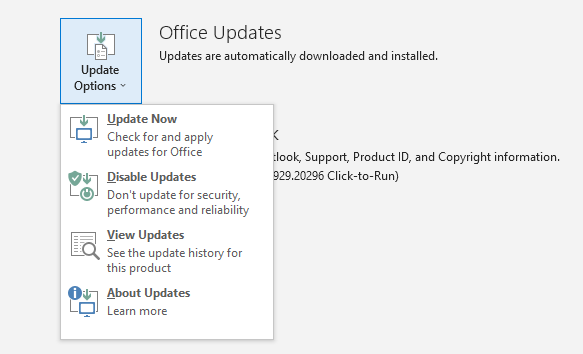
4. Install available updates for Outlook.
5. Reopen Outlook and try to open the attachments again.
Method 4. Disable Outlook Add-ins
Third-party add ons may interfere with the default attachment handling process from Outlook.
Steps to Turn off Add-ins;
- Start Outlook app and click on File >> Options >> Add-ins.
- Choose COM Add-ins and click Go.
- Uncheck all add-in and tap the OK button.
- Then, restart your Outlook app.
Now, try to open the attachment again.
Method 5. Repair Corrupted or Damaged PST File
If your Outlook PST file is corrupted then Outlook will not able to access the emails and attachments properly.
Repair your PST file if you see the following signs;
- Attachments can’t be opened.
- Could not load emails.
- Outlook crashes a lot.
- Missing emails.
Try the Microsoft Inbox Repair Tool (SCANPST.EXE). But if the corruption is severe, you may need a professional PST repair solution.
Alternate Way: Recover Attachments from a Corrupted PST File
If Outlook is not opening attachments due to corrupted PST file then you need to repair the PST file to access the attachments. In such cases, Advik PST Repair Tool can assist you to repair corrupted PST files and restore mailbox data. The software lets the user extract Outlook email attachments separately and save the recovered data without changing the original file.

Note: The software supports Outlook 2024, 2021, 2019, 2016, 2013, and earlier versions.
Watch the Tutorial to Fix the ” Unable to Open Outlook Attachment Issue
Final Words
In conclusion, the Outlook not opening attachments on double click issue is generally due to Outlook various reasons that we discussed in this article. So, it’s important to understand the reasons first so that you can choose an appropriate method to fix it. Most of the time, the problem is fixed by deleting the temporary files, updating Outlook or disabling add-ins. If the PST corruption is causing the problem then repair your PST file first and get back access to your Outlook attachments.
Frequently Asked Questions
Q1. Why Outlook attachments are not opening on double click?
Ans. The most common reasons for this issue are PST corruption, Outlook Secure Temp Folder settings, antivirus restrictions, Outlook add ons or outdated Outlook versions.
Q2. Does antivirus stop Outlook attachments from opening?
Ans. Yes, sometimes antivirus programs incorrectly identify attachments as a threat and prevent Outlook from opening it.
Q3. What is Outlook Secure Temp folder?
Ans. This is a folder that Outlook uses to process email attachments. If this folder fills up, Outlook may not be able to open attachments.
Q4. Is there a way for Outlook add-ons to stop attachments from opening?
Ans. It is due to some third-party add-ons conflicting with the default attachment functionality of Outlook.
Q5. How to fix a damaged PST file?
Ans. To repair corrupted PST files, you can use Microsoft’s own Inbox Repair tool i.e. scanpst.exe or a professional PST repair solution.
Q6. How can a corrupt PST file block access to attachments?
Ans. It can prevent Outlook to open email messages and attachments when there is major problem in your PST file.
Q7. Is the software compatible with Outlook 2024?
Ans. The software mentioned in this article supports Outlook 2024, 2021, 2019, 2016, 2013 and all the previous versions.