How to Transfer AOL Mail to Google Workspace?
Jackson Strong | March 5th, 2026 | AOL Mail, Email Migration
If you are planning to migrate from AOL Mail to Google Workspace, transferring emails is an important step.This article will step-by-step guide you to transfer AOL Mail to Google Workspace with complete mailbox data. Here, you will get a simple and quick solution to perform AOL to G Suite migration.
Both AOL and Google Workspace offer various benefits for their users. However, both of them have different user bases. Where AOL Mail is ideal for users who are looking for a straightforward way to manage email. However, on the other hand, Google Workspace is designed for professionals who are seeking an integrated solution for their communication and collaboration needs.
Why Migrate from AOL Mail to Google Workspace?
- Google Workspace offers smart and more advanced feature as compare to AOL Mail.
- Google Workspace is integrated with collaboration tools such as Google Docs, Drive, Meet, etc.
- It provides strong security features like 2FA, spam filtering, etc. to keep emails safe.
- By migrating emails, users can access data from any device with real-time synchronization.
So, let’s check out an easy and simple way to complete this process.
How to Transfer AOL Mail to Google Workspace Automatically?
Check out the Advik AOL Mail Backup Tool to migrate multiple AOL emails to Google Workspace at once. The software offers 4 easy and simple steps to export AOL mailbox data into Google Workspace account. Just run the tool, choose AOL Mail from the email source and login. After that, choose Google Workspace account as a saving option, click on Backup and the tool starts migrating your data. You can even choose selective AOL email folders to transfer into Google Workspace. Moreover, the software has a user-friendly and intuitive working system so that anyone even with the least technical knowledge can use it.
Click the link below and download the FREE demo version to evaluate its working status and all the advanced features.

Steps to Transfer AOL Emails to Google Workspace
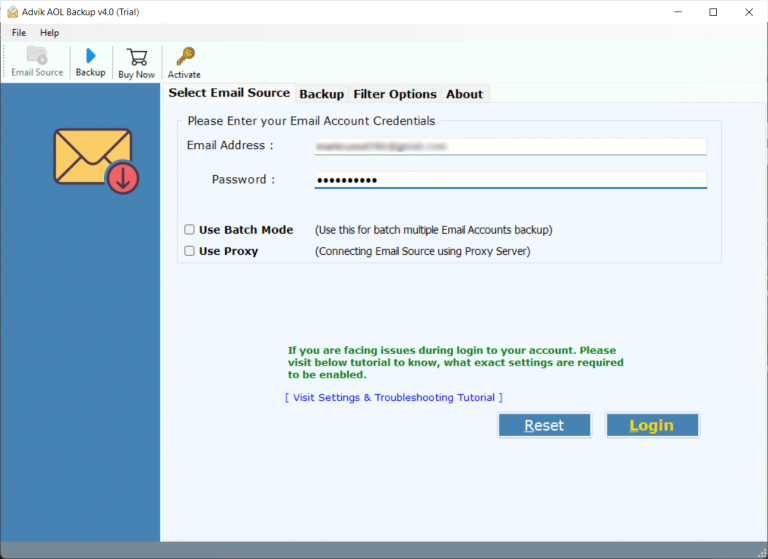
- Run the software and log in to your AOL account.
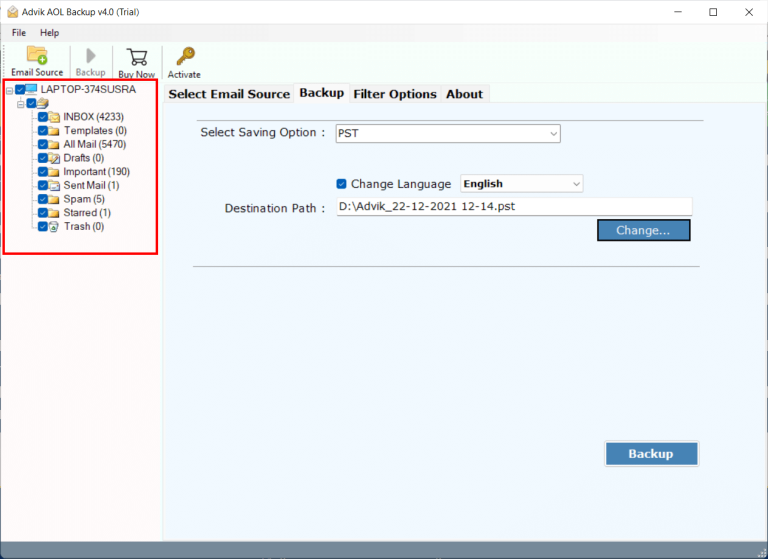
- Choose the AOL mailbox folders to transfer.
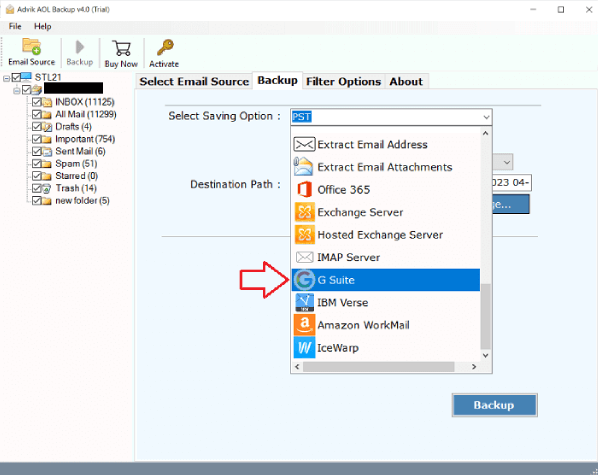
- Next, select G Suite as a saving option from the list.
- Enter Google Workspace account details and click Convert.
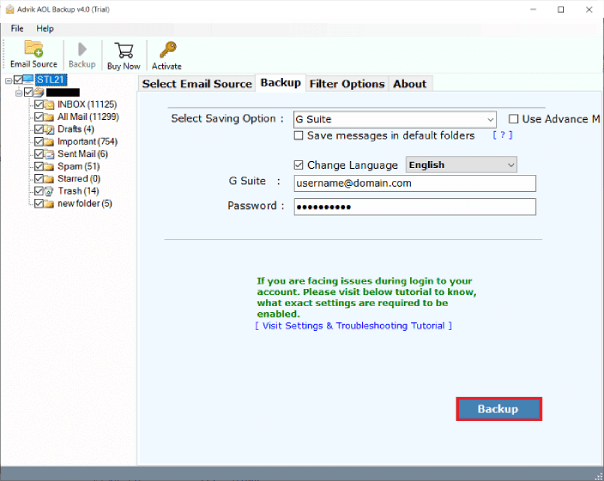
Done!! This is how you can easily migrate emails from AOL to Google Workspace.
Here are some useful advantages of using this utility;
- Transfer multiple AOL email accounts to Google Workspace simultaneously.
- Easily export AOL emails to Google Workspace, including attachments, in simple steps.
- Also, transfer AOL to Office 365, and many other email accounts.
- Maintains all properties intact while transferring AOL data to Google Workspace.
- Offers to select specific AOL data to export into Google Workspace as needed.
- Easy to use & user-friendly interface, making it easy to use.
- Compatible with Windows 11, Windows 10, and other versions.
Final Words
The above article has focused on a direct way that will help users transfer AOL mail to Google Workspace account. The method explained is reliable and very secure for those who want to pursue the migration process securely without data loss. Also, it comes with a FREE demo edition with the help of which users can experience the steps and advanced options of the process. However, it allows migrating 25 AOL Mail emails to Google Workspace with attachments for free.