How to Fix Unable to Open RPMSG File Issue? 5 Easy Solutions
Summary: Can’t open an RPMSG file? It can be annoying when you need to view an important protected email message. RPMSG files are usually related to Microsoft message protection and may need authentication and the right permissions to view their contents. Sometimes the file you download might be incomplete, corrupted or incompatible with the application you are using.
This manual will assist you to identify common reasons why you may not be able to open an RPMSG file and provide troubleshooting steps to diagnose and resolve the problem. We also discuss when an email conversion tool such as Advik MSG Converter can be used with decrypted/unprotected RPMSG files.
Note: Advik MSG Converter only supports decrypted/unprotected RPMSG files. It does not decrypt, unlock or bypass Microsoft Purview Information Protection, Information Rights Management (IRM) or other protection applied to encrypted RPMSG messages.
Why Can’t I Open an RPMSG File?
There can be several reasons why an RPMSG file won’t open. The most popular include:
- The message is protected: RPMSG messages can use Microsoft’s rights-management or message-encryption technologies. You may need to be authenticated or authorised to see the message.
- You don’t have the required permissions: The sender may have limited access to certain recipients or accounts.
Wrong download of the file: If the file was downloaded incorrectly, either partially or in a corrupt form, it may not open. - The file is being opened outside of the original protected message workflow: A downloaded .rpmsg file might not be directly readable as a normal MSG or EML file.
- Authentication or application problems: There are access issues that may be related to the application, Microsoft account, browser session or authentication process.
- The application does not support the RPMSG file: Not every application that can handle vanilla email formats can process protected RPMSG content.
How to Fix the “Unable to Open RPMSG File” Issue?
There are several manual tricks to solve this issue. You can try them and fix it.
1. Use a Compatible Application: To open the RPMSG file use its supported application i.e. Microsoft Outlook.
2. Verify Permissions: Contact the sender to ensure you have the necessary permission to view the content of messages. If permission is restricted, then ask them to modify the access settings.
3. Update Outlook: An outdated Outlook version is also the cause of your unable to open RPMSG file. So, ensure that your Outlook application is updated to the latest version. To do it – Open Outlook, click on File >> Office Account >> Update Options >> Update Now.
4. Repair the File: Sometimes file may be corrupted during the download process. So, download the file again from the source and ensure the file wasn’t altered.
Alternative Solution for Decrypted RPMSG Files
If you have an unprotected/decrypted RPMSG file and want to convert or migrate the email data from it, then you can use any suitable email conversion tool like Advik MSG Converter.
Important Compatibility Notice: Advik MSG Converter is not a decryption/de-protection tool for RPMSG files. It supports RPMSG files decrypted / unprotected and compatible with the software. Having a .rpmsg extension does not mean you can open a protected RPMSG file.
Therefore, do not use this method as a workaround for a Microsoft authentication or permission problem
We recommend you to try your own decrypted RPMSG files with the trial version before buying.
Click here below for the demo version download:


Steps to Solve Unable to Open RPMSG File Issue
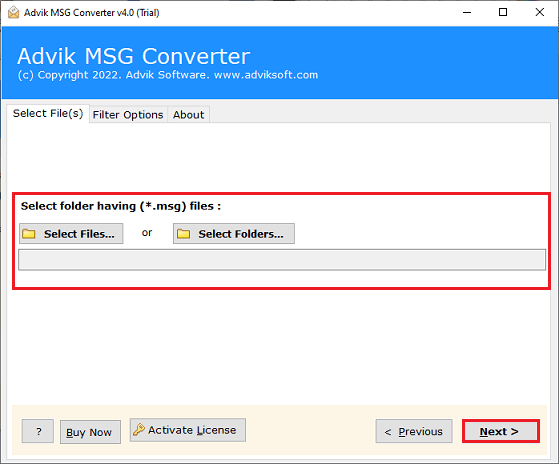
Step 1. Run the suggested tool and add the decrypted RPMSG file.
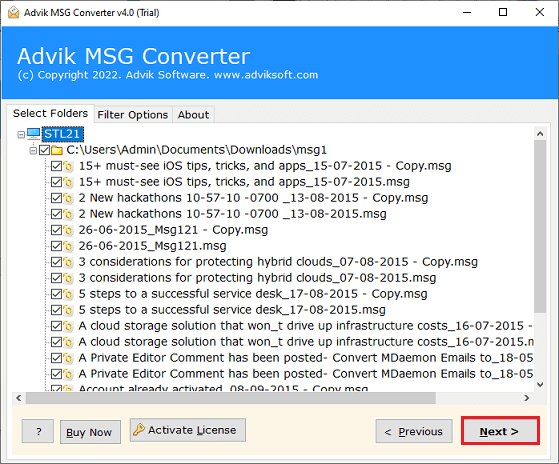
Step 2. Choose the required RPMSG files and click Next.
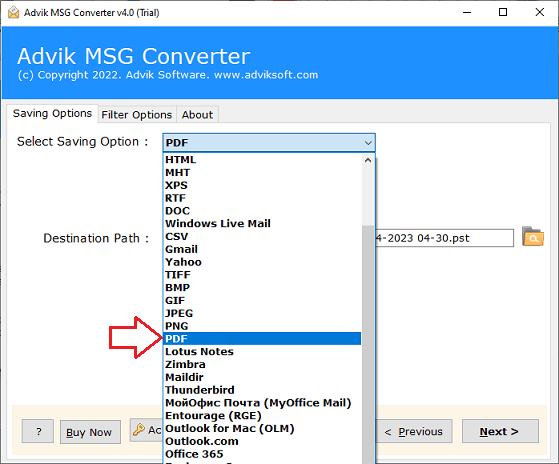
Step 3. Select the desired saving option from the given list.
Step 4. Choose the destination location to save resultant file and press Next.
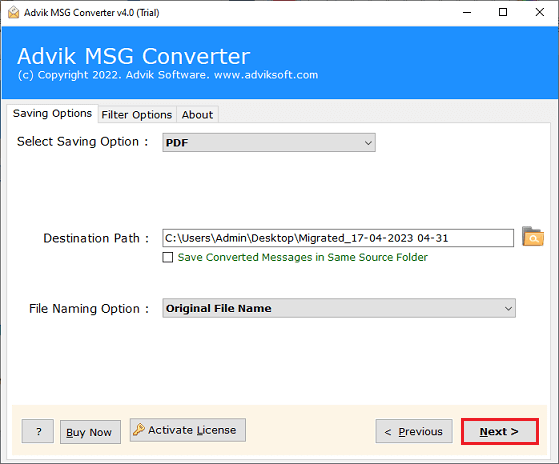
The decrypted RPMSG data will be input into the software and outputted to the supported format you selected. After the conversion is finished you can open the created file with an application that supports that format.
Important Note: If your RPMSG file is encrypted or otherwise protected, then do not assume it is corrupt if the software cannot process it. Advik MSG Converter does not decrypt the Protected RPMSG content. You must have the correct Microsoft authorisation to decrypt it.
Conclusion
The reasons why you are unable to open RPMSG file in Gmail due to many reasons, such as the message is protected, you don’t have the rights permissions, there is an authentication problem, the download is incomplete, the app is not compatible.
If the RPMSG message is protected, then use the original Microsoft protected-message workflow, and authenticate with an account that has permission to access the content. A converter cannot bypass the protection set by the sender or organization effectively.
To test the decrypted/unprotected RPMSG file, you can also use Advik MSG Converter tool that helps to convert/transfer supported email data to other formats.
Important: Advik MSG Converter is not able to decrypt, unlock or bypass protected RPMSG files. Test your specific files using the trial version before buying.