Advik MBOX Converter Wizard

Professionally Verified Software to Convert MBOX Files into 30+ Formats

30+ Export Formats
195K+ Downloads
4.9★ Avg Rating
3,478+ Reviews

( 4.9 Rating  Based on 3,478 Reviews )

Advik MBOX Converter Wizard
Export Options

MBOX File Converter - Export Options

You Can Convert MBOX Files to Any File Format Using This Reliable MBOX Conversion Software

PST
  • Import MBOX emails directly into Outlook PST file
  • Maintains folder hierarchy and metadata
  • Supports all Outlook versions
  • Ideal for backup and migration to Outlook

Convert MBOX files into PST format for easy access in Outlook. This option is perfect for users switching from MBOX-based clients to Outlook without losing any data.

How It Works

How MBOX File Converter Works

Quickly Convert MBOX File into 30+ Options Using AdvikSoftware

01

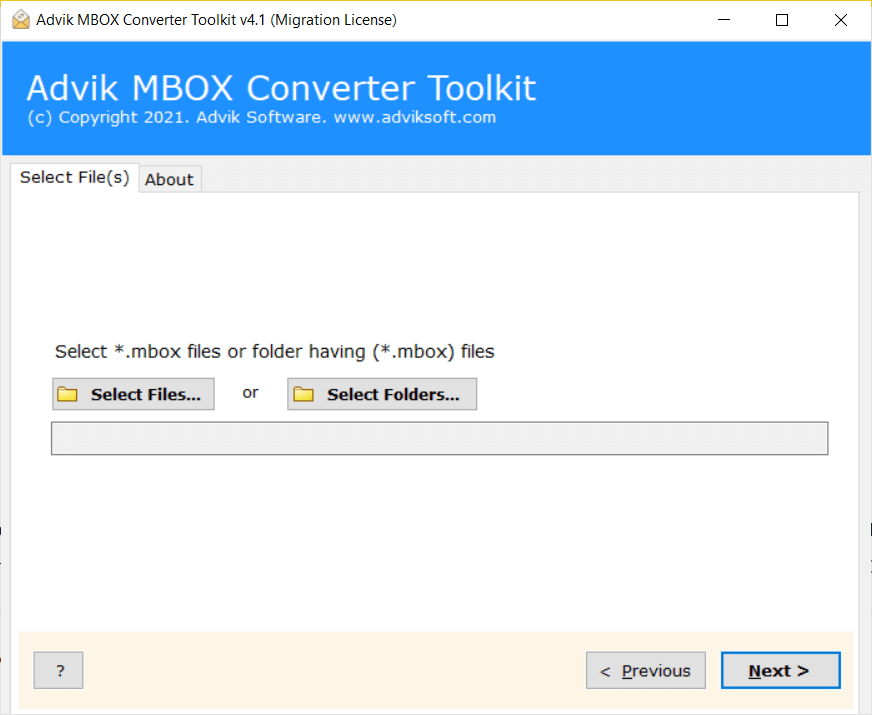
Install and Launch Advik MBOX Converter

Download the Advik MBOX Converter and install it by following simple on-screen instructions. The setup is quick and does not require any technical knowledge, so even beginners can start easily.

02

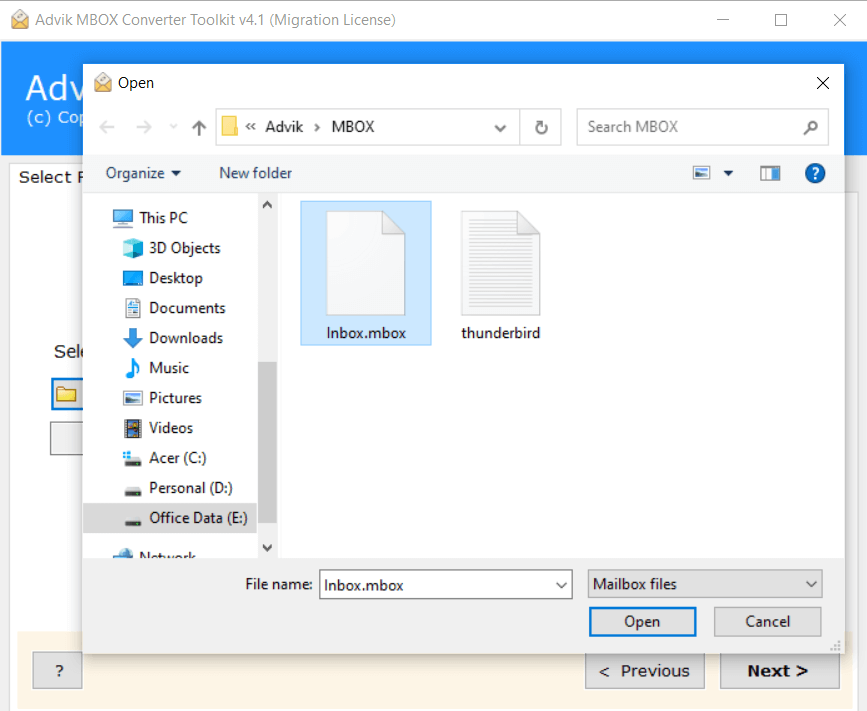
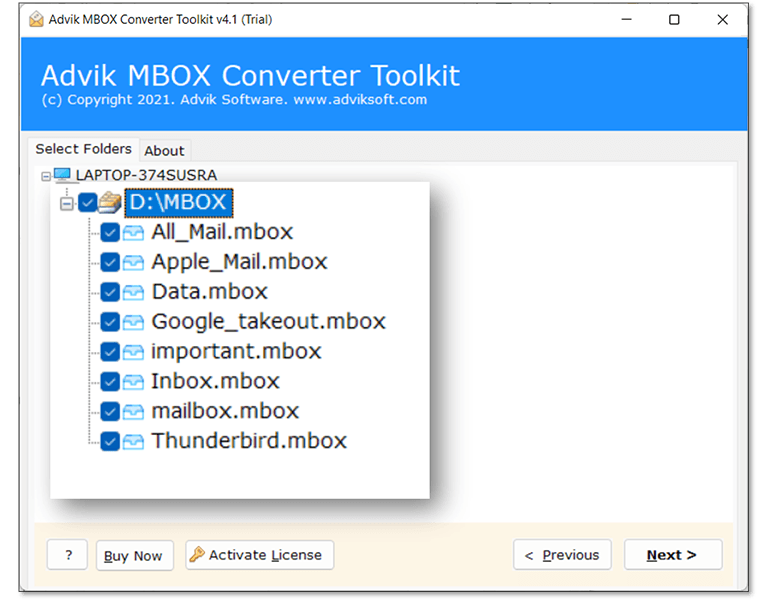
Add MBOX Files or Folders

The software provides flexible options to upload your MBOX data. Select individual MBOX files or add an entire folder for bulk conversion, depending on your requirement.

03

Preview Email Data Before Conversion

Once loaded, the tool scans and displays a complete preview of your emails along with attachments. This lets you verify the data before starting the conversion.

04

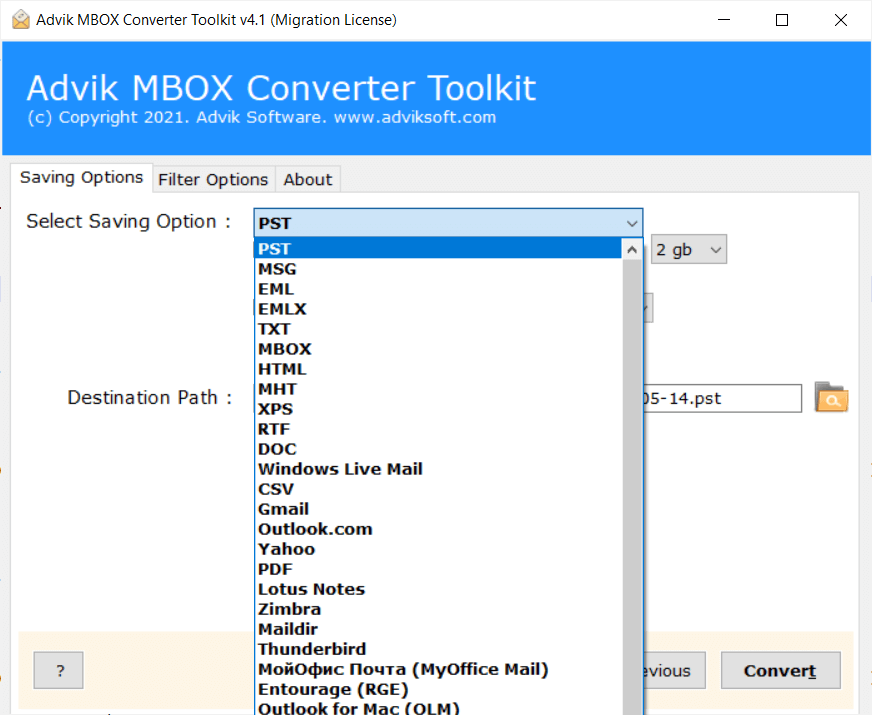
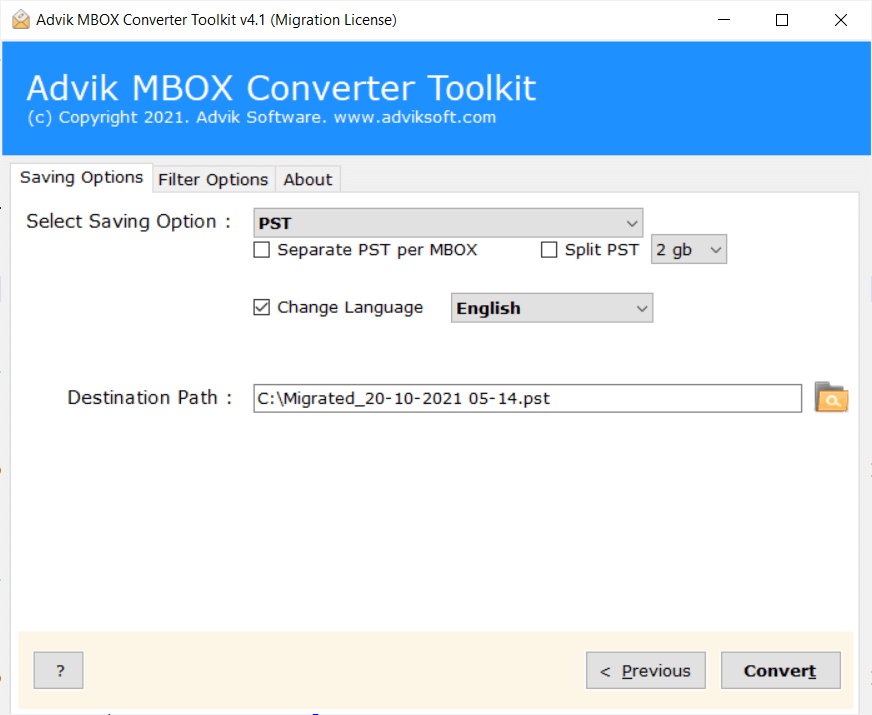
Choose Saving Option and Start Conversion

Select your desired output format — PST, MSG, EML, PDF, HTML, and more. Apply filters if needed, choose a destination path, and click Convert to complete the process.

Install and Launch Advik MBOX Converter
Step 1 Screenshot
Add MBOX Files or Folders
Step 2 Screenshot
Preview Email Data
Step 3 Screenshot
Choose Format and Convert
Step 4 Screenshot
Step 1 of 4
Supported Clients

Popular Email Applications That Use MBOX Files

Use Case
When Do You Need MBOX Converter Wizard?

An MBOX Converter Wizard is useful in real-life situations where managing or accessing your emails becomes difficult. Below are some common scenarios explained in simple, user-friendly language:

If you are moving from email apps like Thunderbird or Apple Mail to Outlook, Office 365, or Gmail, you may face compatibility issues. MBOX files are not directly supported by many platforms, so your emails may not open properly after migration. In this case, Advik MBOX Converter helps you convert your data into formats like PST or EML so that you can transfer MBOX file to another platform hassle-free.

Sometimes, you may no longer have access to the email application where your MBOX file was created. This can happen due to system crashes, software uninstallation, or switching devices. Without the original app, you cannot open or read your emails.

Here, the Advik MBOX Exporter lets you open and access your emails without needing the original email client.

Large MBOX files often become slow, unresponsive, or even corrupted. You might experience missing emails, loading issues, or application crashes when trying to open them. This MBOX Converter can handle large files efficiently and even recover accessible data from partially corrupted files.

In legal cases, audits, or investigations, emails are often required as evidence. You may need to convert them into readable and secure formats like PDF or HTML while keeping all original details intact. The MBOX Converter ensures emails are converted with complete data integrity, making them suitable for legal and compliance use.

MBOX files are not flexible when it comes to sharing or using across different platforms. You may need your emails in formats like PDF, DOC, CSV, or TXT, depending on your requirement. The Advik MBOX Converter Utility allows you to convert MBOX files into multiple formats and make your data more usable and accessible.

If you want to store your important emails safely for future use, keeping them in MBOX format is not always the best option. You may need a more stable and universally supported format for long-term storage. Using this tool, you can archive emails in formats like PDF or HTML, ensuring easy access and data safety for years.

Features

MBOX File Converter Software - Core Functions

Below are the major functionalities and technical advantages of using this utility

Advanced Filtering Options

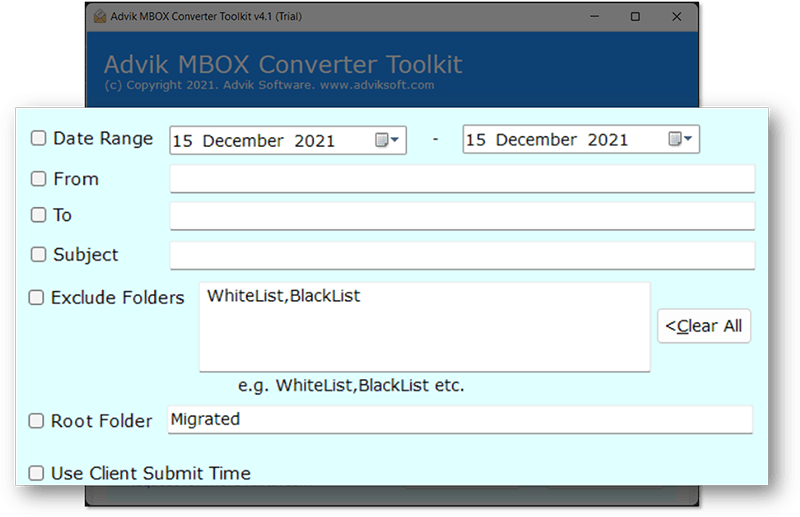
The software comes with an email filter feature that helps you convert only the data you actually need instead of processing the entire mailbox. This is especially useful when you are dealing with large MBOX files and want to avoid unnecessary data conversion. It gives you better control, saves time, and keeps your output clean and relevant.

  • Allows you to select specific folders like Inbox, Sent, or Drafts
  • Enables date-based filtering to export emails from a particular time period
  • Helps avoid converting unwanted or duplicate emails
  • Reduces overall conversion time and improves performance
  • Keeps output data organized and clutter-free
  • Useful for professionals handling selective data like legal or audit records
mbox converter advanced filtering
bulk mbox file conversion

Bulk MBOX File Conversion

This feature is designed for users who want to convert multiple MBOX files at once without repeating the same steps again and again. Instead of handling files individually, you can process entire folders in a single attempt. Either you can click Select Files to add multiple files for conversion, or you can click the Select Folders option to load folders having multiple .mbox files to carry out the conversion task without any issues.

  • Convert multiple MBOX files in one go without manual repetition
  • Option to add entire folders for batch processing
  • Saves a significant amount of time and effort
  • Minimizes chances of human error during conversion
  • Ideal for large-scale data migration and business use
  • Maintains consistency across all converted files

Multiple File Format Support

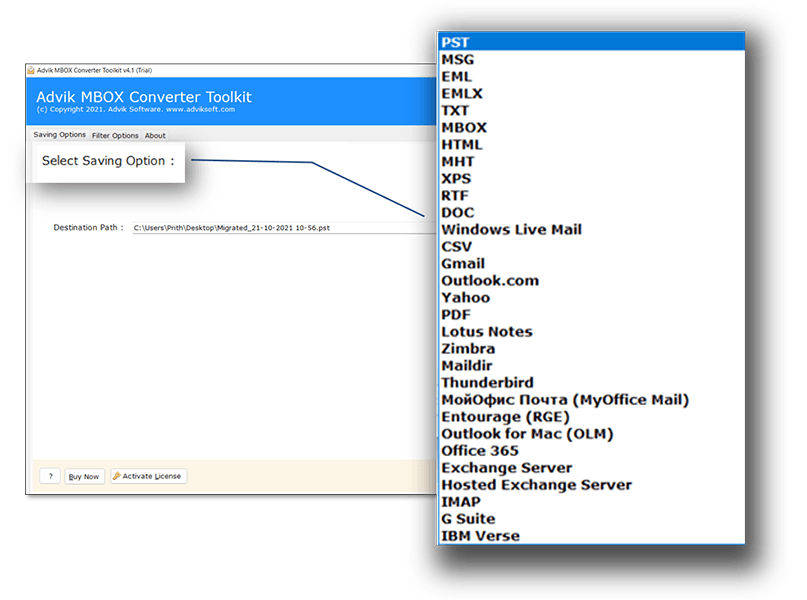
It also allows you to convert MBOX files into various formats based on your needs. Whether you want to access emails in another email client or save them as documents, this flexibility makes the tool highly useful for different scenarios.

  • Convert MBOX to formats like PST, MSG, EML, PDF, HTML, CSV, TXT, DOC, XPS, RTF, and MHT
  • Helps in switching between different email clients easily
  • Allows saving emails as documents for backup or sharing
  • Makes data accessible across multiple platforms and devices
  • Useful for both personal and professional data management
  • Eliminates dependency on a single email application
multiple mbox conversion formats
More Features

Additional Key Features of MBOX Conversion Tool

Convert MBOX Files with All Data

This feature ensures that all email components of MBOX email file are converted completely, including attachments, metadata (To, From, Subject, Date), and embedded elements. Users do not have to worry about missing information during the conversion process. This is especially useful for professionals who need accurate email records for business or legal purposes, as it guarantees that every detail remains intact.

Dual Modes for Adding MBOX Files

The software offers two flexible options to load data: either select individual MBOX files or add entire folders in one go. This makes it convenient for both small and large-scale tasks. Users handling a few files can choose individual selection, while those working with bulk data can upload complete folders, saving time and effort.

Selective MBOX File Conversion

With this feature, users can choose only the required emails or folders instead of converting the entire mailbox. It helps avoid unnecessary data processing and reduces conversion time. This is highly beneficial when users only need specific data, such as emails from a particular date range or folder.

Browse Specific Destination

This option allows users to select the exact location where they want to save the converted files. It gives better control over file management and helps keep data organized. Users can easily access their converted files without searching through multiple folders.

Retains MBOX File Data Integrity

The tool is designed to maintain the original structure and properties of emails during conversion. It ensures that formatting, attachments, and header details remain unchanged. This is important for users who need reliable and accurate data after conversion, especially in professional environments.

Maintain Folder Hierarchy

During conversion, the software keeps the original folder structure the same as the source MBOX file. This helps users easily navigate and manage their emails after conversion. It eliminates confusion and saves time in reorganizing files manually.

Multiple File Naming Options

Users can rename output files using different naming patterns such as subject, date, or sender details. This feature helps in better file organization and makes it easier to identify emails later. It is especially useful when handling large volumes of converted data.

Show Folder List with Item Count

The tool displays all folders along with the number of emails in each folder before conversion. This gives users a clear overview of their data and helps them decide what to convert. It adds transparency and improves decision-making during the process.

Allows for OAuth Authentication

For secure login and data access, the software supports OAuth authentication. This ensures that user credentials are protected and not stored insecurely. It is particularly useful when connecting with cloud-based email services, providing a safe and trusted environment.

Windows Compatibility

The software is fully compatible with all major Windows operating systems, including the latest versions. Users do not need to worry about system compatibility issues that make it accessible for a wide range of users.

Free Trial Version

A free trial version is available to help users test the software before purchasing. It allows them to understand how the tool works and evaluate its performance. This builds trust and helps users make informed decisions based on their needs.

Simple and Easy-to-Use GUI

The tool is designed with a clean and user-friendly interface that makes it easy for anyone to use, even without technical knowledge. All steps are clearly guided to reduce confusion and ensure a smooth experience for beginners as well as professionals.

Availability

Supported by Trusted Marketplaces

cnet logo

CNET

CNET appreciates the Advik MBOX Converter Tool for its stable performance and accurate results during email conversion. It highlights the tool's ability to handle large files smoothly while preserving data integrity and structure.

capterra logo

Capterra

On Capterra, users rate the software highly for its simple interface and time-saving bulk conversion feature. Many users mention that it delivers reliable results without requiring technical expertise.

software suggest logo

SoftwareSuggest

SoftwareSuggest highlights the Advik MBOX Converter for its user-friendly design and reliable performance in handling email migrations.

Specifications

Advik MBOX Converter Wizard - Specification

Software Download

Download Now for Windows
Size 68.1 MB
Version 5.0

Trial Limitations

Advik MBOX Converter Trial Version will allow you to preview and process the first 25 items from each folder of MBOX file.

System Requirements

Processor Pentium Class or higher
Operating System Windows 11, 10, 8.1, 8, 7
Memory 4 GB recommended
Hard Disk 500 MB of free space

License Delivery

Electronic via Email

Product Guides

License & Version

Personal License Activation up to 2 Machines
Business License Activation up to 5 Machines
Migration License Activation up to 10 Machines
Pricing

Advik MBOX Converter - Free vs Paid Version Comparison

Choose the right plan for your software

Features

Free Demo

$0

Try before you buy

Convert MBOX File Data First 25 Items
Preview Email Data Before Conversion ✓ Available
Advanced Email Filters ✓ Included
Bulk MBOX File Conversion ✓ Included
Compatible with All Windows Versions (11 & Below) ✓ Compatible
Technical Support Basic Support
Commercial Use License Personal Use Only
Free Updates Not Included
Free Download

Note: The Advik MBOX Converter free demo version allows you to process 25 items per folder. Upgrade to the full version to unlock unlimited conversion and commercial use rights.

Reviews
Who Loves Advik MBOX Converter Wizard?
4.9 ★★★★★ out of 5  ·  Based on 3,478 verified reviews
195,000+ Downloads & Counting

Download the #1 MBOX File Converter

Download in seconds. Convert your first MBOX file in under a minute. Completely free to try.

No Credit Card No Signup Required No Time Limit Virus-Free & Safe Works on Windows 11/10/8/7
Advik MBOX Converter Wizard
Size • 68.1 MB • Windows • Version • 5.0
Download Free Now
Convert 25 Items Free Per folder, all conversion options available
Multiple Output Formats PST, EML, PDF, CSV, HTML, MSG & more
Ready in 60 Seconds Install, load MBOX, convert — done
Safe & Secure No data leaves your PC
4.9/5 from 3,478 verified users

Trusted by teams at

Microsoft
Google
IBM
DELLDell
HPHP
ORACLEOracle
AWSAmazon
PayPalPayPal
Spotify
LinkedIn
Slack
CISCOCisco
Microsoft
Google
IBM
FAQ
Popular Questions

MBOX files are not supported directly by most systems. They require specific email clients like Mozilla Thunderbird. If you don't have the original email client, you won't be able to open them easily. In such cases, using this MBOX converter helps you access emails in formats like PDF, PST, or EML.

Users often face issues like file incompatibility, large file size, difficulty in accessing emails without the original client, and lack of direct export options. Sometimes, MBOX files also get partially corrupted, making it difficult to read emails properly.

Yes, but only in limited cases. You can use Thunderbird and configure another email client, then drag and drop emails. However, this method is time-consuming, requires technical knowledge, and is not suitable for bulk conversion.

MBOX files store all emails in a single file, including attachments. Over time, this increases file size, making it slow to open and more prone to corruption. Managing large MBOX files manually becomes difficult.

In manual methods, yes. Drag-and-drop or copy methods may skip attachments or disturb formatting. Using a reliable MBOX converter ensures all email properties like attachments, metadata, and structure are preserved.

Manual methods do not support bulk conversion. You have to process emails one by one. A professional tool allows you to convert multiple MBOX files or folders in a single process.

Manually, this is difficult and requires a filter feature inside an email client. Advanced tools provide selective conversion options so that you can choose specific folders, dates, or emails as per your needs.

For manual methods, yes. You need tools like Thunderbird. However, automated MBOX converters work independently and do not require any additional email client installation.

First, try opening it in Thunderbird and repair it using compact folder options. If that doesn't work, a professional converter can still extract readable data from partially corrupted MBOX files.

It depends on your requirement. For Outlook use PST, for individual email access use EML, for sharing use PDF, and for data analysis use CSV. A good converter provides multiple options to choose from.

Yes, if you use a trusted and secure tool. Make sure the software does not upload your data to any server and performs conversion locally on your system.

Free tools are available but usually come with limitations like restricted conversions, file size limits, or missing features. For complete and accurate conversion, a professional version is recommended.