How to Export Roundcube Emails to PST File?
Roundcube does not provide a direct way to export its emails into PST format. This can be a challenge for the users who want to access their mailbox in Microsoft Outlook or for any other reasons they are exporting their emails into .pst files. In this guide, we will review two real world ways to export emails from Roundcube to PST – using Outlook manually and using a professional solution. We also discuss the benefits, drawbacks and best use cases of each method, so you can decide what is best for your needs.
Table of Contents
- Testing Environment Used
- Understanding Roundcube to PST Export Process
- Why Export Roundcube Emails to PST?
- Method 1: Export Roundcube to PST Using Outlook
- Method 2: Export Roundcube Emails to PST Without Outlook
- Why Choose a Roundcube to PST Export Tool?
- Watch How to Export Roundcube Emails to PST
- Which Method Should You Choose?
- Final Words
- Frequently Asked Questions
Testing Environment Used
The export process was tested to check the accuracy and working of the methods described in this guide work:
- Roundcube webmail account.
- Microsoft Outlook 2021
- Outlook Microsoft 365
- Windows 11 Professional
- PST files checked in Outlook after exporting from Roundcube
Testing Observation: During testing, the mailbox was successfully exported to Outlook after the Roundcube account was completely synced with Outlook. The export took longer to complete because of the large mailboxes.
Understanding Roundcube to PST Export Process – Explained
Roundcube is a webmail interface that allows you to access the emails that are stored on your hosting provider’s mail server. And it does not store mailbox data locally and thus cannot generate PST files itself.
PST (Personal Storage Table) is the mailbox storage format of Microsoft used by Outlook to store:
- Email messages
- Attachments
- Contact Information
- Calendars
- Notes
- Task list
Roundcube export emails to PST allows users to make local copies of their mailbox information that they can manage & open in Microsoft Outlook.
Real-World Scenario: Why Users Export Roundcube Emails to PST
Users usually export Roundcube mailboxes because one or more of the following reasons apply:
- To download Roundcube emails on local system
- Open Roundcube emails using Microsoft Outlook
- Keep business communication records
- Transfer mailbox data to another computer
- Less dependency on webmail access
- To save old emails for long term storage
- Prevent unintentional deletion of important messages
Method 1. How to Export Roundcube to PST with Outlook?
If your hosting provider supports IMAP access, you can connect the Roundcube mailbox to Microsoft Outlook and then create a PST file through the Outlook export wizard.
Follow the steps below and it’s associated screenshots to understand the process in a better way;
1. Open MS Outlook in your Windows system.
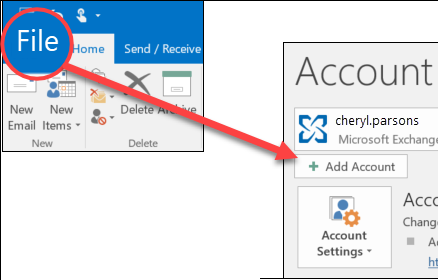
2. Click the File tab and choose the Add Account option.
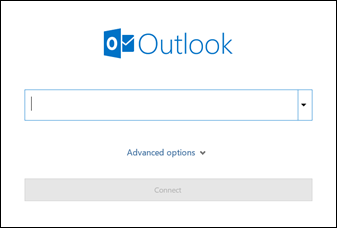
3. Enter Roundcube login credentials and click Connect to configure with Outlook.
4. After configuration, Outlook will load all email folders of your Roundcube.
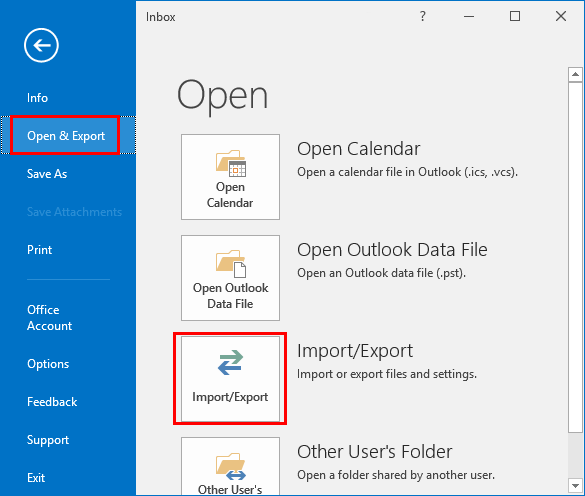
5. Now go to the Open/Export menu and select the Import/Export option.
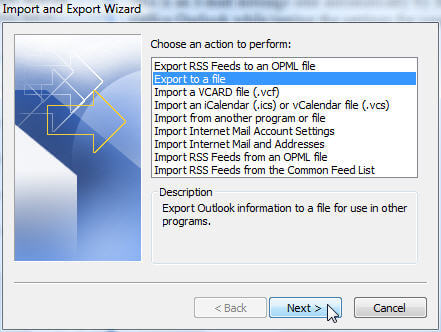
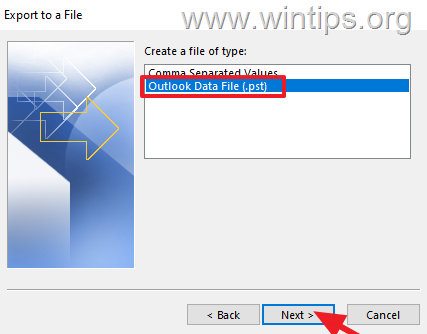
6. A pop-up window will appear. Choose Export to a File and click Next.
7. Select Outlook Data File (.pst) and press Next.
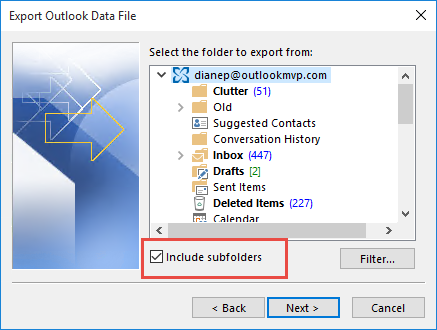
8. Next, choose Roundcube mailbox folders to export.
9. Browse the location and click Finish.
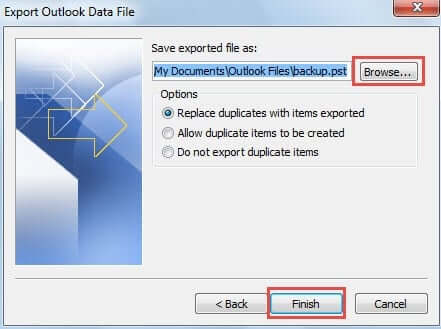
The Roundcube PST export process is complete!
Limitations of Manual Approach
- MS Outlook must be installed
- The risk of data loss is involved
- The configuration is quite complicated
- Time-Consuming process
- No filter option for selective conversion
Method 2. How to Convert Roundcube Mailbox to PST Without Outlook?
Download and install the Advik Roundcube Backup Wizard into your Windows system. This software can directly export Roundcube emails to PST file, in just a few simple clicks. Just run the tool, enter Roundcube account login details, choose mailbox folders, select PST as a saving option.
With this utility, you can export the entire mailbox, including complete emails and attachments. It provides an option to select any particular email folder(s) for conversion. The tool preserves email properties and folder structure while exporting.
Tap on the link below and try the software for FREE.


Steps to Export Roundcube Emails to PST File
Step 1. Run the suggested software and sign in with your Roundcube email account details.
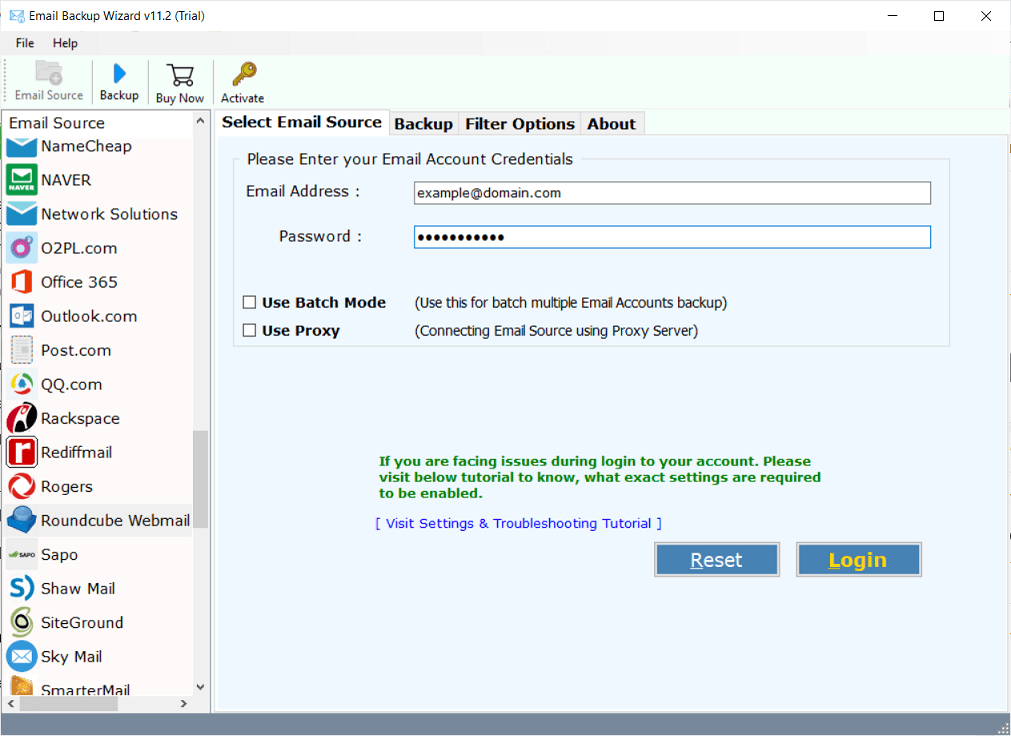
Step 2. In the next step, select mailbox folders to export to the .pst file.
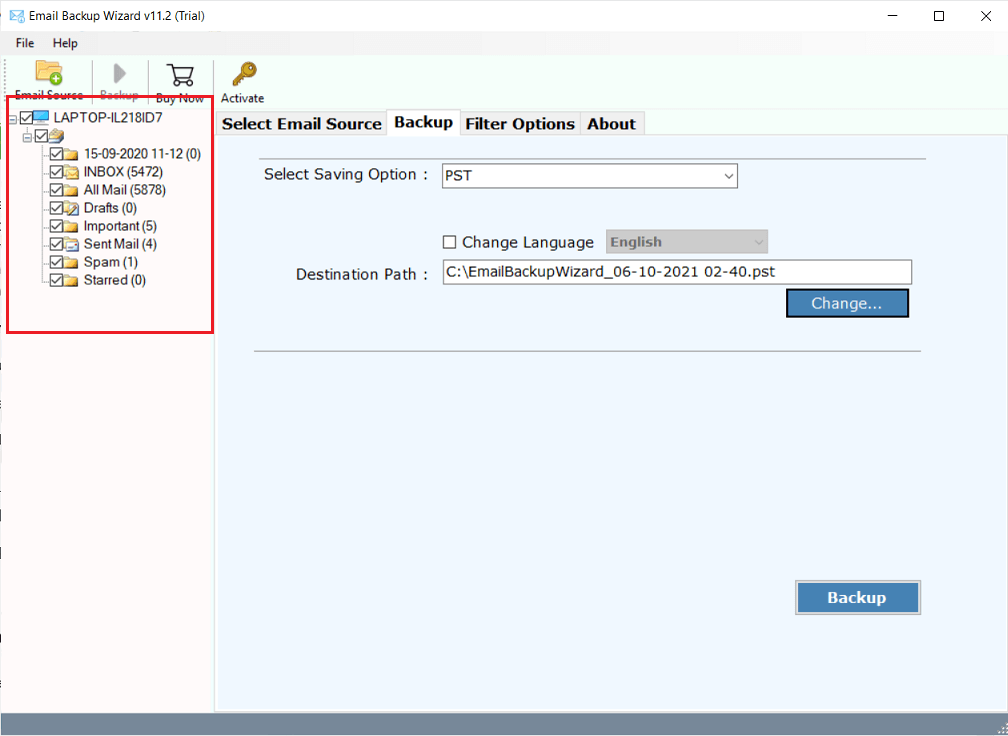
Step 3. Choose PST as a saving option from the list.
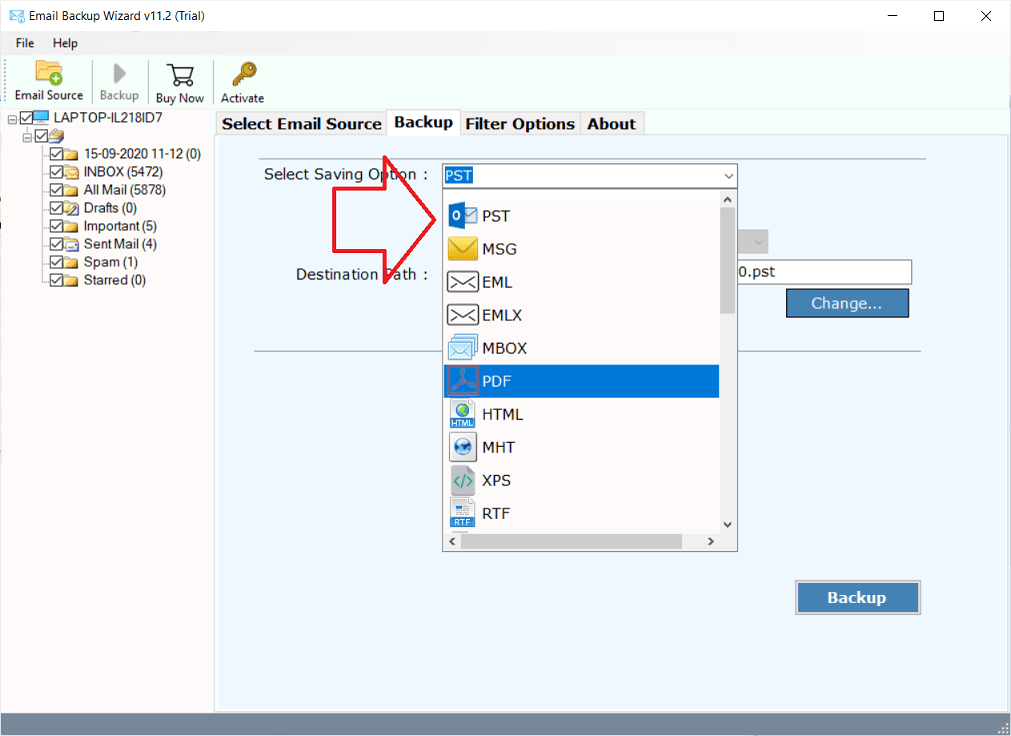
Step 4. Apply Email Filters to export only desired emails.
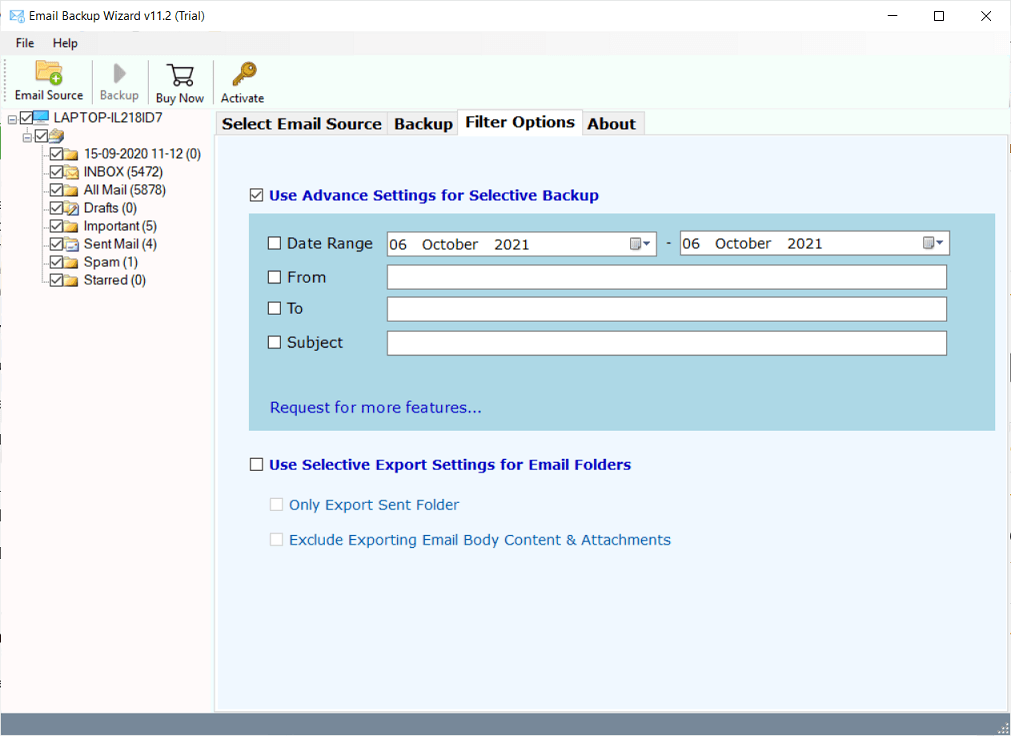
Step 5. Choose the destination path to save the resultant .pst file.
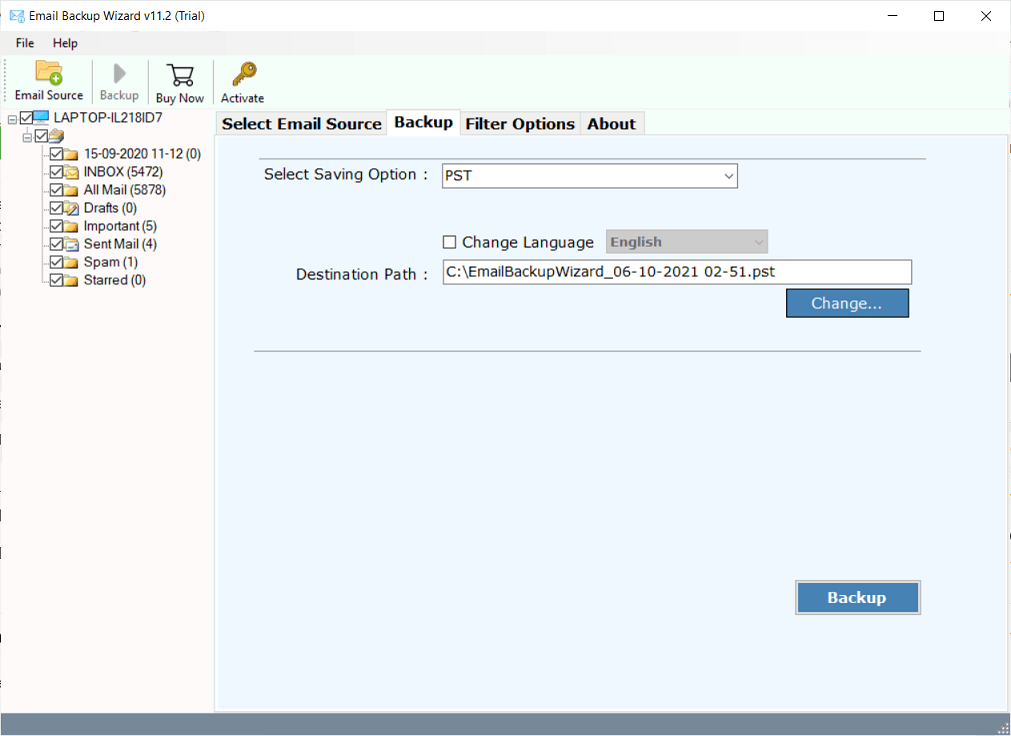
Step 6. Click the Backup button to start the export process.
Finished! Now, the software will start exporting Roundcube emails and folders to .pst file.
Video Tutorial: Export Roundcube Emails to PST
Benefits of Using a Roundcube to PST Export Tool
There are several benefits of using this tool. Some of them are
- Directly export Roundcube mailbox to PST without any external help
- Save the complete Roundcube mailbox in one go
- Preserves all key elements and properties while exporting
- Maintain mailbox folder and subfolder hierarchy
- Export Roundcube to MBOX, EML, PDF, TGZ, XPS, HTML, and 15+ formats
- Instantly Transfer Roundcube Emails to Gmail, Office 365, Yahoo Mail, etc.
- Advance Email Filter Option to Export only Specific emails
- and many more…
Which Method Should You Choose?
The best method depends on the size of your mailbox, your technical requirements and if you have used Microsoft Outlook previously or not. Both methods explained in this article can easily export Roundcube emails into PST format but they are useful for different situations.
Such as that, choose the Outlook Method if:
If you already have Microsoft Outlook installed and just want to export your mailbox for few emails, the manual Outlook method is a good option. You can create PST files without using a third-party tool and it works well for personal users or small mailboxes.
Recommended when:
- Microsoft Outlook is already installed on your computer.
- Your Roundcube mailbox contains a small amount of data.
- Need to export few emails.
- You are comfortable in setting up your Roundcube email accounts in Outlook.
- You need a free solution and don’t need advanced features.
However, before you choose this option, you must be aware that Outlook requires complete mailbox syncing before the export process can start. Downloading and exporting large mailboxes can take a lot of time and you have to do it for each account individually.
When to Choose a Professional Solution?
An automated tool is generally more appropriate for users who need to export large mailboxes or have multiple accounts. This solution was tested to export multiple email accounts and emails and it also includes features that are not available in Outlook’s built-in export wizard.
This method is recommended if:
- You have to export large mailbox data.
- Have multiple Roundcube accounts to process.
- Outlook is not available on your system.
- You want to export only selected emails.
- It is important to keep the mailbox structure and email properties in it’s original format.
Professional solutions can also be helpful for admins, IT teams and business users who deal with multiple mailboxes and looking for a more efficient export process.
Final Words
In the above article, we found two of the best ways to export Roundcube to PST file. You can pick any of the solutions to execute the safe email conversion. The Outlook method is good for users who have Outlook installed and want to export once. For larger mailboxes and with multiple accounts or want filters to export emails selectively a dedicated export solution is recommended.
Frequently Asked Questions
Q1. I want to switch from Roundcube to Outlook. How do I export all my emails to a PST file?
Ans. You can export your Roundcube emails to Outlook using account configuration settings and another way is to use any third-party tool like which i mentioned in this article that will connect with your Roundcube mail account and create PST files.
Q2. I have thousands of emails in my Roundcube email account. Will they all be exported?
Ans. Yes, you can export any email as long as the mailbox is fully synced with Outlook email app or any third-party tool. Keep this in mind that the larger mailboxes may take long time to process and also on the method you choose.
Q3. I want emails from only one folder. Do I have to export the whole mailbox?
Ans. No, just select that specific folders to export before starting the export. This option is available in both the methods that i have explained above. However, to export more selective emails then only an automated tool will help you.
Q4. I don’t have Microsoft Outlook installed. Can I still make a PST file?
Ans. Yes, you can use an automated tool to export PST files without Outlook.
Q5. I want to keep my email attachments. Will they also included in my PST file?
Ans. Yes. PST files usually contain email messages with attachments, folder structure, sender information, dates and other mailbox data.
Q6. I am moving to a new computer. Can I use the exported PST file over there?
Ans. Yes. You can make a copy of the PST files to another computer and open them in Microsoft Outlook using import/export wizard to access your mailbox data.
Q7. I have years of old emails in my Roundcube account. What do I do?
Ans. PST files is often considered the preferred file format for long-term storage and backup purpose. Many users export older and multiple emails in PST so they have a local backup for long term.
Q8. Can I export more than one Roundcube account at a time?
Ans. The Outlook method typically exports one configured account at a time. Some professional solutions allow you to export multiple accounts in one go.
Q9. What is better for a large business mailbox?
Ans. With large mailboxes or if you want to do selective email exports a professional solution is usually more convenient.