How to Go Back to the Old Version of Yahoo Mail (2026 Guide) | 4 Working Methods
If you are one those users who prefer the old version of Yahoo Mail, you might be wondering how to go back to the old version of Yahoo Mail. To do this, Yahoo Mail offers a built-in Go back to the old Yahoo Mail feature on some accounts. If not, you can use Basic Mail, or access it directly via mail.yahoo.com/b/. But keep in mind that Yahoo’s original Classic Mail is no longer available as it is discontinued now.
Yahoo Mail has upgraded it’s interface for many times as per the changing technology. However, not all users are happy with the latest design. If you want a simple layout, you can switch back using Yahoo’s “Go back to the old Yahoo Mail” option on Yahoo. It is available on some Yahoo Mail accounts which uses Basic Mail as it provides a lightweight interface with few visual elements. You can also access Basic Mail option directly with this URL –https://mail.yahoo.com/b/.
But you have to understand that the Yahoo Mail Classic is no longer available. Some user can still go back to old version but not everyone will see it. In many cases, Basic Mail is the closest thing to the original Yahoo Mail experience.
In this comprehensive guide, you will learn, step-by-step how to go back to the old version of Yahoo Mail, how to change Yahoo mail from new to old version, difference between old Yahoo Mail, Yahoo Mail Classic and Basic Mail and many other things.
Before moving ahead with the reasons and ways, let’s first understand the following.
Can You Still Switch Back to the Old Version of Yahoo Mail?
Yes, but that depends on your Yahoo account.
Yahoo has different interface for different account types and region. Some users will still see a “Go back to the old Yahoo Mail” option in the Yahoo Mail interface and others will only have Basic Mail available. If you don’t have either option that means Yahoo has removed the option to turn that account back on.
Another thing is that, the Yahoo Mail Classic interface is no longer available. Many users call any previou layout as the “old version,” but Yahoo officially stated that Classic Mail has retired several years ago. Basic Mail is the closest thing we have today. It is more faster and straightforward but it lacks many of the advanced features of the latest Yahoo Mail.
Below, we will guide you through all the working methods to access older version of Yahoo Mail in 2026, we will discuss each method one by one, so follow them as per your convenience.
Yahoo Mail Classic vs Basic Mail vs New Yahoo Mail
| Feature | Yahoo Mail Classic | Yahoo Basic Mail | New Yahoo Mail |
|---|---|---|---|
| Availability | Discontinued | Available for some accounts | Default interface |
| Officially Supported | No | Yes | Yes |
| Modern Design | No | Comparatively Less | Yes |
| Advanced Features | Limited | Limited | Yes |
| Themes & Personalization | No | No | Yes |
| Rich Email Formatting | Basic | Basic | Yes |
| Keyboard Shortcuts | Limited | Limited | Extensive |
| AI & Productivity Features | No | No | Available (where supported) |
| Best For | Legacy users (no longer available) | Users who prefer a lightweight interface | Most Yahoo users |
Why Users Want to Go Back to the Old Version of Yahoo Mail?
Change isn’t always easy- especially when it affects something you use daily. The new Yahoo interface offers advanced features but users prefer old Yahoo Mail for various reasons. Some of them are;
- Long-term Yahoo Mail users are comfortable with the old version. The new version changes menus, icons, and navigation, which feels confusing.
- The old Yahoo Mail version was lighter and faster. While the new version takes a long time to load.
- The newer Yahoo Mail has more ads and pop-ups. On the other hand, the old version allowed users to focus on emails without any distractions.
- The older Yahoo Mail easily worked with old PCs. The new version may not function smoothly on older systems.
Important Things to Know Before You Switch Back to Old Version of Yahoo Mail
Yahoo no longer officially supports the old version. It discontinued its classic interface but another version i.e. Bacic Mail, offers a similar experience. When you go back to the old version of Yahoo Mail, there is always a risk of emails. A backup ensures your important emails remain safe even if something goes wrong. You can use the Advik Yahoo Backup Tool to save Yahoo emails to computer/pc/hard drive. With this tool, you can export Yahoo Mail to PST, PDF, MBOX, EML, etc. The software preserves all email attributes and folder hierarchy as well during the process.

Method 1. Use Yahoo “Go Back to the Old Yahoo Mail” Option
Note: This method only works for users who still have the Go back to the old Yahoo Mail option in their Yahoo Mail account. If you do not see this option, chances are that Yahoo has removed it for your account. If so, proceed with the Method 2 (Basic Mail).
Steps to Go Back to the Old Yahoo Mail
Just follow these simple steps –
- Open your preferred web browser and go to the Yahoo Mail login page.
- Now, enter your Yahoo email address and password to log into your mailbox.
- Find the “Go back to the Old Yahoo Mail” Option.
- After you’ve signed in, look at the top right corner of your Yahoo Mail interface.
- If your account is eligible you will see Go back to the old Yahoo Mail option.
- Yahoo may ask why you are switching back or may ask for confirmation.
- Choose the right option and continue.
- Your mailbox reloads to the classic Yahoo Mail interface of your account.
- Reload the page and verify the interface is changed successfully.
If the option is not there don’t worry. You can always give Basic Mail a shot, which has the most similar experience to the older Yahoo Mail interface.
Limitations of this technique
This is the most convenient method but has some important limitations;
- Not available for all Yahoo Mail accounts
- No restore original Yahoo Mail Classic interface.
- Yahoo Mail has right to remove this option at any time.
- Availability depends on account, region and Yahoo interface changes.
- There is possibility that Yahoo might automatically switch back to the latest interface.
Helpful Tip: If you don’t see the “Go back to the old Yahoo Mail” option, then proceed with the next method. If you want an easy and more familiar Yahoo Mail experience, Basic Mail is the most recommended and officially supported alternative.
Method 2. Switch to Basic Mail (Closest Alternative to Old Yahoo Mail)
Can’t find the “Go back to the old Yahoo Mail” option in your Yahoo account? No worries. Some users can still access using Yahoo’s Basic Mail mode option. It’s not the original Yahoo Mail Classic interface but it does provide that many users prefer over the latest version.
Important: Basic Mail is the closest thing to the old Yahoo Mail interface. But it doesn’t restore Yahoo Mail Classic which Yahoo permanently discontinued years ago.
Steps to Switch to Basic Mail in Yahoo Mail
If the option is available for your account, below are the steps to switch to Basic Mail.
Open the browser of your choice and log in to your Yahoo Mail account.
Find the “Switch to Basic Mail” Option.
Scroll to the bottom left hand corner of your Yahoo Mail page.
If your account has Basic Mail enabled, you will see an option, Change to Basic Mail.
Yahoo Mail might ask you to confirm that is what you want to do before it changes the interface.
Click Continue or Switch.
The page will reload with the Basic Mail interface.
Method 3. Switch Back to Old Version of Yahoo Mail Using Yahoo Settings
1. Log in to your Yahoo Mail.
2. Click on the Settings icon and select More Settings.
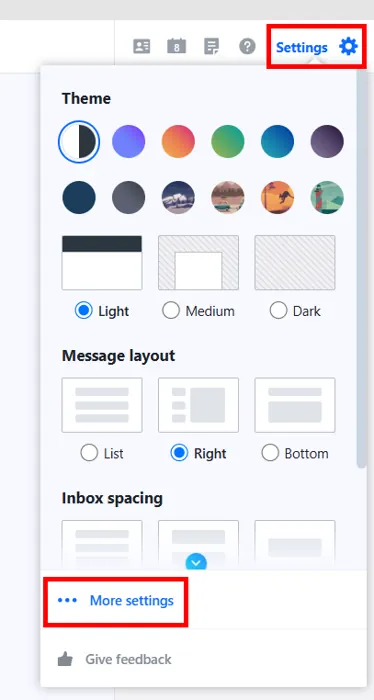
3. Click on the Switch to Basic Mail option in the left panel. A pop-up box appears where you click on the Switch to basic mail button.
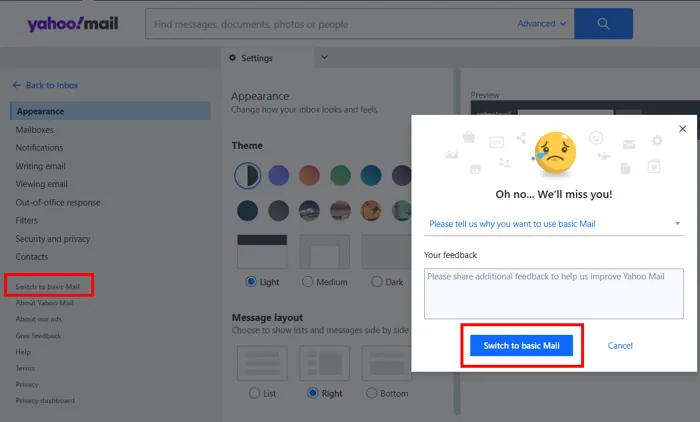
Now, Yahoo will reload your mailbox in Basic Mail view.
Method 4. Switch Yahoo Email Account Back to Old Version
1. Log in to your Yahoo webmail.
2. Check the browser address bar, that is: http://mail.yahoo.com/d/folders/#/
3. Now, replace the letter d with b and press Enter.

This link is going to take you directly to the Basic Mail mode.
By following the above methods, you can go back to the old version of Yahoo Mail i.e. Basic Mail, not restore the original Classic Yahoo Mail. However, it’s important to understand that switching back only changes the look of Yahoo Mail. It does bring any features that were removed earlier.
Conclusion
In this post, we have discussed how to go back to the old version of Yahoo Mail. However, Yahoo does not support Classic Yahoo Mail but there are alternative ways to switch back to the old version of Yahoo Mail Basic. It is highly recommended that you take a backup of your emails before switching Yahoo Mail back to old version.
Frequently Asked Questions
Q1. How do I go back to the old version of Yahoo Mail?
Ans. To go back to old Yahoo Mail, log in to your Yahoo Mail account, go to settings, and click on Switch to Basic mail option.
Q2. Is Yahoo Mail Basic the same as old Yahoo Mail?
Ans. No, it’s similar but still different from the classic version.