How to Import PST to iCloud Mail? (Complete Guide)
There is a rapid increase from Microsoft Outlook to Apple’s ecosystem. It can be a personal and professional reasons both such as few users switch to a MacBook, begin using an iPhone as their main device or just wish to access their old Outlook emails via iCloud Mail.
The problem is iCloud is unable to identify Outlook PST files. Even if you have years of emails, folders and attachments in your mailbox, you can’t upload the PST file directly into iCloud.
The good news is that you don’t have to get trouble anymore. As this guide is made after researching various methods and solution available to import PST to iCloud Mail.
There are two practical ways that totally satisfy this query solution.
Use Microsoft Outlook as a medium between your PST file and iCloud account or select a dedicated migration tool that can transfer PST mailbox data directly to iCloud.
So, now the question is which method you should choose depends on questions such as:
- Do you have Outlook already?
- Is your PST file accessible?
- Are you moving one mailbox or multiple?
- Would you like to save folders and attachments?
This guide will answer all of these questions. More importantly it explains why each method works, where it gets difficult and what approach is most appropriate for you as per your situation.
Why Can’t You Simply Upload a PST File to iCloud?
A lot of first time users believe they can simply log into iCloud Mail, click Import and upload their Outlook PST file. Apple unfortunately doesn’t have this option.
And the reason is simple.
A PST is not an email format like EML or MBOX. Instead, Outlook stores your e-mail messages, attachments, calendars, contacts, notes, and folder information in a separate mailbox database and in a structure that can be read only by Outlook or Outlook-compatible applications.
iCloud Mail is pretty different in this regard. It stores messages on Apple’s mail servers and uses the IMAP protocol to synchronise them. Since there is no support to read PST databases natively, another application needs to read the mailbox first and then upload the email data to the iCloud.
This technical difference is the reason why every PST-to-iCloud migration goes one of two ways:
- Outlook opens the PST file and syncs its contents to iCloud.
- The migration application reads the PST file and uploads the mailbox to IMAP directly.
Once you’ve got this, the rest of the migration process is much easier to follow.
How Does PST Data Actually Reach iCloud?
Users believe that a PST file is uploaded into iCloud directly. But this is not the way of migration.
Instead, an application that understands Outlook’s file format must read the PST mailbox first. The email messages are then uploaded to iCloud Mail using the IMAP protocol, which is supported by Apple for syncing email.
Whichever option you choose, the process is a little different.
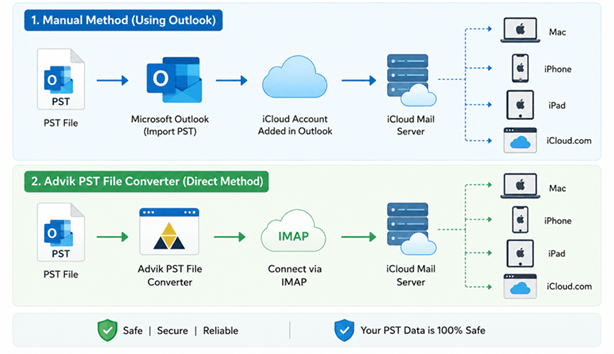
Understanding this process can make the choice of migration method easier. If Outlook is already with you and you are moving a small mailbox, Outlook can be used as a medium. If you don’t have Outlook installed, or if you’re dealing with multiple or large PST files, a tool that connects directly to IMAP will make the migration easier.
Things You Should Know Before Starting the Migration
The actual import process is quite simple but the success of this email migration task depends more on preparation. A few minutes checking the following points can prevent interruptions later on.
Make sure your PST file opens properly: If errors are reported by Outlook when opening the PST file, resolve these errors before you start the migration.
Have Sufficient iCloud Storage: Uploading each email, attachment and folder from the PST file will take your available iCloud storage.
Backup PST File: Both migration methods are designed to read the PST file without making any changes to it; however, we still recommend that you backup the PST file to tackle any mishap in the future.
Create an App-Specific Password: If you have already done it, then it’s alright; if not, go to this page and follow the steps as explained https://discussions.apple.com/thread/254805086
Check your internet connection: Lastly, please check your internet connection before starting this method. As, migration requires a good internet connection and if your connection is not working correctly then you may see interruptions in your migration process.
Method 1. How to Import PST to iCloud Manually?
iCloud Mail cannot import PST files directly. To access PST data in iCloud, you must first add iCloud to Outlook and then import the PST file into Outlook to sync it with iCloud account.
Follow the step-by-step instructions to upload PST to iCloud mail account using Outlook.
1. Open MS Outlook on your Windows computer.
2. Click on File >> Add Account.
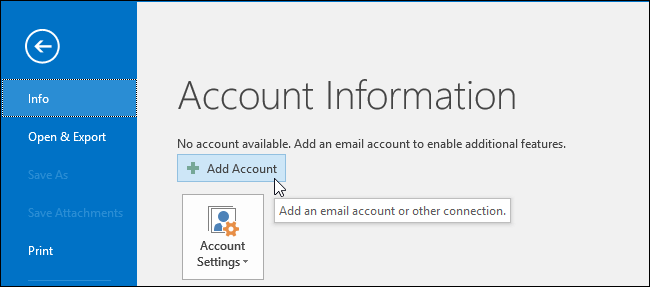
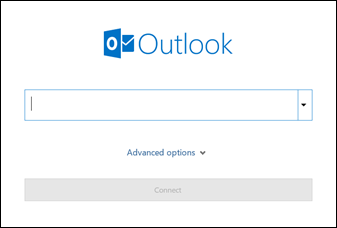
3. Now, sign in to your iCloud account and set it up in Outlook.
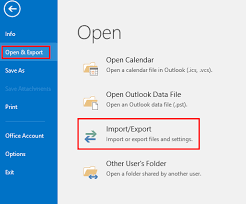
4. Next, restart Outlook & go to File >> Open & Export >> Import/Export.
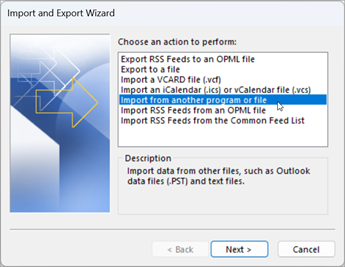
5. Select Import from another program or file & click Next.
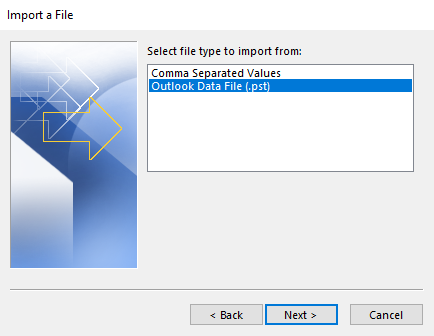
6. Choose Outlook data file (.pst) and click the Next button.
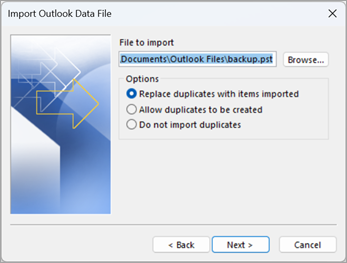
7. Browse the PST file and click on the Next button.
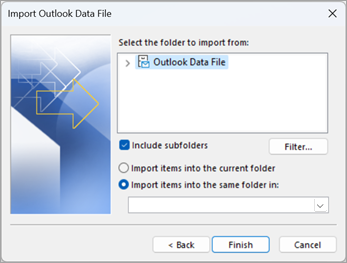
8. Select the folder of your iCloud account and click Finish.
If you are migration for large mailboxes then Outlook may not respond well while synchronising thousands of emails. Most of the time the sync is running in the background so it is preferable to wait and not to interrupt the process.
The manual method is recommended when…
- Outlook is installed on your system
- You have sufficient time to perform this email transfer
- You have single or few PST files, not recommended for large or multiple PST files.
Method 2. How to Transfer PST File to iCloud Mail Directly
If Outlook is not available or if you are migrating multiple PST files, the practical alternative is to use a dedicated migration tool. Another solution is Advik PST File Converter that can directly open PST files and upload the mailbox data to iCloud via IMAP.
Now, download the software to try it for free.


Steps to Import PST File to iCloud Mail
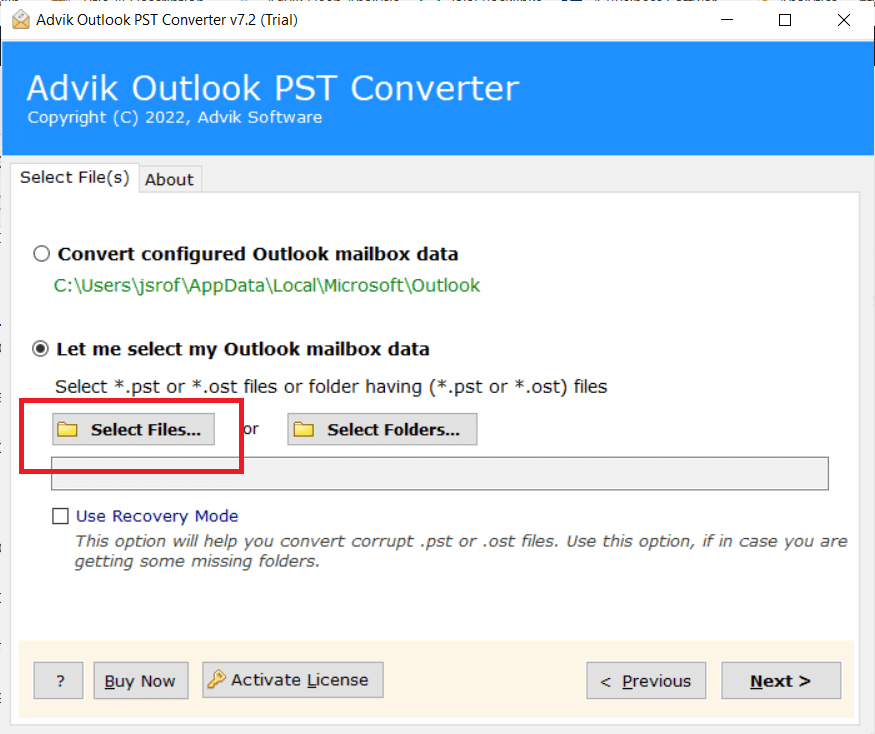
Step 1. Launch the software and click the “Select Files” option.
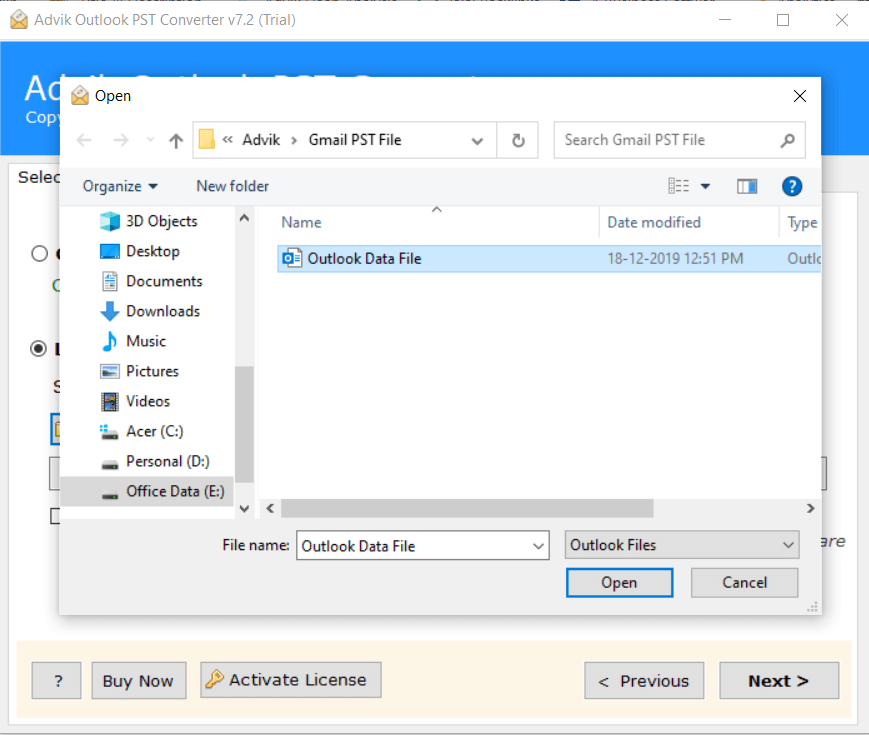
Step 2. Browse and add Outlook PST files into the software.
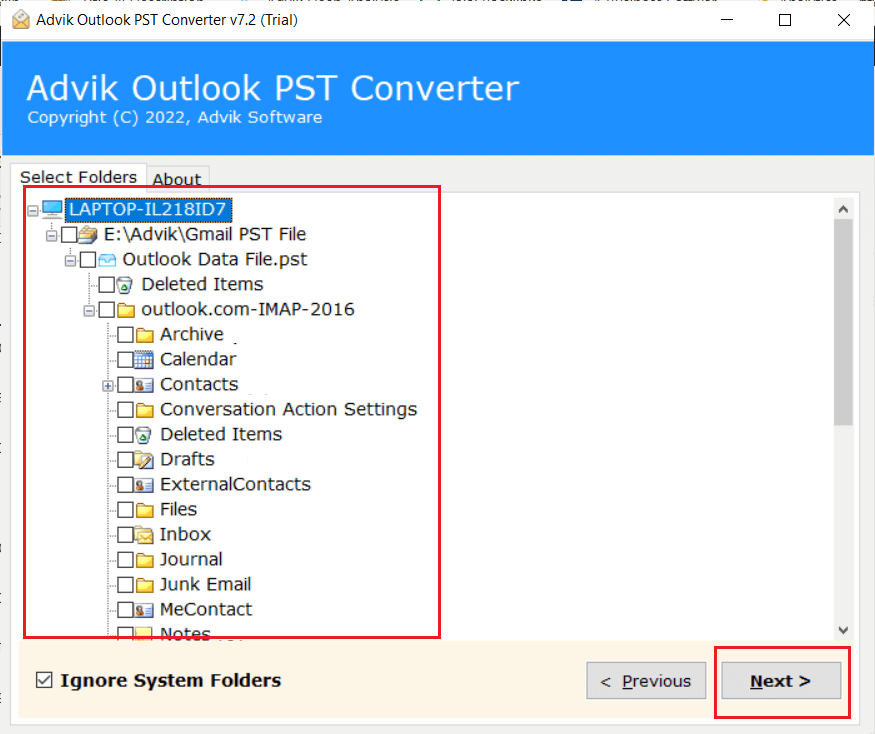
Step 3. Select mailbox folders to transfer and click the Next button.
Step 4. Choose IMAP as a saving option from the list.
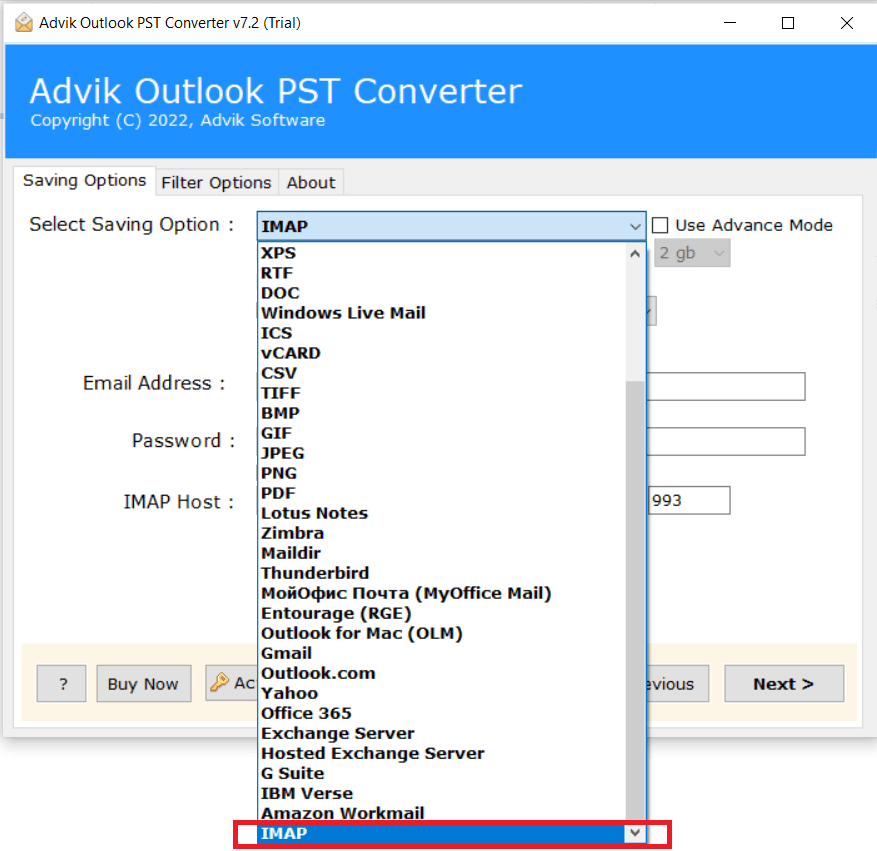
Step 5. Enter your iCloud email login email address and password and click Convert.
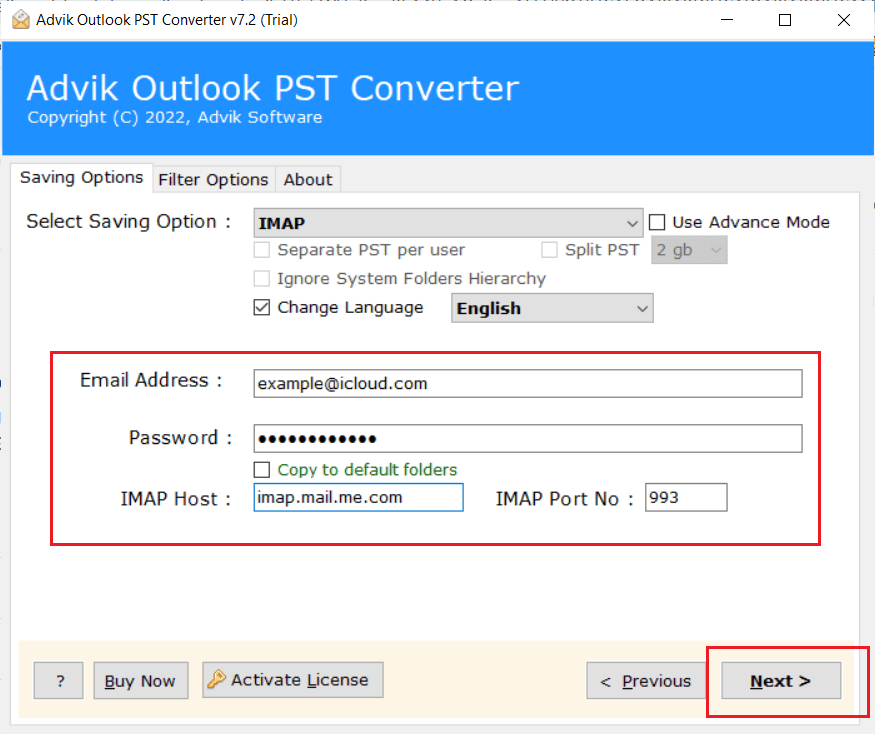
Now sit back and relax; the software will start the email migration process immediately.
Now, log in to your iCloud Mail account and check all the imported PST email data there.
Watch How to Open PST File in iCloud Mail
Which Method Should You Choose?
There is no one best method for all. The right solution depends on your Outlook setup, size of your mailbox and many other things.
Before you begin the migration, compare your situation to the table below.
| Comparision Basis | Manual Outlook Method | Automated Method |
|---|---|---|
| Need to install Microsoft Outlook? | Yes | No |
| Supports any types of PST files? | Requires importing into Outlook first | Yes |
| Process multiple PST files? | No | Yes |
| Large PST file? | Possible, but can be slow | Designed for large mailboxes |
| Preserves folder hierarchy? | Yes | Yes |
| Migrates emails with attachments? | Yes | Yes |
Final Words
After going through this blog, you must have understood that the correct approach is mainly dependent on your needs and requirements. If you’ve already have Outlook set up and you are moving a smaller mailbox, the built-in method is usually good enough. For larger mailboxes, multiple PST files, or systems without Outlook, a more automated solution is suggested to use to make the things work as per your requirements.
Frequently Asked Questions
Q1. What are the iCloud IMAP settings for Outlook?
Ans. To link your iCloud Mail account to Microsoft Outlook or another email client, use the following iCloud IMAP settings for Outlook:
Incoming Mail (IMAP) Server
Server: imap.mail.me.com (use SSL)
Port: 993
Encryption: SSL/TLS
Outgoing mail (SMTP) server
Server: smtp.mail.me.com
Port: 587
Encryption: STARTTLS/TLS
Authentication: Needed
You’ll also need to log in with your iCloud email address and app password if two-factor authentication is enabled on your Apple ID.
Q2. Why do I need to set up my iCloud account in Outlook before importing a PST file?
Ans. Outlook can only import a PST file into an existing account or mailbox in your Outlook app. And iCloud Mail stores your email messages on Apple’s servers, you’ll need to add your iCloud account to Outlook first. Once added, Outlook can transfer the emails from the PST file to your iCloud mailbox. It will automatically sync with all your Apple devices.
Q3. Do I need an app-specific password for iCloud Mail?
Ans. Yes, if you have turned on two-factor authentication for your Apple ID. It’s so because Apple doesn’t allow third-party email apps like Outlook to sign in with your regular Apple ID password. That’s why, you will need to generate app password from your Apple ID account and use that to add iCloud account to Outlook.
Q4. Is there a way to move just specific folders from my PST file to iCloud?
Ans. If you are using Microsoft Outlook, you can select what folder you wish to import as part of the Import/Export process. Any professional tool will let you to select individual folders so you can migrate just the emails you need rather than the entire mailbox.