How to Migrate Rackspace Emails to Exchange Server? [Updated 2026]
Summary: In this blog post, we’ll discuss how to migrate Rackspace emails to Exchange Server. If you are also looking for a solution to the same query, then this article will be extremely beneficial for you. Here. We’ll walk you through the procedure step-by-step.
In today’s world of advanced technology, many tools make our daily tasks, like email management and collaboration, much easier. This is why many people look for simple and accurate ways to migrate emails from Rackspace to Exchange Server. While the internet offers various solutions, finding a hassle-free method to safely transfer Rackspace emails to Exchange Server is important.
Why Migrate from Rackspace to Exchange Server?
Migration trends show that while it’s still in the early stages, the demand is steadily growing as companies’ needs become more specific. Here are the main reasons behind the Rackspace to Exchange migration:
- Complete Control: Microsoft Exchange is ideal for those who want full control over their infrastructure and data.
- Enhanced Security: Exchange provides a secure email gateway to help prevent data loss.
- Scalability: It’s a great platform for managing large email accounts, especially in big enterprises with thousands of users.
- Reliability and Functionality: Exchange ensures reliable email communication and offers tools to make workflows more efficient.
- Boosted Productivity: Exchange promotes better teamwork by enabling easy communication and improving collaboration across teams.
Now, we will discuss an easy and direct way to accomplish this task in a few simple steps. Read on to know more.
How to Transfer Emails from Rackspace to Exchange Automatically?
Download and install the Advik Rackspace Migration Tool to migrate Rackspace emails to Exchange Server with ease and accuracy. With this software, you can migrate multiple Rackspace email accounts to Exchange in a single attempt. Just provide login credentials for both Rackspace and Exchange Server accounts and let the tool handle the rest. This powerful software simplifies the process by preserving the folder structure and ensuring no data loss during migration.
Try It for Free
Curious about the free demo of the Rackspace to Exchange Migration tool? The tool offers a trial version that lets you migrate the first 25 emails from Rackspace to Exchange Server. This free version helps you understand how the software works and explore its features. To migrate unlimited emails, you can upgrade to the Pro version later.


Steps to Migrate Rackspace Emails to Exchange Server
Step 1. Run the software and Sign in.
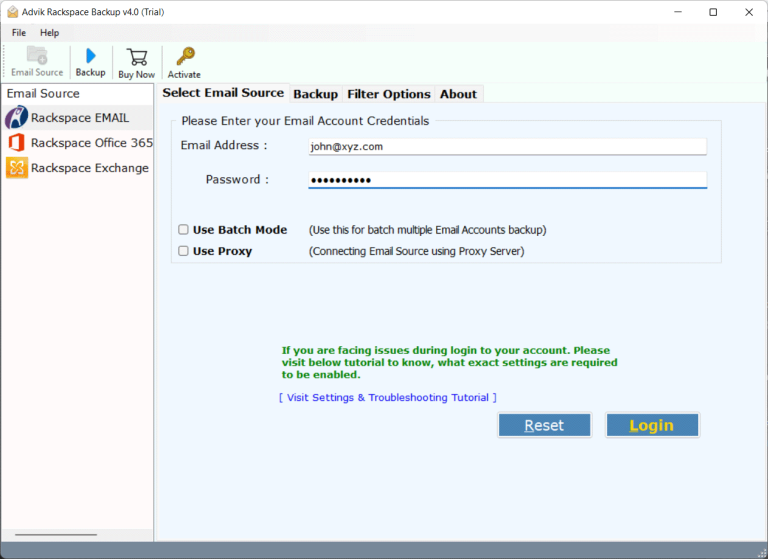
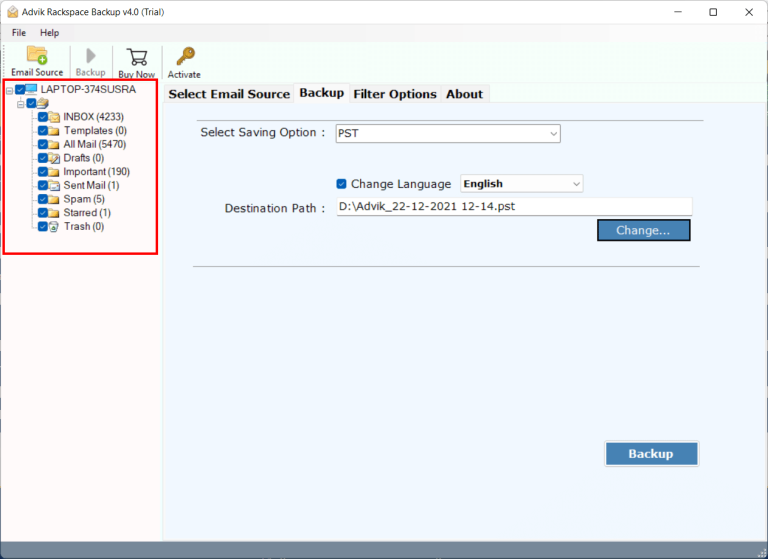
Step 2. Select your mailbox folders for migration.
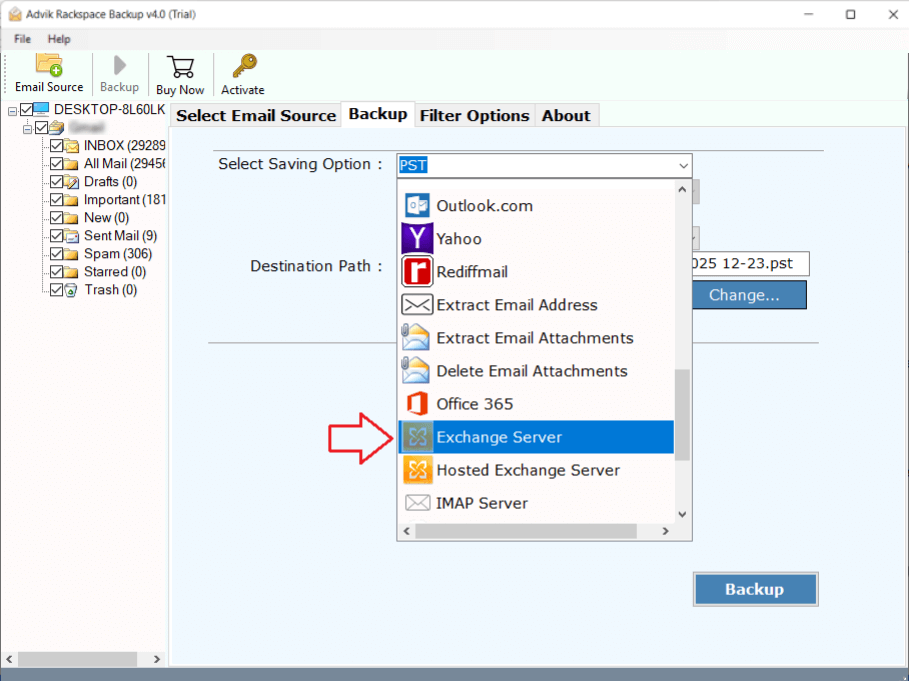
Step 3. Choose Exchange Server as a saving option from the list.
Step 4. Enter your Exchange Server login credentials & click Backup.
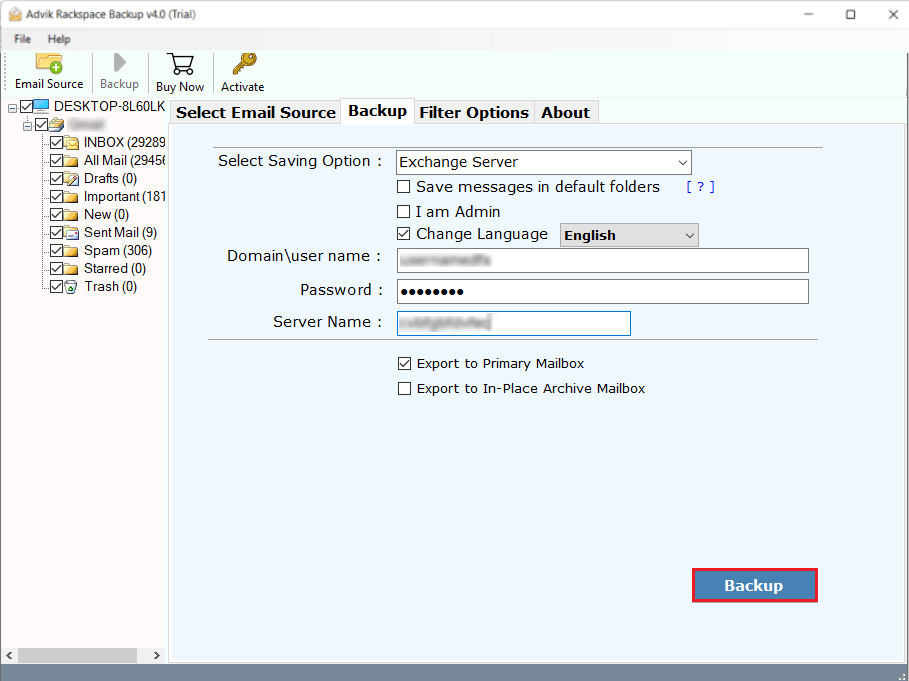
Finished! This is how you can migrate emails from Rackspace to Exchange in bulk. The best part of the software is that you can migrate multiple accounts without any limitations.
Watch the Tutorial to Complete the Rackspace to Exchange Server Migration
Why Choose Rackspace to Exchange Migration Solution?
- Complete Email Migration: Transfer all your emails, including attachments, from Rackspace to Exchange Server.
- Preserves Folder Structure: Keeps your email folders organized just like in Rackspace.
- Fast and Automatic: Eliminates manual effort with its user-friendly and automated process.
- No Data Loss: Ensures that no emails or important data are lost during the migration.
- Secure Transfer: An advanced algorithm ensures the safety of your emails during the transfer.
- Email Filter Option: This also allows for selective email migration based on to, cc, from, subjects, etc.
- Cloud-to-cloud Migration: Also, migrate Rackspace emails to Gmail, Yahoo Mail, Yandex Mail, and many more.
Final Words
In this article, we explained the complete process how to migrate Rackspace emails to Exchange Server. However, there is no manual method to transfer emails from Rackspace to Exchange 2019, 2016, 2013, 2010, or other versions. Here, we have provided an automated solution to accomplish this task quickly. Try the free demo version of this software to get it done easily. For any questions, feel free to reach out to us through the online support chat.
Frequently Asked Questions
Q1. What are the benefits of migrating from Rackspace to Exchange Server?
Ans. The Exchange Server has benefits like central email management, advanced security enhancements, integration with Microsoft 365, and Office etc.
Q2. I need to migrate multiple Rackspace accounts data to Exchnage Server in bulk. Is it possible with this software?
Ans. Yes, using Batch Mode feature, you can transfer emails from multiple Rackspace accounts to Exchange at once.