How to Migrate Thunderbird to Apple Mail?
Jenny Lowrence | November 18th, 2025 | Apple Mail, Email Migration, Mozilla Thunderbird
Learn how to migrate Thunderbird to Apple Mail with complete mailbox data. This blog will guide you through both manual and automated solutions to import Thunderbird to Apple Mail.
Thunderbird is a free, open-source email client developed by Mozilla. Individuals and businesses widely use it for email management. It is known for its customization options, add-ons, and multi-platform support. It is widely used on Windows, macOS, and Linux systems. Despite its flexibility, many users need to export emails from Thunderbird to Apple Mail for various reasons, like switching to a Mac or simply preferring a more native email experience on macOS. Migrating Thunderbird emails to Apple Mail may seem complicated, but it becomes easy once you understand the right method. In this write-up, we will discuss two simple and effective techniques for importing Thunderbird data to Apple Mail. Both methods are mentioned below in complete detail.
Why Migrate from Thunderbird to Apple Mail?
Here are some reasons to transfer Thunderbird to Apple Mail.
- Modern and Clean Interface: Apple Mail offers a simple and user-friendly interface compared to Thunderbird.
- macOS Integration: Seamless compatibility with macOS features like Spotlight, Siri, Contacts, Calendars, etc.
- Better iCloud Support: Integration with iCloud for syncing emails, drafts, and folders across Apple devices.
- Enhanced Security: Apple Mail provides more advanced features like Mail Privacy Protection to prevent email tracking.
Let’s start the process without any further delay.
How to Import Thunderbird to Apple Mail Manually?
Follow the below-given steps to manually migrate Thunderbird to Mac Mail.
- Open Thunderbird on your system.
- Click on the bar icon and choose Add-on option.
- Search for ImportExportTools NG.
- Click on Add to install it in Thunderbird and restart Thunderbird.
- Now, right-click on the mailbox folder and click ImportExportTools NG >>> Export Folder (mbox) >> As mbox file.
- Choose the folder to save the exported file and click Select Folder.
- After that open Apple Mail and import mailbox to Apple Mail.
This is how you can export emails from Thunderbird to Apple Mail.
How to Migrate Thunderbird to Apple Mail Automatically?
Try the Advik Thunderbird Converter on your system to import Thunderbird to Mac Mail effortlessly. With this tool, you can export Thunderbird to MBOX file and then import the exported file into Apple Mail. It can transfer the entire mailbox in a single attempt. This is a 100% safe and secure solution that does not lose a single bit of data during the process. The tool preserves data integrity and folder hierarchy throughout the process.
Download the Thunderbird to Apple Mail Import tool and try it for FREE.


Steps to Transfer Thunderbird to Apple Mail
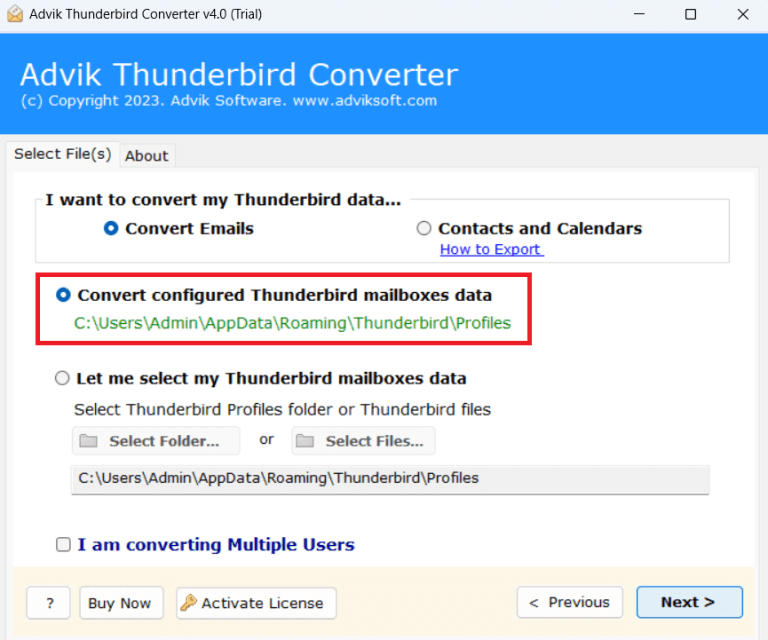
1. Run the tool and choose your Thunderbird profile.
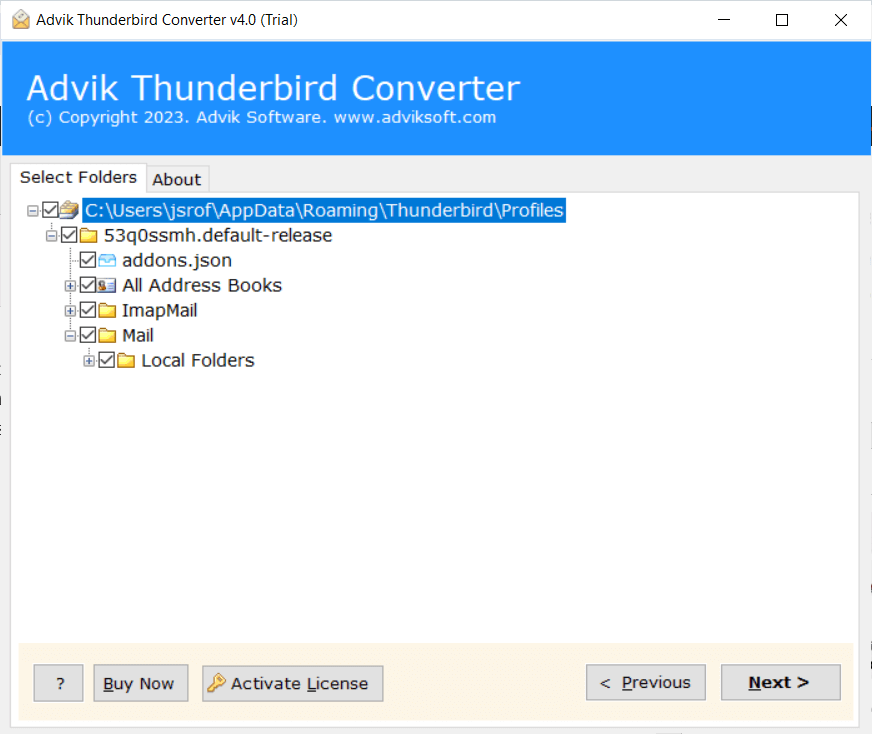
2. Select the required mailbox folders and press Next.
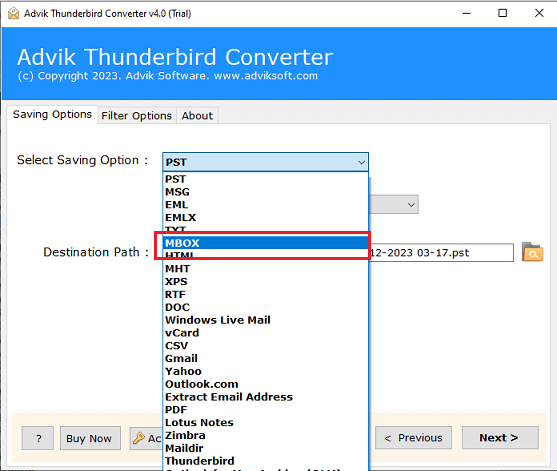
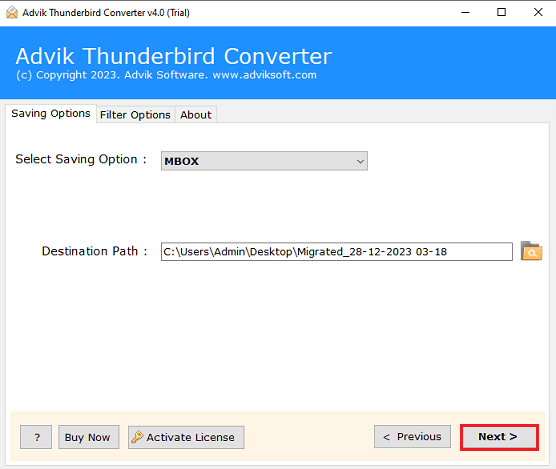
3. Now, Choose MBOX as a saving option.
4. Browse target location and click the Next button to begin the exporting process.
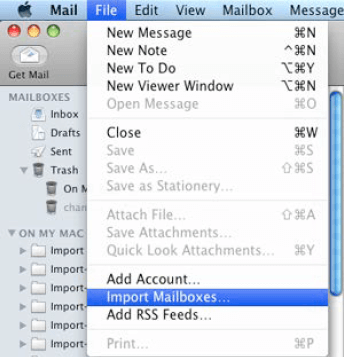
5. After that, open Apple Mail and import the exported file.
The process is complete! Apart from the above function, the software offers various advanced features that make the process simple. Some of them are given here;
- Transfer all Thunderbird email folders in a single attempt.
- Offers multiple saving options to export Thunderbird emails.
- Preserves all email attributes and metadata properties while exporting.
- Maintains the original structure of folders even after the process.
- Directly migrate Thunderbird emails to Office 365, and any IMAP-based email account.
- Advanced email filter options to migrate selected Thunderbird emails.
- Simplified user graphical interface for all types of users.
- Compatible with all the latest and old versions of Windows OS.
- 24/7 customer support team to solve user queries related to the product.
Final Words
In this post, we have discussed how to migrate Thunderbird to Apple Mail. Here, we have mentioned both manual and automated solutions to accomplish this task. Both methods are 100% workable and give accurate results. You can choose any method that is most suitable for you. However, with the above-suggested tool, you can easily import Thunderbird to Apple Mail in bulk.
Frequently Asked Questions
Q 1. Is it possible to transfer selected Thunderbird emails to Apple Mail?
Ans. Yes, the Advik Software offers advanced filter options to move specific emails.
Q 2. Will my email folder structure remain the same after the migration?
Ans. Yes, your Thunderbird email folders will be transferred in their original structure without any changes.
Q 3. Can I test the software before purchasing it?
Ans. Yes, the software offers a free demo version to check its working procedure without any cost.