How to Migrate Emails from One cPanel to Another cPanel?
Jackson Strong | January 28th, 2026 | Email Migration
Summary: Migrating emails from one cPanel server to another is a common task when switching hosting providers, upgrading servers, or moving to a new domain. If you are also planning to migrate emails from cPanel to cPanel then this post is for you. In this write-up, we’ll show you two different ways to transfer email from one cPanel to another.
cPanel is a well-known web hosting provider that also offers email hosting for businesses and individuals. While transferring your cPanel email to another cPanel account may seem complicated, it’s a simple process if you follow the right steps.
In the upcoming section, we’ll discuss two easy ways to complete the cPanel to cPanel migration process.
How to Migrate Emails from One cPanel to Another cPanel Manually?
This method comprises various major steps that you need to follow to successfully transfer email from cpanel to cpanel account.
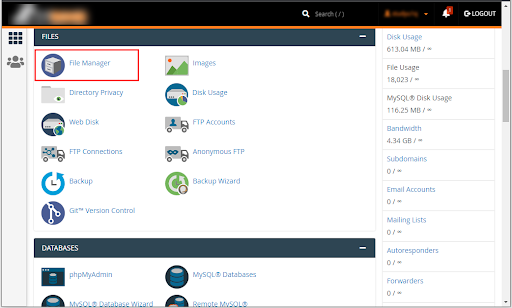
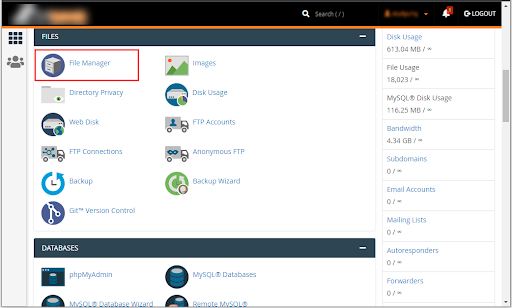
- First of all, log into your source cPanel account and go to the File Manager icon.
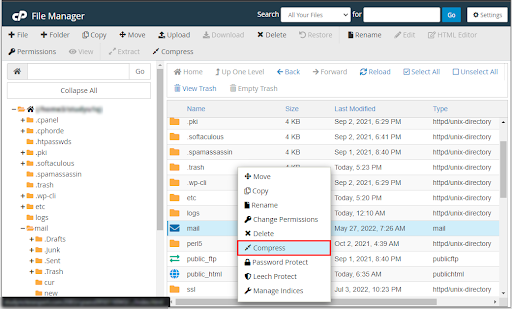
- Locate the ‘Mails’ directory within the list of files and folders >> right-click on it and opt for Compress.
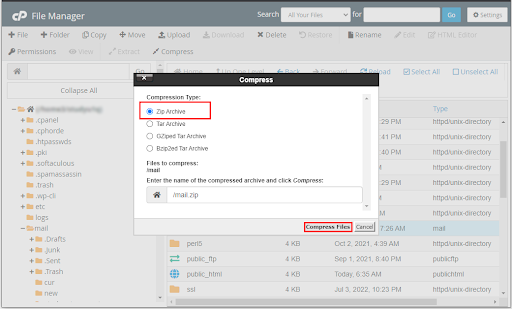
- In the Compress Panel, select the ‘Zip Archive’ option, and click the Compress Files.
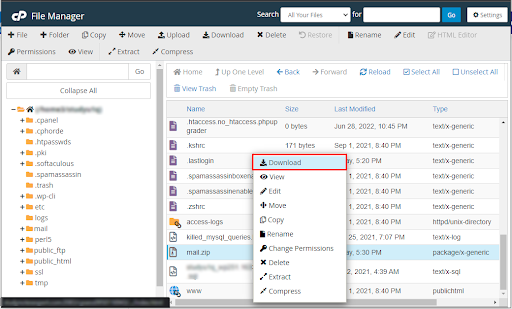
- Now, it will create a Zip file for you, right-click on it and choose Download.
- Then, log in to the desired cPanel account and navigate to the File Managers section.
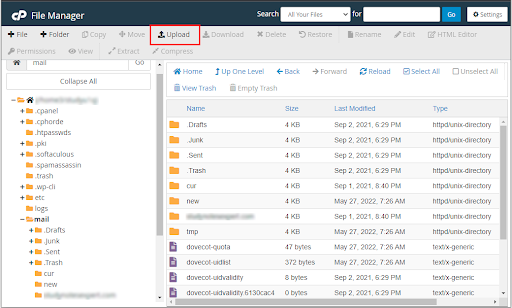
- After that, select the ‘Upload’ option and choose the ZIP file you downloaded.
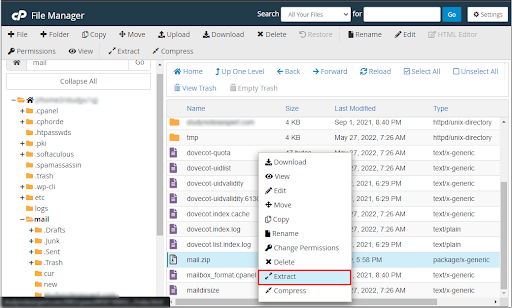
- Right-click and select ‘Extract’ to extract its contents into the home directory.
Thus, it was the manual solution to transfer emails from one cPanel to another.
However, users should note that this solution is time-consuming and requires technical expertise to implement. To avoid these errors, it is recommended to consider the solution provided below.
How to Transfer Emails from cPanel to cPanel Account Instantly?
Download and Install the Advik Email Migration Tool on your Windows/Mac system. This tool is designed to transfer complete emails from one cPanel account to another cPanel account with just a few clicks. Also, it will maintain and secure the complete mailbox folder hierarchy of your cPanel mailbox data throughout the process. No need for technical expertise or lengthy manual procedures; this tool ensures a fast, secure, and error-free transfer of all your email data.
Download the FREE trial version of this handy application and understand its working steps at no cost.


Steps to Migrate Emails from cPanel to cPanel
- Run this suggested utility on your PC.
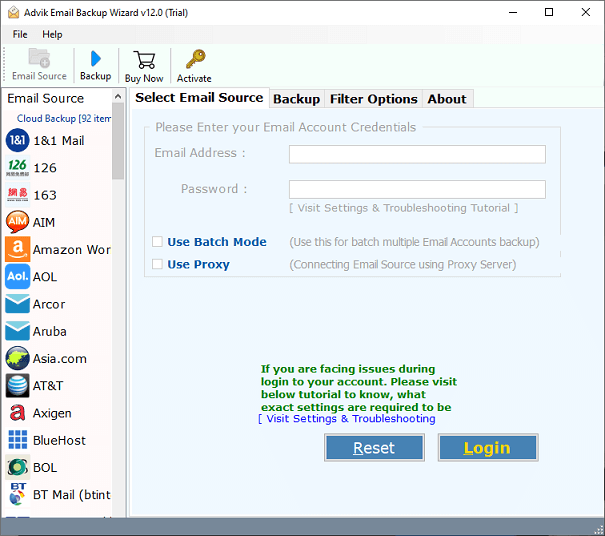
- Choose IMAP Server and enter source cPanel account details.
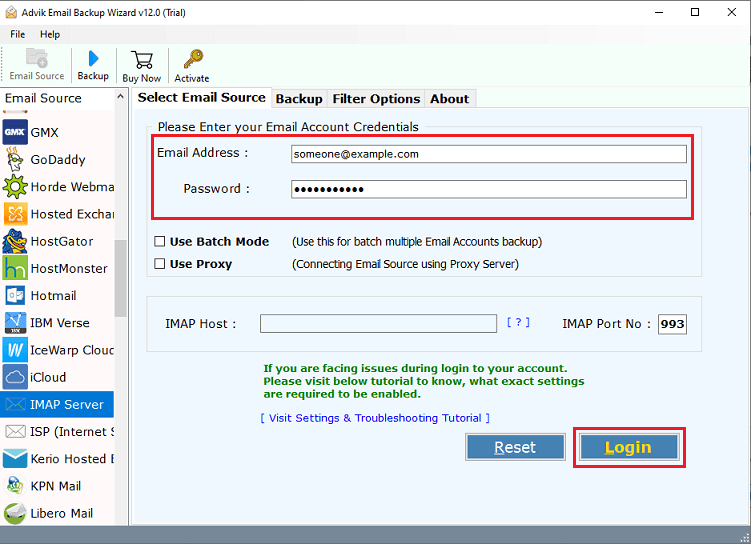
- Now, select the required email folders of your choice.
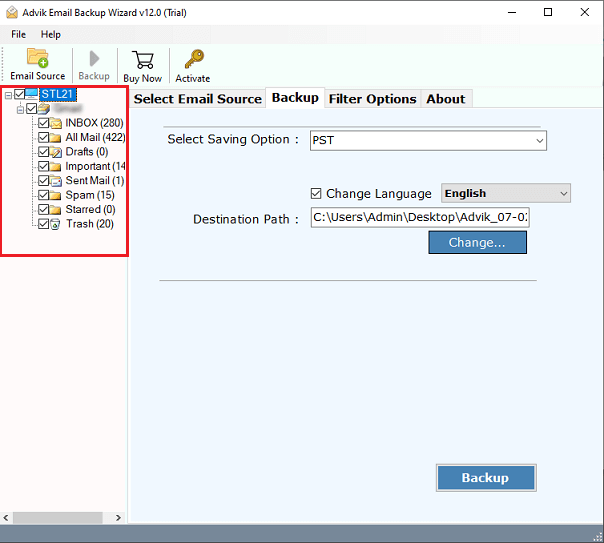
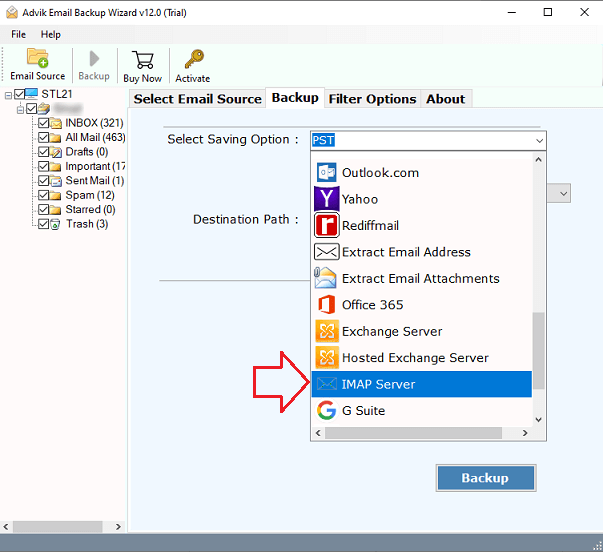
- Choose IMAP Server as a file-saving option.
- Enter destination cPanel account details and press the Backup button.
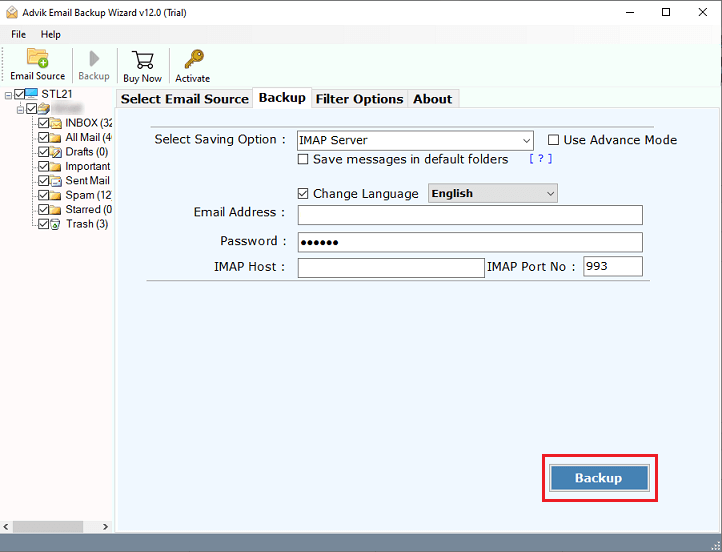
Done!! Now, the tool will connect both of your cPanel accounts and easily transfer all the selected emails from one cPanel account to another.
Once completed, you can log in to check all the transferred emails from one cPanel account to another.
Watch How to Perform the cPanel to cPanel Migration Process
Benefits of Using an Automated Software
Have a look at the additional features that might be helpful for you.
- Migrate emails between two cPanel accounts in a matter of minutes.
- Backup cPanel emails with attachments in a single attempt.
- Option to choose specific folders or emails for transfer, such as Inbox, Sent, or Drafts.
- Also, transfer cPanel to Zoho Mail, Yahoo, Google, Exchange, Outlook.com, and more.
- Preserves the original folder structure during the migration process.
- Move multiple email accounts at once to save time and effort.
- Easy to use, even for beginners, with no advanced technical skills required.
- Ensures complete accuracy and prevents data loss during the transfer.
- Offers email filters based on specific Date Range, To/from, Cc, BCC, and many more.
- You can use it on all Windows and Mac OS.
Final Words
Now, we understand that transferring emails from one cPanel account to another isn’t difficult if you use the right methods. While it can be done manually, it requires time and technical skills. For a faster and easier solution, using automated software is an excellent option. It allows users to migrate emails from cPanel to cPanel instantly while maintaining folder structure and data integrity throughout the process. With just a few clicks, you can securely and efficiently transfer all your emails.
Download the software for free and try it.