How to Open RPMSG File Without Outlook?
Jackson Strong | April 6th, 2026 | Data Backup
If you received an RPMSG file but don’t have Microsoft Outlook to open it. You’re not alone. Trying to open RPMSG file without Outlook is the most common issue faced by users. RPMSG files are protected email messages created using Microsoft Rights Management Services. These files often contains sensitive information and can only be accessed with proper permissions.
Not everyone uses Outlook or has it subscribed. However, there are times when they urgently need to open their RPMSG file. Accessing this file without Outlook can be challenging. In this article, we are going to share the best solutions to view RPMSG file without relying on the Outlook. Read this post till the end and learn step-by-step instructions to read RPMSG files.
How to Open RPMSG File Without Outlook Manually?
Manually users can view RPMSG file without Outlook using web based options. Here, we’ll provide two different methods to accomplish this task.
Method 1. Access RPMSG File in Outlook for Web
- Open Outlook Web App in your browser.
- Locate the email with the RPMSG file.
- If the file was sent as an attachment, click on the email to view it.
- Click on the RPMSG file.
- Outlook Web App will detect that the file is a Rights-Protected Message.
- A secure viewing window will open inside your browser.
- If it asks for permissions, click Sign in with your Microsoft account credentials.
- Now, the system verifies whether you have the right to view the protected message.
- Once authenticated, the protected email content will be displayed in Outlook Web App.
Method 2. View RPMSG File in Gmail
You can also open the RPMSG file using Gmail or any other email client. However, Gmail cannot open files directly but using the OME Viewer tool, users can easily access them.
- Open your Gmail account and locate the RPMSG file.
- Click on Read Message link and open it.
- It will redirected to the Microsoft webpage.
- Now, sign with your Microsoft account.
- Once you sign into the Microosft Webpage, the RPMSG file message will be decrypted. You can access the message.
However, these manua methods require a Microsoft account to view the RPMSG file.
How to Open RPMSG Files Without Outlook Automatically?
If you want an instant solution to view RPMSG message then try the Advik MSG Converter on your system. The software enables you to access RPMSG emails in a just a few simple clicks. With this tool, you can convert RPMSG files into PDF, TXT, DOC, and other formats and open them without Outlook. This is a secure and authetic program that preserves all email attributes and formating during the process.
Download the FREE version of this utility and analyze its working procedure without any cost.

Step-by-Step Guide to View RPMSG File Without Outlook
1. Run the software on your Windows PC.
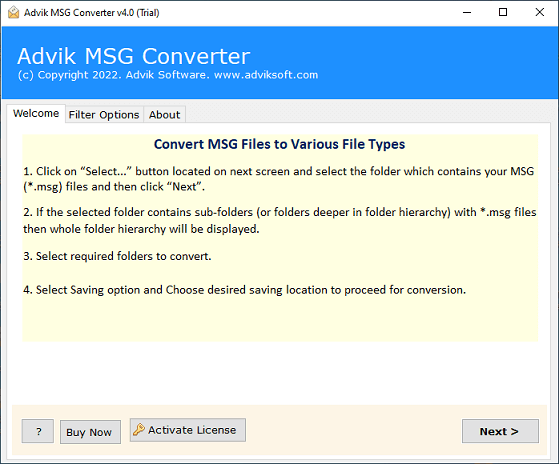
2. Add the RPMSG file into the software and click Next.
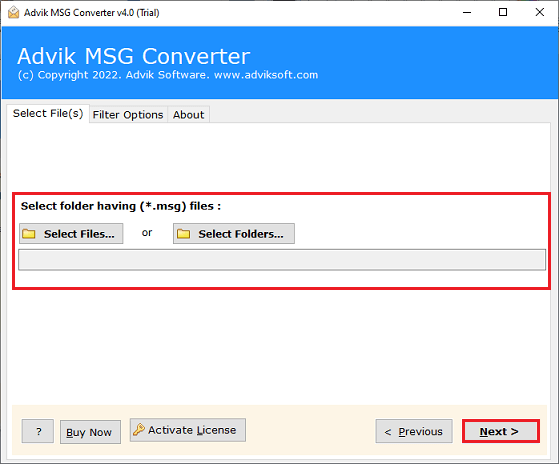
3. Choose the required RPMSG files and press Next.
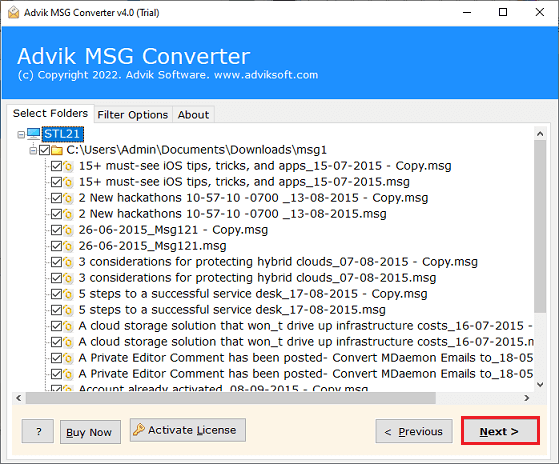
4. Now, select a saving option from the given list.
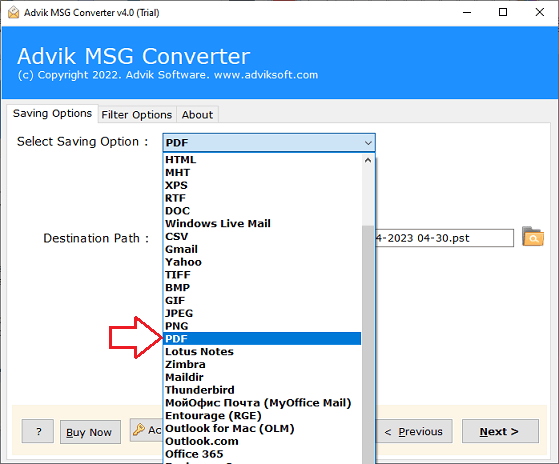
5. Browse the target location and click the Next button.
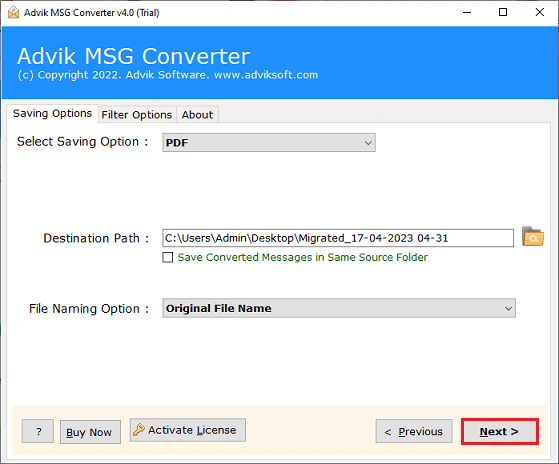
The software will start converting RPMSG file into your desired format. Once the conversion is complete, you can easily open the exported file without Outlook.
Watch How to Open RPMSG File Without Outlook
Why Choose Automated Tool Instead of Manual Approaches?
There are several adavantages of using this professional utility. Some of them are:
- Open RPMSG File in Bulk: This software will enable you to view multiple RPMSG files at once. Using Select Folder option, you can add multiple RPMSG files and then export them all together.
- Export RPMSG into 20+ Formats: The tool offers various saving options to save RPMSG files. You can convert RPMSG to MBOX, EML, CSV, HTML, and many other formats.
- Preserve Data Integrity: This is a secure solution that retains the all email attributes and properties during the process. It maintains the email formatting while converting.
- Freedom to Choose Destination Path: This toolkit gives the freedom to choose a location to save the resultant file. In this way, you can easily access the file after the conversion.
- Simple GUI: This tool has an easy-to-use interface. Both technical and non-technical users can easily operate it without having any technical guidance.
- Windows Supportive: You can run this tool on any Windows-based system. It supports all the latest and old versions, including Win 11, 10, 8.1, 8, 7, and all editions below.
Final Words
In this post, we have discussed how to open RPMSG file without Outlook. You can manually view RPMSG file without Outlook if you have a Microsoft account. While the automated approach provides a permanenet and secure solution without any restrictions. To explore more about the tool, users can try the demo version before buying it in order to reach a certain satisfication level.
Frequently Asked Questions
Q1. Can I open RPMSG files without Outlook in bulk?
Ans. Yes, by using the automated tool, you can read RPMSG files in bulk.
Q2. How do I convert RPMSG files into an accessible format?
Ans. To edit RPMSG file without Outlook, the professional tool helps users to easily convert into 30+ formats.
Q3. Will the original data structure be preserved while converting RPMSG?
Ans. Yes, the software preserves the data structure and email fotmatting without any alteration.
