How to Recover Deleted CCTV Footage from Hikvision DVR?
Recently, I found a similar query while searching for workable methods for CCTV data recovery issue. I think you will be able to relate if you are using a Hikvision DVR system.
The user said that he accidentally deleted an important surveillance video about a month ago after clipping it through their mobile app. So, it’s very obvious that anyone gets worried and wants a reliable method that can actually work to recover deleted CCTV footage as soon as possible.
So, if you are in the same situation, you might be wondering the same thing, “Is my CCTV footage lost forever, or can I still recover it?”
This is the kind of scenario I want to explain. Here, i will explain how Hikvision DVR storage works, what happens when you delete footage and most important of all, your real chances of recovery based on technical behavior and practical experience.
By the end of this guide you will clearly know if your deleted CCTV Footage is recoverable and what you should do immediately to give yourself the best chance.
How Hikvision DVR Stores Data and Deletes CCTV Footage? (Technical Insights)
As, CCTV plays a crucial role in security purposes as it is a modern system for security setups in our homes, shops, offices etc. Hikvision DVR is one such brand that records surveillance footage on an internal hard disc drive (HDD).
The recording process in Hikvision DVR is based on a loop system:
- The DVR captures footage in continuous manner.
- When storage is full, older recordings are automatically overwritten
- Deleted footage is generally not immediately erased but it marked as “free space
Key Points:
Most DVR systems don’t delete data immediately. Rather, the system simply stores the file references and leaves the data behind until it is overwritten by new recordings.
This is why CCTV recovery timing is important.
Common Reasons for Losing CCTV Footage in Hikvision DVR
Knowing the reasons for data loss is important to know whether it is possible to recover it or not.
Accidental Deletion: It’s very common to delete footage accidentally when playing videos or accidentally pressing the shift + delete button.
Delete old footage: If you are deleting old CCTV footage then the new recordings will automatically replace the old ones.
Improper Shutdown or Power Loss: If power is lost during recording, the video files may become corrupt.
Bad Sectors or Hard Drive Failure: Physical damage or degradation of the hard drives in the DVR can also make your CCTV footage unreadable.
System / Firmware Errors: Software bugs or any kind of corruption in the firmware can lead to corruption of the recorded data structures.
Immediate Steps After Deleting CCTV Footage
If you found that your CCTV footage has been deleted, take the following steps immediately;
- Stop recording on your DVR system
- Prevent overwriting your existing data
- Don’t format or reset the DVR
- Remove the hard drive, if possible
- Do not install or save new recordings.
Why it is important;
The chances for successful recovery decreases if you continue using it.
How to Retrieve Deleted CCTV Footage from Hikvision DVR Manually?
Hikvision DVR has its own recovery tool that will be helpful when recover deleted CCTV videos. Follow the given instructions –
1. Log in to your Hikvision DVR system.
2. After that, go to Advance settings and find recovery options.
3. Follow the instructions and recover your deleted videos.
Done! Here complete the recovery process. However, if your drive is corrupted, then you cannot recover deleted CCTV footage from Hikvision DVR.
How to Recover Deleted Videos from Hikvison DVR Professionally?
If the manual method is not able to retrieve your deleted data, then try an automated tool i.e., Advik Data Recovery Wizard for Windows. The software is efficient enough to recover deleted footage from a corrupted Hikvision DVR system without affecting your data. With its robust features, it can cover large amounts of data in a few simple steps.
To recover your videos and other data, first connect the DVR system with your Windows. After that run the tool, choose the recovery option, and choose your dvr device. Then follow the steps mentioned in the below section.
Click on the link below and download the demo version of the software. The free version will recover 25 videos.


Steps to Recover Deleted CCTV Footage from Hikvision DVR
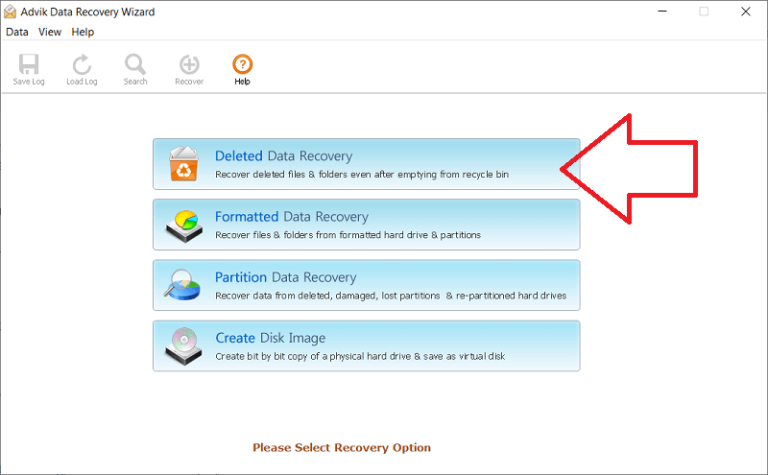
1. Open the recovery tool and choose the Deleted Data Recovery option.
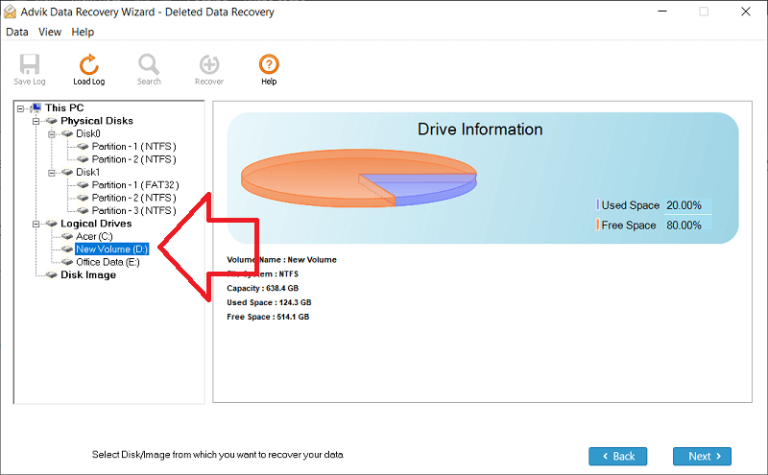
2. After that, select your drive (Connect Hikvision DVR to the system).
3. The software will scan your device and load the data which is deleted from your system.
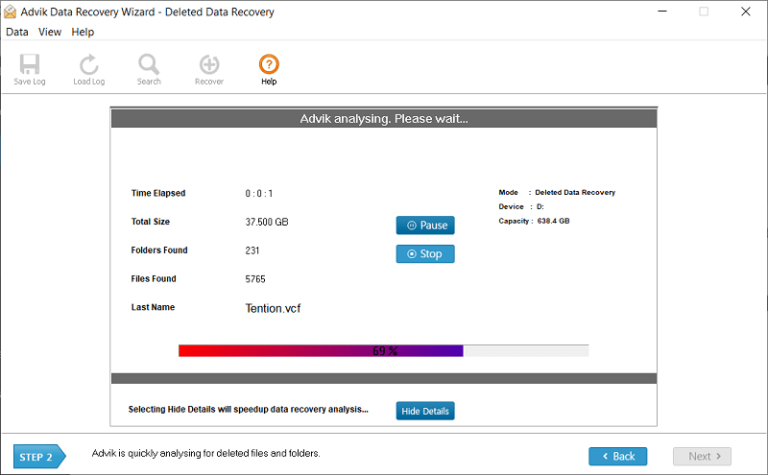
4. Now select the videos you want to recover.
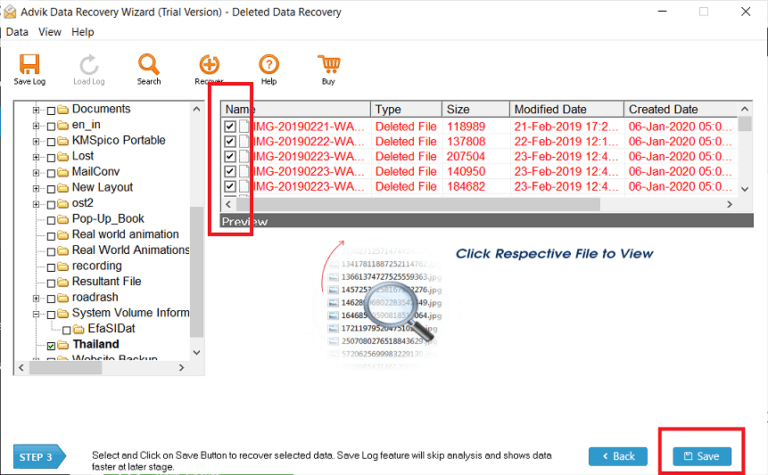
5. Choose the location where you want to save retrieved CCTV footage.
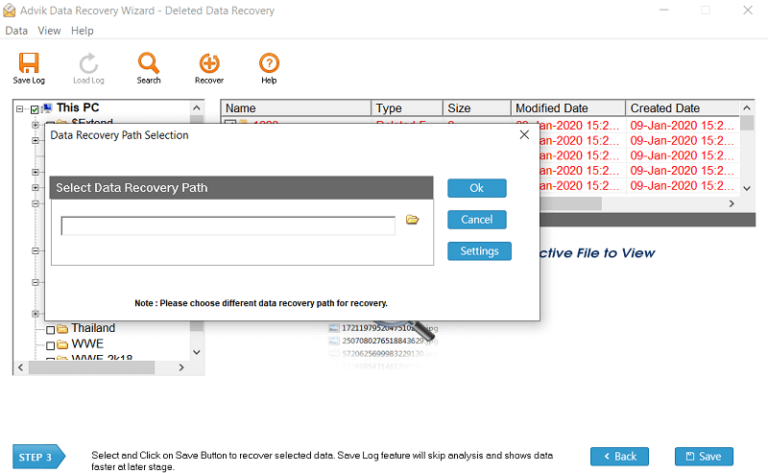
Done! Now the software will start to recover deleted CCTV footage from Hikvison DVR.
Some Helpful Features to Retrieve Deleted CCTV Footage
With this tool, there are various prominent features, some of which includes –
- Recover deleted CCTV footage from corrupted or damaged devices.
- Allows you to recover formatted, partitioned data without affecting your data.
- Option to recover permanently deleted photos from laptops on any Windows OS.
- Simple and user-friendly interface designed for both technical and non-technical users.
- Preserve data integrity and folder hierarchy while recovering deleted data.
- Using this tool you can also recover data from Kingston USB drive and other storage devices.
Watch Video Tutorial
Real Life CCTV Recovery Scenario
A small retail store owner accidentally deleted surveillance footage that consists a security incident which occurred using a Hikvision DVR. The system had about 2TB of storage with continuous recording on.
First Try: User attempted to retrieve footage using DVR playback settings but only partial data was available.
Second attempt: The DVR hard drive was connected to a computer to recover the footage, but as the recording was still on so some footage had already been overwritten.
Result:
Only the partially deleted footage could be recovered. That’s a very important fact and it’s all about timing and acting right away to have a successful recovery.
Conclusion
Recovering deleted CCTV footage from Hisvision DVR is a crucial process that requires precision. Here in this post, we address the situation where users want to recover deleted videos from CCTV DVR. Here we mention the built-in tool or professional approach to recover deleted data. Whether you are using the manual solution or the Hikvision DVR data recovery software, you will get your deleted data in the end. However, the manual one has its limitations, thus it is suggested to rely on an expert approach. Now the choice is yours, select the right tool and retrieve your data.
Frequently Asked Question
Q1. Can I recover deleted CCTV footage after being overwritten?
Ans. No, you can’t recover deleted data after it is overwritten.
Q2. What prevention can be taken to avoid the data loss?
Ans. It is best to take some measures to avoid any data loss if your data is deleted.
- Regularly back up your data and avoid any unseen situation.
- Make a copy of your data and store cloud for better security.
- Regularly check your DVR device to detect any issues.
- Limit the access permission to reduce accidental deletion.
Q3. Can you actually recover deleted CCTV footage from a Hikvision DVR?
Ans. Yes , in most cases . If you haven ‘t overwritten the data you deleted, it is possible .
Q4. What do I need to do after losing CCTV footage?
Ans. First of all, stop using the DVR immediately. Deleted video data can be overwritten by new data that makes the chances of recovery even more difficult.
Q5. Can I get back CCTV footage without professional software?
Ans. In some cases, basic recovery can be done using backup files or exported clips. But the success rate of the professional DVR data recovery tool is better in most cases of deletion.
Q6. Is there a recovery option built in the Hikvision DVR?
Ans. There is no built in option in Hikvision DVR systems to restore deleted files. However, you can try to restore it from backup files.
Q7. How long can I recover deleted CCTV footage?
Ans. There is no time limit. Depends on the DVR usage. If the system is continuously recording, deleted files could be overwritten within hours or days.
Q8. Is it possible to recover footage if the hard drive was formatted?
Ans. Yes, if you use a good data recovery tool, there is a chance of recovering some or all of the data. But there is no guarantee of success after formatting.

Related Articles