How to Transfer Emails from Hotmail to iCloud?
Jenny Lowrence | January 22nd, 2026 | Email Migration
This technical post will guide you on how to transfer emails from Hotmail to iCloud mailbox. If you also want to migrate Hotmail to iCloud then read this post till the end. Here, you will get manual as well as automated solutions to accomplish this task.
Hotmail is the email service that is now owned by Microsoft. However, there are still users who are using Hotmail and plan to switch to iCloud for better features. For all those users who want to migrate Hotmail emails to iCloud, this post is specially outlined for you.
Why do Users Prefer iCloud over Hotmail?
There can be various reasons why users want to migrate emails from Hotmail to iCloud mailbox, some of them are –
- iCloud users can use the integrated application with Apple Services that includes – contacts, calendars. reminders, notes and many more.
- It offers free storage of 5 GB which helps in storing your important data.
- Apple mainly focuses on user privacy. Thus, if you switch to iCloud, then there will be no spam mail, advertising, email scanning, etc.
- The automatic backup feature reduces the need for manual backups, making data protection simple and hassle-free.
There can be various other reasons to transfer Hotmail to iCloud mailbox. Let’s move ahead and know the Hotmail to Icloud migration process in detail.
How to Transfer Emails from Hotmail to iCloud Manually?
- Launch Outlook and go to File >> Add Account.
- Enter your Hotmail email address and click Connect.
- Type the password of Hotmail account and click Done.
- Now, Outlook will check all entered details.
- Once done, you will receive a noticatication Account added successfully.
- After that, repeat the same steps to add iCloud account in Outlook.
- After configuration, drag & drop Hotmail emails into iCloud mailbox.
Done! That’s how you can transfer Hotmail emails to iCloud manually but this is a lengthy process and email client installation is required.
How to Migrate Hotmail Emails to iCloud Account?
Download and try the Advik Email Migration Tool to transfer emails from Hotmail to iCloud account. This utility enables users to migrate multiple Hotmail emails to iCloud at once. You can even choose to migrate emails from various Hotmail accounts to iCloud account in a single attempt. Moreover, while transferring Hotmail email to iCloud, the tool will maintain email folder and sub-folder hierarchy and structure. You need your Hotmail and iCloud login details and start the migration process.
Download its FREE trial version to explore working steps now!


Steps to Transfer Hotmail to iCloud
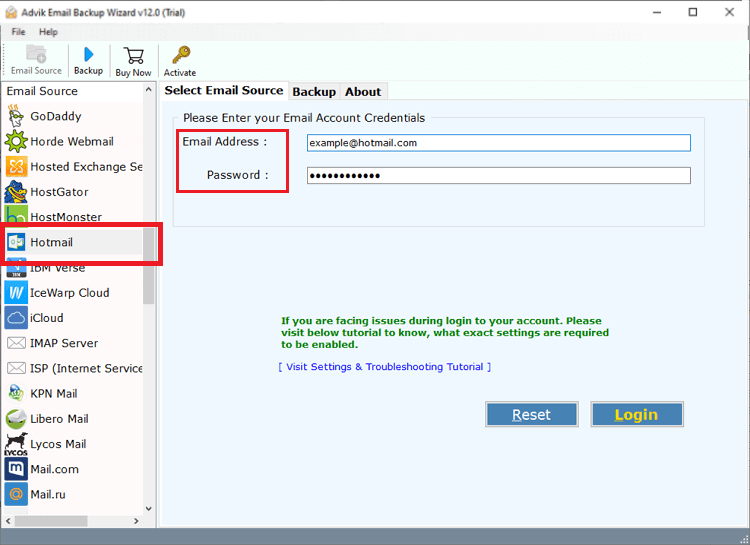
1. Run the software and log in with Hotmail account details.
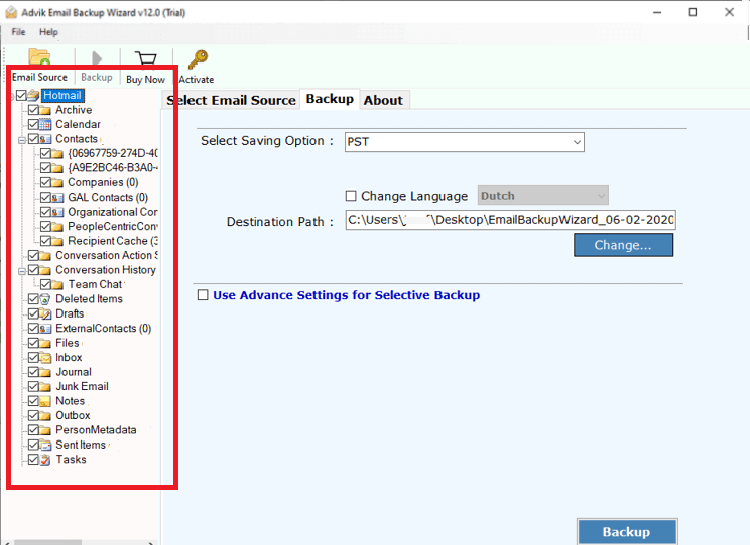
2. Choose the required Hotmail mailbox folders.
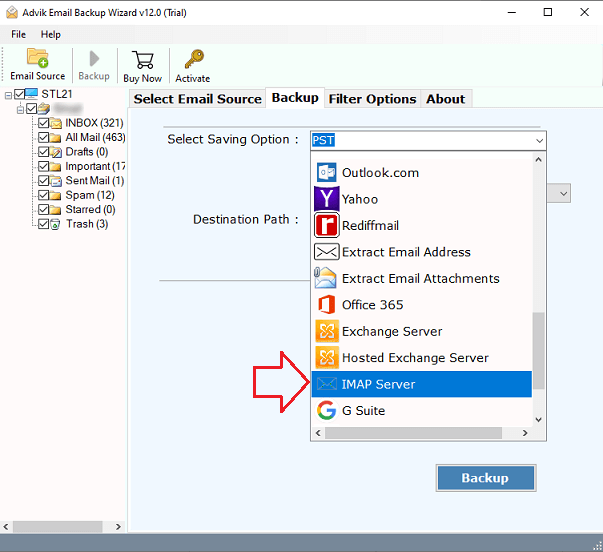
3. Next, select IMAP as a saving option from the list.
4. Enter iCloud account details and click the Backup button.
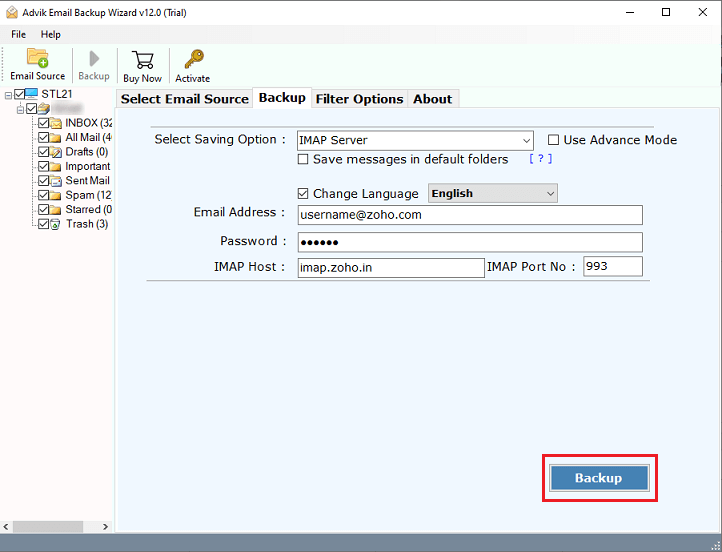
Done!! This is how you can easily transfer emails from Hotmail to iCloud account. In the same manner, you can also move emails from multiple Hotmail accounts to iCloud mailbox.
Watch How to Transfer Hotmail Emails to iCloud
Advantages of using an automated Tool
- Transfer Hotmail email to iCloud directly on all Windows without losing any data.
- Advanced Email filters like date range, subject, from, to, etc.
- Transfer the entire Hotmail folders to iCloud in one step.
- Maintain the folder structure and formatting of your emails during the transfer.
- User-friendly interface and easy for all types of users to navigate.
- Also, export Hotmail to PST, OLM, PDF, MSG, EML, HTML, etc.
- Compatible with all Windows operating systems and supports all editions.
Final Words
This blog has come to an end by providing the best ways to migrate Hotmail emails to iCloud account. You can manually transfer emails from Hotmail to iCloud but this approach comes with some limitations. So, the expert recommended using the professional solution to perform the Hotmail to iCloud migration Before upgrading to its licensed version, users can also try its FREE demo version to evaluate its performance & all its advanced features.