How to Convert RPMSG to PDF Files? 3 Easy Methods
RPMSG files are protected Outlook email message files which means that you cannot easily view, share, or print these files without the required permissions. Many users convert RPMSG to PDF to have a portable, readable and easily accessible copy of their email content. This article describes manual and automated solutions to convert RPMSG files to PDF while keeping the email format and message properties in it’s original format.
You can manually convert RPMSG to PDF using the Print to PDF feature of Outlook or automatically using Advik MSG Converter. The manual method needs Microsoft Outlook installation and sender permissions and the automated method can convert in bulk without using Outlook and retains original email structure as well.
Table of Contents
- What is an RPMSG File?
- Key Facts About RPMSG Files
- Why Convert RPMSG to PDF?
- Real-World Example: When a Recipient Cannot Open an RPMSG File
- How Do I Change an RPMSG File to PDF? Explore Top 3 Methods!
- Method 1: Export RPMSG to PDF Using Outlook
- Method 2: Convert RPMSG to PDF Using Microsoft Purview
- Method 3: Batch Convert RPMSG Files into PDFs Automatically
- Watch How to Convert RPMSG to PDF Files
- Manual vs Automated Method Comparison: Which Method Should You Choose?
- Conclusion
- Frequently Asked Questions (FAQs)
What is an RPMSG File?
An RPMSG file is a secured email message file format created by Microsoft Outlook using Microsoft Rights Management Services or Information Rights Management. This file is made to protect sensitive information as it limits recipients on applying any change to that email.
It’s not like other Outlook files such as .msg which is a normal email message file. The thing that makes it different from other Outlook file format is that it is encrypted and need permission to access this protected file. Recipients cannot forward, copy, print or edit the email content, depending on the permissions assigned by the sender.
RPMSG files are commonly used by organizations to share sensitive information such as financial reports, legal documents, business contracts and internal communications. This can help prevent unauthorized users from accessing or misusing sensitive data.
If you want to open RPMSG file but without prior permissions, then you will see unreadable content, or receive messages such as:
You don’t have permission to open this message. .’
“This message is protected by rights.”
To view the contents of RPMSG files, you need special permissions and support from Outlook. Therefore, many users convert RPMSG files to the PDF format for easy viewing, sharing, printing, and long-term archiving.
Key Facts About RPMSG Files
| Specification | Details |
| File Extension | .rpmsg |
| File Type | Rights-Protected Outlook Message |
| Developed By | Microsoft |
| Associated Application | Microsoft Outlook |
| Security | Encrypted and Permission Protected |
| Common Use | Secure Email Communication |
Why Convert RPMSG file to PDF?
Here are some advantages of converting RPMSG files into PDF:
- PDF files can be opened on nearly any device.
- PDFs are simple to share and to archive.
- You don’t need a special email application to view PDFs.
- Formatting remains same on various platforms.
- PDFs can be protected by passwords for security.
- PDF is a popular format for business and legal documents.
Real-World Example: When a Recipient Cannot Open an RPMSG File
A user on Reddit shared a situation where he explained that he worked in a call center amd sent a PDF document to a customer to print and sign. But the recipient says the file was received as an RPMSG message, not as a normal PDF. As RPMSG files are protected by Microsoft Rights Management so that’s why the recipient would not be easily able to open or access the document without the correct permissions.
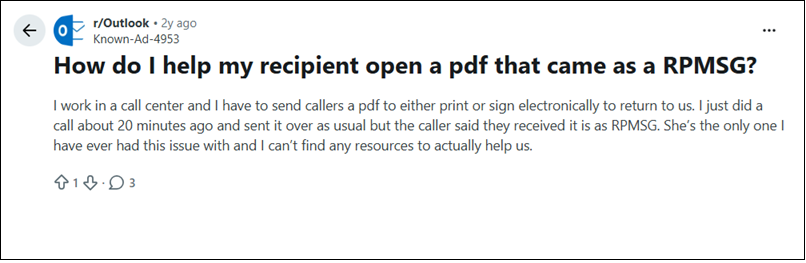
Now, Such users want to know how to convert RPMSG to PDF online so that the file can be opened on any device without Outlook restrictions. While online services are convenient, they often have file size limits, privacy issues and may not support protected RPMSG messages. For business or confidential communications, it is preferable to use Outlook, Microsoft Purview or a specialized conversion tool that can also resolve your security-related issues.
Fortunately, there are several ways to convert RPMSG files to PDF. Let’s understand them in detail.
How do I change an RPMSG file to PDF? Explore Top 3 Methods!
This guide explains three different ways to convert RPMSG files to PDF:
- Outlook Print to PDF Method
- Microsoft Purview Information Protection Viewer
- Advik MSG Converter
Method 1. Export RPMSG to PDF Using Outlook
This method will work if you have Microsoft Outlook installed and you need permission from Sender to open the protected message.
- Open MS Outlook on your system.
- Send a request to the sender to provide access to the RPMSG file.
- After that, click on File tab and choose the Print option.
- Select Save As PDF and choose destination location.
- Finally, click on Save button to begin the conversion.
Now, wait for a while and go the location to see the converted .rpmsg files into pdfs.
Method 2. Convert RPMSG to PDF Using Microsoft Purview
If you don’t have Outlook desktop installed, Microsoft offers another route through Microsoft Purview Information Protection Viewer.
- Download and install the Microsoft Purview Information Protection Viewer.
- Launch the application & sign in using the email account where you received the protected message.
- Open the RPMSG file.
- If the permissions are so, the message will be decrypted and shown to the viewer.
- Choose Print or Save As.
- Select Microsoft Print to PDF.
- Select a location where you want to save the file.
What You Will Miss in Manual Methods?
- You will need to open each RPMSG file one by one in both the methods.
- There is no option to batch convert hundreds of RPMSG files in one go.
Outlook and Microsoft Purview solutions are good for occasional conversions, but not for users who have to regularly process multiple RPMSG files.
Method 3. Batch Convert RPMSG Files into PDFs Automatically
If you have multiple RPMSG files to convert then you must try Advik MSG Converter to export your protected Outlook messages into PDF format. The software supports both single mode and bulk conversion. During conversion process, it also maintains email formatting, metadata, attachments and folder structure.


Steps to Export RPMSG to PDF in Bulk
1. Run the suggested tool on your system.
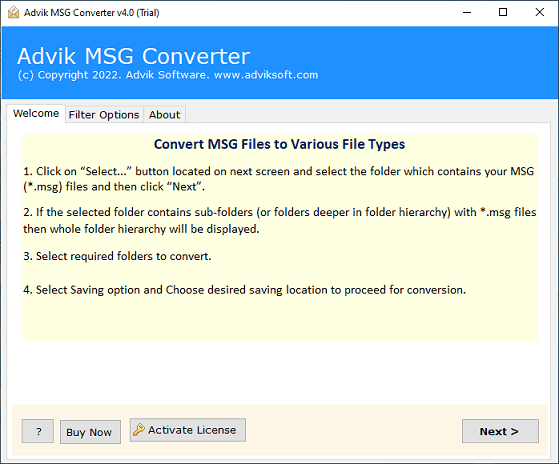
2. Click on Select Files or Folders to add RPMSG files and click Next.
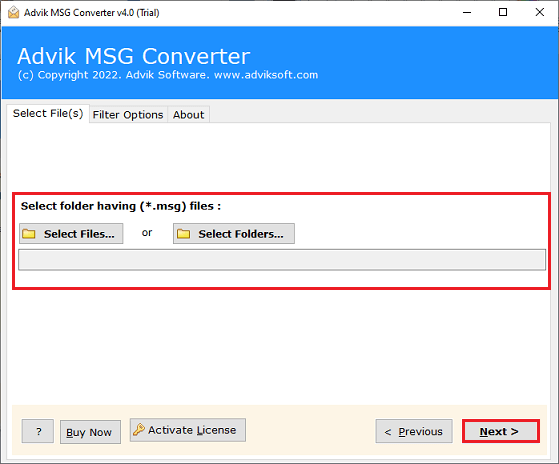
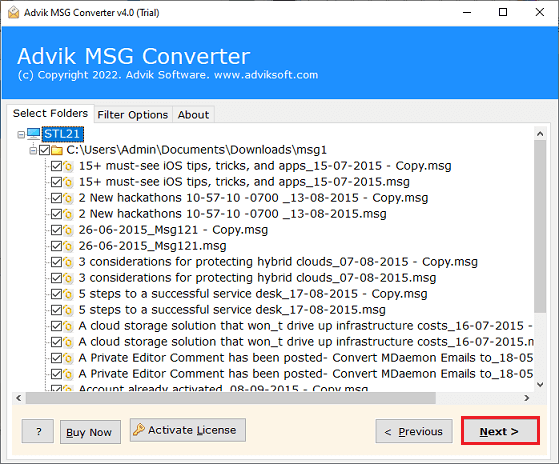
3. Choose the required files and hit the Next button.
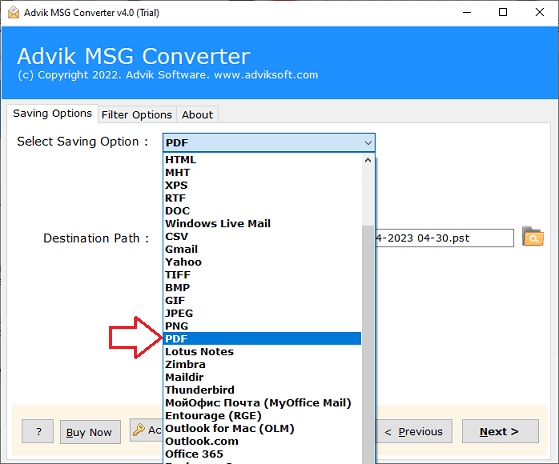
4. Now, select PDF as a saving option.
5. Browse the target location and click the Next button.
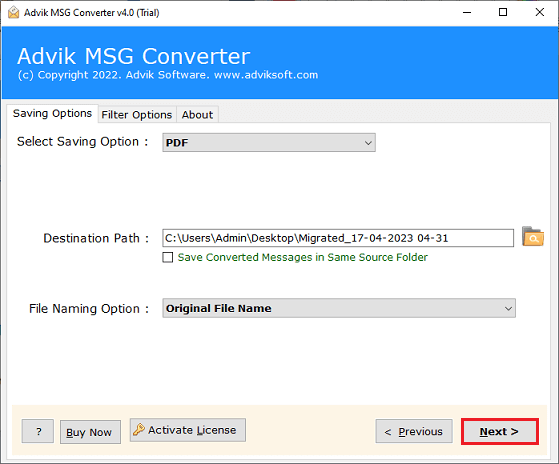
The software will start converting RPMSG files to PDF format. Once the process is complete, it will automatically redirect to the destination location.
Watch How to Convert RPMSG to PDF Files
Manual vs Automated Method Comparison: Which Method Should You Choose?
| Feature | Outlook Method | Microsoft Purview | Advik MSG Converter |
|---|---|---|---|
| Outlook Required | Yes | No | No |
| Sender Permission Required | Yes | Yes | No |
| Bulk Conversion | No | No | Yes |
| Large File Support | Limited | Limited | Yes |
| Email Formatting Preserved | Partial | Partial | Yes |
| Attachments Preserved | Limited | Limited | Yes |
| Time Required | High | High | Low |
| Technical Skill Required | Medium | Medium | Low |
Conclusion
In this post, we have discussed how to convert RPMSG to PDF files. Here, we have explained both manual and automated solutions. You can choose any method that is most suitable for you. Still, the manual method does not permit you to change RPMSG file to PDF without Outlook. You can download the above-suggested tool which does not require Outlook to complete RPMSG to PDF conversion process.
Frequently Asked Questions
Q1. What is .RPMSG file extension?
Ans. The most common software that opens RPMSG files is Microsoft Outlook and Microsoft Purview Information Protection Viewer.
Q2. What is RPMSG? Is this the same as MSG?
Ans. No, MSG is a normal Outlook message file, RPMSG is an Outlook message with rights management, encryption and permission restrictions.
Q3. Why can’t I open RPMSG files?
Ans. Microsoft Rights Management protects RPMSG files. Without required permissions, you cannot access it as Outlook or other compatible software may prevent access to that protected message.
Q4. Does converting RPMSG to PDF will change my emails?
Ans. No. a reliable method will not change anything to your emails. However, it’s not guaranteed in manual methods but a professional tool let you to convert your emails from RPMSG files into PDF files.
Q5. Can I print a protected RPMSG document?
Ans. That depends on what permissions the sender has given. Some protected messages restrict the ability to print.
Q6. Will my attachments be preserved in conversion?
Ans. Yes, Advik MSG Converter preserves email attachments and related metadata while converting.
Q7. Is there a way to convert multiple RPMSG files to PDF at one time?
Ans. Yes. A professional solution such as AdvikSoftware, supports batch conversion of multiple RPMSG files into PDF in a single process.
Q8. Can I convert RPMSG to PDF without Outlook?
Ans. Yes, you can convert RPMSG to PDF without Outlook. There will be two options if you don’t want to use Outlook. One is by using Microsoft Purview Information Protection Viewer or using a professional tool like the one I mentioned in this article.

Related Articles