How to Transfer Yahoo Emails to Another Yahoo Account?
Jackson Strong | January 11th, 2026 | Email Migration
Read this article to learn how to transfer Yahoo emails to another Yahoo account. Here, we’ll show you both manual and automated solutions to move emails from one Yahoo account to another. Keep continue to know everything you need for migration.
Yahoo Mail is a reliable platform for managing emails. It is one of the best and most versatile platforms in this technical era. Many users have Yahoo accounts for personal and professional use. Sometimes, users need to transfer emails from one Yahoo account to another for various reasons, such as:
- Switching to a new Yahoo email ID.
- Consolidating emails for easier management.
- Backing up important emails.
- To free up some storage space from the existing Yahoo account.
Whatever your reason, transferring emails between Yahoo accounts is a straightforward process that can be completed by two simple methods.
Let’s move ahead and find out the right solutions.
How to Transfer Yahoo Emails to Another Yahoo Account Manually?
Yahoo Mail does not offer native email forwarding unless you’re using Yahoo Mail Pro or a paid version. Follow the below given steps to migrate emails from Yahoo to another Yahoo.
1. Open Yahoo Mail and enter your login credentials.
2. Then click on Settings and select the More Settings option.
3. Click on Mailboxes and select your email account.
4. Your mailbox settings will open, scroll down, and locate Forwarding.
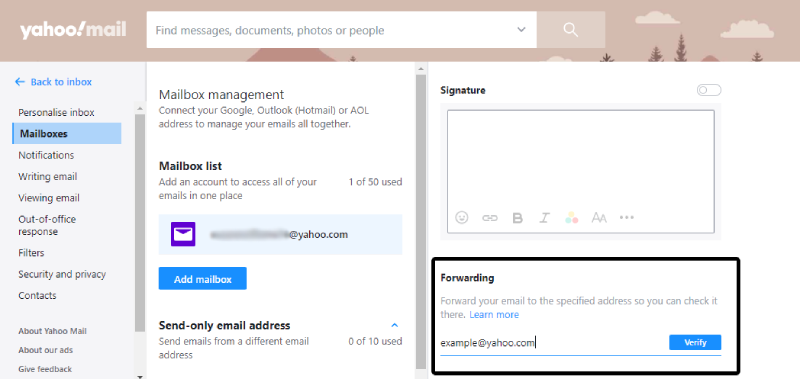
5. Enter your other Yahoo Mail email address and click on the verification message.
In this way, you can forward emails from one Yahoo account to another.
Drawback: This method is not suitable for bulk transfer. It’s time-consuming and doesn’t preserve folders or metadata.
How to Move Emails from One Yahoo Account to Another Automatically?
With the help of the Advik Yahoo Migration Tool, you can transfer Yahoo emails to another Yahoo account. The software will migrate all email folders from one account to another account in a few clicks. Just run the tool with your Yahoo credentials and choose Yahoo from the saving options. After entering your other Yahoo Mail login details, hit the Backup button to start the transfer process. It will maintain data integrity and folder hierarchy during the Yahoo-to-Yahoo transfer process.
Download the demo version of the software and learn its complete working process.


Note: Turn on access for less secure apps and generate app password in Yahoo Mail settings.
Steps to Transfer Yahoo Emails to Another Yahoo Account
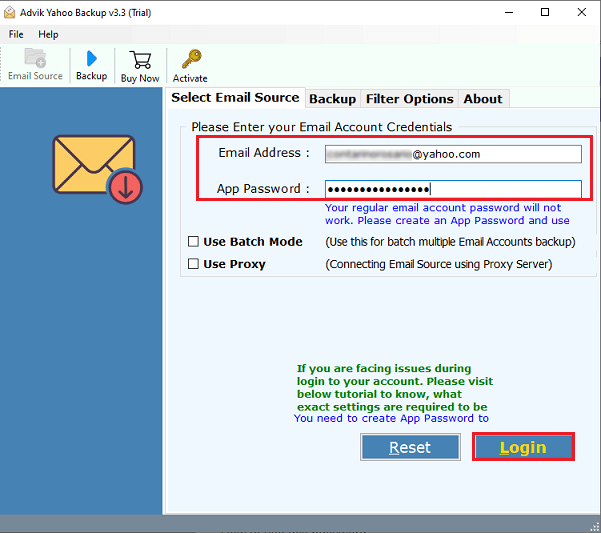
Step 1. Launch the software & log in with your Yahoo Mail credentials.
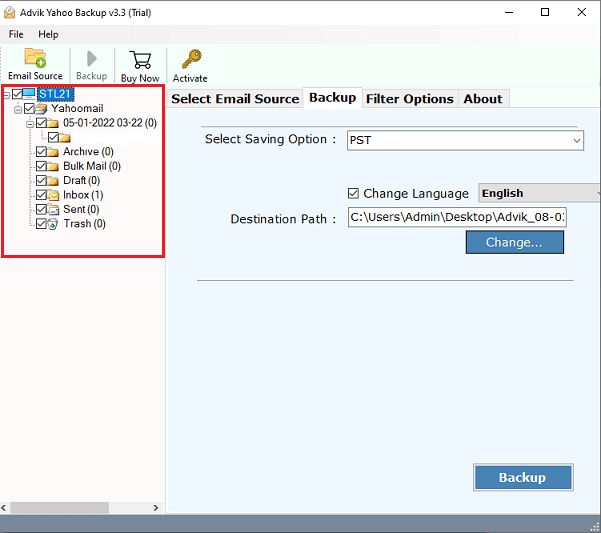
Step 2. Select the desired mailbox folders that you want to transfer.
Step 3. From the multiple saving list, select Yahoo as the saving Option.
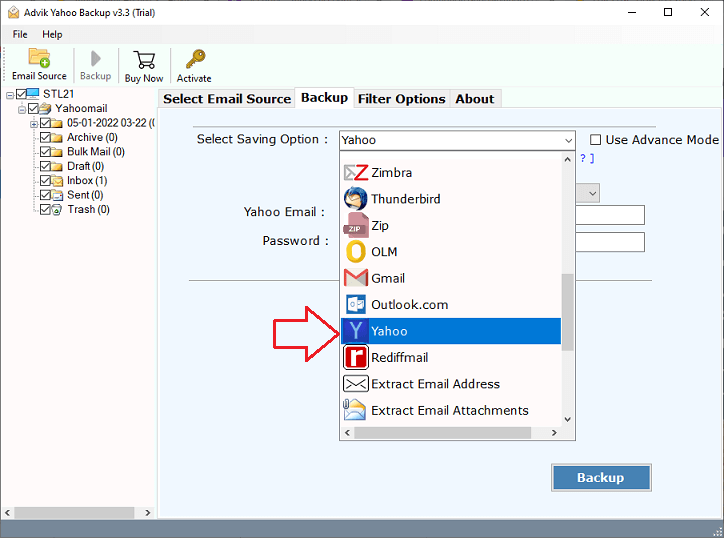
Step 4. Enter your Yahoo login details & click Backup button, and analyze the process.
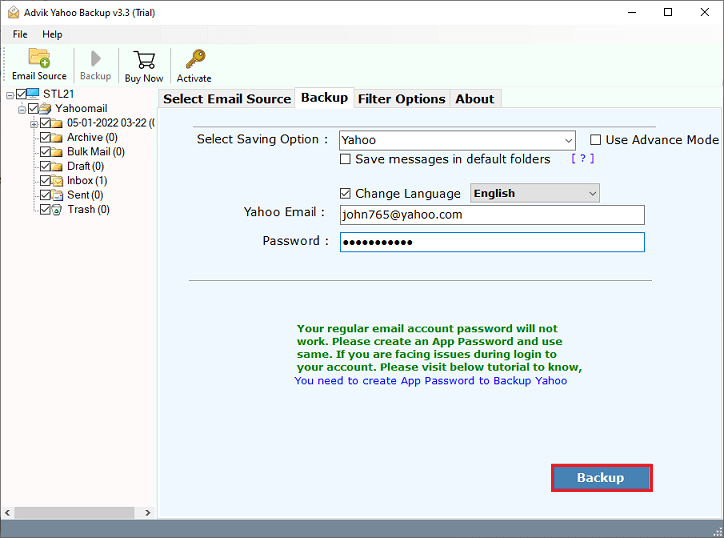
Doe! Here starts the process, and in a while, the tool will export Yahoo Mail folders to another Yahoo account.
Once the migration process is completed, you can view mailbox folders in your new Yahoo Mail account.
Watch How to Transfer Emails from One Yahoo Account to Another
Why Opt for an Automated Solution Instead of Manual Methods?
There are many reasons to choose Advik Yahoo to Yahoo Migration tool. Some of them are as follows;
- Batch Migration Supported: You can forward Yahoo email folders to another Yahoo account in bulk. This saves time and makes it easier for users with a large number of emails to manage the migration smoothly.
- Maintain Folder Structure: This software maintains the folder structure of emails during the export process of Yahoo mail folders to another Yahoo account. So that you can easily navigate your emails after the migration process.
- Include Attachments: Attachment plays a very important role in email messages. Today, most of the confidential information is sent and received through attachment files. That’s why this Yahoo-to-Yahoo transfer tool is programmed to keep all attachment files intact.
- Preserve Key Elements: During the Yahoo to Yahoo migration process, all the key elements of the emails, such as to, from, Cc, Bcc, Hyperlink, Unicode characters, etc., remain the same.
- Multiple output formats: You can use this software to download emails from Yahoo Mail into various file formats, such as Yahoo to PST, MSG, EML, MBOX, PDF, XPS, TGZ, etc.
- Advanced Email Filters: Need to migrate only specific emails? Use the advanced filter options to select emails by date range, subject keywords, sender, etc. This makes the process more focused and efficient.
- Cloud Migration: Apart from Yahoo to Yahoo Migration, this software also allows users to transfer emails from Yahoo to Gmail, G Suite, Office 365, Outlook.com, and any other email service that uses IMAP protocol.
- Simple and User-Friendly Interface: Even if you’re not tech-savvy, you can use this tool without hassle. The interface is clean, easy to navigate, and designed for beginners and professionals alike.
- Safe, Secure & Ad-Free: The tool is 100% virus-free, doesn’t show ads, and does not store or misuse your login credentials. It uses secure authentication protocols to keep your account safe during the process.
Conclusion
There can be different reasons to transfer Yahoo emails to another Yahoo account, based on what the user needs. In this guide, we explained both manual and automated methods to help you with the transfer. However, if you have a large number of emails, the manual method may not be the best option. That’s why we recommend using the Advik Software, a quick and reliable solution to move your emails safely.
You can download the free demo version to test how the tool works and check its features before making a decision.
FAQs
Q1. Can I transfer all my old Yahoo emails to another account?
Ans. Yes, use the import mailbox method or an automated tool to migrate all existing messages.
Q2. Is Yahoo Mail forwarding free?
Ans. Yahoo discontinued free automatic forwarding in basic accounts. You can use filters as a workaround.
Q3. Will attachments also get transferred?
Ans. If you use an email migration tool, yes. Attachments and folder structure are preserved.
Q4. Can I merge two Yahoo accounts?
Ans. Yahoo doesn’t offer account merging, but you can import or migrate emails to consolidate accounts.
In Case you get stuck somewhere while using this tool, you can contact our customer support for further help.