How to Export Zoho Emails to Excel CSV File?
Jackson Strong | January 11th, 2026 | Data Conversion, Zoho Mail
Learn step-by-step instructions to export Zoho emails to Excel CSV file. This article will show you both manual and automated solutions to save Zoho emails to CSV format. Let’s get started!
Zoho Mail is one of the most reliable and secure email platforms for personal or business use. It offers a wide range of features, including email hosting, calendar, tasks, notes, and contacts. However, there are times when users need to export data from Zoho to Excel CSV file for various reasons, such as;
- Open and analyze email data in Excel
- Import emails into other applications that support CSV
- Keep a local copy of emails for future reference
- Analyze communication needs for businesses
In this guide, we’ll explore the step-by-step process to convert Zoho mail to Excel CSV file.
Can You Export Zoho Emails to Excel CSV Manually?
Zoho Mail does not provide any option to convert its emails into Excel CSV file. If you try to do it manually, the most common approach is:
- Export emails using the Export feature
- Convert the exported files into CSV format
However, this process can:
- Be time-consuming
- Outlook/Thunderbird must be installed
- Doesn’t retain original formatting
How to Convert Zoho Emails to Excel CSV File Easily?
Check out Advik Zoho Mail Backup Tool to export Zoho Emails to Excel CSV file. The best part of this utility is that you can directly export emails into CSV format without any external help. With this utility, you can convert all emails at once. Apart from this, it also offers advanced email filter options to export specific emails. It maintains the original structure of the mailbox folders even after the conversion.
Click on the below link and try it for FREE.

Steps to Export Zoho to Excel CSV File
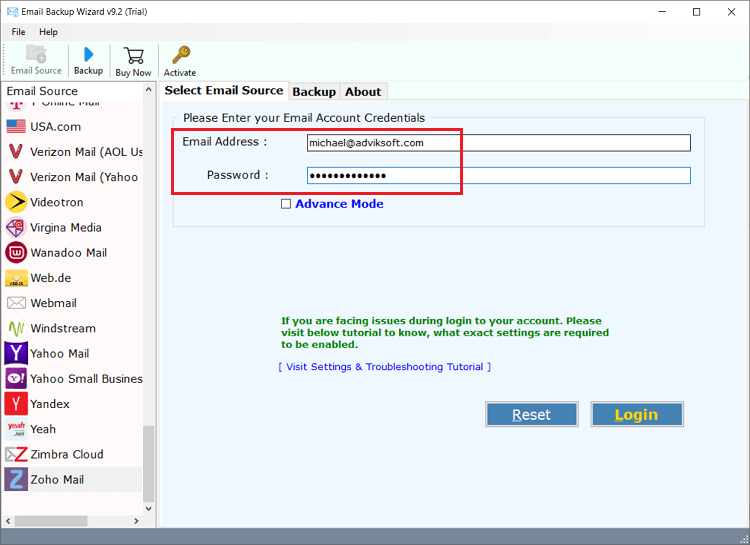
Step 1. Run Advik Email Backup Wizard and Sign in to Zoho Mail.
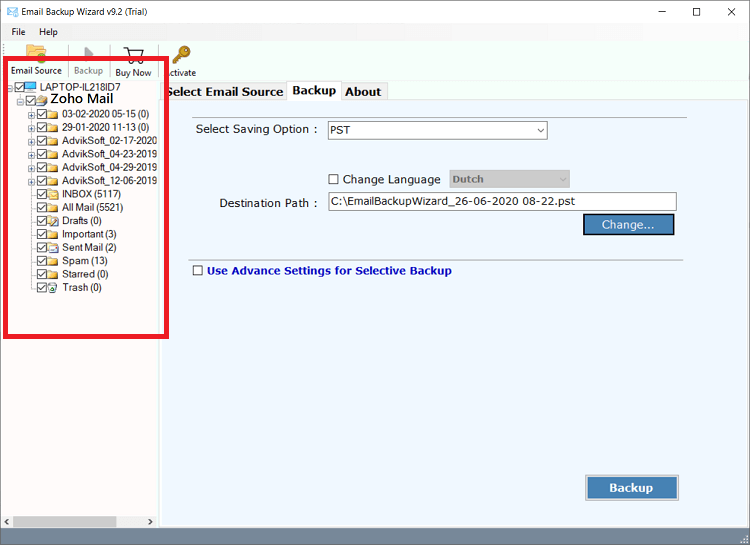
Step 2. Choose mailbox folders to export.
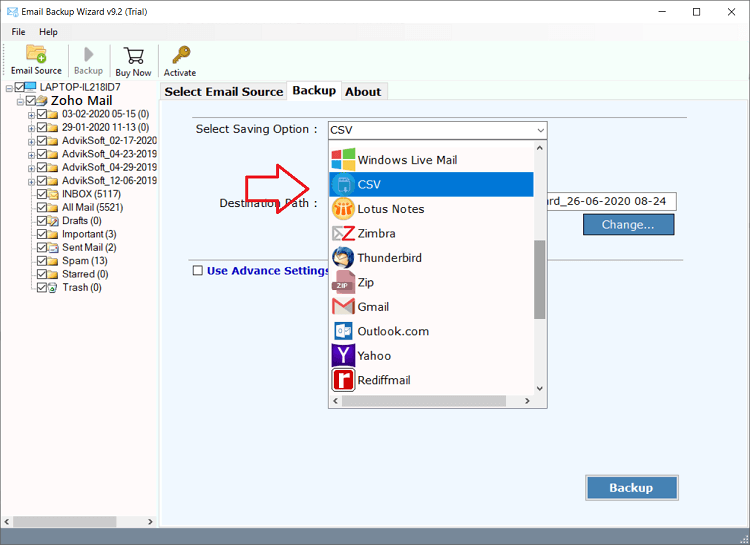
Step 3. Select CSV as saving option from the list.
Step 4. Apply email filters if required and click Backup.
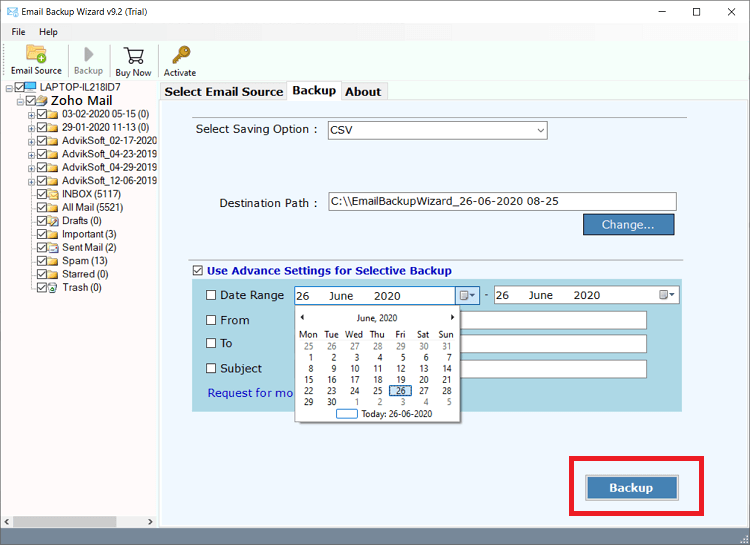
Now sit back and relax! The software will do the rest. Follow the above steps to export Zoho data into Excel CSV in one fell swoop.
Watch How to Export Data from Zoho to Excel
Amazing Features of Zoho Mail to CSV Converter Tool
The application offers its users several useful functions to export emails from Zoho to Excel. few of them are listed below:
- Backup Zoho Emails to Hard Drive Securely with Attachments
- Easy and Understandable working of the tool for beginners
- Migrate from Zoho Mail to Office 365, Gmail, Outlook.com, etc.
- Application keep On-Disk Mailbox Folder and Sub-Folder Hierarchy
- Export all email addresses from Zoho to Excel
- Advance Email Filter Options for Exclusive Backup
- Users can take unlimited data backup with this utility
- The tool is designed with a simple graphical user interface that permits even a non-technical user to run the program without technical help.
- This application is fully supported with all versions of Windows, such as Windows 10, 8.1, 8, 7, etc., for both 32-bit and 64-bit OS.
- The tool provides online chat and 24 × 7 support to help the users. They have very responsive and extremely knowledgeable customer support.
The Final Verge
Exporting Zoho Mail to Excel is a common task, but hard to do manually. It requires additional steps to convert exported files. For a faster and more efficient solution, using the professional tool allows you to export Zoho to Excel CSV while maintaining email integrity. You can download the free demo version of the tool, which allows you to convert 25 emails from each folder.
Frequently Asked Questions
Q1. Is it possible to export data from Zoho to Excel manually?
Ans. Zoho Mail exports its data into MBOX format. After exporting, you need to convert the exported data into Excel CSV format.
Q2. Can I export all emails from Zoho Mail to Excel CSV file at once with this tool?
Ans. Yes, the software can export all data from Zoho Mail in a single attempt.
Q3. Does your software support the latest Windows 11 OS?
Ans. Yes, the tool supports the latest Windows 11 and other editions.
