How to Import OLM File to Gmail Account?
Summary: This article explains how to easily import OLM to Gmail. We’ll cover all possible methods to complete the process and address any issues that may arise. By the end, you’ll know exactly how to open OLM file in Gmail. Let’s get started!
An OLM file is the proprietary file format used by Microsoft Outlook for Mac to store emails, contacts, calendars, and other mailbox data. While Outlook for Mac can easily read these files, Gmail doesn’t natively support them, which makes importing OLM files directly into Gmail a bit tricky. To overcome this, we’ll show both manual and automated solutions to transfer your OLM data into Gmail efficiently.
Before moving further let’s take a look at benefits of importing OLM files into Gmail account.
Why Import OLM Files into Gmail?
Gmail is a web-based email service that lets you access your emails from any device with an internet connection.
Here are some reasons to import OLM files into Gmail;
Easy Access: Gmail’s smart filters and labels help you manage and navigate your emails effortlessly.
Compatibility: With POP and IMAP support, you can integrate other email clients like Thunderbird and Outlook.
Free Storage: Gmail offers 15 GB of free storage and access to all Google applications at no cost.
Enhanced Security: Gmail ensures data protection with features like encryption, two-factor authentication, and spam filters.
Data Backup: By importing OLM files, you can back up important data and view it anytime within Gmail.
Now, we are going to explain two well-searched solutions to import OLM files to Gmail. Firstly, we will start with a manual solution, however, this manual solution consists of some unavoidable limitations. Therefore, to overcome this a direct and easy method is just explained after that.
How to Open OLM File in Gmail Account Free?
In this section, we need to use Mac Outlook to carry out the OLM to Gmail import process. As this manual method is quite lengthy we have divided the whole process into 3 steps so that you can understand the procedure easily.
Follow the below step-by-step instructions to import a .olm file to your Gmail account.
- Launch Outlook for Mac and click on the “File” tab in the menu.
- Tap, tool and choose “Import” from the options.
- Select the OLM file you want to import.
- In the Import window, select “Outlook for Mac archive file (.olm).
- Select the OLM file and click “Import“.
- Restart Outlook now.
- Click on “Tools” and then select “Accounts” option.
- In the “Accounts” window, click on “Email Account.”
- Fill in the information for your Gmail account.
- Finally, click on “Add Account“.
- Go to the Gmail inbox where you want to move OLM data.
- Right-click and choose “Copy to a folder.”
- In the next window, choose the new label and select “Copy” from the list.
- To complete the task, click the send/receive icon.
You can now access all your OLM emails in your Gmail account.
Why Shouldn’t You Rely on Manual Approaches?
- This is because the manual method is lengthy and consists of a lot of complex steps.
- There is no option to choose selective OLM mailbox folders.
- No email filter for selective OLM to Gmail import process.
The below-explained solution will reduce manual efforts as well as valuable time. Using this effortless solution you can import OLM file to Gmail in one fell swoop. The best part of this utility is that you don’t have to face any kind of manual configuration.
How to Transfer OLM Files into Gmail Account Automatically?
Check out the Advik OLM Converter which is a quick and direct way to import OLM emails into Gmail account. The software allows users to transfer OLM file in Gmail with complete emails and attachments. With this program, you can apply email filters that, enable you to select emails according to date range. This tool works with advanced algorithms that are capable of Importing multiple OLM files at a time. Additionally, This tool can Import OLM files to Gmail and its associated attachments while completely keeping up the data integrity.
Click on the FREE Download button on your Windows/Mac OS and check it’s working procedure;


Steps to Import OLM to Gmail Account
1. Run the software on your PC and click Add Files.
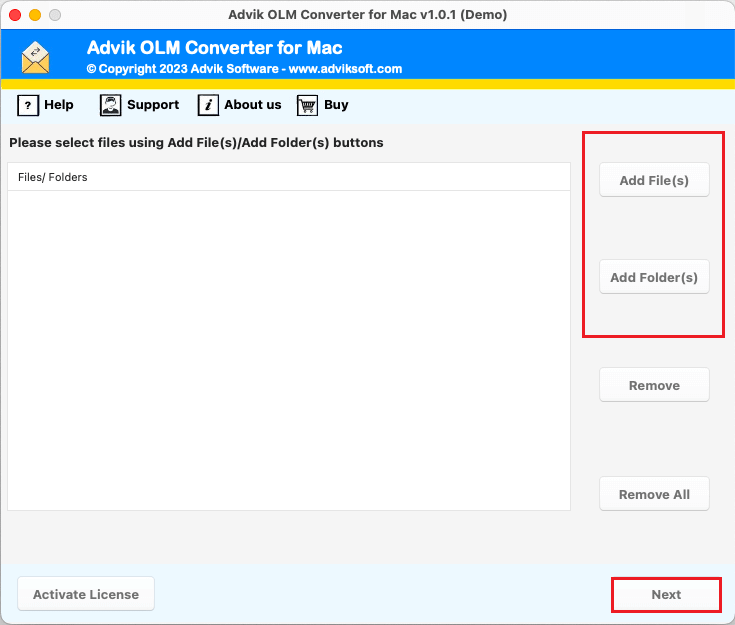
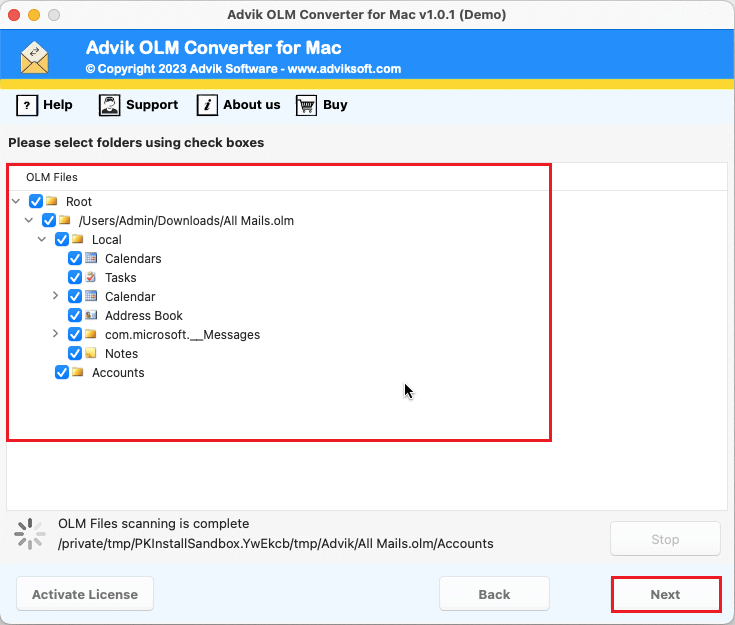
2. After adding .olm file click Next button.
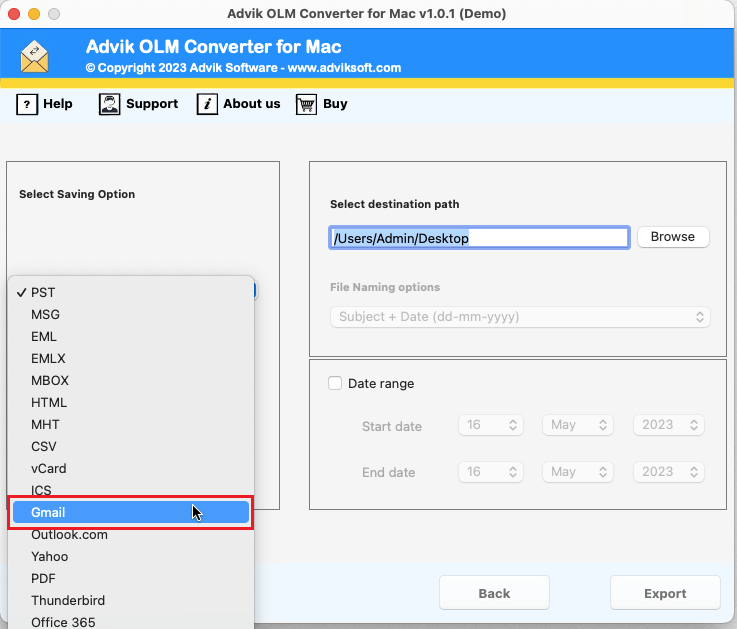
3. Select Gmail as a saving option from the list.
4. Enter your Gmail login credentials and click Export.
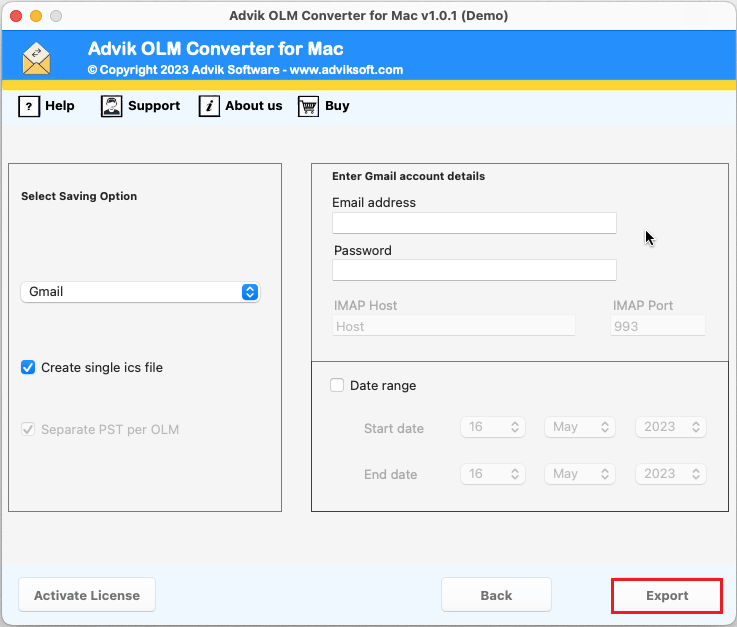
Now, the tool will start transferring emails from OLM file to Gmail account in no time.
Next, log in to your Gmail account and check all the migrated OLM mailboxes into it.
Finished! In this way, you can easily import OLM to Gmail account without any issues.
Watch How to Import OLM File into Gmail Account
Advanced Features of Software
- Import OLM to Gmail in batch: If you have multiple Outlook for Mac archives (.olm file), with this tool you can batch import OLM to Gmail in one single attempt. This option will help you to get rid of the same conversion process again and again.
- Simple and User-Friendly GUI: This software is well-known for providing a user-friendly interface to its users. It will be helpful for both technical and non-technical users. Anyone can use this tool without any further assistance from any technical guide.
- No File Size Limitations: No matter how large the OLM file is, the software is capable of exporting OLM to Gmail without facing any file size limitation error. This is one of the most premium features that makes this software unique from others.
- Maintain Folder Hierarchy: The tool properly maintains the mailbox folder hierarchy and integrity. This feature helps to retain the folder tree without diminishing the structure of email content. This will help you to locate and find your desired emails.
- Support All Outlook Versions: This software supports all currently released Outlook versions OLM files of Outlook Mac. You can upload OLM files of any latest and previous versions of Mac Outlook such as 2011, 2013, 2016, 2019, etc.
Final Words
Both manual and professional methods can be used to import OLM to Gmail. However, the manual approach may come with several challenges. For example, your Gmail storage might fill up after importing the OLM file, email attachments could go missing, or corrupted OLM files may fail to open in Gmail. Other common issues include duplicate emails being downloaded and various errors during the process.
To avoid these problems, it’s a good idea to backup your OLM files, seek professional help, or contact our support team, available 24/7 to assist you. Remember, while transferring OLM files to Gmail is important, ensuring your data is safely and securely downloaded is equally crucial.
Frequently Asked Questions
Q1. Can I Import OLM calendar into Gmail?
Ans. Of course, you can easily import OLM calendar to Gmail account. For this, you need to convert OLM Calendar data into ICS format and then you can import the ICS data in Google Calendar.
Q2. Is it possible to export OLM Contacts to Gmail?
Ans. Yes, you can effortlessly export Outlook for Mac Contacts (.olm) to Gmail by using this single software.
Q3. Can I try for free, to examine the performance of this tool?
Ans. Yes, we provide fully functional trials to check the performance, accuracy, and reliability of the tool. You can download Advik Outlook OLM to Gmail Import and transfer 25 emails/folder for free.
Q4. Does Gmail have storage limitations?
Ans. Yes, Gmail offers 15 GB of free storage shared across Google services. Ensure you have enough space before importing large OLM files.
Q5. Can I transfer only specific emails from OLM to Gmail?
Ans. Yes, Advik OLM to Gmail Converter allows you to select specific folders or emails for import.