How to Export Zoho Mail to PST File?
When users want to export Zoho Mail to PST file, they usually need it to migrate their mailbox to Microsoft Outlook, create a backup in Outlook or to keep important emails for future access. Since there is no direct option offered by Zoho Mail to export it’s email data into PST directly, many users are unable to find out a reliable way to convert their mailbox data. Fortunately, you can export Zoho Mail using Zoho’s native export feature, Microsoft Outlook or a dedicated tool based on your needs. In this article you will learn all three methods along with their disadvantages & advantages so that you can decide which method will work for you as per your needs.
Table of Contents
- What is a PST File?
- Benefits of Exporting Zoho Mail to PST File
- Which Zoho Mail Export Method Is Right for You?
- Method 1: Export Zoho Mail Emails Using Built-in Export Feature
- Method 2: Transfer Zoho Mail to Outlook PST Format
- Method 3: Create PST Files from Zoho Mail Automatically
- Watch How to Export Zoho Mail to PST File
- Benefits of Using Automated Software
- Manual vs Automated Method Comparison
- Final Recommendation
- Frequently Asked Questions
What is a PST File?
PST (Personal Storage Table) file is Microsoft’s Outlook data file format which is used to store emails, contacts, calendars, tasks and attachments locally. PST file is often used to backup mailboxes, for Outlook migration, archiving purpose or to access email data offline.
Benefits of Exporting Zoho Mail to PST File
Below are the reasons why many users prefer to export Zoho Mail to PST:
- To make a local backup of your important emails.
- To transfer emails from Zoho Mail to Microsoft Outlook.
- Access mailbox data when you are not connected to the internet
- Archive emails in Zoho Mail for legal compliance and to keep record of emails.
- Reduce mailbox size to increase Zoho Mail storage limit.
- Avoid accidentally deleting important messages.
- Save emails to a password protected Outlook data file.
- To arrange mailbox data in PST file for legal and eDiscovery needs.
The above benefits are the reason why users prefer PST files. But, the right export method depends on what you want to achieve. The next part will help you choose the most suitable solution no matter what your need is, just go through and decide which works best for you.
Which Method Should You Choose?
The best way to export Zoho mail to PST file depends on your needs. Some users simply want their emails for backup while others want a PST file for Outlook migration or a long term storage needs. Here are the three options you can use and where you should use each one is also explained. So, read it first;
Option 1. Export Zoho Mail Emails Using Export Feature of Zoho
Best for users who want a free offline backup of their mailbox and do not specifically require a PST file. Zoho exports emails in EML format which you can store locally or import later to Outlook and other EML compatible email applications.
Option 2. Migrate Zoho Mail to PST using Microsoft Outlook
Best for users who have Microsoft Outlook installed already and want to create PST file without using third-party software. This method requires you to transfer Zoho Mail to Outlook via IMAP and then export it’s mailbox data to PST format.
Option 3. Export Zoho Mail to PST Without Outlook
Best for users who need a direct and quick way to create PST files. This approach does not require Outlook installation and is useful for if you have large mailboxes need to export selective emails and best for bulk email export requirements.
Now, we will review each method individually so you can decide which approach works best for you.
Method 1. Export Zoho Mail Emails Using Built-in Export Feature
If you just want to create an offline backup of your Zoho Mail account, then you can do that using the in-built export feature provided by Zoho. In this method, you can will export Zoho emails to EML files that you can later import into Outlook and then export it as a .pst file.
Now, let’s see the steps to do that;
Step 1. First of all, sign in to your Zoho Mail account.
Step 2. Next, click on the Settings icon.
Step 3. Go to the Import/Export emails tab.
Step 4. Select the mailbox folders that you wish to export.
Step 5. Select a date range if needed.
Step 6. Click Start Export.
Step 7. Then wait for the Zoho Mail to complete the export request.
Step 8. Once this is done, Zoho will send you a notification email with the link to download.
Step 9. You have the option to download your exported emails as a zip file.
Step 10. The archive you downloaded contains emails in EML format.
Step 11. Next, install and open Outlook on your system.
Step 12. Now, drag and drop these .eml files into Outlook application.
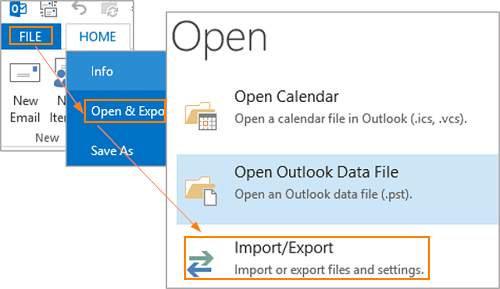
Step 13. Then, click on the File tab and choose Open & Import >> Import/Export Wizard.
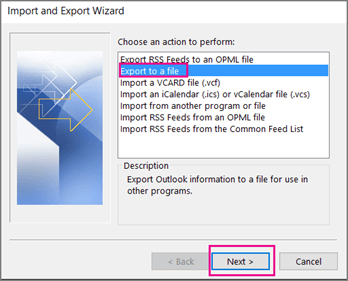
Step 14. Select the Export to a file option and click the Next button.
Step 15. Select file type as an Outlook data file (.pst) and tap the Next button.

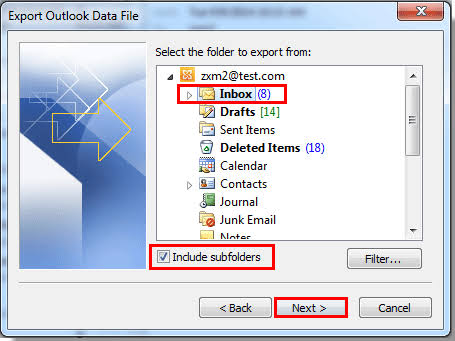
Step 16. Choose the required emails to export.
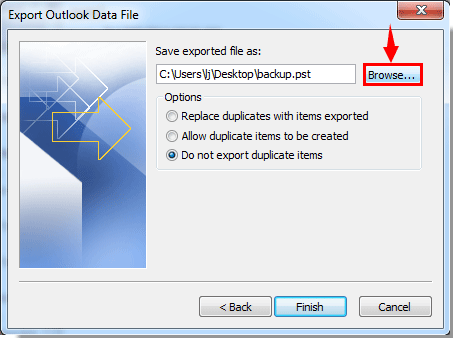
Step 17. Lastly, browse the location and click on the Finish button.
Done! This is how you can export your Zoho emails in .pst file format.
References: https://help.zoho.com/portal/en/community/topic/save-zoho-mail-to-pst-file
Method 2. How to Transfer Zoho Mail to Outlook PST Format
Zoho Mail provides IMAP option to set up your account in Outlook and any other third-party tool or email client. Once the account is added to Outlook then you can export mailbox data into PST file.
Before you begin:
- Requires Microsoft Outlook installation.
- Make sure IMAP access is enabled for Zoho Mail.
- Broadband internet connection required.
- There must be enough local storage for mailbox syncing.
Step 1. Open Microsoft Outlook on your computer.
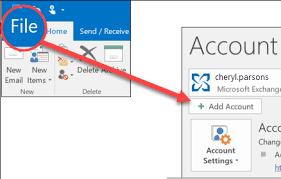
Step 2. Click the File tab in the top menu. Next, Click Add Account to configure your Zoho Mail account.
Step 3. Enter your Zoho Mail email address and password and follow the instructions on the screen to finish setting up your email account.
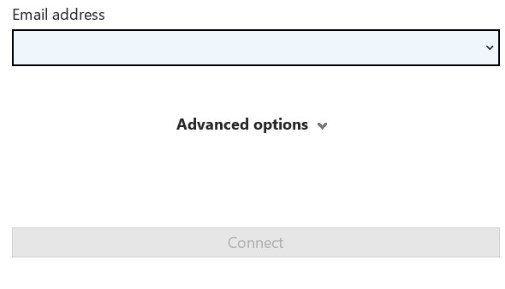
Step 4. Now, Outlook will to connecting with your Zoho Mail and download your emails and folders in a while. Wait for the synchronisation process to finish.
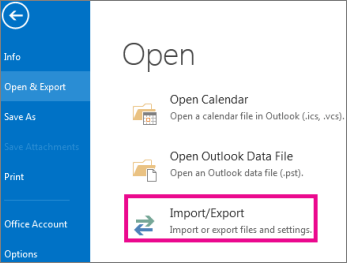
Step 5. Then, Click File >> Open & Export >> Import Export Wizard.
Step 6. Select Export to a File from the list and then click Next.
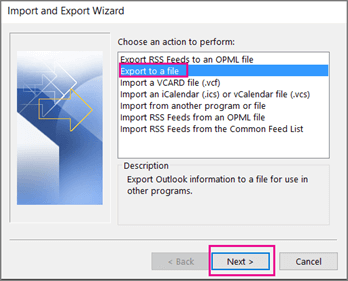
Step 7. Choose Outlook Data File (.pst) and hit Next.
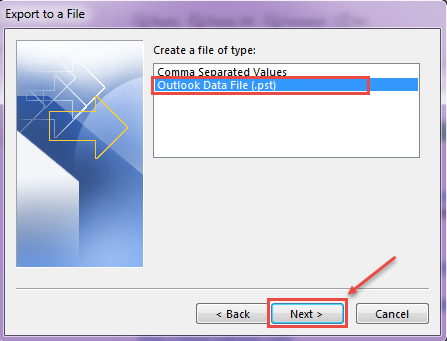
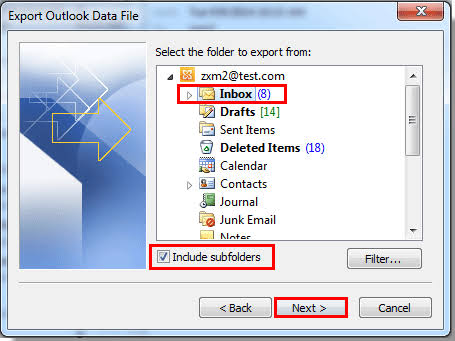
Step 8. Select the Zoho Mail folder that you want to export. To export all emails choose main mailbox folder and check Include Subfolders option.
Step 9. Click Browse and select a folder to save the PST file. Then, click Finish.
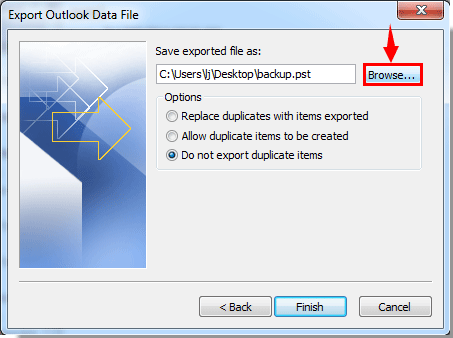
Outlook will create a PST file and place it where you choose.
Method 3. How to Create PST Files from Zoho Mail Automatically?
If the above methods look lengthy or complicated then you can also take the help of Advik Zoho Mail Backup Tool. It is made for those who want to export Zoho Mail to PST directly without any technical steps.
You just need to login to your Zoho Mail account, select the mailbox folders, select PST as the saving option and start the exporting process. The tool automatically downloads your emails and stores them in a PST file and also maintains original folder structure, email properties and attachments.
The software makes it easy to create PST files without any fear of sync issues whether you want to export only a few folders or an entire mailbox. It also includes advanced filters so you can export specific emails by date range, folders or other criteria. This is a good choice for those who have large mailboxes with bulky data.
If you want to see how the tool works, you can download the free trial version. This demo edition gives you an option to test the software working and features. This allows you to check whether the tool is suitable for you before you finally upgrade to the full version.


Trial Edition: It allows you to export 25 emails from each folder of Zoho mailbox into a .pst file. To do more, you need to upgrade to it’s licensed version. To know more, click on the buy link.
Steps to Convert Zoho Emails to PST File
Step 1. Launch the software and choose Zoho Mail as an email source from the following options.
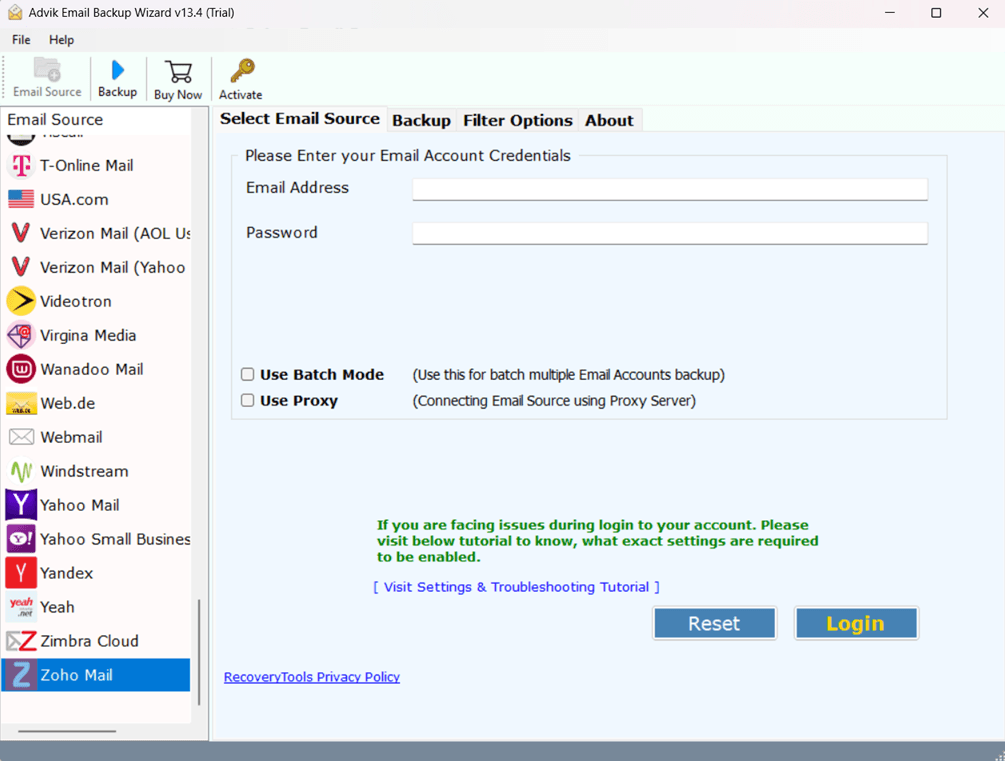
Step 2. Now, log in using your Zoho Mail account details to proceed further.
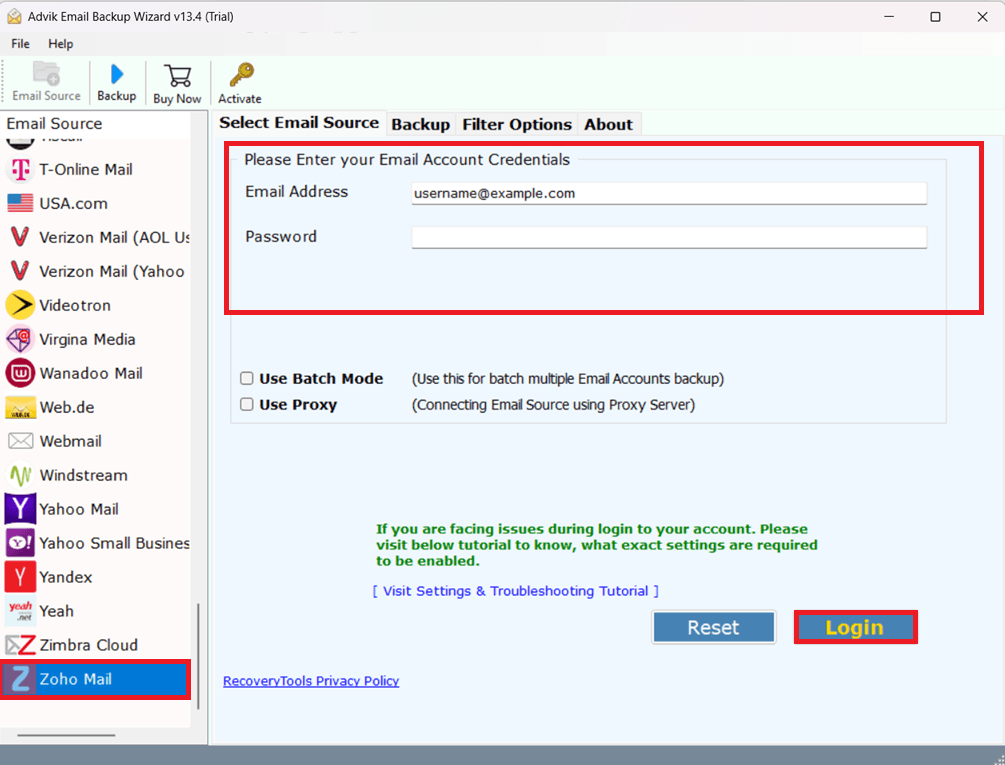
Step 3. Choose the email folders that you want to export into PST format.
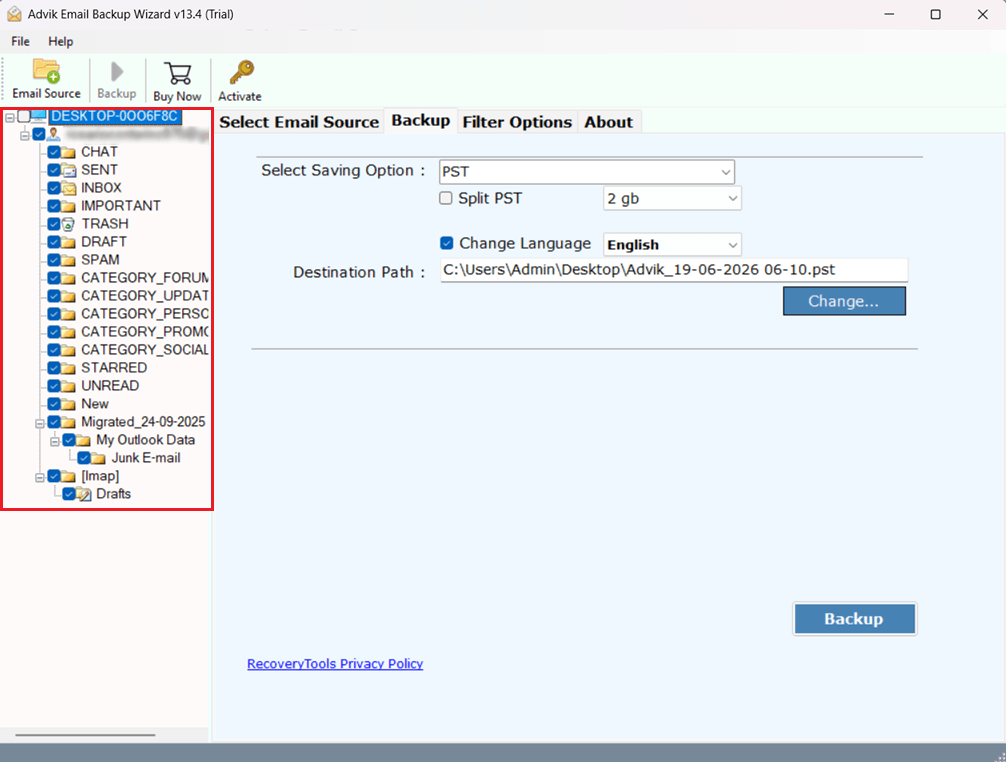
Step 4. Select PST from the list of saving options.
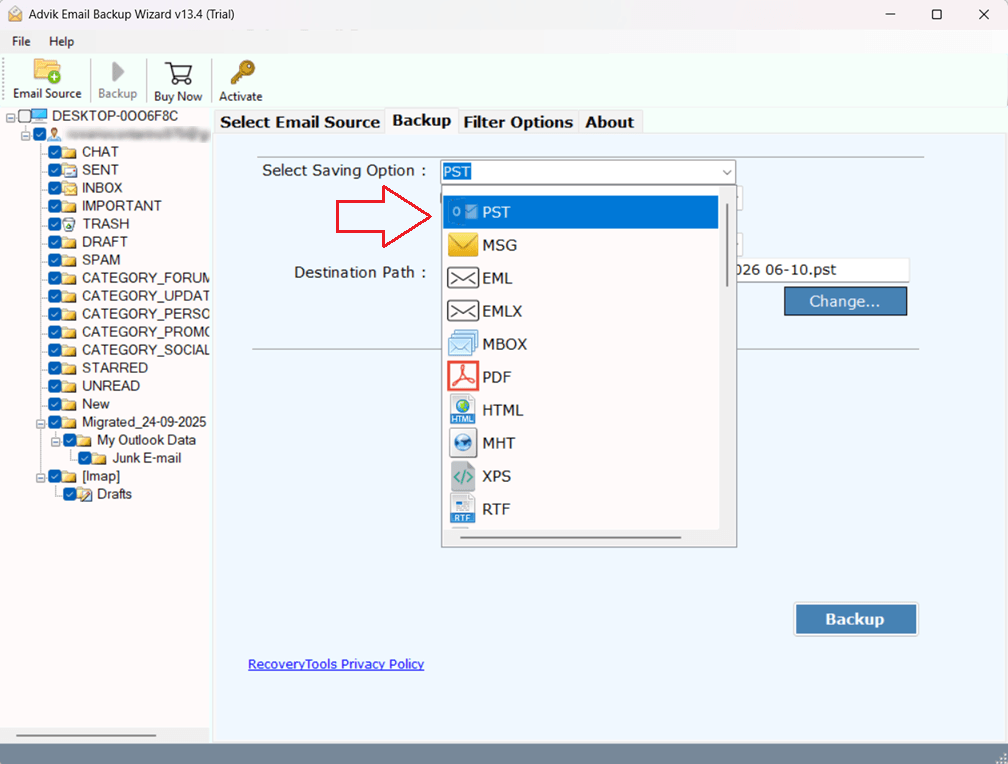
Step 5. Choose a destination folder to save the PST file and click Backup to start.
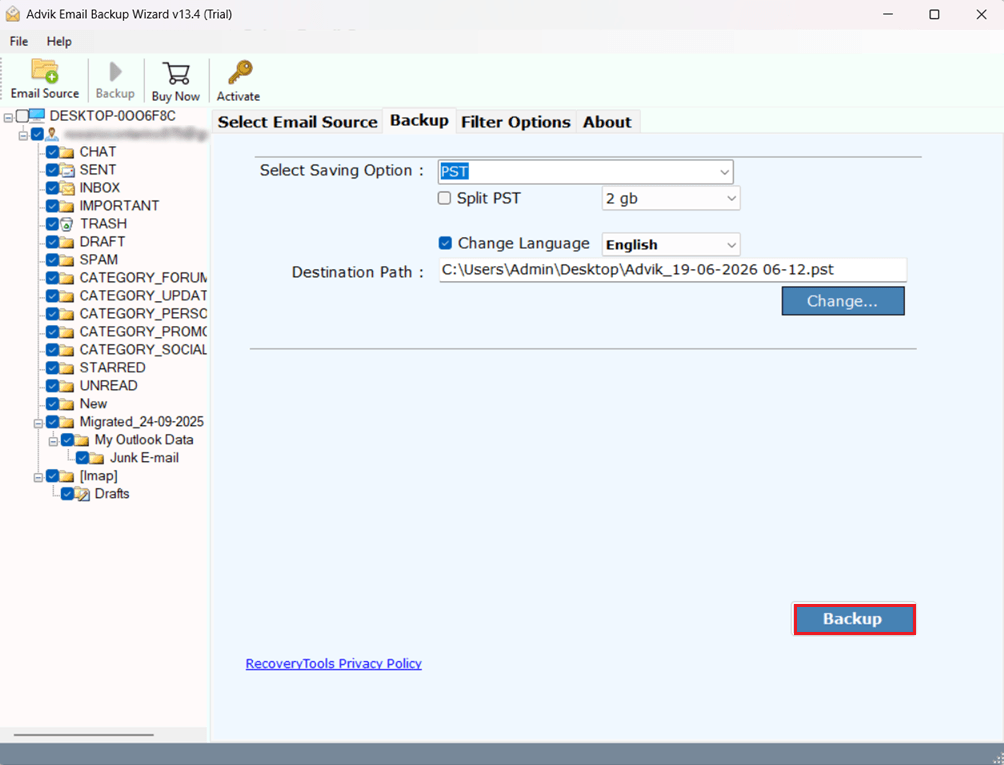
The software will automatically export your selected Zoho Mail data and save it as a PST file at the chosen location.
Once the process gets completed, a pop-up will appear on your screen. Click OK to close.
Now, your chosen location will automatically open on your window tab, here access all your exported Zoho emails in a .pst file.
Watch How to Export Zoho Mail to PST File
Why Users Prefer the Automated Method?
- You don’t have to set up Zoho Mail in Outlook.
- Directly creates PST files from Zoho Mail accounts.
- Advanced filters to export only the emails you need.
- Good for big mailboxes that would take a long time to process manually.
- Keeps your mailbox organised when exporting.
- It saves email, attachments and message details to the output file.
- Reduces the risk of problems caused by Outlook synchronisation.
- Supports bulk mailbox export needs.
- Designed for people who don’t have Outlook installed.
- Makes Zoho mail to PST conversion process easy.
Manual vs Automated Method Comparison
| Feature | Zoho Native Export | Outlook Method | Backup Tool |
|---|---|---|---|
| Creates PST File | No | Yes | Yes |
| Outlook Required | No | Yes | No |
| Bulk Export | Limited | Limited | Yes |
| Date Filter | Yes | No | Yes |
| Selective Folder Export | Yes | Limited | Yes |
| Suitable for Large Mailboxes | Moderate | Limited | Yes |
| Technical Knowledge Required | Low | Medium | Low |
| Processing Time | Moderate | High | Fast |
Final Recommendation
We hope this guide has helped you to understand the ways to export Zoho Mail to PST file. Here all possible methods are discussed with their advantages and limitations. You can go through each approach and choose the one that works for you. If your system does not have Outlook installed or you want to export large mailbox data directly to PST, then the above mentioned tool can help you to get the desired results.
Frequently Asked Questions
Q1. How to export Zoho Mail to PST?
Ans. To export Zoho Mail to PST, you have three options. This article has described three different ways to save your Zoho emails in .pst file format. Go through each to understand which works for you.
Q2. Does Zoho Mail provide a direct export to PST option?
Ans. No, Zoho Mail does not have a built-in feature to export emails to PST file format.
Q3. I don’t have Outlook, is it possible to export Zoho Mail without Outlook?
Ans. Yes, you can use any professional tool to export your Zoho emails as a .pst file.
Q4. What is the native export format of Zoho Mail?
Ans. Zoho Mail exports your emails as EML files which you can import later to Outlook and other email clients.
Q5. Can I export selected Zoho Mail folders?
Ans. Sure. With Zoho’s native export feature or professional backup tools, you can export selected folders.
Q6. Can I export emails from a selective time period?
Ans. Yes. Zoho Mail and professional export tools have date range filters to export only selected emails.
Q7. Can I import the exported PST file in Outlook 2024?
Ans. Yeah. The exported PST file can be imported in Outlook 2024, 2021, 2019, 2016 and earlier versions supported.