Smart Solution for Converting Outlook PST Files in 30+ File Formats

What is PST File Format? The .pst file format stands for Personal Storage Table. This file type is used by MS Outlook to store/export mailbox data to a local drive. PST file store items like emails, contacts, calendar, attachments, tasks, notes, etc. All in a system folder hierarchy. This file is basically used to backup data locally or transfer Microsoft Outlook data from one system to another.
Advik PST Converter Software is designed to handle large Outlook PST files and convert them without losing any information. Doesn't matter the file's size, password-protected, or corrupted, just add the file into the software, select the saving options from a wide range, and hit the convert button. That's all.
From individual users to large enterprises, thousands rely on Advik PST Converter every day.
Migration from Outlook to Another Email Platform
If you are using MS Outlook and need to export your emails to another platforms, then this tool will help. The software will import emails from Outlook to Thunderbird, Zimbra, etc. and make them easily accessible.
Convert PST to Other File Format
If your data are saved in a PST file and you need to convert them into another format. In that case a PST converter will enables you to export your data into multiple formats such as MBOX, EML, PDF, MSG, and many more.
Outlook Email Backup & Archiving
A PST file converter helps to create a secure and flexible email backups by converting Outlook PST data into multiple other formats. This makes archiving easier, long-term accessibility, and protect data from loss.
Recover Data from Corrupted PST File
In cases where Outlook PST file is no more accessible, the program will let you to recover and make it workable again.
Open PST file Anywhere/Anytime
Its not necessory to have MS Outlook installed on every system. The converter will help you in extracting PST data into readable format.
Trasfer PST Emails to Cloud Platforms
Noy just locally, you can migrate PST data to any email service providers to keep a copy in case you might loose access to the .pst file.
Explore the benefits of the software to convert PST file data into 30+ Formats
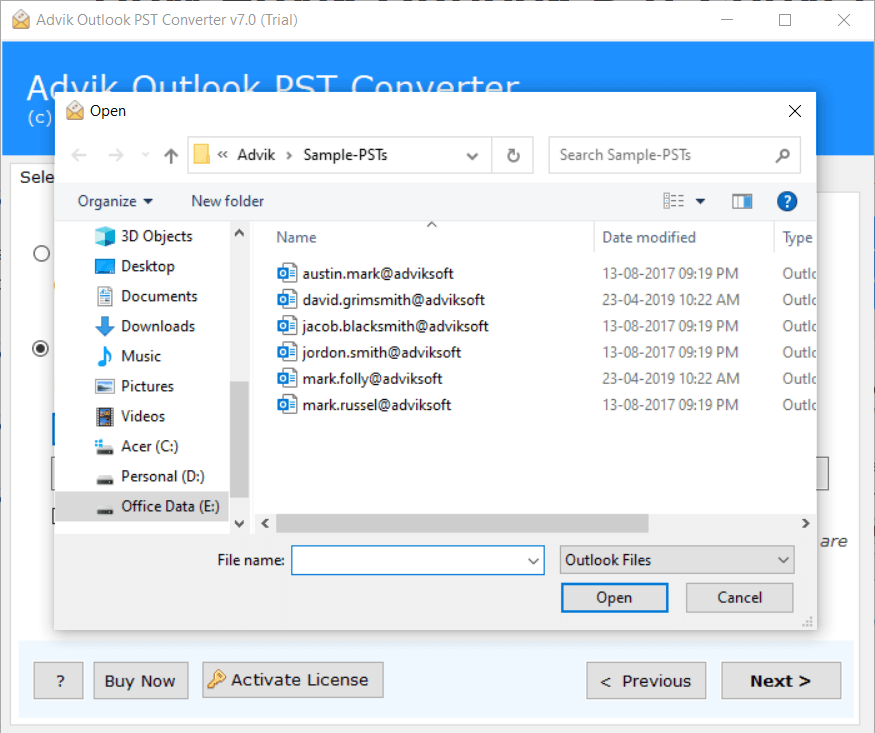
The PST file Converter provides an option to convert multiple PST files in one single attempt. If you have several Outlook PST files, you can export all the archives in one fell swoop. This option will save your time and manual efforts. Thus, you don't have to undergo with same conversion process again and again with each file.
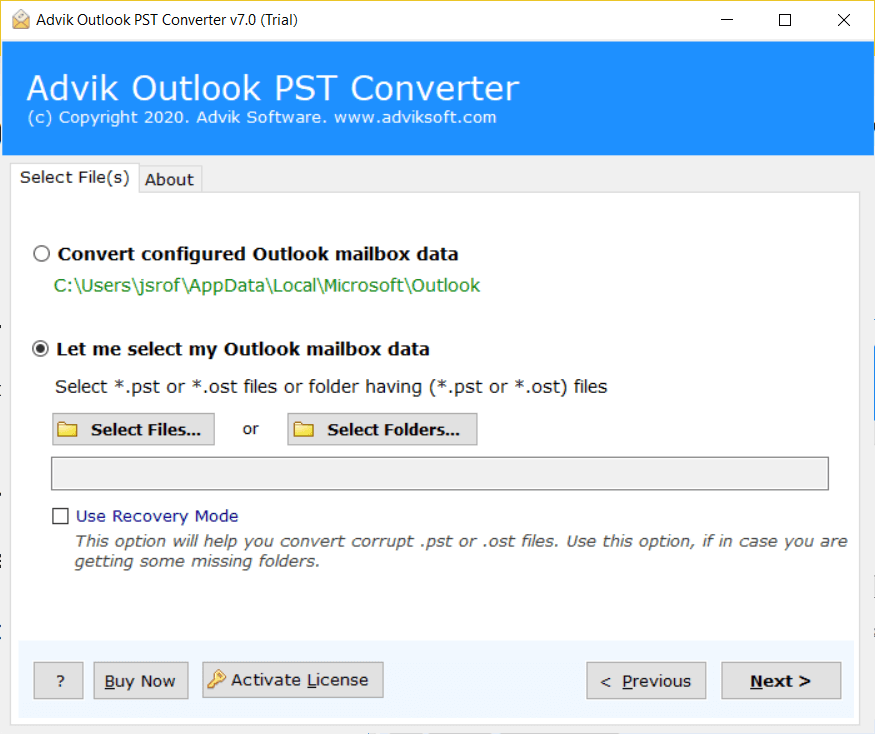
Select Files: The option will let you select and add multiple PST files from your system.
Select Folder: You can also select and add the entire folder having Outlook PST files.
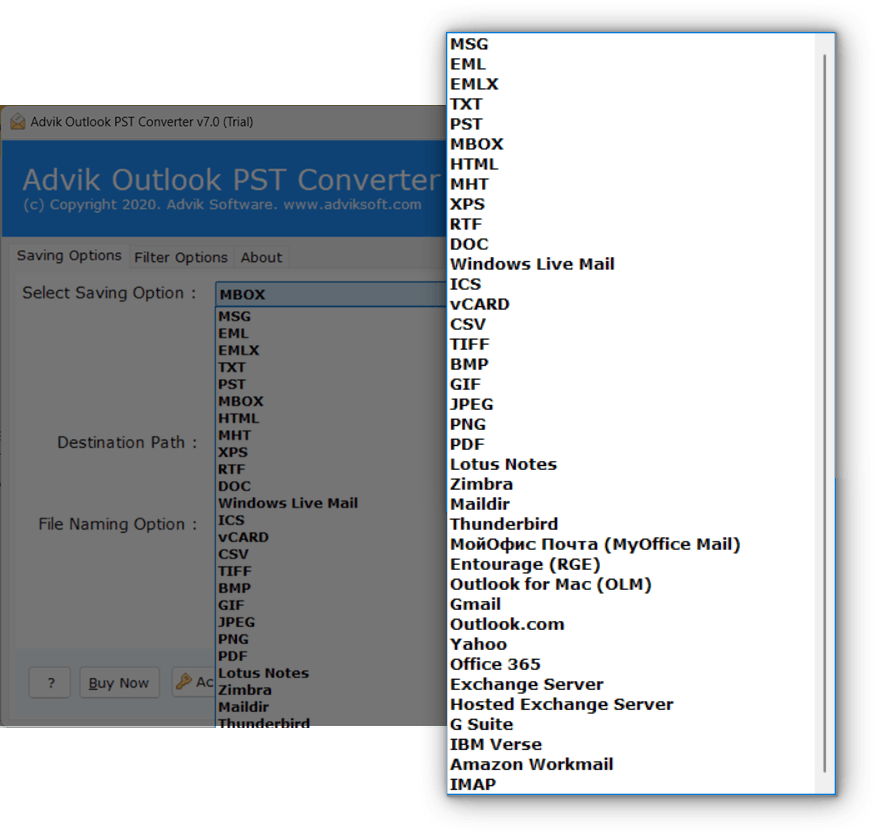
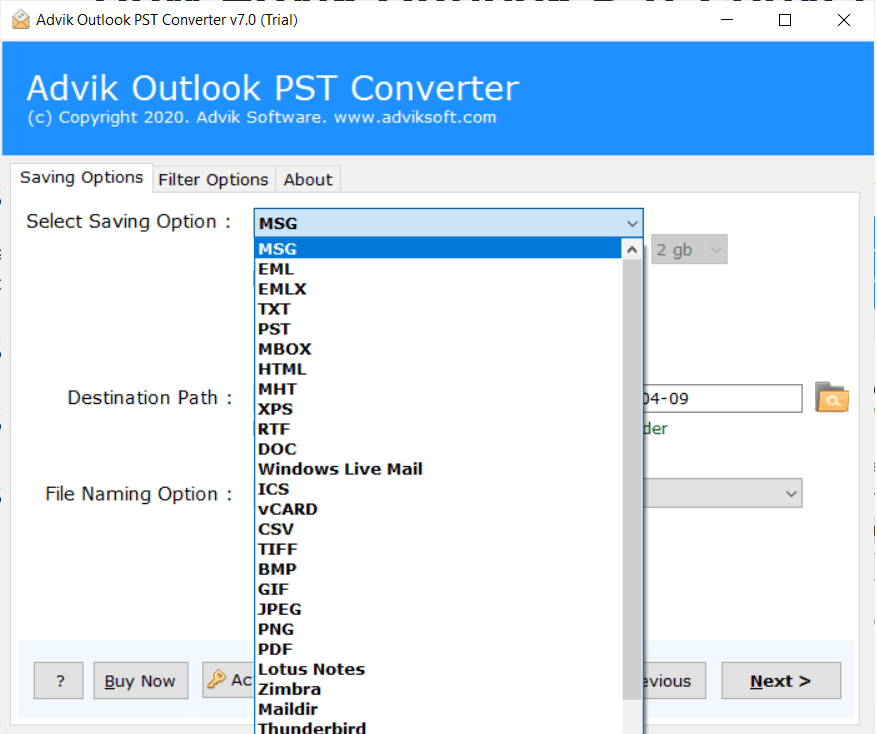
Advik Software recently updated the tool and added a few additional saving options. Currently, the software has 39 data saving options that convert emails for documents, email clients, email servers, and desktop-based email clients. You can convert PST file various readable file format.
File Formats: Convert PST to MBOX, EML, EMLX, MSG, PST, DOC, OLM, PDF, HTML, MHT, RTF, DOC, TXT, XPS, ICS, vCard, TIFF, BMP, GIF, JPG, and PNG
For Email Clients: Import PST to Thunderbird, Windows Live Mail Converter, Lotus, Zimbra, Maildir, Entourage and My Office Mail
Email Services: Import PST to Office 365, Gmail, Yahoo Mail, Outlook for Web, G Suite, IBM Verse, and Amazon Workmail
Email Servers: Import PST to Exchange Server, Hosted Exchange Server, IMAP Server
One of the best time saver feature for converting specific emails is right here. The tool provide advance Email Filter option to skip out the unwanted emails from converting or convert only the specific emails. You can even select those emails by selecting a date range, contact email address, subject name, or folder. This will help you convert large Outlook data files that include unwanted emails or specific important emails.
Convert All PST Data
With PST File Converter software, you can export all the mailbox items, including emails, contacts, calendars, notes, journals, and tasks on one go. You do not need to repeat the steps to export each folder. This feature is useful for full mailbox migration or backup purpose
Preserve Email Attributes
While using this PST Converter tool, you do not need to worry about any missing or incomplete data in the resultant files. The file carries a digital signature from DigiCert, Inc., utilizing SHA-256 hashing along with RSA encryption, which verifies that it is fully genuine and secure. The tool will maintain the email properties such as Attachments, To, Cc, Bcc, From, Subject, Inline Images, Hyperlinks, etc. throughout the process.
Convert Only Specific Folder
The PST file contains your complete mailbox data, but you only need the selective data to be converted. When you add the PST file, the tool shows the complete mailbox hierarchy, you can choose the specific folder and convert it only. In this way, you can avoid the unwanted conversion.
Maintains Email Folder Hierarchy
The software preserves the original folder structure of your PST file during conversion. All folders and subfolders remain organized exactly as they were before exporting. Also, it makes sure that your emails are easy to navigate and maintain their original context.
Split Large PST File
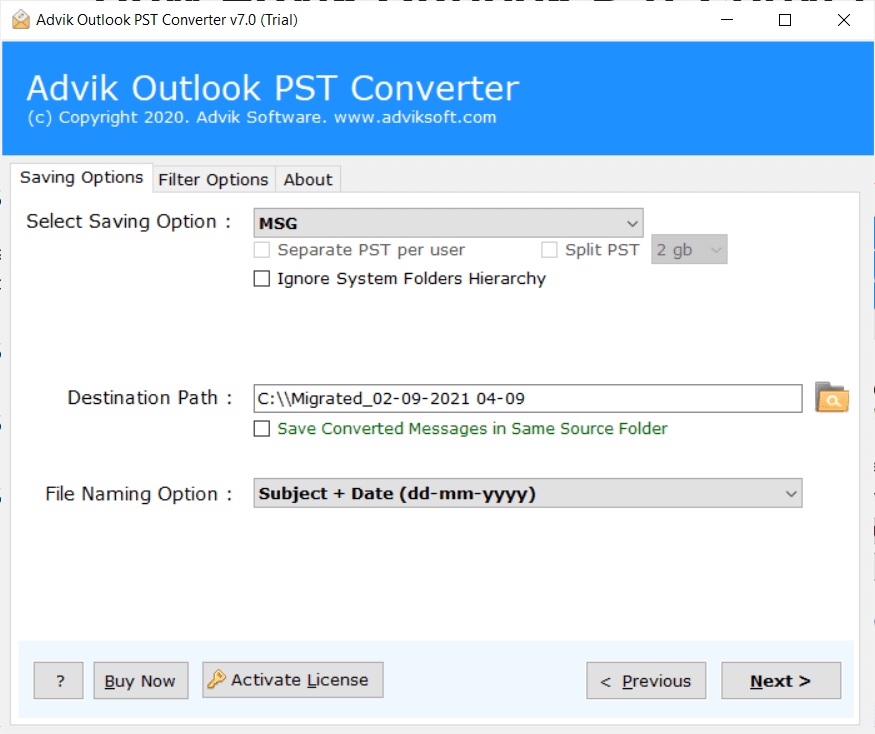
One of this utility's best facilities is control over the size of the PST file. If your PST file is too large, then you can convert it to multiple PST files with the help of the Split PST feature of the tool. You will get "Separate PST per User" or you can "Split PST" in 2 GB, 5 GB, and 10 GB options.
Preserve Non English Texts
The PST File Converter is coded with advanced algorithms to ensures that all email content, including special characters and Non-English languages, remains intact during conversion. It prevents data corruption or unreadable text issues while exporting PST files.
Repair Corrupt PST File
The software is capable of repairing corrupt, damaged, or inaccessible PST file, eliminating any errors. PST Converter provides the Recovery Mode option for making the task easy if you need to repair PST file and convert it into various saving formats. Enable this option and export it into a healthy format.
Auto File Naming
Another feature of this application is that it provides multiple Naming Convention Options: Subject-based, Date-based, From-based, or Custom naming formats to save exported data as per your requirements. This feature lets you easily manage and identify converted data later.
Save any Target Location
The PST File Converter allows you to save the resultant files at your desired location. By default, the converted data are automatically saved at the Desktop but you can change the destination. You can save the resultant files to your system, USB Drive, or other external drive as per your need.
Extract Contacts, Calendar & Attachments
Another beneficial feature is the ability to extract attachments from PST file. The tool also allows you to export contacts from PST file to vCard and CSV format or extract calendar from PST to ICS format that can be easily imported into multiple platforms.
Avoid System Folder Hierarchy
The Outlook Data file converter export the data into system folder hierarchy. However, you can void this folder tree by selecting "Avoid System Folder Hierarchy". It will simply export all the folders to one place that you can locate them easily.
Support OAuth Protocol
One of the best feature of this utility is that it support OAuth authentication protocol. If you need to import PST data to Gmail, the tool allows you to securely sign in using your Gmail credentials without sharing your password directly. This ensures a secure connection between the software and Gmail.
Windows Compatible
PST File Conversion software can be installed in Windows OS 11, 10, 8, 7 or older versions. It can smoothly run on 32-64 Bit processors. If you find any difficulties during installation, please contact our technical team via Live Chat.
Supported PST File
The software support both ANSI and UNICODE Outlook PST file. In addition, PST Exporter can convert PST file created by all Classic Microsoft Outlook 2021, 2016 and other editions.
No MS Outlook Required
The PST Converter is designed in such a way that it only requires PST files to perform the conversion process. Outlook configuration is not required by the software to export PST data. Just add the PST file, choose required data, select desired saving option, and press convert to initiate the process.
Software Download
Trial Limitations
Outlook PST File Converter Trial Version will allows you to convert first 25 items from each folder of PST file.
System Requirements
License Delivery
Product Guides
License & Version
PST File Converter - Free vs Paid Version Comparison
| Features |
Free Demo $0
Try before you buy |
Full Version Starts from $39
One-time payment |
|---|---|---|
| Convert PST File Data | First 25 Items | Unlimited Items |
| Preview Email Data Before Conversion | ✓ Available | ✓ Available |
| Email Filters | ✓ Included | ✓ Included |
| Convert Corrupt or Inaccessible PST File | ✓ Included | ✓ Included |
| Compatible with All Windows Versions (11 & Below) | ✓ Compatible | ✓ Compatible |
| Technical Support | Basic Support | 24/7 Priority Support |
| Commercial Use License | Personal Use Only | Allowed |
| Free Updates | Not Included | 1 Year Free Updates |
| Free Download | Buy Now |
Note: The PST File Converter free demo version allows you to convert 25 items per folder. Upgrade to the full version to unlock unlimited conversion and commercial use rights.
Over a decade of proven performance, third-party recognition, and real user satisfaction back every download.
With 9+ years of experience, Advik Software has become a trusted name in data recovery, data backup and data migration. We are about to make successful 10 Years journey next year for sure.
Honest reviews from real users on globally recognized company review platforms.
Featured and validated by top software directories — backed by real reviews, not just our words
All processing happens locally on your computer. Your data never leaves your system.
Here are wonderful words from real users who have used our Full Version edition — rated 4.9 out of 5 based on 1817 reviews.
I had purchased this Outlook PST Converter software on early March 2026. After since, the experince is very good. The software did a great job in converting large .pst file. The process is very quick and smooth.
9/10 ratings for the perfomance and saving options. Mainly, I am using Macbook Air for most of the time. Hope they launch the tool for Mac OS too.
I really liked how this software allowed me to convert 4GB of Outlook PST file. This is super amazing. Neither I faced any technical glitch nor I needed any technical assistance.
The software is not so complicated, but the support team is very cooperating. I had an error while converting the Outlook data file, but the prompt solution of support team excites me the most.
My experience with the Advik Outlook PST Converter was excellent. The software internace was clean, and user friendly, so I was able to convert PST file without needing help.
Conversion from PST to MSG was so smooth. Successfully preserved all the email information. 5 Out of 5 star for the working.
My Outlook data file was not readable, but this PST Converter processes it smoothly and created a healthy PST file. I was very happy to see that all the inaccessible data is accessible now.
Easy to install, easy to add file, easy to navigate to the menu, and easy to convert pst file. Trust me, you don't need any tech advisor for this simple procedure.
I would rate this PST File Converter an A-plus due to its smart way of moving emails from Outlook data files into Google Mail. Doesn't even imagine that such solutions are available. Glad I found this one.
The software did a great job. I was looking for software that can convert PST to CSV so that I can manage my mailing data in MS Excel. 5 out of 5.
I had compared this tool with several others before buying it. I found Advik PST Conversion tool allows more saving options than any other. This is the reason why I am purchasing this software.
Works perfect!
Advik PST Conversion tool did converted PST file that has multiple emails in different languages. Highly recommended.
Overall the software is workable with large PST files. That all what i need.
Actually I had used many similar tools before but this one was much better in terms of speed and export options.
See It Work on Your PST File —
No Signup. No Card. No Catch.
Download in seconds. Convert your first file in under a minute. Completely free to try.
Trusted by teams at
Software Suggest
Software Suggest gave Trustworthy, Best Support and Customer Choice Awards to Advik Outlook PST File Converter.
CNET
Advik PST Conversion tool is a genuine solution for extracting emails from Outlook data file into multiple file formats. The interface is amazing, no tricky navigations.
G2
Received best Outlook data file converter with hassle free navigations and export options.
Working of PST File Converter is as follows;
Outlook PST files are generally located in the Documents\Outlook Files folder within your User profile in Windows 11/10. Alternatively, in older versions, files may be located in C:\Users\Username\AppData\Local\Microsoft\Outlook.
Simply use Advik Outlook PST Converter to export Outlook emails into html, pdf, doc, text, etc. To open PST file data without Outlook.
ANSI and Unicode PST file types mainly affect size limits, language support, and compatibility.
Basically, ANSI PST files were used in Outlook 97, 2000, and 2002 (XP) versions. It only supports English characters. The ANSI PST file is very restrictive, which means it has a fixed file size not exceeding 2 GB. Due to this corruption, chances are very high.
On the other hand, Unicode PST files are used in MS Outlook 2003 and the latest versions. It supports multiple languages with multiple characters. It comes with a default file size of 20 GB, which is now 50 GB in newer versions. Unicode PST files are much more stable and a fast performer.
If you want to convert an inaccessible or corrupt PST file, then you should select Recovery mode. This option will convert the old PST into a new healthy PST file.
No, Outlook installation is not required the working of this tool. It's a complete stand alone utility.
You can find the size of your Outlook PST file by following steps mentioned below.
IMAP Option is the advance feature that can transfer PST emails to IMAP supporting email services like Gmail, Office 365, Zoho Mail, etc.