How to Transfer Emails from Webmail to Gmail?
In this digital era, Webmail accounts are used by almost everyone. However, despite the many good features of a particular Webmail, many users still intend to switch from Webmail to Gmail. If you also want to migrate from Webmail to Gmail then this post is for you. In this write-up, we are going to share with you the best way to transfer emails from Webmail to Gmail. Stick to this tutorial till the end to find out the way. In the segment, we are using two easy approaches to complete the task securely.
Webmail service gives basic emailing tools but Gmail has extensive search options, smart labeling and filters for easier email organization. Migrating from Webmail to Gmail improves the way you manage and access your emails by offering a faster, cleaner and more-user-friendly interface.
Table of Contents
- Why Choose Gmail?
- How to Transfer Webmail to Gmail Free?
- How to Migrate Webmail Emails to Gmail Automatically?
- Steps to Transfer Emails from Webmail to Gmail
- Watch Video Tutorial
- Key Features and Benefits
- Manual vs Automated Methods: Comparison Table
- Real World User case
- Conclusion
- Frequently Asked Questions
Why Choose Gmail?
There are several benefits of switching emails from Webmail to Gmail account which improves email management, security and efficiency.
- Accessibility Enhancements: Access all your emails from anywhere, using a web browser, desktop program or mobile device without using your hosting provider Webmail interface.
- Advanced Spam Protection: Gmail filters spam, phishing attempts and malicious emails that will allow you to keep your inbox clean and safe.
- Search Feature: In Gmail, you may easily search emails using the advanced search option.
- More Storage Capacity: Gmail gives you lots of space for years worth of email.
- Enhanced Security: Gmail provides advanced security for your account with 2FA, monitoring for suspicious activity and improved account recovery.
- Integration with Google Services: It is integrated with Google Drive, Calendar, Sheets, Docs, Meet and other Google Workspace applications.
In this article, we will discuss both manual and automated ways to forward Webmail emails to Gmail account. Let’s move ahead and complete the webmail to Gmail migration process easily.
How to Migrate Webmail Emails to Gmail Free?
- First of all, sign in to your Gmail account and select the settings icon.
- Navigate to See all Settings > Import and Accounts.
- Select the option to import contacts and mail.
- In the subsequent Wizard, enter your webmail email address and select “Continue”.
- To accept the terms of the migration, click continue once more.
- To continue, check the necessary boxes, enter your Webmail password, and click Next.
- In order to add webmail to Gmail, tap Agree to give authentication.
- To begin the migration process, select your preferred import choices here and press Start Import.
- To complete the webmail to Gmail migration process, click OK at the end.
Note:Before starting the migration, ensures that IMAP access is enabled in your Webmail account. Also, verify your login credentials beforehand to avoid authentication errors during the migration process.
If you are finding it difficult, you can choose an automatic solution i.e. explained below.
How to Transfer Webmail to Gmail Automatically?
Advik Email Migration Tool is an effortless tool for those who are looking to avoid manual steps and want to migrate Webmail emails to Gmail within seconds. This tool allows you to import Webmail to Gmail in a few simple steps. Also, you can transfer emails from multiple Webmail accounts to Gmail without any issues. The working steps of this utility are also convenient and accessible so that any user without any non-technical background can also use it. Even the built-in features of this software will keep the users’ crucial details safe while performing the steps.
Download the software from below link and try it for free.


Steps to Transfer Emails from Webmail to Gmail
- Run the software on your PC.
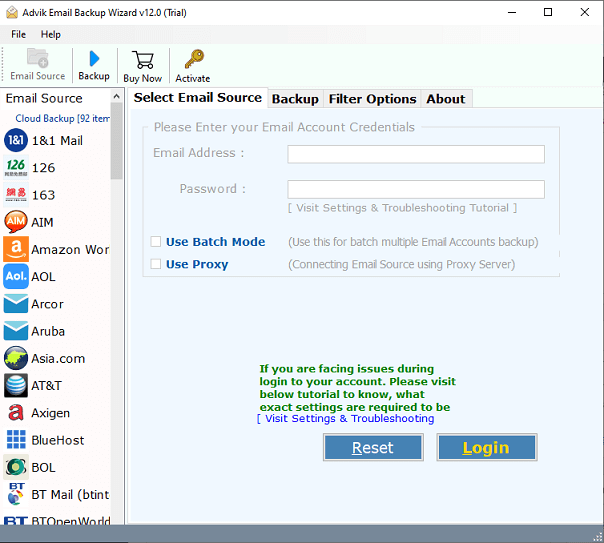
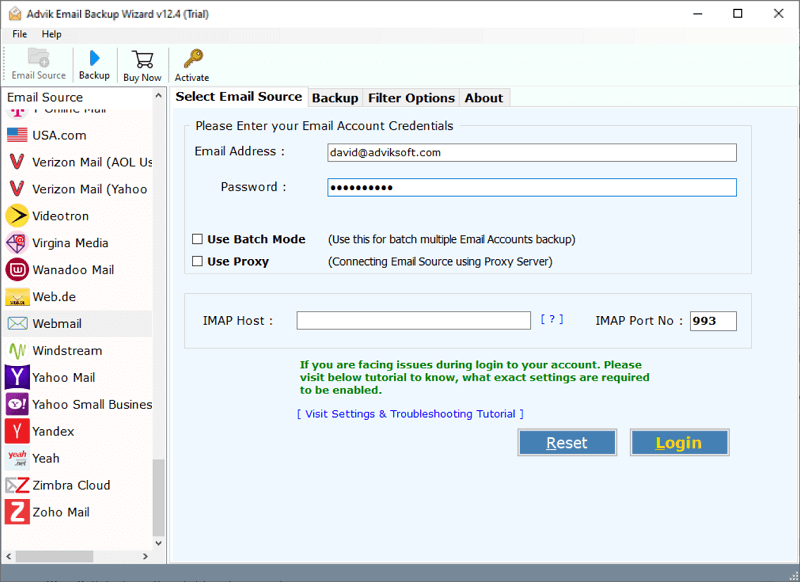
- Choose Webmail as an email source and sign in.
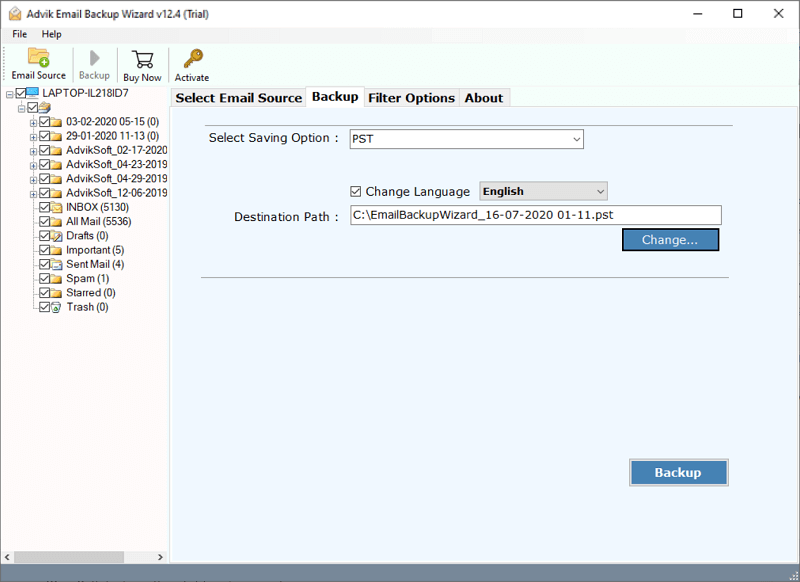
- Now, select the required email folders from the preview.
- Next go to Select saving option and select Gmail from the list.
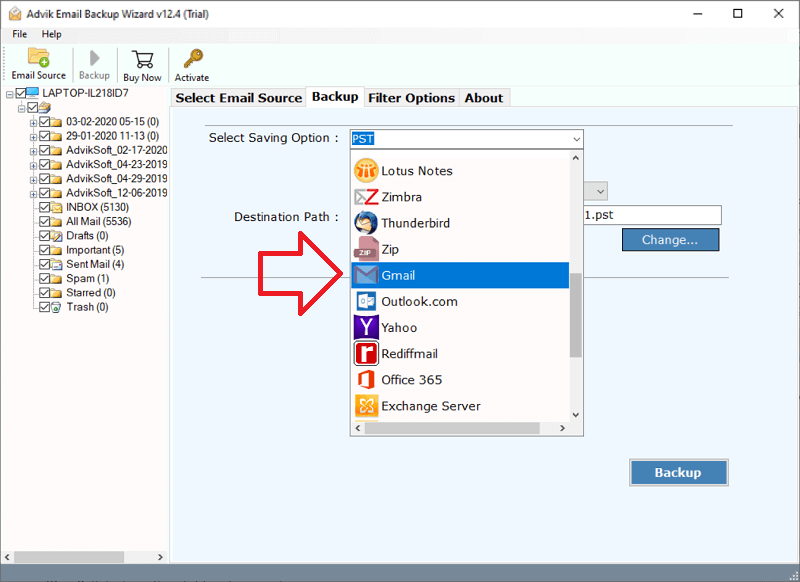
- Enter Gmail account credentials and press the Backup button.
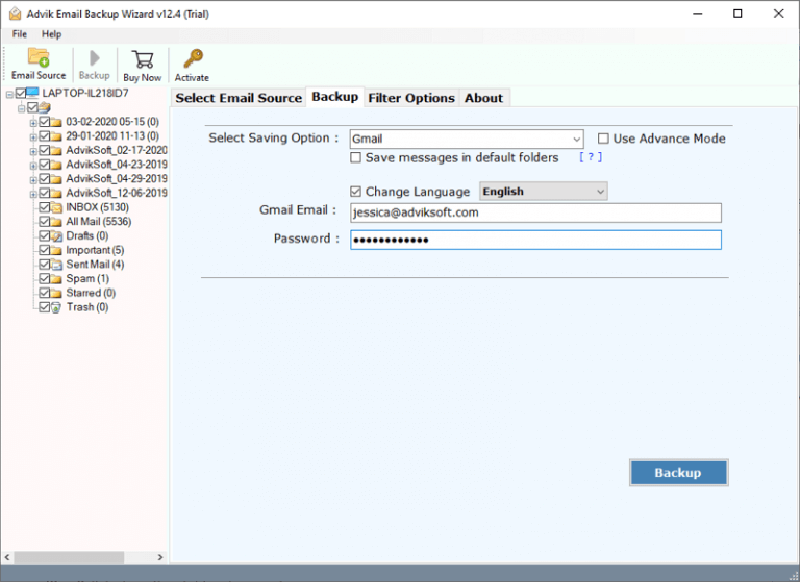
Finished! Thus, with these simple steps you can easily transfer Webmail to Gmail account easily.
Watch How to Complete the Webmail to Gmail Migration
Highlighted Features of the Software
Below are the key highlights of the software that will make your migration more comfortable;
- Migrate multiple Webmail emails to Gmail in one attempt with the Batch Mode feature.
- With this tool, users can easily download all attachments from webmail account in a single click.
- Preserve and hold folder hierarchy with email attributes throughout the Webmail to Gmail migration process.
- Export Emails from Webmail to PST, PDF, DOC, MSG, MBOX, CSV, OLM, HTML, MHT, XPS, and other file formats.
- You can also move Webmail folder to Gmail as per your choice with the selective mode option.
- Standalone utility to backup emails from 100+ Email sources without any issues.
- Offers an advanced email filter option for selective migration on the basis of To/From, Date range, Cc, Bcc, etc.
- Also, you can migrate Webmail to Yahoo Mail, Office 365, Outlook.com, and almost any email service provider as per your choice.
- With this tool, you can also backup Webmail emails to PC/Hard drive/computer with attachments.
- Available for Mac and Windows OS
Manual vs Automated Method Comparison: Which Method Should You Choose?
| Feature | Manual Approach | Automated Tool |
|---|---|---|
| Gmail Configuration Required | Yes | No |
| Technical Knowledge | High | Low |
| Migrate Multiple Accounts | No | Yes |
| Email Filters | No | Yes |
| Import Complete Mailbox | Only Inbox Folder | Yes |
| Preserve Folder Hierarchy | No | Yes |
| Migration Speed | Slow | High |
Real World Migration Case
I had been using a Webmail account for my business communications for several years. As my email data grew, I decided to move everything to my Gmail account.
Initially I tried Gmail built in import feature. However, the process was very slow and only imported emails from my Inbox folder. Other folders such as Sent Items, Drafts and Client Communications were not transferred which was a major concern.
While searching for a better solution, a friend recommended the Advik Email Migration Tool. I used this software for migration, it detected all my mailbox folders and allowed me to migrate the complete mailbox.
I successfully transferred 9 GB Webmail mailbox containing more than 26000 emails to Gmail in approximately 20 minutes. All email folders and attachments were migrated accurately and the original folder hierarchy was preserved throughout the process.
Final Words
Thus, the blog offering two useful and simple solutions to transfer Webmail to Gmail comes to an end. Now, you can analyze and choose the method that best suits your needs and requirements. However, as per our recommendation, we have found the manual solution not very useful and it consists of a lot of unavoidable drawbacks. As you can see, the above email migration took only 5 simple steps to move Webmail folder to Gmail account. You can also move an unlimited number of emails or email folders from Webmail account.
Frequently Asked Questions
Q1. Can I migrate emails from multiple Webmail accounts to Gmail at once?
Ans. Yes, the software has a Batch Mode option which allows you to transfer emails from multiple accounts by adding a CSV file that contains the login details of all accounts.
Q2. Will email attachments be migrated over to Gmail?
Ans. Yes, email attachments will be migrated along with the respective emails in case of manual or automated migration.
Q3. How long does Webmail to Gmail migration take?
Ans. The duration depends on mailbox size, internet speed and the method used. The manual approach takes a lot of time while the automated software reduces migration time.
Q4. Can I select the particular folders while transferring Webmail emails to Gmail account?
Ans. Yes. The software displays all folders of your Webmail account. You can choose any folder that you want to migrate.