How to Fix Gmail Something Went Wrong Error?
Jackson Strong | January 5th, 2026 | Data Backup, Gmail
A lot of Gmail users are reporting a strange issue Something went wrong, try again later even everything looks normal. While working on this problem, I went through some real user discussions on different platforms where people are facing the same issue while sending or receieving emails.
During my research on different solutions I found out some troubleshooting methods which could actually help to fix this error in real scenarios. The problem is caused due to many reasons, not only a single reason is responsible for this error.
So, in this blog, I will share my complete findings and explain the actual reasons behind this error along with working solutions to fix it easily. If you are facing this Gmail issue also then keep reading because here I will cover all the methods step by step which I have tested and found useful.
Table of Contents
- Real User Scenario (Reported Case)
- Why This Gmail Error Matters
- Why Does Gmail Keep Showing “Something Went Wrong”?
- How to Fix Gmail “Something Went Wrong, Try Again Later” Error
- Watch Video Tutorial to Solve Gmail Something Went Wrong Issue
- Tips to Prevent Gmail Errors in Future
- Final Words
- Frequently Asked Questions (FAQs)
Real User Query (Reported Case)
I have done research in finding solution for this issue and analyzing many of the users’ discussions on forums and community platforms I found out that many users are facing the same Gmail error issue.
Recently, I found discussion on Reddit related to “Something went wrong. Please try again later.” error. Here, a Gmail user is saying that most of the time this error appears when out when he tries to send emails, attach files or refresh his inbox. Here is a user query that illustrates this problem well:
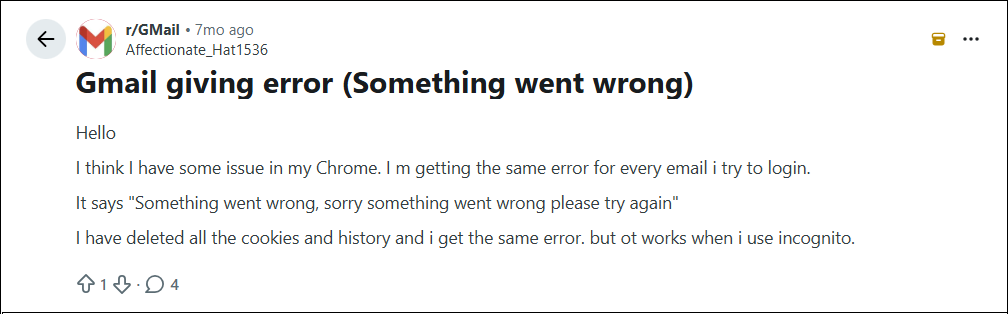
This screenshot is a typical case when users are not able to perform even the basic Gmail functions even when they have the correct internet connection and login credentials.
What Users Usually See:
The pattern for this issue from several real-world cases is:
- Gmail stops when receiving or sending emails
- The error keeps coming back for no genuine reason
- Refreshing or reloading the page does not solve the problem
- Gmail is not working but users are logged in already
- Temporary solutions only offer short term relief
Why It Matters?It is important to know this real-life example because it shows that the problem is not always the fault of the user. It is often related with:
- Temporary server side issues with Gmail
- Corrupted cookies or browser cache
- Conflicts with add-ons or extensions
- Problems syncing Google account
- Delays in security checks
That’s why users are often confused that the error appears to be simple but the root cause may depend on the system environment.
Why Does My Gmail Keep Saying Something Went Wrong?
This error can appear while loading Gmail, signing in, sending emails, or performing any activity inside Gmail.
Here are some reasons for sorry, something went wrong there & try again Gmail error:
- Unstable internet connection
- Corrupted browse cache & cookies
- Server outage from Google
- Outdated browser
- Login or account sync issues
- Conflicting browser extensions
After we have read the reasons behind this error, let’s quickly get into the ways to solve this error.
How to Fix Gmail Something Went Wrong Try Again Later Error?
The error message means there is a problem and you might wonder why does my Gmail automatically sign out of my account when you try to sign in. Thus, it could be your fault or Google’s fault if you see this error on all your devices.
Also, you can try to check whether Gmail is hacked or not as sometimes if your Gmail account is hacked or compromised you might see these types of issues in your Gmail account.
For Desktop Users:
These tips and tricks will be helpful if you are trying to access your Gmail account through the browser and if you are using the Gmail app then proceed with the next section.
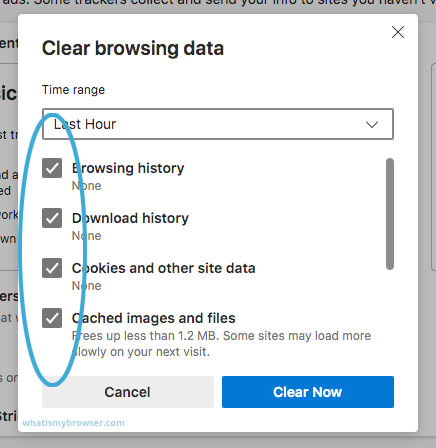
1. Clear Browser Cache and Cookies: An outdated browser cache and cookies can sometimes interfere with Gmail’s functionality and cause this error. Try to clear the cache and cookies in your default browser in which you are trying to access your Gmail account.
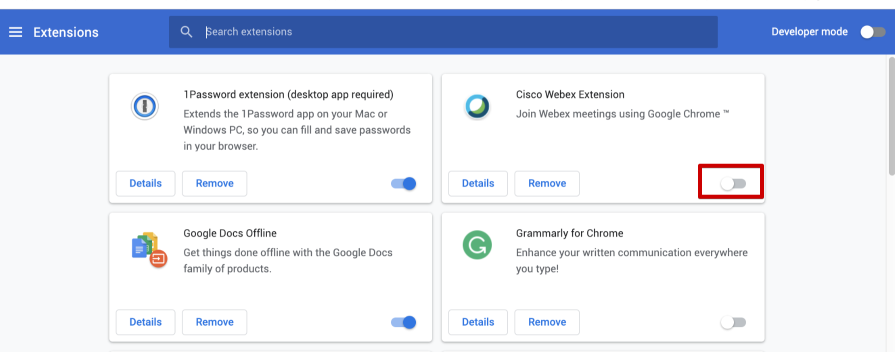
2. Disable Browser Extensions: Sometimes browser extensions or add-ons can conflict with Gmail and this error might appear. Try to disable all the irrelevant browser extensions that stop Gmail from working well.
For Mobile Users:
If you are accessing your Gmail account through an application on your mobile device then follow the below solutions to fix something went Gmail error.
1. Clear Gmail App Cache: First of all, the reason behind something went wrong Gmail error could be the low storage on your phone. In this situation, you should try removing the cache data of the Gmail application that causing this problem.
To do this;
- Open settings and click on Storage.
- Then, choose Manage apps and look for the Gmail app.
- Now, select Clear Cache and tap on Clear Data.
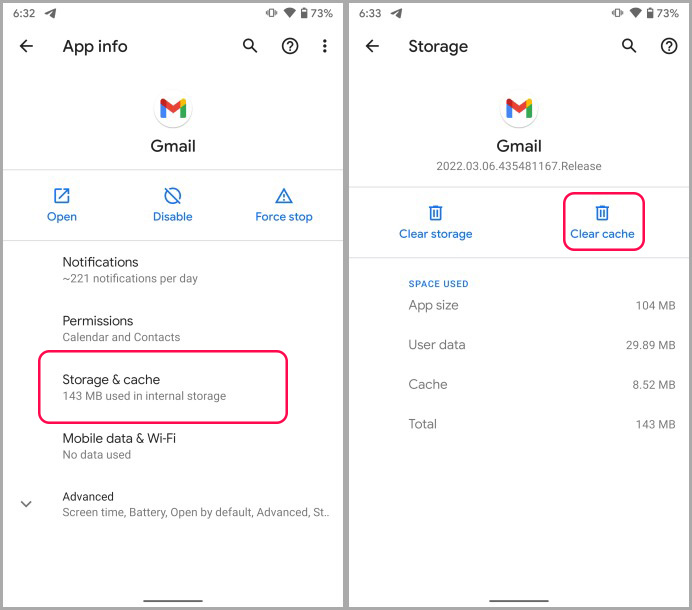
By following the above steps, you will easily erase all the unuseful data from your Gmail application.
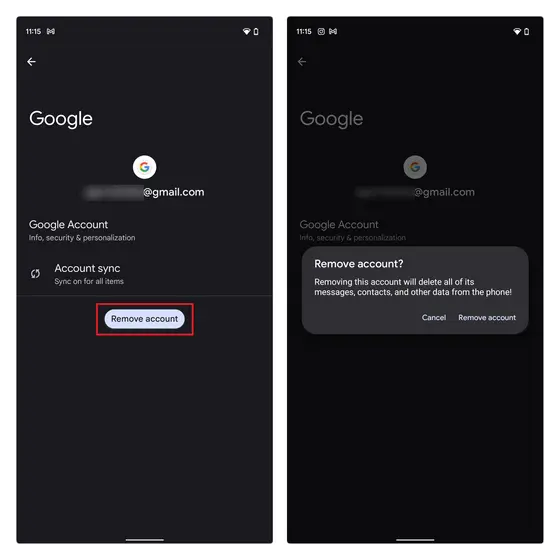
2. Remove Google Account: If clearing Gmail’s cache doesn’t fix this problem then don’t worry as you may fix this problem by removing the account from the app and logging in again.
To do this, follow the below steps;
- Go to settings on your device.
- Look for passwords and accounts and click users & accounts.
- Now, “under accounts” choose the account that you wish to remove and click on Remove account.
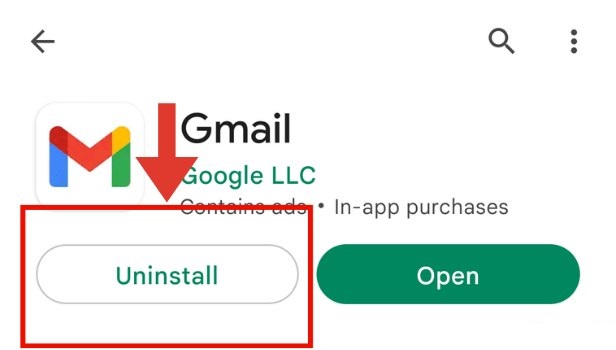
3. Uninstall Gmail App Updates: If removing the account also doesn’t work then try to uninstall the Gmail app from your device and again log in to see if the error resolves or not.
4. Check Your Internet Connection: Gmail requires an internet connection to work, so the last step is to check for connectivity issues for Gmail users. A weak or unstable internet connection can lead to various Gmail errors including something went wrong. Ensure that you are connected to a stable network and try to refresh your Gmail page.
Watch How to Solve Gmail Something Went Wrong Try Again Later Issue
Tips to Prevent Gmail Errors in Future
Gmail errors such as “Something went wrong, try again later” can occur due to any reason and may interfere with your daily email activities. These issues are often caused by old browser data, a weak internet connection, browser conflicts or temporary problems with account your Gmail account syncing issues. But by following some precautions you can reduce the chances of facing this Gmail error again in the future.
Below are some useful tips that will help you to avoid this problem in future;
- Update your browser and Gmail app with the latest version.
- Regularly clear your browser cache and cookies to avoid gathering of corrupted or temporary files.
- Don’t install unnecessary browser extensions or add-ons that may cause issues with your Gmail account.
- Make sure to have a stable and secure internet connection whenever accessing Gmail account.
- Update your recovery email address and phone number to recover your account in emergency.
- Don’t sign into your Gmail account on too many devices at the same time.
- Restart your browser or device frequently to refresh background services.
Another important precaution is to make a backup Gmail emails with attachments regularly. Sometimes users are unable to access important mails due to Gmail errors, accidental deletion, account problems or temporary server problems. You can download Gmail emails to PC or hard drive so your important mailbox data is always secure and accessible.
If you want a simple solution, you can use tools like Advik Gmail Backup Tool to save your important email data to computer or external hard drive without complicated configuration.
Final Words
We hope you have understood what Gmail something went wrong error is and how to fix this error using above mentioned tips and tricks. We understand that facing this type of error makes you feel frustrated as you might not be able to access your Gmail emails but relax it’s easy to solve this. First analyze the real cause of this error and then apply a reliable method concerned with it.
Frequently Asked Questions
1. Why do I am getting “Something went wrong, try again later” error in my Gmail account?
It might happen if your Gmail is not loading properly due to some temporary problems. Such as poor internet connection, browser cache problems, outdated browser version or even a temporary server issues from Google’s side.
2. Is this Gmail error permanent or temporary?
Most of the time it is temporary. solves after refreshing Gmail, clearing browser cache, restarting the browser or fixing internet issues.
3. How to check if Gmail is down for everyone or just me?
You can check the status of Gmail on the Google Workspace Status Dashboard or sites like Downdetector. If a lot of people are reporting the same thing at the same time it’s probably a global outage and not a problem with your device.
4. When I try to send emails or attach files in Gmail i get this error. Why?
This error is appearing when you try to send emails or attach files if Gmail is having trouble in processing its functions.
5. Do browser extensions cause this Gmail error?
Yup. Some extensions in particular ad blockers or security tools may interfere with Gmail’s scripts and cause errors when loading or sending.
6. Does deleting cache delete my emails?
No. Clearing cache and cookies in browser won’t delete your Gmail emails. It only clears out temporary files stored in your browser which can actually help Gmail load without any issues.
7. Why is Gmail working on mobile but not my browser?
Most of the time this means there is a problem with your browser not with your account. Corrupted cache, outdated browser versions or conflict with extensions are the most common causes.
8. I am worried as this error keeps appearing?
If the error continues after trying all fixes then it could be a fault in browser, unstable network or account sync problem. If this happens i recommend you to try another browser or another device.
9. When to contact Google support for this issue?
You should contact Google support, if:
- Gmail not working on multiple devices
- You can’t log into your account at all.
- The error continues after trying all the mentioned measures.
- You notice suspicious activity on your account

Related Articles